The editor docs show a "Keybindings" setting, and imply that there's a vim mode. I'd love to use that, but the option is not showing up for me.
Reproduction Steps:
- start Eclipse Che with
docker run -it --rm \
 -v /var/run/docker.sock:/var/run/docker.sock \
 -v /some/new/dir:/data \
 eclipse/che start
- Create a new workspace (I chose the default Python stack)
- When it starts up, select Profile -> Preferences, then Editor (under IDE)
- Observe that there's no keybindings settings
OS and version:
- MacOS Sierra 10.12.6
- Eclipse Che 5.15.0
- Docker 17.06.0-ce / docker4mac
 dpatterson-aio
All 8 comments
If I recall correctly that during the initial Keynote about Che, there is no plan yet to change Keybindings at the moment
 sr229
on 11 Aug 2017
sr229
on 11 Aug 2017
interesting. i'll have to check that out. if that's the case, then maybe the docs should be updated. right now the first screenshot has keybindings, and it says:
you can even switch to vi or emacs keybindings in
Profile > Preferences
dpatterson-aio
on 11 Aug 2017
Hi @dpatterson-aio and @sr229. Thanks for reporting the issue, the keybindings are available from the menu Assistant > keybindings.
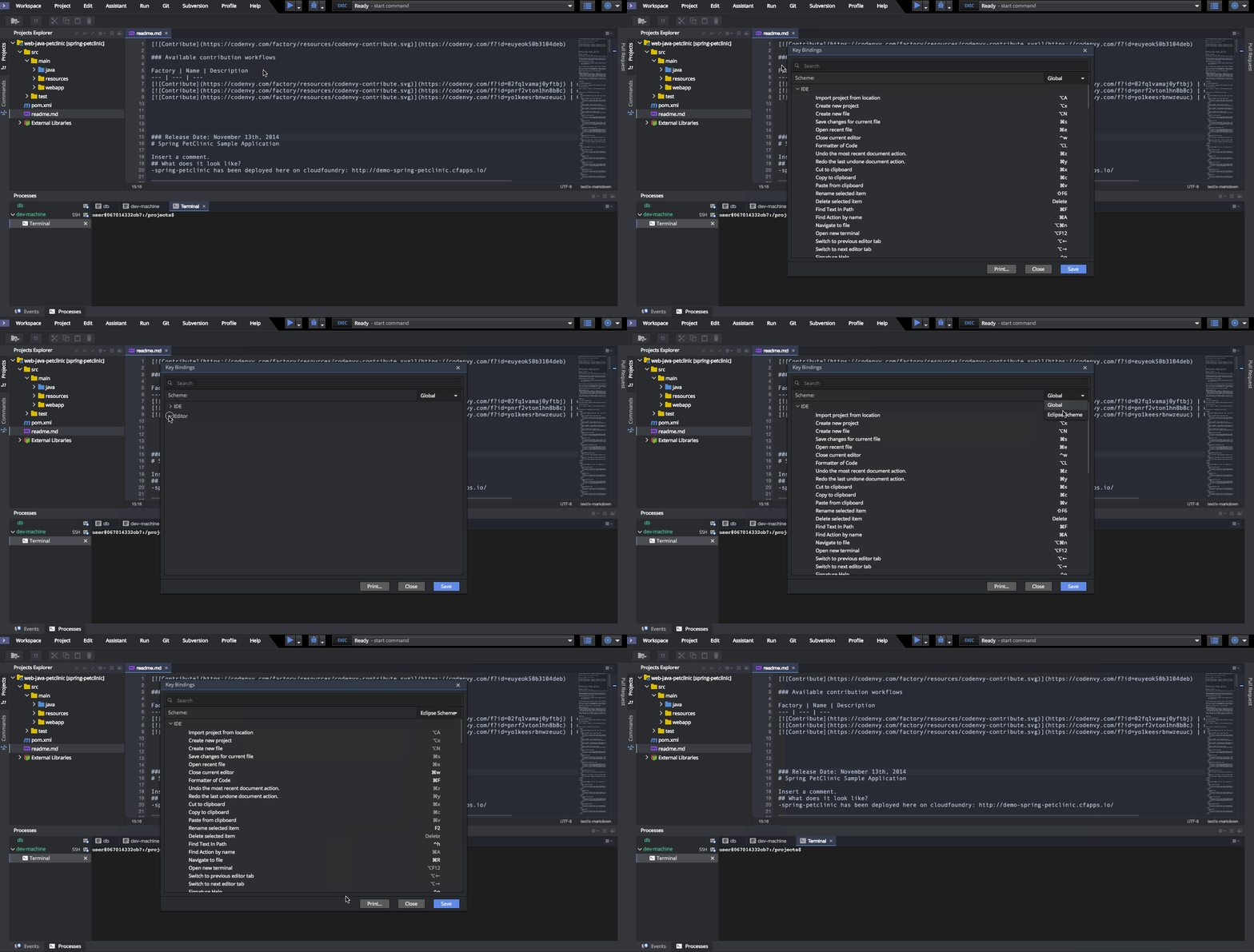
This is a doc issue, I created the following one to track it: https://github.com/eclipse/che-docs/issues/276
 slemeur
on 11 Aug 2017
slemeur
on 11 Aug 2017
thanks @slemeur!
Do you know if there is indeed a vim keybinding scheme out there? (or a way to define a custom one)
dpatterson-aio
on 11 Aug 2017
We don't have it anymore. Right now we don't have a way in the IDE to define your custom scheme, it needs to be implemented like this.
If you are interested to contribute a vim keybinding scheme, we will be glad to support you and I'm sure the community would appreciate it :) !
slemeur
on 11 Aug 2017
cool, thanks for the link. I'll look into that. it might be a while before I'm up to speed, but I think this would be a reasonable goal for me.
dpatterson-aio
on 11 Aug 2017
Excellent !
Please reach us on mattermost: https://mattermost.eclipse.org/eclipse/channels/eclipse-che if you need any assistance.
slemeur
on 11 Aug 2017
@slemeur we have VI and EMAC keybindings. @RomanNikitenko has spotted a bug (they were lost but we did have them). So, they will be back. Sure, defining own keybindings isn't possible due to many reasons.
 ghost
on 11 Aug 2017
ghost
on 11 Aug 2017
Related issues
 luckymore0520
·
3Comments
luckymore0520
·
3Comments
 InterestedInTechAndCake
·
3Comments
InterestedInTechAndCake
·
3Comments
 l0rd
·
3Comments
l0rd
·
3Comments
 apupier
·
3Comments
apupier
·
3Comments
 vanzhiganov
·
3Comments
vanzhiganov
·
3Comments