Che: Display machine's exposed ports in IDE
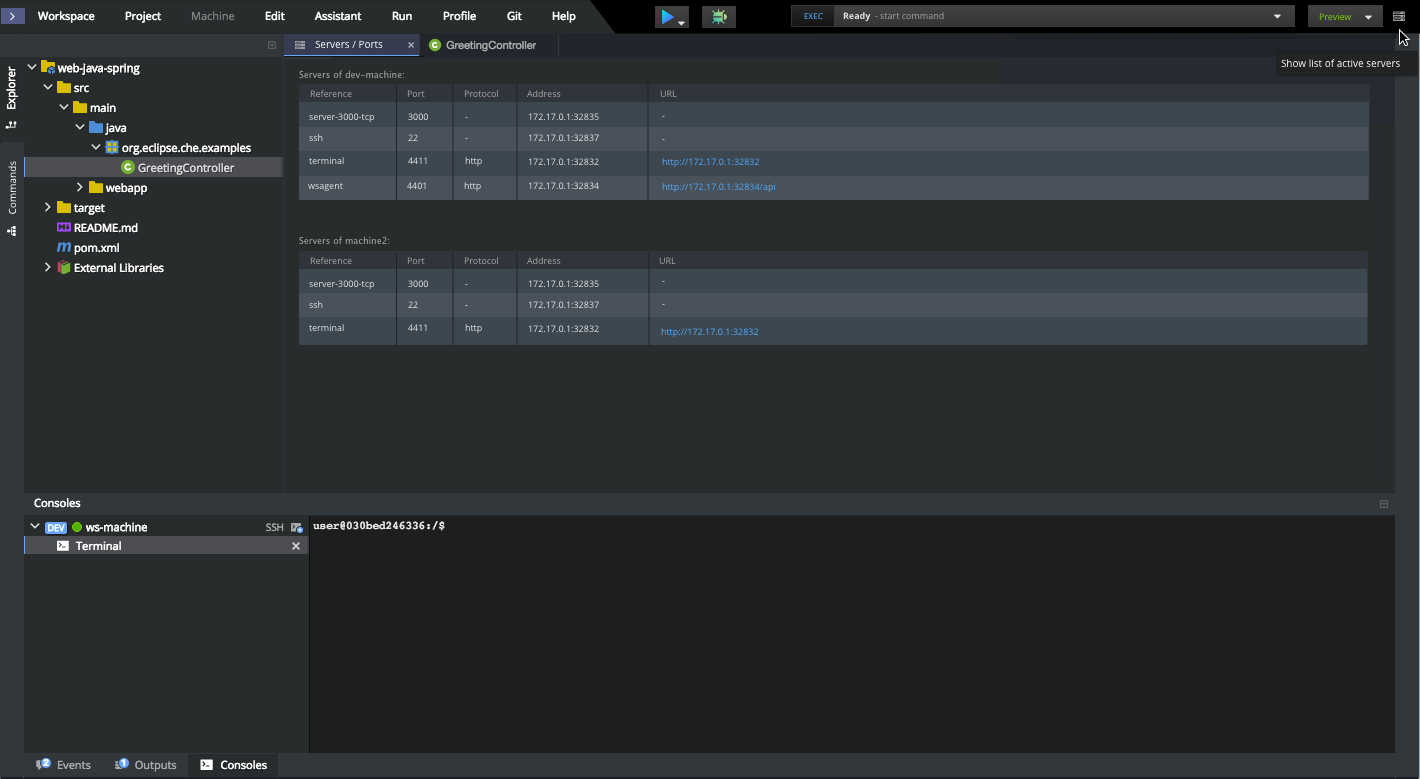
The machine's exposed ports information would be useful to have directly in IDE in the consoles panel.
Now, when user is developing in IDE and needs that info, he has to switch to workspace details of the current workspace, expand proper machine and scroll to servers section.
The proposed way is to display this info as following:
 ashumilova
All 22 comments
Yeah, I confirm this is a frequently asked question. Sure thing, using macros is a solution, but having this info in the IDE would be useful.
 ghost
on 17 Jul 2017
ghost
on 17 Jul 2017
We had an issue for that in the past: https://github.com/eclipse/che/issues/3853
@ashumilova : I have the feeling that a dedicated tab to handle that would probably be better - but would it require more efforts?
 slemeur
on 17 Jul 2017
slemeur
on 17 Jul 2017
yes, separate control + tab will take more time, but here need place where user will intuitively look for that info
ashumilova
on 17 Jul 2017
updated the description with mockup
ashumilova
on 17 Jul 2017
Just a side note, this tab will make no sense in Che on OSIO or k8s since both use their internal mechanisms to expose services (like routes in OSIO).
ghost
on 17 Jul 2017
@eivantsov you mean they are not exposed via Servers on OS?
@ashumilova @slemeur @vparfonov
I really doubt that keeping Servers panel between files is a good idea. IMO it is just not logical place, too difficult to find.
Lets consider other places like (1) somewhere on bottom (machine) panel, below Terminal for ex (2) popup window
 gazarenkov
on 18 Jul 2017
gazarenkov
on 18 Jul 2017
@gazarenkov I see what you mean. Probably, in openshift implementation we will still have this info in machine runtime. So, disregard my previous comment. Even now, Che running in OSIO has this info in servers just instead of host+published_port there's route:
22/tcp
{ref: "Server-22-tcp", properties: {internalAddress: "172.30.109.119:22"},…}
4401/tcp
{url: "https://wsagent-3g2bo5lrhvrznw8c-yivantso-che.8a09.starter-us-east-2.openshiftapps.com/api",…}
4403/tcp
{url: "https://tomcat-jpda-3g2bo5lrhvrznw8c-yivantso-che.8a09.starter-us-east-2.openshiftapps.com",…}
8080/tcp
{url: "https://tomcat-3g2bo5lrhvrznw8c-yivantso-che.8a09.starter-us-east-2.openshiftapps.com",…}
@gazarenkov I think there is a confusion/mix between two different actions.
This is the flow for the user when he wants to interact with the servers:
1/ Find the action to display the list of servers
2/ Browse is a proper way the list of servers
"I really doubt that keeping Servers panel between files is a good idea. IMO it is just not logical place, too difficult to find." --> User will click on an action to get the list of servers: he will see the new panel displayed. The panel does not need to be "found", the action to display it needs to be and it corresponds to "1/"
I agree that "1/" is not easy to find in the mockup and should be considered closer to machines panel.
We can add one icon before "SSH" - aligned with the machine name. It will display a new tab in the process panel, displaying the list of servers for the machine.
slemeur
on 18 Jul 2017
@slemeur What I am saying is: I do not think putting Servers (actually anything but file editors) into the central (Editors) panel is a good idea. Machines panel looks much better for it.
gazarenkov
on 18 Jul 2017
You can't really have general rules like that without any context.
There is a layout, with different panes. In those panes, there are tabs. The tabs can have different goals. There could be tab for editing files, for editing commands, for interacting with the terminal, for commands outputs, for git compare, for preferences...
You can check Eclipse, XCode, Atom, VSCode - they all allow the user to use the central pane to display other things that file editors.
It's to the user to organize the layout exactly how he wants and move the tabs from panes to panes. Today the user has only limited ability to organize the layout (by splitting the panes).
slemeur
on 18 Jul 2017
Take into account that Server model in CHE 5 differs from the Server model in CHE 6.
There aren't address, protocol, properties anymore.
If it's planned for CHE 5.x, please, don't use Server's fields which were removed in CHE 6.
It worries me because I do merge master into spi branch regularly and using Server's fields which don't exist in CHE 6 will require to rework code while merging.
 azatsarynnyy
on 18 Jul 2017
azatsarynnyy
on 18 Jul 2017
AFAIK editor part stack (central part) in Project perspective isn't intended to contain any part differs from the editor part. So, likely, displaying Servers tab will require using some hacks for that.
azatsarynnyy
on 18 Jul 2017
@azatsarynnyy thank you for notifying, we can implement it only for Che 6 in appropriate branch.
And will display servers in console panel on separate tab.
ashumilova
on 18 Jul 2017
@ashumilova or @slemeur can you provide an icon which will be placed in tab?
 vzhukovs
on 5 Sep 2017
vzhukovs
on 5 Sep 2017
There is an update on issue.
Due to changes in server model there is a thoughts to make following algorithm:
If there isn't any servers provided by user in configuration, we won't show anything in server list panel
Otherwise, we get server name (which is _reference_), search in runtime by _reference_ and get _runtime url_. From environment config we get _port_, _protocol_ and construct table:
Reference | Port | Protocol | Url
------------ | ------------- | ------------- | -------------
web | 666/tcp | http | http://localhost:32823/context
We omit server status and don't show it to the user.
Is it ok?
vzhukovs
on 5 Sep 2017
@vzhukovskii : the requirements is to display this server tab, as a tab from the console panel - not to introduce a new panel.
slemeur
on 5 Sep 2017
@slemeur which item should trigger this tab to open?
ashumilova
on 5 Sep 2017
This must be aligned with the upcoming IDE design.
https://user-images.githubusercontent.com/1636769/28358800-819fab90-6c70-11e7-80db-36f7d34c4e94.png
Few notes:
- I should be able to get a server tab per machine.
- When user hits the button "+" it'll propose for each machine: Terminal, SSH and Servers
- This menu must also be available when doing a right click on a machine from the list of machines
- The title of the tab must be "Servers - [Machine name]"
slemeur
on 6 Sep 2017
@vzhukovskii talked with @slemeur and dealt to:
- The empty servers message - There is no servers defined in this machine. Configure and edits the servers from the dashboard
- To display internal servers as well per machine - but to be able to hide them if needed (checkbox would be enough)
ashumilova
on 6 Sep 2017
@ashumilova what's "internal servers" ?
gazarenkov
on 6 Sep 2017
wsagent, ssh, terminal, etc - those that are not explicitly added by user
ashumilova
on 7 Sep 2017
you mean the ones declared in installers? (not sure "internal" is the good name for them, they are the same functionally)
gazarenkov
on 7 Sep 2017
Related issues
 sleshchenko
·
3Comments
sleshchenko
·
3Comments
sleshchenko
·
3Comments
sleshchenko
·
3Comments
 skabashnyuk
·
3Comments
skabashnyuk
·
3Comments
 apupier
·
3Comments
apupier
·
3Comments
 AndrienkoAleksandr
·
3Comments
AndrienkoAleksandr
·
3Comments
Most helpful comment
@azatsarynnyy thank you for notifying, we can implement it only for Che 6 in appropriate branch.
And will display servers in console panel on separate tab.