Describe the bug
After deploying and setting up Chatwoot 1.7.2 using Docker, upon trying to register, the web app says "Could not connect to Woot Server, Please try again later". The following log entry appears in production.log:
Started POST "/api/v1/accounts.json" for 10.0.0.72 at 2020-09-11 14:57:31 +0000
Processing by Api::V1::AccountsController#create as JSON
  Parameters: {"account_name"=>"XXX", "email"=>"XXX", "account"=>{}}
Completed 500 Internal Server Error in 86ms (ActiveRecord: 12.4ms | Allocations: 8379)

NoMethodError (undefined method `feature_channel_facebook=' for #<Account:0x00005580e2d7ef48>
Did you mean?  feature_flags_change):

app/models/concerns/featurable.rb:23:in `block in enable_features'
app/models/concerns/featurable.rb:22:in `each'
app/models/concerns/featurable.rb:22:in `enable_features'
app/models/concerns/featurable.rb:58:in `enable_default_features'
app/builders/account_builder.rb:43:in `create_account'
app/builders/account_builder.rb:13:in `block in perform'
app/builders/account_builder.rb:12:in `perform'
app/controllers/api/v1/accounts_controller.rb:22:in `create'
app/controllers/application_controller.rb:16:in `handle_with_exception'
To Reproduce
Steps to reproduce the behavior:
- Launch Chatwoot using the Docker deployment guide.
- Migrate/create database.
- Open a browser and go to the main page.
- Click on "Create new account".
- Enter required data, then click "Submit".
Expected behavior
Account is created.
Screenshots
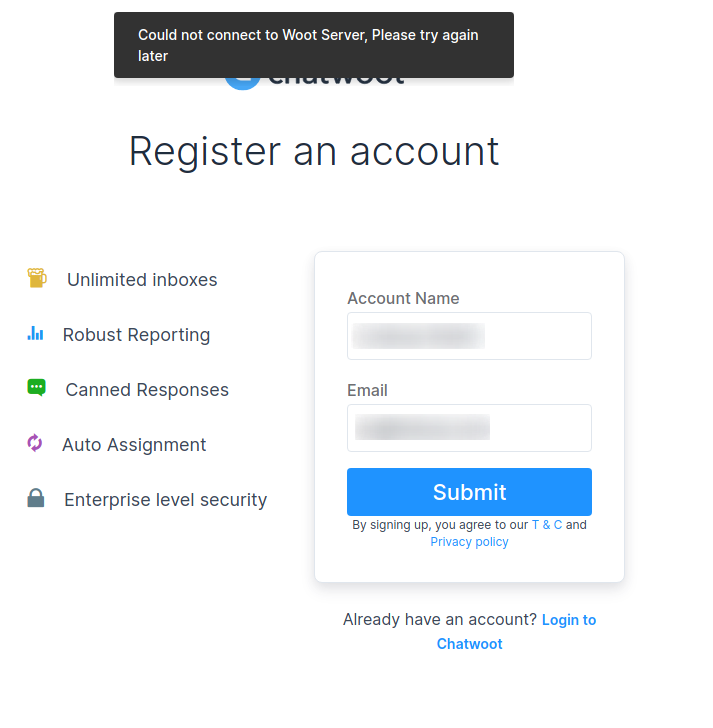 .
.
Environment
Self-hosted, official Chatwoot 1.7.2 Docker image from the hub. Postgres, Redis and S3 are all set up.
Desktop (please complete the following information):
- Arch Linux
- Chromium
- Version 83.0.4103.116
Additional context
Did I miss anything else for creating a super account or something? The docs don't explain this very well.
 stschindler
All 4 comments
@sojan-official Can you please provide the steps to rerun the config loader here? It looks like the feature_flags are not created.
 pranavrajs
on 14 Sep 2020
pranavrajs
on 14 Sep 2020
@stschindler could you try restarting the rails servers and give it another try.
run the following command from rails console to reload config
ConfigLoader.new.process
Also had you tried running rake db:seed in your set up process
 sojan-official
on 14 Sep 2020
sojan-official
on 14 Sep 2020
After executing those commands and restarting, it worked. I'm no Rails guy, so I have no clue about what I did wrong. Can you elaborate? ;-)
stschindler
on 15 Sep 2020
We had a couple of installation configs which needs to run before you can use the service. This was supposed to be run as part of the installation process. Somehow it didn't work in this case. I guess we might need better documentation around the installation process and commands used. Closing this as it is fixed.
pranavrajs
on 16 Sep 2020
Related issues
 mike9011
·
3Comments
mike9011
·
3Comments
 converso-chat
·
4Comments
converso-chat
·
4Comments
 niklaskorz
·
3Comments
niklaskorz
·
3Comments
 tramal228228
·
4Comments
tramal228228
·
4Comments
 JasoonS
·
3Comments
JasoonS
·
3Comments