Charts: [bitnami/cassandra] Cassandra cannot start properly on Azure AKS cluster
Which chart:
cassandra-4.1.5, app version: 3.11.4
Description
When I install cassandra chart, nodes do not start properly.
Liveness probe fails, readiness probe fails. All this is due to something on line 120 at "libos.sh" script on minideb-extras-base image as showed in below logs.
Steps to reproduce the issue:
- Create AKS cluster
- Install helm
- Install cassandra bitnami chart
Describe the results you received:
Cassandra process inside the container does not start properly due to libos.sh script error.
kubectl describe pod output:
  Normal   Scheduled               6m34s                  default-scheduler                  Successfully assigned dev/cassandra-0 to aks-agentpool-10841283-1  Normal   SuccessfulAttachVolume  6m13s                  attachdetach-controller            AttachVolume.Attach succeeded for volume "pvc-4cf2bbd2-f99c-11e9-8fa3-f6b794cd6a2d"  Normal   Pulling                 5m55s                  kubelet, aks-agentpool-10841283-1  pulling image "docker.io/bitnami/cassandra:3.11.4-debian-9-r213"  Normal   Pulled                  5m46s                  kubelet, aks-agentpool-10841283-1  Successfully pulled image "docker.io/bitnami/cassandra:3.11.4-debian-9-r213"
  Normal   Created                 5m38s                  kubelet, aks-agentpool-10841283-1  Created container
  Normal   Started                 5m38s                  kubelet, aks-agentpool-10841283-1  Started container
  Warning  Unhealthy               2m18s (x5 over 4m18s)  kubelet, aks-agentpool-10841283-1  Liveness probe failed: nodetool: Failed to connect to '127.0.0.1:7199' - ConnectException: 'Connection refused (Connection refused)'.
  Warning  Unhealthy               42s (x18 over 4m32s)   kubelet, aks-agentpool-10841283-1  Readiness probe failed: nodetool: Failed to connect to '127.0.0.1:7199' - ConnectException: 'Connection refused (Connection refused)'.
Cassandra pod logs:
Setting node as password seeder
cassandra 16:24:39.61 cassandra 16:24:39.62 Welcome to the Bitnami cassandra containercassandra 16:24:39.62 Subscribe to project updates by watching https://github.com/bitnami/bitnami-docker-cassandracassandra 16:24:39.62 Submit issues and feature requests at https://github.com/bitnami/bitnami-docker-cassandra/issues
cassandra 16:24:39.62 Send us your feedback at [email protected] 16:24:39.62 cassandra 16:24:39.62 INFO  ==> ** Starting Cassandra setup **
cassandra 16:24:39.64 INFO  ==> Validating settings in CASSANDRA_* env vars..
cassandra 16:24:39.64 WARN  ==> You set the environment variable CASSANDRA_PASSWORD=cassandra. This is the default value when bootstrapping Cassandra and should not be used in production environments.cassandra 16:24:39.67 WARN  ==> Hostname cassandra-1.cassandra-headless.dev.svc.cluster.local could not be resolved. This could lead to connection issuescassandra 16:24:39.68 WARN  ==> Hostname cassandra-1.cassandra-headless.dev.svc.cluster.local could not be resolved. This could lead to connection issuescassandra 16:24:39.68 INFO  ==> Initializing Cassandra database...
cassandra 16:24:39.70 DEBUG ==> No injected jvm.options file found. Creating default jvm.options file
cassandra 16:24:39.71 DEBUG ==> No injected hotspot_compiler file found. Creating default hotspot_compiler file
cassandra 16:24:40.59 DEBUG ==> No injected cqlshrc.sample file found. Creating default cqlshrc.sample file
cassandra 16:24:40.60 DEBUG ==> No injected commitlog_archiving.properties file found. Creating default commitlog_archiving.properties filecassandra 16:24:40.61 DEBUG ==> No injected metrics-reporter-config-sample.yaml file found. Creating default metrics-reporter-config-sample.yaml filecassandra 16:24:40.62 DEBUG ==> No injected cassandra.yaml file found. Creating default cassandra.yaml filecassandra 16:24:40.62 DEBUG ==> No injected triggers/README.txt file found. Creating default triggers/README.txt filecassandra 16:24:40.63 DEBUG ==> No injected README.txt file found. Creating default README.txt file
cassandra 16:24:40.64 DEBUG ==> No injected cassandra-jaas.config file found. Creating default cassandra-jaas.config filecassandra 16:24:40.65 DEBUG ==> No injected logback-tools.xml file found. Creating default logback-tools.xml file
cassandra 16:24:40.66 DEBUG ==> No injected cassandra-topology.properties file found. Creating default cassandra-topology.properties filecassandra 16:24:40.67 DEBUG ==> No injected logback.xml file found. Creating default logback.xml filecassandra 16:24:41.24 DEBUG ==> No injected cassandra-env.sh file found. Creating default cassandra-env.sh filecassandra 16:24:41.25 DEBUG ==> No injected cassandra-rackdc.properties file found. Creating default cassandra-rackdc.properties filecassandra 16:24:41.25 DEBUG ==> No injected cassandra-env.ps1 file found. Creating default cassandra-env.ps1 filecassandra 16:24:41.50 DEBUG ==> Ensuring expected directories/files exist...cassandra 16:24:41.51 INFO  ==> Deploying Cassandra with persisted datacassandra 16:24:41.52 INFO  ==> Loading user's custom files from /docker-entrypoint-initdb.d ...
cassandra 16:24:41.52 INFO  ==> Starting Cassandra
cassandra 16:24:42.15 INFO  ==> Checking that it started up correctly
cassandra 16:24:42.15 DEBUG ==> Checking that log /opt/bitnami/cassandra/logs/cassandra_init_scripts_boot.log contains entry "Starting listening for CQL clients"
/libos.sh: line 120:   207 Killed                  "${cmd[@]}" "${args[@]}" > "$logger" 2>&1
Describe the results you expected:
Expected to start cassandra properly.
Additional information you deem important (e.g. issue happens only occasionally):
Issue happens all the time.
Version of Helm and Kubernetes:
- Output of
helm version:
Client: &version.Version{SemVer:"v2.14.3", GitCommit:"0e7f3b6637f7af8fcfddb3d2941fcc7cbebb0085", GitTreeState:"clean"}
Server: &version.Version{SemVer:"v2.14.3", GitCommit:"0e7f3b6637f7af8fcfddb3d2941fcc7cbebb0085", GitTreeState:"clean"}
- Output of
kubectl version:
Client Version: version.Info{Major:"1", Minor:"16", GitVersion:"v1.16.0", GitCommit:"2bd9643cee5b3b3a5ecbd3af49d09018f0773c77", GitTreeState:"clean", BuildDate:"2019-09-18T14:36:53Z", GoVersion:"go1.12.9", Compiler:"gc", Platform:"linux/amd64"}
Server Version: version.Info{Major:"1", Minor:"12", GitVersion:"v1.12.8", GitCommit:"a89f8c11a5f4f132503edbc4918c98518fd504e3", GitTreeState:"clean", BuildDate:"2019-04-23T04:41:47Z", GoVersion:"go1.10.8", Compiler:"gc", Platform:"linux/amd64"}
 konradmalik
All 22 comments
Hi @konradmalik
I was unable to reproduce the issue using the latest version (4.1.6):
$ helm search bitnami/cassandra
NAME                CHART VERSION   APP VERSION DESCRIPTION
bitnami/cassandra   4.1.6           3.11.5      Apache Cassandra is a free and open-source distributed da...
$ helm install bitnami/cassandra --name my-release
...
$ kubectl logs -f $(kubectl get pods --namespace default -l app=cassandra,release=my-release -o jsonpath='{.items[0].metadata.name}')
Setting node as password seeder
cassandra 15:03:42.99
cassandra 15:03:42.99 Welcome to the Bitnami cassandra container
cassandra 15:03:42.99 Subscribe to project updates by watching https://github.com/bitnami/bitnami-docker-cassandra
cassandra 15:03:43.00 Submit issues and feature requests at https://github.com/bitnami/bitnami-docker-cassandra/issues
cassandra 15:03:43.00 Send us your feedback at [email protected]
cassandra 15:03:43.00
cassandra 15:03:43.00 INFO  ==> ** Starting Cassandra setup **
cassandra 15:03:43.02 INFO  ==> Validating settings in CASSANDRA_* env vars..
cassandra 15:03:43.04 INFO  ==> Initializing Cassandra database...
cassandra 15:03:43.32 INFO  ==> Deploying Cassandra from scratch
cassandra 15:03:43.32 INFO  ==> Starting Cassandra
cassandra 15:03:43.32 INFO  ==> Checking that it started up correctly
cassandra 15:04:08.41 INFO  ==> Found CQL startup log line
cassandra 15:04:11.17 INFO  ==> Nodetool reported the successful startup of Cassandra
cassandra 15:04:11.17 INFO  ==> Password seeder node
cassandra 15:04:11.17 INFO  ==> Trying to access CQL server @ my-release-cassandra-0.my-release-cassandra-headless.default.svc.cluster.local
cassandra 15:04:12.69 INFO  ==> Accessed CQL server successfully
cassandra 15:04:12.70 INFO  ==> Updating the password for the "cassandra" user...
cassandra 15:04:13.82 INFO  ==> Trying to access CQL server @ my-release-cassandra-0
cassandra 15:04:14.82 INFO  ==> Accessed CQL server successfully
cassandra 15:04:14.83 INFO  ==> Password updated successfully
cassandra 15:04:14.84 INFO  ==> ** Cassandra setup finished! **

cassandra 15:04:14.85 INFO  ==> ** Starting Cassandra **
cassandra 15:04:14.86 INFO  ==> Cassandra already running with PID 183 because of the intial cluster setup
cassandra 15:04:14.86 INFO  ==> Tailing /opt/bitnami/cassandra/logs/cassandra_first_boot.log
CompilerOracle: dontinline org/apache/cassandra/db/Columns$Serializer.deserializeLargeSubset (Lorg/apache/cassandra/io/util/DataInputPlus;Lorg/apache/cassandra/db/Columns;I)Lorg/apache/cassandra/db/Columns;
...
Could you give it a try?
 juan131
on 30 Oct 2019
juan131
on 30 Oct 2019
@juan131, I tried the newest version and the issue is exactly the same, however...
On our another AKS cluster (which was created a few months before the one mentioned in my issue) we installed this helm chart and succeeded. Very strange. I'm not sure if the issue is with the mentioned libos.sh script or with the AKS cluster.
It's worth to mention that standard Cassandra chart (from charts/incubator) works without any problems on both clusters. Also both clusters are exactly the same (on paper). That is, the underlying OSes are the same, kubernetes, kubectl etc. versions are also identical. Just the size of the nodes are different. The older cluster has 4 CPU 16 GB RAM machines, new cluster has 16 CPU and 128 GB RAM nodes. This is the only difference.
konradmalik
on 5 Nov 2019
Hi @konradmalik ,
Just a quick question. Have your tried running other charts from bitnami (apart from cassandra)?
 rafariossaa
on 5 Nov 2019
rafariossaa
on 5 Nov 2019
Hi @rafariossaa,
yes, we are running kafka chart from bitnami on both clusters and they work ok, no issues there.
konradmalik
on 5 Nov 2019
Hi @konradmalik ,
I have notice that in the logs appears INFO ==> Deploying Cassandra with persisted data this happens when a volume with data is detected.
Could you try to stop it and remove al the volumes and run it again ?
In the log should appear Deploying Cassandra from scratch when starting a clean deployment.
rafariossaa
on 7 Nov 2019
@rafariossaa, sorry it took so long. Tried today but still no luck:
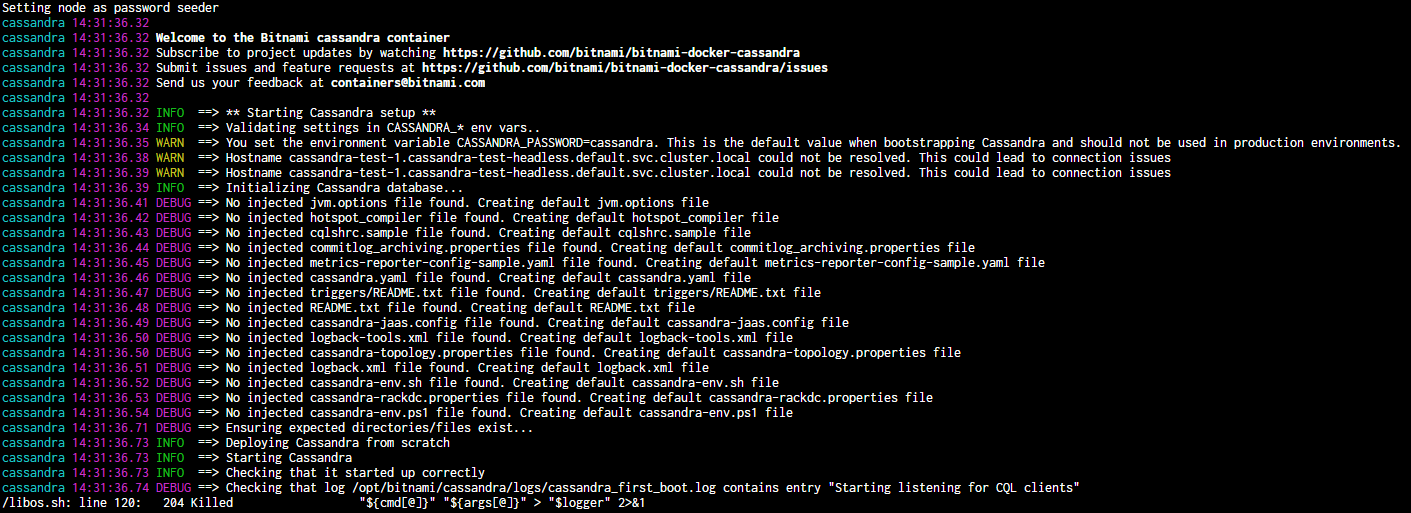
konradmalik
on 21 Nov 2019
Hi @konradmalik,
Sorry for the delay.
In that point it is waiting for a message to appear in the log.
Could you try to take a look to /opt/bitnami/cassandra/logs/cassandra_fist_boot.log ?
rafariossaa
on 26 Nov 2019
This Issue has been automatically marked as "stale" because it has not had recent activity (for 15 days). It will be closed if no further activity occurs. Thanks for the feedback.
![stale[bot] picture](https://avatars3.githubusercontent.com/in/1724?v=4&s=40) stale[bot]
on 11 Dec 2019
stale[bot]
on 11 Dec 2019
Hi,
a couple of new information here:
- issue can be easily reproduced on multipass, mac OS (so essentially ubuntu 18.04 vm) with microk8s (default installation, enabled DNS and storage). Exactly same issue.
- cassandra_first_boot.log is empty, both on cloud and on local microk8s installation. It has 0 bytes.
konradmalik
on 13 Dec 2019
Hi,
I was able to reproduce this in minikube, but not in cloud providers kubernetes clusters.
The problem is that you need more memory. Cassandra calculates automatically the settings, but you need at least 1GB for cassandra.
Could you check if this is your case?
rafariossaa
on 16 Dec 2019
Nope, sorry, does not seem to be the case. On microk8s I tried 1, 2 and 3 gb of memory and 2 CPU cores. On cloud we have it on 4 cores and 8 gb of memory. Should at least start I guess, especially as Cassandra chart from the incubator runs on 1 CPU and 2 gb of ram.
konradmalik
on 16 Dec 2019
Hi,
At least with minikube, I had to set the minikube virtualbox machine to 3GB (by default is 2GB) in order to be able to start cassandra with these settings:
helm install --name my-release --set jvm.maxHeapSize=1024m,jvm.newHeapSize=800m bitnami/cassandra
You need some extra room for the kubernetes processes.
I am not very sure how the resource limitation is done in microk8s.
Could you try adjusting those 2 parameters ?
rafariossaa
on 16 Dec 2019
This Issue has been automatically marked as "stale" because it has not had recent activity (for 15 days). It will be closed if no further activity occurs. Thanks for the feedback.
stale[bot]
on 31 Dec 2019
Due to the lack of activity in the last 5 days since it was marked as "stale", we proceed to close this Issue. Do not hesitate to reopen it later if necessary.
stale[bot]
on 5 Jan 2020
@rafariossaa, we had the same issue in our k8s cluster and the setting you proposed helped:
jvm:
  maxHeapSize: 1G
  newHeapSize: 800M
 yury-kozlov
on 10 May 2020
yury-kozlov
on 10 May 2020
Hi @yury-kozlov ,
I am happy this help you. Thanks for sharing.
Best regards
rafariossaa
on 11 May 2020
I got the same issue as @konradmalik
Since this one wasn't solved I am going to reopen it.
I've attached a minimalized version of my chart which allowed me at least on 2 platforms to reproduce the problem.
Which chart:
bitnami/Cassandra 5.5.3, Cassandra 3.11.6
Describe the bug
Trying to deploy Cassandra in a cluster with 3 nodes, it fails on initial startup of the first node, same as OP.
To Reproduce
Steps to reproduce the behaviour:
- Install the following chart:
image:
  registry: docker.io
  repository: bitnami/cassandra
  tag: 3.11.6-debian-10-r138
  pullPolicy: IfNotPresent
  debug: true
volumePermissions:
  enabled: true
  image:
    registry: docker.io
    repository: bitnami/minideb
    tag: buster
    pullPolicy: Always
  resources:
    limits: {}
    requests: {}
service:
  type: ClusterIP
  port: 9042
  thriftPort: 9160
  nodePorts:
    cql: ""
    thriftPort: ""
  annotations: {}
persistence:
  enabled: true
  annotations:
  accessModes:
    - ReadWriteOnce
  size: 100Gi
resources:
  limits:
    cpu: 8
    memory: 8Gi
  requests:
    cpu: 4
    memory: 8Gi
cluster:
  name: cassandra
  replicaCount: 3
  seedCount: 2
  numTokens: 256
  datacenter: dc1
  rack: rack1
  enableRPC: false
  endpointSnitch: GossipingPropertyFileSnitch
  pdbEnabled: true
  minAvailable: 2
  internodeEncryption: none
  clientEncryption: false
  domain: cluster.local
jvm:
  extraOpts:
dbUser:
  user: cassandra
  forcePassword: false
livenessProbe:
  enabled: true
  initialDelaySeconds: 60
  periodSeconds: 30
  timeoutSeconds: 5
  successThreshold: 1
  failureThreshold: 5
readinessProbe:
  enabled: true
  initialDelaySeconds: 60
  periodSeconds: 10
  timeoutSeconds: 5
  successThreshold: 1
  failureThreshold: 5
podAnnotations: {}
podLabels: {}
affinity: {}
nodeSelector: {}
tolerations: []
statefulset:
  updateStrategy: OnDelete
securityContext:
  enabled: true
  runAsUser: 1234
  runAsGroup: 1234
  fsGroup: 1234
entrypoint: "/entrypoint.sh"
cmd: "/run.sh"
networkPolicy:
  enabled: false
metrics:
  enabled: false
  image:
    registry: docker.io
    pullPolicy: IfNotPresent
    repository: bitnami/cassandra-exporter
    tag: 2.3.4-debian-10-r119
  resources:
    limits: {}
    requests: {}
  podAnnotations:
    prometheus.io/scrape: "true"
    prometheus.io/port: "8080"
- Startup fails
/opt/bitnami/scripts/libos.sh: line 210: 205 Killed "${cmd[@]}" "${args[@]}" > "$logger" 2>&1
Heres the whole pods log:
Setting node as password seeder
cassandra 16:53:48.10
cassandra 16:53:48.10 Welcome to the Bitnami cassandra container
cassandra 16:53:48.10 Subscribe to project updates by watching https://github.com/bitnami/bitnami-docker-cassandra
cassandra 16:53:48.10 Submit issues and feature requests at https://github.com/bitnami/bitnami-docker-cassandra/issues
cassandra 16:53:48.10
cassandra 16:53:48.10 INFO  ==> ** Starting Cassandra setup **
cassandra 16:53:48.12 INFO  ==> Validating settings in CASSANDRA_* env vars..
cassandra 16:53:48.15 WARN  ==> Hostname db002-cassandra-1.db002-cassandra-headless.cassandra.svc.cluster.local could not be resolved. This could lead to connection issues
cassandra 16:53:48.16 WARN  ==> Hostname db002-cassandra-1.db002-cassandra-headless.cassandra.svc.cluster.local could not be resolved. This could lead to connection issues
cassandra 16:53:48.16 INFO  ==> Initializing Cassandra database...
cassandra 16:53:48.17 DEBUG ==> No injected cqlshrc.sample file found. Creating default cqlshrc.sample file
cassandra 16:53:48.18 DEBUG ==> No injected cassandra-rackdc.properties file found. Creating default cassandra-rackdc.properties file
cassandra 16:53:48.19 DEBUG ==> No injected commitlog_archiving.properties file found. Creating default commitlog_archiving.properties file
cassandra 16:53:48.20 DEBUG ==> No injected jvm.options file found. Creating default jvm.options file
cassandra 16:53:48.21 DEBUG ==> No injected metrics-reporter-config-sample.yaml file found. Creating default metrics-reporter-config-sample.yaml file
cassandra 16:53:48.23 DEBUG ==> No injected triggers/README.txt file found. Creating default triggers/README.txt file
cassandra 16:53:48.24 DEBUG ==> No injected README.txt file found. Creating default README.txt file
cassandra 16:53:48.25 DEBUG ==> No injected cassandra.yaml file found. Creating default cassandra.yaml file
cassandra 16:53:48.25 DEBUG ==> No injected cassandra-topology.properties file found. Creating default cassandra-topology.properties file
cassandra 16:53:48.26 DEBUG ==> No injected cassandra-jaas.config file found. Creating default cassandra-jaas.config file
cassandra 16:53:48.27 DEBUG ==> No injected cassandra-env.ps1 file found. Creating default cassandra-env.ps1 file
cassandra 16:53:48.28 DEBUG ==> No injected hotspot_compiler file found. Creating default hotspot_compiler file
cassandra 16:53:48.29 DEBUG ==> No injected cassandra-env.sh file found. Creating default cassandra-env.sh file
cassandra 16:53:48.30 DEBUG ==> No injected logback.xml file found. Creating default logback.xml file
cassandra 16:53:48.31 DEBUG ==> No injected logback-tools.xml file found. Creating default logback-tools.xml file
cassandra 16:53:48.44 DEBUG ==> Ensuring expected directories/files exist...
cassandra 16:53:48.45 INFO  ==> Deploying Cassandra from scratch
cassandra 16:53:48.46 INFO  ==> Starting Cassandra
cassandra 16:53:48.46 INFO  ==> Checking that it started up correctly
cassandra 16:53:48.46 DEBUG ==> Checking that log /opt/bitnami/cassandra/logs/cassandra_first_boot.log contains entry "Starting listening for CQL clients"
/opt/bitnami/scripts/libos.sh: line 210:   205 Killed                  "${cmd[@]}" "${args[@]}" > "$logger" 2>&1
/opt/bitnami/cassandra/logs/cassandra_first_boot.logis empty as well.
Expected behaviour:
Cluster coming up without errors.
Version of Helm and Kubernetes:
- Output of
helm version:
version.BuildInfo{Version:"v3.2.1", GitCommit:"fe51cd1e31e6a202cba7dead9552a6d418ded79a", GitTreeState:"clean", GoVersion:"go1.13.10"}
- Output of
kubectl version:
Client Version: version.Info{Major:"1", Minor:"18", GitVersion:"v1.18.3", GitCommit:"2e7996e3e2712684bc73f0dec0200d64eec7fe40", GitTreeState:"clean", BuildDate:"2020-05-20T12:52:00Z", GoVersion:"go1.13.9", Compiler:"gc", Platform:"linux/amd64"}
Server Version: version.Info{Major:"1", Minor:"17", GitVersion:"v1.17.5", GitCommit:"e0fccafd69541e3750d460ba0f9743b90336f24f", GitTreeState:"clean", BuildDate:"2020-04-16T11:35:47Z", GoVersion:"go1.13.9", Compiler:"gc", Platform:"linux/amd64"}
Workaround
To manually minimize the JVM Heap Size, proposed by @rafariossaa, works well but I think it should be avoidable to use this on a system intended for production.
Chart settings:
jvm:
  maxHeapSize: 1G
  newHeapSize: 800M
Additional Information
I've encountered this problem now on 2 different platforms
- Rancher v2.4.3 (above k8s version information)
- CCP 6.1
 druesendieb
on 13 Jul 2020
druesendieb
on 13 Jul 2020
Hi,
The values I proposed was to be able to execute cassandra in his scenario.
As @juan131 indicated in #1949, there are parameters to limit the cassandra resources.
The issue is not with the chart itself, What produced this issue was the amount of resources kubernetes can give to the pods.
Could you check if your cluster have enough free resources to run with the intended configuration ?
rafariossaa
on 14 Jul 2020
Hi @rafariossaa
thanks for your fast reply :)
I am aware of the parameters to limit the cassandra resources and have used them accordingly in values.yaml
resources:
  limits:
    cpu: 8
    memory: 8Gi
  requests:
    cpu: 4
    memory: 8Gi
These aforementioned resources (and plenty more) are also available on the cluster, if you have any suggestions on how to double-check, I am all ears!
edit:
I took another look on #1949, I guess it was not on purpose that @juan131 just mentioned the resources of the init container and not the actual cassandra container.
druesendieb
on 14 Jul 2020
Hi,
@druesendieb , I think this issue is also being followed in #3104, let's continue there.
rafariossaa
on 16 Jul 2020
Hello All,
While trying to deploy Cassandra stack, I came across the same error of connection refusal
Liveness probe failed: nodetool: Failed to connect to '127.0.0.1:7199' - ConnectException: 'Connection refused (Connection refused)'.
Readiness probe failed: nodetool: Failed to connect to '127.0.0.1:7199' - ConnectException: 'Connection refused (Connection refused)'.
In my case, the solution was exposed to the 7199 port on the service.yaml below is the proposition I would add to the file
serive.yaml:
spec:
======== Some Specs ========
  ports:
   ======== Some Ports ========
    - name: jmx
      port: {{ .Values.service.jmxPort }}
      {{- if and (or (eq .Values.service.type "NodePort") (eq .Values.service.type "LoadBalancer")) (not (empty .Values.service.nodePorts.jmxPort)) }}
      nodePort: {{ .Values.service.nodePorts.jmxPort }}
      {{- else if eq .Values.service.type "ClusterIP" }}
      nodePort: null
      {{- end }}

values.yaml:
======= Some Values ========
service:
==== Other ports ====
  ## JMX port
  ##
  jmxPort: 7199
  nodePorts:
  ==== Other Node Ports ====
    jmxPort: ""
======= Some More Values ========
 bbotiroff
on 20 Nov 2020
bbotiroff
on 20 Nov 2020
Hi @bbotiroff, thanks for the contribution! Would you mind sending a Pull Request with those changes? We'll be happy to review it.
 marcosbc
on 20 Nov 2020
marcosbc
on 20 Nov 2020
Related issues
 skulos
·
5Comments
skulos
·
5Comments
 zackijack
·
3Comments
zackijack
·
3Comments
 minhhoangvn
·
5Comments
minhhoangvn
·
5Comments
 alesanmed
·
6Comments
alesanmed
·
6Comments
 emreberber
·
3Comments
emreberber
·
3Comments