Charts: bitnami/postgresql chart show error 'User "postgres" has no password assigned' when running with persistence.enabled=true
Which chart:
Postgresql helm chart v9.8.2
Describe the bug
Postgresql helm chart v9.8.2 chart show error 'User "postgres" has no password assigned' when running with persistence.enabled=true and using the NFS storage as PVC
Pre-condition
- The Kubernetes cluster installed the nfs-client-provisioner Helm chart v1.2.9
- The Kubernetes cluster has the 'nfs' storage class as a default storage class
To Reproduce
Steps to reproduce the behavior:
- Create the Postgres helm chart value as the sample below:
image:
  debug: true
persistence:
  enabled: true
  storageClass: 'nfs'
  size: 25Gi
resources:
  limits:
    cpu: 500m
    memory: 1024Mi
  requests:
    cpu: 450m
    memory: 512Mi
- Install helm chart with command below
helm install psql -f value.yaml --version 9.8.2 bitnami/postgresql - Exec into Postgresql Pod to verify the Postgresql is running
kubectl exec -it psql-postgresql-0 -- sh - Connect to Postgresql with command below:
psql -U postgres
Expected behavior
The Postgresql pod is running without error 'User "postgres" has no password assigned'
User can log in to Postgresql with a username and password that is defined by Helm chart
Version of Helm and Kubernetes:
- Output of
helm version:
v3.2.1+gfe51cd1
- Output of
kubectl version:
Client Version: v1.18.3
Server Version: v1.19.2
Additional context
- OS: Ubuntu 20.04.1 LTS (GNU/Linux 5.4.0-48-generic x86_64)
- NFS v4
- NFS /etc/exports content as sample below:
/mnt/sharedfolder 192.168.0.0/16(rw,sync,no_subtree_check)
- Kubernetes has 4 nodes
- Below is the debug log when I running chart with persistence.enabled=false
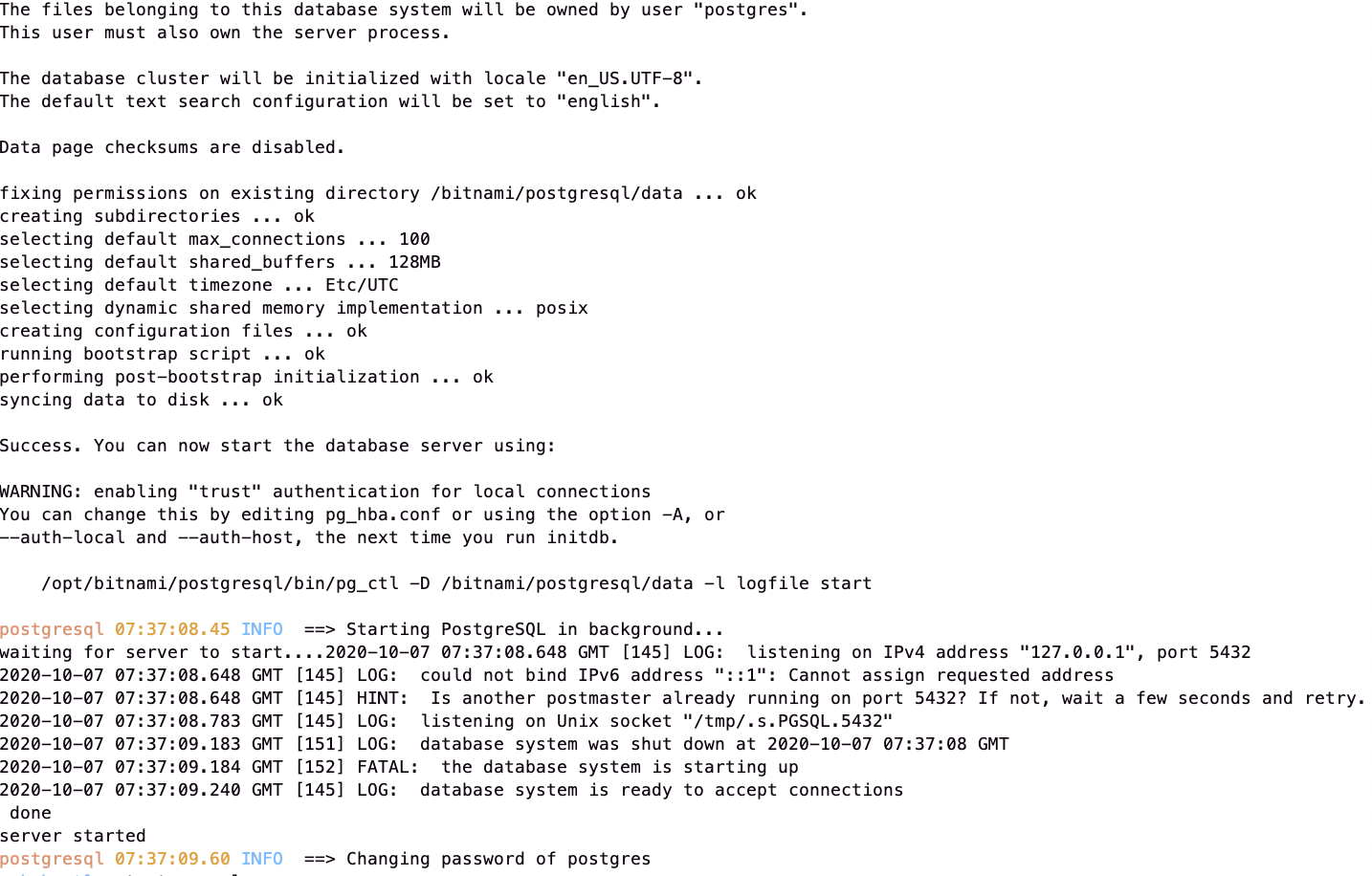
- Below is the debug log when I running chart with persistence.enabled=true


 minhhoangvn
All 5 comments
I'm having the same issue. have you tried the older version?
 dodistyo
on 7 Oct 2020
dodistyo
on 7 Oct 2020
I'm having the same issue. have you tried the older version?
I have tried with 9.7.1, and the same issue is still happening.
minhhoangvn
on 7 Oct 2020
Hi, with NFS storage it is usually required to define volumePermissions.enabled=true due to it not setting any permissions after volume creation. Could you try it and let us know if it worked?
 marcosbc
on 7 Oct 2020
marcosbc
on 7 Oct 2020
Hi, with NFS storage, it is usually required to define
volumePermissions.enabled=truedue to it not setting any permissions after volume creation. Could you try it and let us know if it worked?
I already set that option to true, and I have checked the NFS storage folder in my NFS server to verify if the Postgresql container has permission to write in the folder. As the picture below, and unfortunately, the issue is still happening:

minhhoangvn
on 8 Oct 2020
Hi, I have increased the initialDelaySeconds value in livenessProbe and readinessProbe, and now the issue is not happening anymore. I think in some case the "performing post-bootstrap initialization" take took too much time than the configuration in livenessProbe/readinessProbe, leading to the Postgresql Pod is restarted before completing the post-bootstrap initialization task
minhhoangvn
on 8 Oct 2020
Related issues
 vilyansky
·
4Comments
vilyansky
·
4Comments
 tkam8
·
5Comments
tkam8
·
5Comments
 skulos
·
5Comments
skulos
·
5Comments
 estenssoros
·
3Comments
estenssoros
·
3Comments
 Cellebyte
·
5Comments
Cellebyte
·
5Comments
Most helpful comment
Hi, I have increased the initialDelaySeconds value in livenessProbe and readinessProbe, and now the issue is not happening anymore. I think in some case the "performing post-bootstrap initialization" take took too much time than the configuration in livenessProbe/readinessProbe, leading to the Postgresql Pod is restarted before completing the post-bootstrap initialization task