Centernet: Many false detections from pascal modelzoo in webcam demo
When i run demo in webcam, and I use pretrained demo in model zoo, the results looks like that:
There are so many false detections . And with some other models, it detects nothing.
 lih627
All 7 comments
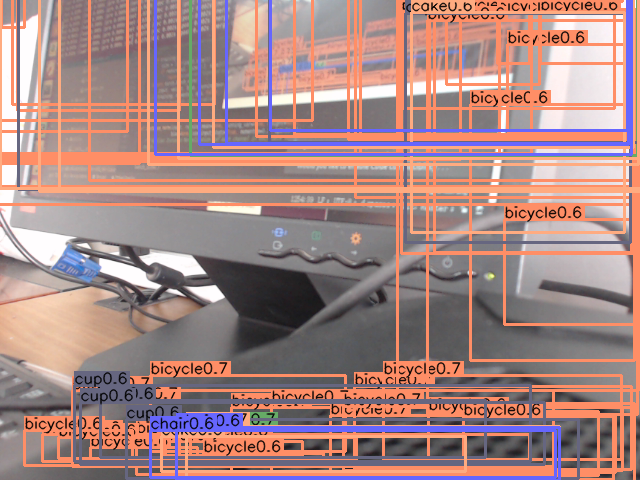
I don't know what caused this problem.
I use torch=0.4.1 torchvision=0.2.1
lih627
on 13 Jun 2019
refer to #38
lih627
on 13 Jun 2019
And this is the command
python demo.py ctdet --demo webacm --load_model ../models/ctdet_pascal_dla_384.pth
This situation only appears on the model pre-trained in PASCAL dataset..
By the way, how to use --arch
lih627
on 13 Jun 2019
The current implementation only support coco model in demo.py. To use pascal demo, you will need to change here. The reason why you got random predictions is that the last layer of the pascal model contains 20 channels and the created model with random initialization contains 80 channels. The pretrained weights are dropped.
 xingyizhou
on 13 Jun 2019
xingyizhou
on 13 Jun 2019
python demo.py ctdet --demo webacm --load_model ../models/ctdet_xxx --arch resdcn_18
xingyizhou
on 13 Jun 2019
Thanks a lot!@xingyizhou
lih627
on 13 Jun 2019
The current implementation only support coco model in demo.py. To use pascal demo, you will need to change here. The reason why you got random predictions is that the last layer of the pascal model contains 20 channels and the created model with random initialization contains 80 channels. The pretrained weights are dropped.
I have done the following steps:
1- Save opts.py as opts_voc.py
2- Save demo.py as demo_voc.py
3- In demo_voc.py, change from opts import opts to from opts_voc import opts
4- In init method of opts_voc.py, set the entry with ctdet key to the following:
  def init(self, args=''):
    default_dataset_info = {
        # mean and std for PASCAL VOC (Image Net) dataset are found at
        # https://www.learnopencv.com/pytorch-for-beginners-semantic-segmentation-using-torchvision/
      'ctdet': {'default_resolution': [512, 512], 'num_classes': 20, #80
                'mean': [0.485, 0.456, 0.406], 'std': [0.229, 0.224, 0.225],
                'dataset': 'pascal'},...# other things
After downloading a model that was trained over Pascal such as ctdet_pascal_dla_384, you can easily run demo_voc.py with the following command:
python demo_voc.py ctdet --demo ../images --load_model ../models/ctdet_pascal_dla_384.pth --dataset pascal
 ashkan-abbasi66
on 28 Jul 2019
ashkan-abbasi66
on 28 Jul 2019
Related issues
 deandiakov
·
5Comments
deandiakov
·
5Comments
 zjp99
·
4Comments
zjp99
·
4Comments
 bhack
·
6Comments
bhack
·
6Comments
 huang229
·
4Comments
huang229
·
4Comments
 HamsterHuey
·
4Comments
HamsterHuey
·
4Comments
Most helpful comment
The current implementation only support coco model in demo.py. To use pascal demo, you will need to change here. The reason why you got random predictions is that the last layer of the pascal model contains 20 channels and the created model with random initialization contains 80 channels. The pretrained weights are dropped.