Cellprofiler: MeasureImageQuality error using calculate blur metrics
I'm getting an error when trying to calculate blur metrics on images using MeasureImageQuality. It could possibly be something with the image, but the terminal report makes me think it might be a bug? Thanks!
Here is the terminal report:
 ** On entry to DLASCLS parameter number  4 had an illegal value
 ** On entry to DLASCLS parameter number  4 had an illegal value
 ** On entry to DLASCLS parameter number  4 had an illegal value
 ** On entry to DLASCLS parameter number  4 had an illegal value
 ** On entry to DLASCLS parameter number  5 had an illegal value
 ** On entry to DLASCLS parameter number  4 had an illegal value
Failed to run module MeasureImageQuality
Traceback (most recent call last):
  File "cellprofiler\gui\pipelinecontroller.py", line 3348, in do_step
  File "cellprofiler_core\pipeline\_pipeline.py", line 1275, in run_module
  File "cellprofiler\modules\measureimagequality.py", line 1067, in run
  File "cellprofiler\modules\measureimagequality.py", line 1090, in run_on_image_group
  File "cellprofiler\modules\measureimagequality.py", line 1405, in calculate_power_spectrum
  File "scipy\linalg\basic.py", line 1223, in lstsq
ValueError: illegal value in 4-th argument of internal None
And screenshot of CellProfiler pipeline:
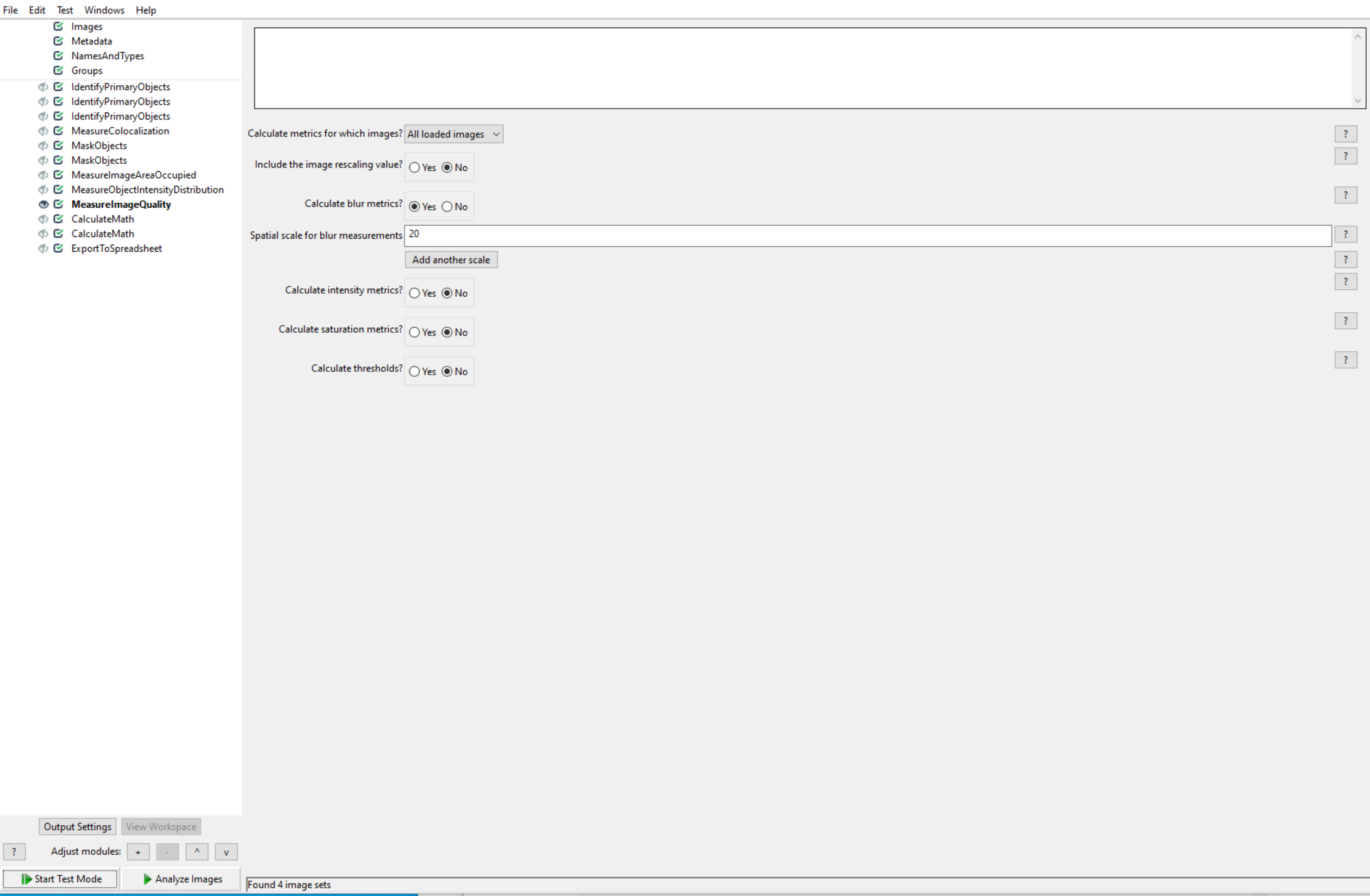
Desktop (please complete the following information):
- OS: Windows 10
- CellProfiler Version 4.05
- Downloaded from the website
 ehildebr
All 12 comments
Hi, we've not been able to replicate this. Would you be able to upload a copy of the pipeline and a problem image set? Thanks
 DavidStirling
on 23 Oct 2020
DavidStirling
on 23 Oct 2020
Hi, @ehildebr, I'm getting same error as you on CellProfiler 4.07, even though I load the example pipeline and use the example images for calculations. My pipeline can run on the Windows 10 Home Edition operating system, but this error occurs when the pipeline is running on the Windows 10 Professional Edition operating system. I doubt that this error is related to the computer operating system. Is your computer operating system also Windows 10 Professional? @DavidStirling, I hope this will help you to replicate the error. Looking forward to your reply. Thanks!
 gzzwjhzxh
on 22 Nov 2020
gzzwjhzxh
on 22 Nov 2020
This issue has been mentioned on Image.sc Forum. There might be relevant details there:
 imagesc-bot
on 24 Nov 2020
imagesc-bot
on 24 Nov 2020
I've done some further digging here, and I think it's related to scipy/scipy#12747 and numpy/numpy#16744 in that this is the result of an underlying issue with mathematics libraries on Windows 10 versions updated past build 2004. We'd resolved the Numpy problem by pinning to 1.19.3, but it looks like the Scipy-related functions are still being effected. We'll have to see if these dependencies are updated to fix this.
DavidStirling
on 25 Nov 2020
@DavidStirling, thank you for your reply! It seems that this is a bug that cannot be fixed at present. Unfortunately, that computer's operating system is Windows 10 version 2004. And I cannot reinstall the system on that computer because it is public. It seems I have to use CP3.1.9 for analysis. Maybe I also need to confirm whether I will get different results from other versions of the window system if I use CP 3.1.9 to analyze the image on Windows 10 version 2004.
gzzwjhzxh
on 26 Nov 2020
If you really want to use CP4, one thing you could try is building from source and installing Numpy+MKL from here.
DavidStirling
on 26 Nov 2020
Due to lack of programming experience, it is difficult for me to build pipelines from source code. But when this bug can be completely fixed Windows 10 version 2004, could you inform me on github or forum (https://forum.image.sc/t/cellprofiler-4-0-7-valueerror-during-run-of-module-measureimagequality/45655)?
Thanks!
gzzwjhzxh
on 27 Nov 2020
I didn't mean building the actual pipelines, "building from source" means installing CellProfiler from the original code rather than using the packaged bundle. There are instructions for this. A source build allows you to change which sub-packages are installed and thus potentially work around the bug. Nonetheless I understand that this can be daunting without experience with Python.
I believe 3.1.9 should work because it uses a different (older) mathematics library. The results will probably be slightly different since several modules were updated in 4.0, but the general pipeline should work as intended. It's still best to not compare data from different CellProfiler versions though.
Hope that helps
DavidStirling
on 29 Nov 2020
Thank you so much for your patient explanation! Sorry, maybe my words is ambiguous, I mean if I use CP 3.1.9 to analyze the image on a computer with Windows 10 version 2004, whether the data I get will be different from that I get from other computers with old version Windows 10. My preliminary tests have shown that the data from computers with different versions Windows 10 are the same. But I still hope that your team could completely fix this bug in later versions of CellProfiler if some sub-packages have been updated to fix this.
Thank you once again!
gzzwjhzxh
on 30 Nov 2020
Ah, ok. Which version of Windows 10 you use should not have any impact on the results from 3.1.9.
In terms of a resolution, we'll have to see when either Windows itself or the numerics library receives an update fixing this. If this doesn't happen soon there may be a couple of other things I could try.
DavidStirling
on 30 Nov 2020
I have started to analyze my images on CP 3.1.9. And I hope I can get meaningful data to complete my project.
Generally speaking, for those who lack professional knowledge of image analysis, CellProfiler is a software that can obtain large amounts of data and realize automatic analysis. Thanks to all CellProfiler developers!
gzzwjhzxh
on 30 Nov 2020
Just an update on this, Microsoft have now released KB4598291 which should fix this issue.
DavidStirling
on 10 Feb 2021
Related issues
 bethac07
·
7Comments
bethac07
·
7Comments
 AnneCarpenter
·
9Comments
AnneCarpenter
·
9Comments
AnneCarpenter
·
9Comments
AnneCarpenter
·
9Comments
 dlogan
·
9Comments
dlogan
·
9Comments
 0x00b1
·
5Comments
0x00b1
·
5Comments