Cellprofiler: No home, zoom, etc buttons on module window in Ubuntu
From this forum post:
"I am glad that CellProfiler installation on Linux (Ubuntu 16.04) now works (Since version 2.2.0).
The CellProfiler behaves similar to the windows in most respects, however the modules windows lacks the controls associated with zooming, panning. These controls facilitate accurate pipeline parameters like thresh-holding, bounds, smoothing scales, etc.
Is that a known issue in Linux installation, or is there a problem in my installation/JRE/JVM?"

 bethac07
All 30 comments
Please let me know if any other information is required.
:)
 Harmanjit
on 4 Apr 2017
Harmanjit
on 4 Apr 2017
@Harmanjit Which version of CellProfiler are you running?
 mcquin
on 5 Apr 2017
mcquin
on 5 Apr 2017
@mcquin, I am usig 2.2.0 rev ac0529e in ubuntu 16.04.
Harmanjit
on 6 Apr 2017
This might be related to recent matplotlib changes. Have you tried upgrading matplotlib?
 0x00b1
on 20 Apr 2017
0x00b1
on 20 Apr 2017
I did not do that.
How do I do that?
Thanks
Harmanjit
on 20 Apr 2017
@Harmanjit Try pip install --upgrade matplotlib. You can check your matplotlib version with pip freeze.
mcquin
on 20 Apr 2017
Any luck, @Harmanjit ?
mcquin
on 5 May 2017
Hi @mcquin I am sorry I did not reply earlier.
No the problem is not resolved.
I ran both
pip install --upgrade pip
pip install --upgrade matplotlib
my version of matplotlib is 1.5.1 checked using pip freeze.
my pip version is 8.1.1
Harmanjit
on 5 May 2017
Thanks for the reply! Please try installing matplotlib 2.0.
I believe the command is pip install matplotlib==2.0.1
mcquin
on 5 May 2017
I did the above command pip install matplotlib==2.0.1, but even after successful installation pip freeze, shows that I have matplotlib==1.5.1.
Another peculiar thing is that pip is as adamant as matplotlib. Even after a successful update (using the command pip install --upgrade pip), The version stays 8.1.1. The message that I see is:
You are using pip version 8.1.1, however version 9.0.1 is available.
You should consider upgrading via the 'pip install --upgrade pip' command.
Harmanjit
on 5 May 2017
How did you install python?
mcquin
on 8 May 2017
sudo apt-get install python
And I have python version 2.7.11-1
Harmanjit
on 8 May 2017
OK. I find it odd that you aren't able to update pip and matplotlib. Is pip raising an error?
Perhaps sudo is the problem. You can try sudo pip install --upgrade pip matplotlib. If you don't have sudo privileges, you can try pip install --user --upgrade pip matplotlib to install the dependencies to your local user account.
mcquin
on 10 May 2017
@Harmanjit Have you had any luck?
mcquin
on 16 May 2017
It sounds like you have multiple site-packages (directories where Python stores packages).
Can you run:
$ python -c "from distutils.sysconfig import get_python_lib; print(get_python_lib())"
and paste the output?
0x00b1
on 16 May 2017
@0x00b1: The output to the command you mentioned in previous comment is,
/usr/lib/python2.7/dist-packages
Harmanjit
on 3 Jun 2017
Hi
I just updated the packages, using --force-reinstall flag, i.e. pip install --upgrade --force-reinstall matplotlib
Now the cell profiler is messed up, it does not show any GUI. the error now seems to be in Java.
The entire error message is:
java.lang.IllegalArgumentException: Cannot handle replace call to list in ij.Menus's public static synchronized java.lang.String[] getPlugins()
    at net.imagej.patcher.CodeHacker.replaceCallInMethod(CodeHacker.java:725)
    at net.imagej.patcher.CodeHacker.replaceCallInMethod(CodeHacker.java:650)
    at net.imagej.patcher.LegacyExtensions.addExtraPlugins(LegacyExtensions.java:477)
    at net.imagej.patcher.LegacyExtensions.injectHooks(LegacyExtensions.java:175)
    at net.imagej.patcher.LegacyInjector.inject(LegacyInjector.java:308)
    at net.imagej.patcher.LegacyInjector.injectHooks(LegacyInjector.java:109)
    at net.imagej.patcher.LegacyEnvironment.initialize(LegacyEnvironment.java:101)
    at net.imagej.patcher.LegacyEnvironment.applyPatches(LegacyEnvironment.java:495)
    at net.imagej.patcher.LegacyInjector.preinit(LegacyInjector.java:397)
    at net.imagej.patcher.LegacyInjector.preinit(LegacyInjector.java:376)
    at net.imagej.patcher.JavaAgent.preinit(JavaAgent.java:147)
    at net.imagej.patcher.JavaAgent.premain(JavaAgent.java:95)
    at sun.reflect.NativeMethodAccessorImpl.invoke0(Native Method)
    at sun.reflect.NativeMethodAccessorImpl.invoke(NativeMethodAccessorImpl.java:62)
    at sun.reflect.DelegatingMethodAccessorImpl.invoke(DelegatingMethodAccessorImpl.java:43)
    at java.lang.reflect.Method.invoke(Method.java:498)
    at sun.instrument.InstrumentationImpl.loadClassAndStartAgent(InstrumentationImpl.java:386)
    at sun.instrument.InstrumentationImpl.loadClassAndCallPremain(InstrumentationImpl.java:401)
Caused by: java.lang.RuntimeException: java.io.IOException: invalid constant type: 18
    at javassist.CtClassType.getClassFile2(CtClassType.java:203)
    at javassist.compiler.MemberResolver.lookupMethod(MemberResolver.java:110)
    at javassist.compiler.MemberResolver.lookupMethod(MemberResolver.java:96)
    at javassist.compiler.TypeChecker.atMethodCallCore(TypeChecker.java:704)
    at javassist.compiler.TypeChecker.atCallExpr(TypeChecker.java:681)
    at javassist.compiler.JvstTypeChecker.atCallExpr(JvstTypeChecker.java:156)
    at javassist.compiler.ast.CallExpr.accept(CallExpr.java:45)
    at javassist.compiler.CodeGen.doTypeCheck(CodeGen.java:241)
    at javassist.compiler.CodeGen.atStmnt(CodeGen.java:329)
    at javassist.compiler.ast.Stmnt.accept(Stmnt.java:49)
    at javassist.compiler.CodeGen.atIfStmnt(CodeGen.java:390)
    at javassist.compiler.CodeGen.atStmnt(CodeGen.java:354)
    at javassist.compiler.ast.Stmnt.accept(Stmnt.java:49)
    at javassist.compiler.Javac.compileStmnt(Javac.java:568)
    at javassist.expr.MethodCall.replace(MethodCall.java:234)
    at net.imagej.patcher.CodeHacker$7.edit(CodeHacker.java:686)
    at javassist.expr.ExprEditor.loopBody(ExprEditor.java:191)
    at javassist.expr.ExprEditor.doit(ExprEditor.java:90)
    at javassist.CtBehavior.instrument(CtBehavior.java:618)
    at net.imagej.patcher.CodeHacker$EagerExprEditor.instrument(CodeHacker.java:1278)
    at net.imagej.patcher.CodeHacker.replaceCallInMethod(CodeHacker.java:670)
    ... 17 more
Caused by: java.io.IOException: invalid constant type: 18
    at javassist.bytecode.ConstPool.readOne(ConstPool.java:1027)
    at javassist.bytecode.ConstPool.read(ConstPool.java:970)
    at javassist.bytecode.ConstPool.<init>(ConstPool.java:127)
    at javassist.bytecode.ClassFile.read(ClassFile.java:693)
    at javassist.bytecode.ClassFile.<init>(ClassFile.java:85)
    at javassist.CtClassType.getClassFile2(CtClassType.java:190)
    ... 37 more
java.lang.IllegalArgumentException: Cannot handle app name in ij.ImageJ's public <init>(java.applet.Applet applet, int mode)
    at net.imagej.patcher.CodeHacker.replaceAppNameInCall(CodeHacker.java:446)
    at net.imagej.patcher.LegacyExtensions.insertAppNameHooks(LegacyExtensions.java:406)
    at net.imagej.patcher.LegacyExtensions.injectHooks(LegacyExtensions.java:291)
    at net.imagej.patcher.LegacyInjector.inject(LegacyInjector.java:308)
    at net.imagej.patcher.LegacyInjector.injectHooks(LegacyInjector.java:109)
    at net.imagej.patcher.LegacyEnvironment.initialize(LegacyEnvironment.java:101)
    at net.imagej.patcher.LegacyEnvironment.applyPatches(LegacyEnvironment.java:495)
    at net.imagej.patcher.LegacyInjector.preinit(LegacyInjector.java:397)
    at net.imagej.patcher.LegacyInjector.preinit(LegacyInjector.java:376)
    at net.imagej.patcher.JavaAgent.preinit(JavaAgent.java:147)
    at net.imagej.patcher.JavaAgent.premain(JavaAgent.java:95)
    at sun.reflect.NativeMethodAccessorImpl.invoke0(Native Method)
    at sun.reflect.NativeMethodAccessorImpl.invoke(NativeMethodAccessorImpl.java:62)
    at sun.reflect.DelegatingMethodAccessorImpl.invoke(DelegatingMethodAccessorImpl.java:43)
    at java.lang.reflect.Method.invoke(Method.java:498)
    at sun.instrument.InstrumentationImpl.loadClassAndStartAgent(InstrumentationImpl.java:386)
    at sun.instrument.InstrumentationImpl.loadClassAndCallPremain(InstrumentationImpl.java:401)
Caused by: java.lang.RuntimeException: java.io.IOException: invalid constant type: 18
    at javassist.CtClassType.getClassFile2(CtClassType.java:203)
    at javassist.CtClassType.subtypeOf(CtClassType.java:303)
    at javassist.CtClassType.subtypeOf(CtClassType.java:318)
    at javassist.compiler.MemberResolver.compareSignature(MemberResolver.java:247)
    at javassist.compiler.MemberResolver.lookupMethod(MemberResolver.java:119)
    at javassist.compiler.MemberResolver.lookupMethod(MemberResolver.java:96)
    at javassist.compiler.TypeChecker.atMethodCallCore(TypeChecker.java:704)
    at javassist.compiler.TypeChecker.atCallExpr(TypeChecker.java:681)
    at javassist.compiler.JvstTypeChecker.atCallExpr(JvstTypeChecker.java:156)
    at javassist.compiler.ast.CallExpr.accept(CallExpr.java:45)
    at javassist.compiler.CodeGen.doTypeCheck(CodeGen.java:241)
    at javassist.compiler.CodeGen.atStmnt(CodeGen.java:329)
    at javassist.compiler.ast.Stmnt.accept(Stmnt.java:49)
    at javassist.compiler.Javac.compileStmnt(Javac.java:568)
    at javassist.expr.MethodCall.replace(MethodCall.java:234)
    at net.imagej.patcher.CodeHacker$4.edit(CodeHacker.java:427)
    at net.imagej.patcher.CodeHacker$4.edit(CodeHacker.java:441)
    at javassist.expr.ExprEditor.loopBody(ExprEditor.java:219)
    at javassist.expr.ExprEditor.doit(ExprEditor.java:90)
    at javassist.CtBehavior.instrument(CtBehavior.java:618)
    at net.imagej.patcher.CodeHacker$EagerExprEditor.instrument(CodeHacker.java:1278)
    at net.imagej.patcher.CodeHacker.replaceAppNameInCall(CodeHacker.java:402)
    ... 16 more
Caused by: java.io.IOException: invalid constant type: 18
    at javassist.bytecode.ConstPool.readOne(ConstPool.java:1027)
    at javassist.bytecode.ConstPool.read(ConstPool.java:970)
    at javassist.bytecode.ConstPool.<init>(ConstPool.java:127)
    at javassist.bytecode.ClassFile.read(ClassFile.java:693)
    at javassist.bytecode.ClassFile.<init>(ClassFile.java:85)
    at javassist.CtClassType.getClassFile2(CtClassType.java:190)
    ... 37 more
Exception fetching new version information from http://cellprofiler.org/CPupdate.html: HTTP Error 404: Not Found
ilastik import: failed to import the ilastik. Please follow the instructions on
    "http://www.ilastik.org" to install ilastik
Traceback (most recent call last):
  File "/home/vs_lab_admin/CellProfiler/cellprofiler/modules/classifypixels.py", line 71, in <module>
    from ilastik.core.dataMgr import DataMgr, DataItemImage
ImportError: No module named ilastik.core.dataMgr
ilastik import: failed to import the ilastik. Please follow the instructions on
                          "http://www.ilastik.org" to install ilastik
Traceback (most recent call last):
  File "/home/vs_lab_admin/CellProfiler/cellprofiler/modules/ilastik_pixel_classification.py", line 70, in <module>
    import ilastik_main
ImportError: No module named ilastik_main
Failed to stop Ilastik
Harmanjit
on 9 Jun 2017
Also the output of the pip freeze is:
adium-theme-ubuntu==0.3.4
cellh5==1.3.0
-e git+https://github.com/CellProfiler/CellProfiler.git@ac0529ec5b243cc8fce0c7de43cc2c29119e29c5#egg=CellProfiler
centrosome==1.0.7
cycler==0.10.0
Cython==0.25.2
decorator==4.0.6
functools32==3.2.3.post2
h5py==2.6.0
hmmlearn==0.2.0
inflect==0.2.5
javabridge==1.0.14
libtiff==0.4.0
lxml==3.8.0
matplotlib==2.0.1
MySQL-python==1.2.5
mysqlclient==1.3.7
networkx==1.11
numpy==1.13.0
pandas==0.20.2
Pillow==3.1.2
prokaryote==1.0.11
py==1.4.34
pygpgme==0.3
pyparsing==2.2.0
pytest==3.1.1
python-bioformats==1.1.0
python-dateutil==2.6.0
pytz==2017.2
PyWavelets==0.5.2
pyzmq==15.2.0
scikit-image==0.13.0
scikit-learn==0.18.1
scipy==0.17.0
scour==0.32
six==1.10.0
subprocess32==3.2.7
unity-lens-photos==1.0
wxPython==3.0.2.0
wxPython-common==3.0.2.0
Harmanjit
on 9 Jun 2017
Hey, @Harmanjit, would it be possible to use the latest commit?
0x00b1
on 9 Jun 2017
I observe the same bug as I can not see the toolbar in any plot. I am on Ubuntu 16.04 using CP 3.0.0 with the following environment.yml via Conda install.
name: cp
# in order of priority: lowest (top) to highest (bottom)
channels:
  - anaconda
  - goodman # mysql-python for mac
  - bioconda
  - cyclus # java-jdk for windows
  - conda-forge # libxml2 for windows
  - bjornfjohansson
dependencies:
  - appdirs
  - cython
  - h5py
  - ipywidgets
  - java-jdk
  - jupyter
  - libtiff
  - libxml2
  - libxslt
  - lxml
  - packaging
  - pillow
  - pip
  - python=2
  - pyzmq=15.3.0
  - mahotas
  - matplotlib!=2.1.0,>2.0.0
  - mysql-python
  - numpy
  - raven
  - requests
  - scikit-image
  - scikit-learn
  - scipy
  - sphinx
  - tifffile
  - wxpython=3.0.2.0
  - pip:
    - cellh5
    - centrosome
    - inflect
    - prokaryote==2.3.2
    - javabridge==1.0.15
    - python-bioformats==1.3.1
    - git+https://github.com/CellProfiler/CellProfiler.git@master
These are the associated installs with the YAML installs. (sorry for the dump)
alabaster 0.7.10 py27he5a193a_0 anaconda
appdirs 1.4.3 py27_0 anaconda
asn1crypto 0.23.0 py27h7b0c810_0 anaconda
babel 2.5.0 py27h20693cd_0 anaconda
backports 1.0 py27h63c9359_1 anaconda
backports.functools_lru_cache 1.4 py27he8db605_1 anaconda
backports.shutil_get_terminal_size 1.0.0 py27h5bc021e_2 anaconda
backports_abc 0.5 py27h7b3c97b_0 anaconda
bleach 2.1.1 py27h655ea9b_0 anaconda
bokeh 0.12.13 py27h5233db4_0 anaconda
ca-certificates 2017.08.26 h1d4fec5_0 anaconda
cellh5 1.3.0 <pip>
CellProfiler 3.0.0 <pip>
centrosome 1.0.9 <pip>
certifi 2017.11.5 py27h71e7faf_0 anaconda
cffi 1.11.2 py27ha7929c6_0 anaconda
chardet 3.0.4 py27hfa10054_1 anaconda
click 6.7 py27h4225b90_0 anaconda
cloudpickle 0.5.2 py27hc3dac03_0 anaconda
configparser 3.5.0 py27h5117587_0 anaconda
contextlib2 0.5.5 py27hbf4c468_0 anaconda
cryptography 2.1.4 py27h6697b16_0 anaconda
cycler 0.10.0 py27hc7354d3_0 anaconda
cython 0.27.3 py27hc56b35e_0 anaconda
dask 0.16.0 py27h8aa6184_0 anaconda
dask-core 0.16.0 py27he98c51e_0 anaconda
dbus 1.10.22 h3b5a359_0 anaconda
decorator 4.1.2 py27h1544723_0 anaconda
distributed 1.20.2 py27_0 anaconda
docutils 0.14 py27hae222c1_0 anaconda
entrypoints 0.2.3 py27h502b47d_2 anaconda
enum34 1.1.6 py27h99a27e9_1 anaconda
expat 2.2.5 he0dffb1_0 anaconda
fontconfig 2.12.4 h88586e7_1 anaconda
freetype 2.8 hab7d2ae_1 anaconda
functools32 3.2.3.2 py27h4ead58f_1 anaconda
future 0.16.0 <pip>
futures 3.2.0 py27h7b459c0_0 anaconda
glib 2.53.6 h5d9569c_2 anaconda
gmp 6.1.2 h6c8ec71_1 anaconda
gst-plugins-base 1.12.2 he3457e5_0 anaconda
gstreamer 1.12.2 h4f93127_0 anaconda
h5py 2.7.1 py27h2697762_0 anaconda
hdf5 1.10.1 h9caa474_1 anaconda
heapdict 1.0.0 py27_1 anaconda
hmmlearn 0.2.0 <pip>
html5lib 1.0.1 py27h5233db4_0 anaconda
icu 58.2 h9c2bf20_1 anaconda
idna 2.6 py27h5722d68_1 anaconda
imageio 2.2.0 py27hf108a7f_0 anaconda
imagesize 0.7.1 py27hd17bf80_0 anaconda
inflect 0.2.5 <pip>
intel-openmp 2018.0.0 hc7b2577_8 anaconda
ipaddress 1.0.18 py27h337fd85_0 anaconda
ipykernel 4.7.0 py27h5233db4_0 anaconda
ipython 5.4.1 py27h36c99b6_1 anaconda
ipython_genutils 0.2.0 py27h89fb69b_0 anaconda
ipywidgets 7.0.5 py27hfb35cc2_0 anaconda
java-jdk 8.0.112 0 bioconda
javabridge 1.0.15 <pip>
jinja2 2.10 py27h4114e70_0 anaconda
joblib 0.11 <pip>
jpeg 9b h024ee3a_2 anaconda
jsonschema 2.6.0 py27h7ed5aa4_0 anaconda
jupyter 1.0.0 py27_3 anaconda
jupyter_client 5.1.0 py27hbee1118_0 anaconda
jupyter_console 5.2.0 py27hc6bee7e_1 anaconda
jupyter_core 4.4.0 py27h345911c_0 anaconda
libedit 3.1 heed3624_0 anaconda
libffi 3.2.1 hd88cf55_4 anaconda
libgcc-ng 7.2.0 h7cc24e2_2 anaconda
libgfortran-ng 7.2.0 h9f7466a_2 anaconda
libpng 1.6.32 hbd3595f_4 anaconda
libsodium 1.0.15 hf101ebd_0 anaconda
libstdcxx-ng 7.2.0 h7a57d05_2 anaconda
libtiff 4.0.9 h28f6b97_0 anaconda
libxcb 1.12 hcd93eb1_4 anaconda
libxml2 2.9.4 h2e8b1d7_6 anaconda
libxslt 1.1.29 h78d5cac_6 anaconda
locket 0.2.0 py27h73929a2_1 anaconda
lxml 4.1.1 py27hdd00cef_0 anaconda
mahotas 1.4.4 py27_0 conda-forge
markupsafe 1.0 py27h97b2822_1 anaconda
matplotlib 2.1.1 py27h0128e01_0 anaconda
mistune 0.8.1 py27h1bd0165_0 anaconda
mkl 2018.0.1 h19d6760_4 anaconda
msgpack-python 0.4.8 py27hc2fa789_0 anaconda
mysql-python 1.2.5 py27_0 anaconda
nbconvert 5.3.1 py27he041f76_0 anaconda
nbformat 4.4.0 py27hed7f2b2_0 anaconda
ncurses 6.0 h9df7e31_2 anaconda
networkx 1.11 py27h7358325_0 anaconda
notebook 5.2.2 py27h6748267_0 anaconda
numpy 1.13.3 py27hbcc08e0_0 anaconda
olefile 0.44 py27h4bd3e3c_0 anaconda
openjdk 8.0.112 zulu8.19.0.1_3 conda-forge
openssl 1.0.2n hb7f436b_0 anaconda
packaging 16.8 py27h5e07c7c_1 anaconda
pandas 0.21.1 py27h38cdd7d_0 anaconda
pandoc 1.19.2.1 hea2e7c5_1 anaconda
pandocfilters 1.4.2 py27h428e1e5_1 anaconda
partd 0.3.8 py27h4e55004_0 anaconda
pathlib2 2.3.0 py27h6e9d198_0 anaconda
pcre 8.41 hc27e229_1 anaconda
pexpect 4.3.0 py27hdeba8d9_0 anaconda
pickleshare 0.7.4 py27h09770e1_0 anaconda
pillow 4.3.0 py27h353bd0c_1 anaconda
pip 9.0.1 py27ha730c48_4 anaconda
prokaryote 2.3.2 <pip>
prompt_toolkit 1.0.15 py27h1b593e1_0 anaconda
psutil 5.4.1 py27h61c8946_0 anaconda
ptyprocess 0.5.2 py27h4ccb14c_0 anaconda
pycparser 2.18 py27hefa08c5_1 anaconda
pygments 2.2.0 py27h4a8b6f5_0 anaconda
pyopenssl 17.5.0 py27hcee3be0_0 anaconda
pyparsing 2.2.0 py27hf1513f8_1 anaconda
pyqt 5.6.0 py27h4b1e83c_5 anaconda
pysocks 1.6.7 py27he2db6d2_1 anaconda
python 2.7.14 h1571d57_29 anaconda
python-bioformats 1.3.1 <pip>
python-dateutil 2.6.1 py27h4ca5741_1 anaconda
pytz 2017.3 py27h001bace_0 anaconda
pywavelets 0.5.2 py27hecda097_0 anaconda
pyyaml 3.12 py27h2d70dd7_1 anaconda
pyzmq 15.3.0 py27_0 anaconda
qt 5.6.2 h974d657_12 anaconda
qtconsole 4.3.1 py27hc444b0d_0 anaconda
raven 6.3.0 py27_0 conda-forge
readline 7.0 ha6073c6_4 anaconda
requests 2.18.4 py27hc5b0589_1 anaconda
scandir 1.6 py27hf7388dc_0 anaconda
scikit-image 0.13.1 py27h44232b9_0 anaconda
scikit-learn 0.19.1 py27h445a80a_0 anaconda
scipy 1.0.0 py27hf5f0f52_0 anaconda
setuptools 36.5.0 py27h68b189e_0 anaconda
simplegeneric 0.8.1 py27_1 anaconda
singledispatch 3.4.0.3 py27h9bcb476_0 anaconda
sip 4.18.1 py27he9ba0ab_2 anaconda
six 1.11.0 py27h5f960f1_1 anaconda
snowballstemmer 1.2.1 py27h44e2768_0 anaconda
sortedcontainers 1.5.7 py27he59936f_0 anaconda
sphinx 1.6.3 py27hf9b1778_0 anaconda
sphinxcontrib 1.0 py27h1512b58_1 anaconda
sphinxcontrib-websupport 1.0.1 py27hf906f22_1 anaconda
sqlite 3.20.1 hb898158_2 anaconda
ssl_match_hostname 3.5.0.1 py27h4ec10b9_2 anaconda
subprocess32 3.2.7 py27h373dbce_0 anaconda
tblib 1.3.2 py27h51fe5ba_0 anaconda
terminado 0.6 py27h4be8df9_0 anaconda
testpath 0.3.1 py27hc38d2c4_0 anaconda
tifffile 0.12.1 py27_1 conda-forge
tk 8.6.7 hc745277_3 anaconda
toolz 0.8.2 py27hd3b1e7e_0 anaconda
tornado 4.5.2 py27h97b179f_0 anaconda
traitlets 4.3.2 py27hd6ce930_0 anaconda
typing 3.6.2 py27h66f49e2_0 anaconda
urllib3 1.22 py27ha55213b_0 anaconda
wcwidth 0.1.7 py27h9e3e1ab_0 anaconda
webencodings 0.5.1 py27hff10b21_1 anaconda
wheel 0.30.0 py27h2bc6bb2_1 anaconda
widgetsnbextension 3.0.8 py27h618a941_0 anaconda
wxpython 3.0.2.0 py27_0 bjornfjohansson
xz 5.2.3 h55aa19d_2 anaconda
yaml 0.1.7 had09818_2 anaconda
zeromq 4.1.5 0 anaconda
zict 0.1.3 py27h12c336c_0 anaconda
zlib 1.2.11 ha838bed_2 anaconda
Lastly, when I run > cellprofiler I get the following GDK warnings before the GUI appears.
GLib-GIO-Message: Using the 'memory' GSettings backend.  Your settings will not be saved or shared with other applications.
(cellprofiler:34197): Gdk-WARNING **: gdk_window_set_icon_list: icons too large
/home/user1/anaconda3/envs/cp/lib/python2.7/site-packages/matplotlib/font_manager.py:1320: UserWarning: findfont: Font family [u'Tahoma'] not found. Falling back to DejaVu Sans
  (prop.get_family(), self.defaultFamily[fontext]))
Did anyone find the work around? Thanks in advance.
 bgriffen
on 28 Dec 2017
bgriffen
on 28 Dec 2017
I am experiencing the exact same issue with the same error messages on CP3.0.0 on Ubuntu 17.10.
 votti
on 29 Dec 2017
votti
on 29 Dec 2017
Hi @Harmanjit, @bgriffen, @votti,
Thanks for posting your version information.
I don't have an update for you at this time. It's not yet obvious to me what the issue is. I'll need access to an Ubuntu machine to debug.
I'm curious if this user_interfaces example code works for you on Ubuntu. Download the source code and run:
python ~/path/to/embedding_in_wx4.py
You should ideally see:
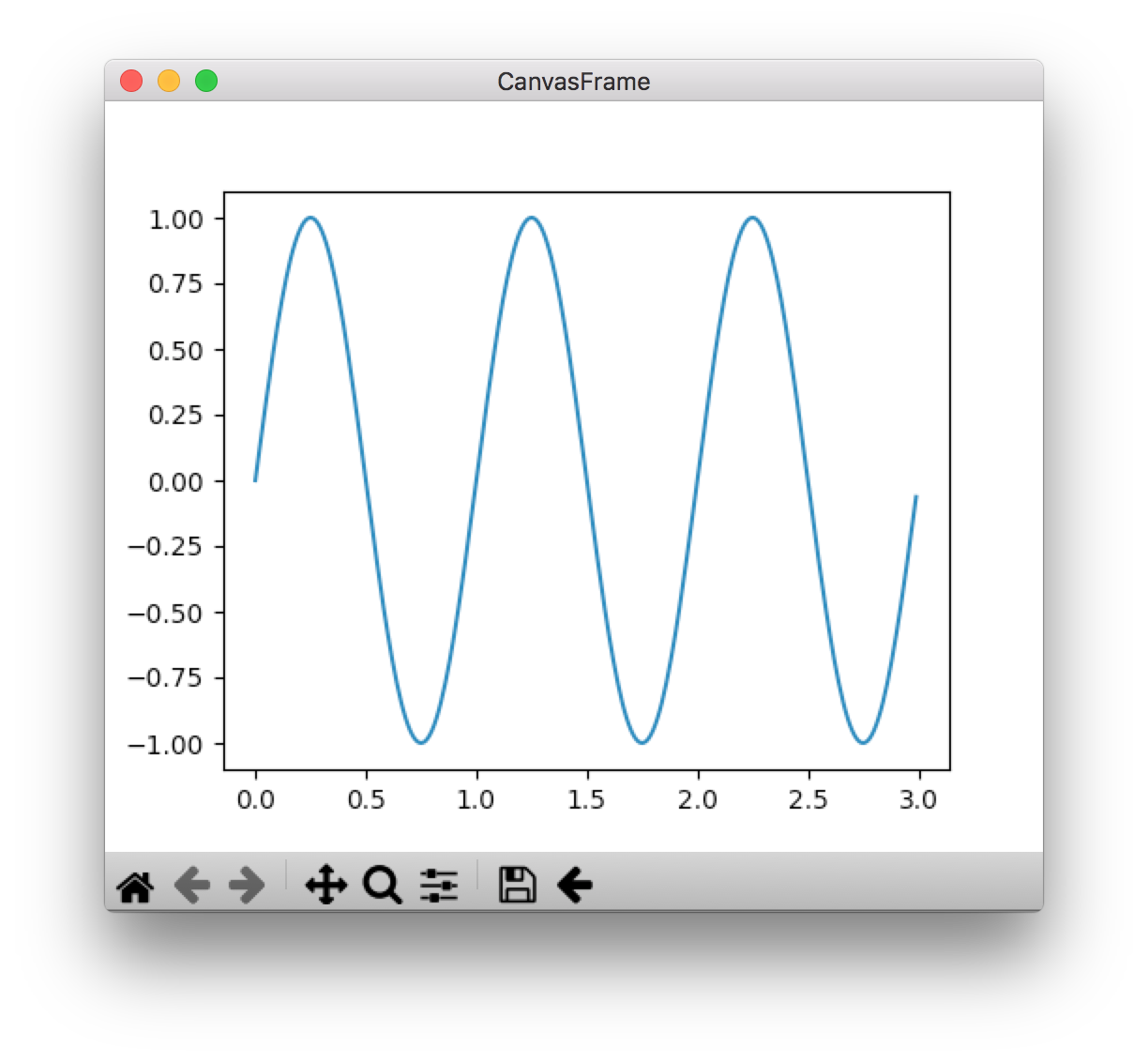
Here's some potentially relevant code if anyone wants to get a jump on debugging:
NavigationToolbarsubclasses matplotlib'sNavigationToolbar2WxAgg. The "WXAgg" backend is set herecreate_toolbardefines how the toolbar is instantiated- add toolbar to frame
mcquin
on 2 Jan 2018
I tried it but get a now expected error.
Traceback (most recent call last):
  File "embedding_in_wx4.py", line 8, in <module>
    import wxversion
ModuleNotFoundError: No module named 'wxversion'
After some digging, it seemed as though there was no stable version of wxpython for Python 3.6+Ubuntu-16.04 via Anaconda. I then came across this
pip install -U \
    -f https://extras.wxpython.org/wxPython4/extras/linux/gtk3/ubuntu-16.04 \
    wxPython
which turns this:
wxpython 3.0.2.0 py27_0 bjornfjohansson
into
wxPython 4.0.0b2 <pip>
This may well work for non-Anaconda environments but for those of us that use Anaconda (py3.6+) it seems this isn't a workable solution (results in same error). Has anyone got wxPython working with Python 3+? I've tried others conda install -c conda-forge wxpython to no avail. It may be targeting the wrong interpreter as python2 import wxversion works fine.
bgriffen
on 2 Jan 2018
Hi,
CellProfiler is Python 2, not Python 3. If you try running CP in an Anaconda 2.X environment do the buttons etc work for you?
bethac07
on 2 Jan 2018
Deep apologies, I thought I was on my Python2 environment when I wrote that then after I sent it off I realized I was in the wrong environment stupidly confusing the "3" mentally between Python3 and CP3. I have since activated my CP environment (Python2.7) and after conda install wxpython the window appears with the relevant Navigation Toolbar as depicted above. I double checked CP3.0.0 and the problem remains (e.g. no navigation toolbar on IdentifyPrimaryObjects).
bgriffen
on 2 Jan 2018
The example also does run correctly for me while the toolbar in CP doesnt.
Maybe the difference is that CP does not seem to use a 'Sizer' to place and resize the toolbar?
votti
on 3 Jan 2018
Hi,
I've also observed the missing buttons in CP 2.2.0.
A bit of print-debugging brought up that the toolbar height is set to 4 in my scenario.
With the little hack below the toolbar becomes visible and works (but sizing the window below a certain height yields to warnings from Gtk...).
--- cellprofiler/gui/cpfigure.py.dist   2017-12-11 15:14:45
+++ cellprofiler/gui/cpfigure.py        2018-01-03 13:15:05
@@ -473,6 +473,8 @@ def on_size(self, event):
             return
         available_width, available_height = self.GetClientSize()
         nbheight = self.navtoolbar.GetSize()[1]
+        if nbheight < 40:
+            nbheight = 40
         self.navtoolbar.SetPosition((0, 0))
         self.navtoolbar.SetSize((available_width, nbheight))
        if self.secret_panel.IsShown():
Actually I guess that the reason for the 'wrong' height is somewhere down the line in wxPython and/or matplotlib, but I'm not so deep in the matter.
The versions of the other components are Python2.7, matplotlib-1.5.3, wxPython-3.0.2.0
 t-kreitler
on 3 Jan 2018
t-kreitler
on 3 Jan 2018
From the code:
Sizers have proven to be too unpredictable and useless. So
we do it manually here. Reinventing the wheel is so much
and works much better.
https://github.com/CellProfiler/CellProfiler/blob/master/cellprofiler/gui/figure.py#L519-L521
Looks like this is leftover from Lee: https://github.com/CellProfiler/CellProfiler/issues/1279
@t-kreitler's fix works for me, I'll make a PR for it (thanks @t-kreitler!). If we don't want to have to make this manual fix, I believe it will require using a Sizer with the navtoolbar (something which Lee was apparently against).
 AetherUnbound
on 4 Jan 2018
AetherUnbound
on 4 Jan 2018
Pull request #3445 fixes the problem for me as well!
Ubuntu 17.10, matplotlib==2.0.1, wxPython-common==3.0.2.0
Thanks for taking care of it! This bug was one of the major hurdles for us not to move to CP3.0
votti
on 4 Jan 2018
:star: Thanks @AetherUnbound for implementing a fix!
:star: Thanks @t-kreitler for noticing the toolbar height was too small, excellent debugging!
:star: Thanks @votti for verifying @AetherUnbound's changes!
:star: Thanks @bgriffen, @Harmanjit for working with us to help debug and resolve the issue!
mcquin
on 4 Jan 2018
Related issues
 katrinleinweber
·
3Comments
katrinleinweber
·
3Comments
 AnneCarpenter
·
9Comments
AnneCarpenter
·
9Comments
0x00b1
·
5Comments
0x00b1
·
10Comments
AnneCarpenter
·
9Comments
AnneCarpenter
·
9Comments
0x00b1
·
5Comments
0x00b1
·
10Comments
Most helpful comment
:star: Thanks @AetherUnbound for implementing a fix!
:star: Thanks @t-kreitler for noticing the toolbar height was too small, excellent debugging!
:star: Thanks @votti for verifying @AetherUnbound's changes!
:star: Thanks @bgriffen, @Harmanjit for working with us to help debug and resolve the issue!