Cefsharp: Browser goes blank if used in combination with WPF TabControl
What version of the product are you using?
Nuget 73.1.130 and 74.1.130-CI3117 (not reproducible on 71.0.2)What architecture x86 or x64?
x64On what operating system?
Win10Are you using
WinForms,WPForOffScreen?
WPFWhat steps will reproduce the problem?
Use TabControl (or similar approach) to launch ~10 tabs of ChromiumWebBrowser pointing to google.com
Switch between tabs and eventually (after 10-20 switches) browser will go blank (according to debug tools browser still works and you can execute JS, change DOM, etc.).
Adapted minimal example: https://github.com/dkrainyk/CefSharp.MinimalExample/commit/8fa4bd572240695f485d4323a5ca247b1eacbb0b
- What is the expected output? What do you see instead?
Browser window goes blank. Page should be visible. Please provide any additional information below.
debug.log is emptyDoes this problem also occur in the
CEFSample Application from http://opensource.spotify.com/cefbuilds/index.html?
N/A
 dkrainyk
All 62 comments
Looks like a bug in CEF, will add more details later.
I suspect that testing with with cefclient and minimizing/maximizing the window will probably reproduce the same problem.
For now rollback to version 71.
 amaitland
on 21 May 2019
amaitland
on 21 May 2019
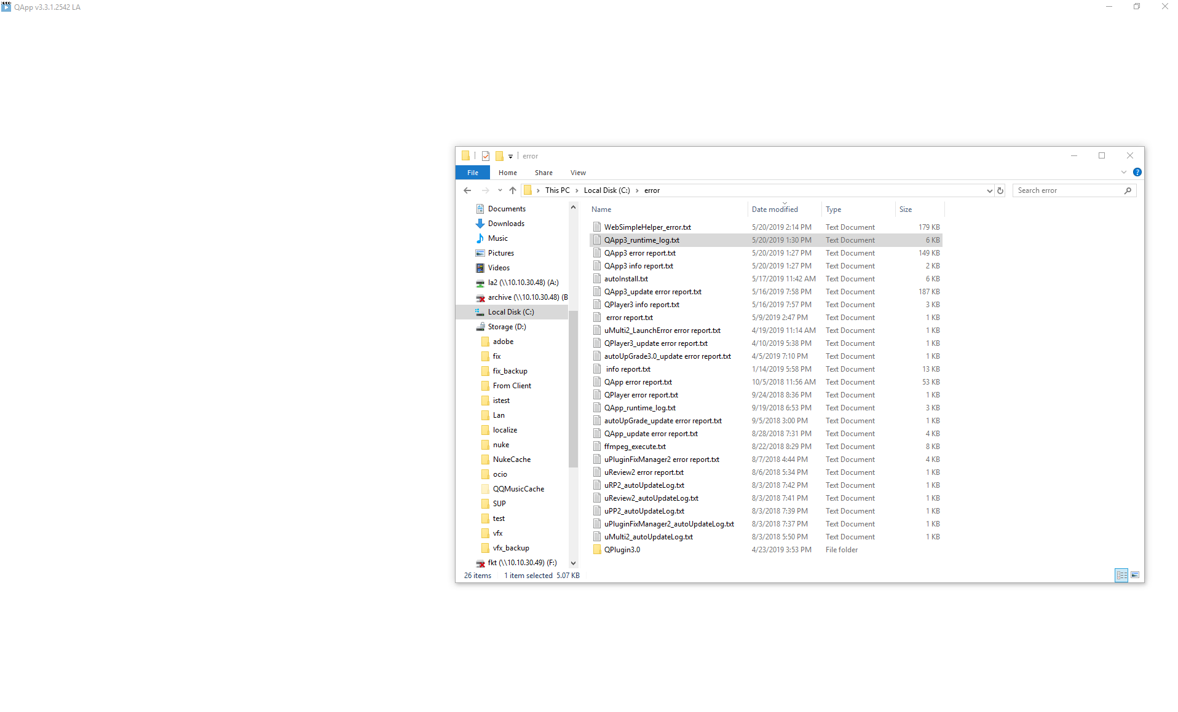
version 71 ,I had a similar problem;
environment: winform use cefsharp(nuget);
Sometimes when I refresh or load a page with a large amount of data, it appears white screen, is it too big data for chrome to process?
 hucongquan
on 21 May 2019
hucongquan
on 21 May 2019
environment: winform use cefsharp(nuget);
@hucongquan If you are using WinForm then your issue is completely unrelated to this one.
is it too big data for chrome to process?
Probably the render process is crashing with an out of memory exception if you are loading huge amounts of data. Upgrading to a newer version of CEF is likely the only fix (remember that CefSharp is just a wrapper).
Now back to the actual issue at hand. The OnPaint method continues to be called even though it looks like it's not rendering, it's just getting invalid data, the DirtyRect has y = 0, a rough check and the width and height appear to be correct. So CEF is basically passing an incorrect image back. Resizing the browser in most cases causes it to start rendering again, there was a very similar issue with CEF not too long ago.
CEF is about to undergo a major rewrite of the Offscreen Rendering implementation due to a Chromium change, outlined in https://bitbucket.org/chromiumembedded/cef/issues/2575/viz-implementation-for-osr there is a PR which is still reportedly a work in progress at https://bitbucket.org/chromiumembedded/cef/pull-requests/226/wip-viz-osr-implementation/diff
It's probably worth someone creating an issue upstream after a bit more testing, though I don't expect this to be fixed until the new VIZ implementation is done unless someone specifically wants to debug the issue and submit a PR.
Probably next week I'll do some more testing to see if there's a viable workaround.
amaitland
on 23 May 2019
Please only post further comments if you have a viable workaround, other non constructive comments will likely be removed.
amaitland
on 23 May 2019
It's probably worth testing with gpu acceleration disabled. I've added a rough example in https://github.com/cefsharp/CefSharp/commit/0ef6ec36191113bf90dc6768c744db551da67978 that should make debugging easier.
amaitland
on 23 May 2019
@amaitland do you expect it to be smooth transition for CefSharp? I mean integration with VIZ.
dkrainyk
on 24 May 2019
Disabling gpu acceleration makes no difference. Resizing the browser height programmatically on visibility change somewhat resolves the problem, the crash that appears in some cases when changing tabs quickly can still be seen unfortunately. On some cases this might be a workable solution in some circumstances.
Testing with cefclient to see if constantly changing from minamized to maxamized is probably the next step, hopefully this will reproduce the problem.
amaitland
on 6 Jun 2019
i have same problem when win10 x64 wpf disable gpu
 nocanstillbb
on 5 Jul 2019
nocanstillbb
on 5 Jul 2019
We had a similar problem, and a resize on show helped as workaround.
Increase height by 1 and set it back to original.
 ray007
on 5 Jul 2019
ray007
on 5 Jul 2019
Once the cefsharp/75 branch is created I'll look at applying a hack to resize the browser when it becomes visible. Viz support should be available in the 77 release, so hopefully this will be resolved properly.
amaitland
on 12 Jul 2019
@ray007 I'm having the same issue. How exactly did you set up the height change? On IsVisibleChanged? How about when minimizing and restoring the window?
 mol
on 24 Jul 2019
mol
on 24 Jul 2019
@ray007 I'm having the same issue. How exactly did you set up the height change? On IsVisibleChanged? How about when minimizing and restoring the window?
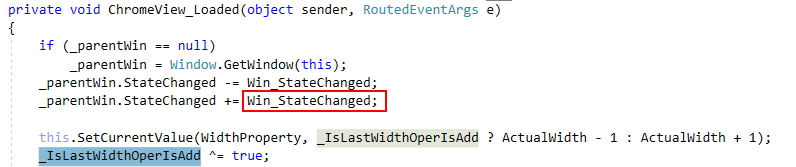

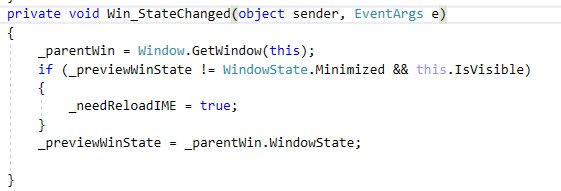
i do this
nocanstillbb
on 24 Jul 2019
@mol in my case the developer using the view-control provided by me in a tab-control added to code to the activation of a tab.
ray007
on 24 Jul 2019
Thanks guys - I managed to get it set up and working, but the width/height change is messing up the other resize code/bindings we have, so that's not great.
@amaitland any idea if there's another way to "give it a kick" without setting the width/height? It's pretty easy to reproduce using the latest WPF example in case you haven't seen (assuming it's the same issue):
https://www.screencast.com/t/1UQDCCEk
mol
on 25 Jul 2019
1.binding parent actualWidth/height
2.dependencyobject.SetCurrentValue
setcurrentVlaue will not clear binding.
nocanstillbb
on 25 Jul 2019
@mol I'm not aware of another way. How are you resizing? My plan is to use an approach similar to https://github.com/cefsharp/CefSharp/blob/master/CefSharp.Wpf.Example/Controls/ChromiumWebBrowserWithScreenshotSupport.cs
I will implement a workaround hopefully tomorrow if all goes well.
amaitland
on 25 Jul 2019
@nocanstillbb yeah I'm using SetCurrentValue but it's not that it's clearing a binding, it's that we have some JavaScript triggering resizes as well when the content in the browser changes (and it seems to break as a result of the workaround. Probably some kind of timing/race condition issue).
@amaitland that would be amazing. I tried forcing the InteropBitmapRenderHandler to create a new Bitmap but then I saw it was already doing it when the issue occurs, and I can't see what the difference is for when it works (with the resizing hack) and when it doesn't. But I can't say I'm familiar with the code so hopefully you can figure it out :)
mol
on 25 Jul 2019
@amaitland you probably already know but I just noticed that the elements on the page shown in the browser are still clickable in the blank browser, they're just not drawn.
mol
on 25 Jul 2019
Rough hack was added in https://github.com/cefsharp/CefSharp/commit/0d67b05513c2f716db8151d763eaf021de993e4f
Will add more details tomorrow. It's had some testing, needs quite a bit more.
amaitland
on 26 Jul 2019
Thanks a lot Alex, I really appreciate it. Looks interesting. When you think it's ready we'll release it as an alpha for testing.
mol
on 26 Jul 2019
So the hack basically works like this
- When the browser is hidden/minimised we set a bool to ignore subsequent OnPaint calls.
- Waits 50ms then resizes the browser, reduces it's height/width by 1px
- Waits 50ms then resizes browser to it's original dimensions
- Waits 50ms then calls Invalidate to generate a new frame (was seeing a few instances of flicker where an empty frame was rendered). It's possible we can do without this, leaving it for now as I've tested with it being there.
- Set bool to continue OnPaint calls
Attempting to resize the browser when the hack is running shouldn't cause any problems though I've only tested whilst my automated test was running, so it's not a definitive test. The new value should be stored and restored as it's original dimensions. The hack will take ~150ms to run, it might be possible to reduce this, reducing the 50ms wait before Invalidate would be the first step if absolutely required.
Further changes
- Add option to disable hack in https://github.com/cefsharp/CefSharp/commit/c912277fcfdbc67dcba3582ac08868c405f885b7
- Only call WasHidden and enable hack when WindowState was previously Minimised https://github.com/cefsharp/CefSharp/commit/22a9149e0a2461f82f3c5a49c6a24a54799b7874
I've had the CefSharp.Wpf.Example switching between two tabs every second for 1000 iterations and both tabs were functional.
@mol Should be ready for a wider audience to test, I've only tried against version 75 though, should work on an older branch if you backport the changes starting at https://github.com/cefsharp/CefSharp/commit/1423a9741a29162b9f4a7db11de064a8ffa4f9ff and finishing at https://github.com/cefsharp/CefSharp/commit/22a9149e0a2461f82f3c5a49c6a24a54799b7874
amaitland
on 27 Jul 2019
Thanks a lot @amaitland! It looks to be working great. I'll release this for testing and see if any issues come up.
I grabbed all of the commits from https://github.com/cefsharp/CefSharp/commit/1423a9741a29162b9f4a7db11de064a8ffa4f9ff to https://github.com/cefsharp/CefSharp/commit/22a9149e0a2461f82f3c5a49c6a24a54799b7874 including this one for instance https://github.com/cefsharp/CefSharp/commit/30ba69ddc517ee8432954504bd19a8f043d200f0, I assume that's fine?
mol
on 28 Jul 2019
@mol Should be safe to leave out commit https://github.com/cefsharp/CefSharp/commit/30ba69ddc517ee8432954504bd19a8f043d200f0 if you would prefer. I did some checking to see if we'd missed anything or there were any subtle differences in relation to the cefclient reference implementation. The rectangles are both scaled in GetScreenInfo, made no difference to this particular issue. For reference https://github.com/chromiumembedded/cef/blob/c7701b8a6168f105f2c2d6b239ce3958da3e3f13/tests/cefclient/browser/osr_window_win.cc#L960 which calls GetViewRect which does the scaling.
amaitland
on 28 Jul 2019
I've updated master to 76.1.5 in commit https://github.com/cefsharp/CefSharp/commit/94b9e9043f99a3befc49443d67d6a61b9d1abf67
Somewhat surprisingly I can still reproduce this, I'll triple check that I haven't missed anything, fact that resizing gets the browser rendering again still has me thinking this is a CEF issue.
amaitland
on 2 Aug 2019
Re-enabling GPU Compositing in https://github.com/cefsharp/CefSharp/commit/c9203c93101e722c30a8c6151d4737eb943ba4d1 and the behaviour is different, the browser stops rendering all together, yet is still functional (you can click a link and it'll navigate, the cursor changes when hovering). Basically OnPaint is never called.
amaitland
on 2 Aug 2019
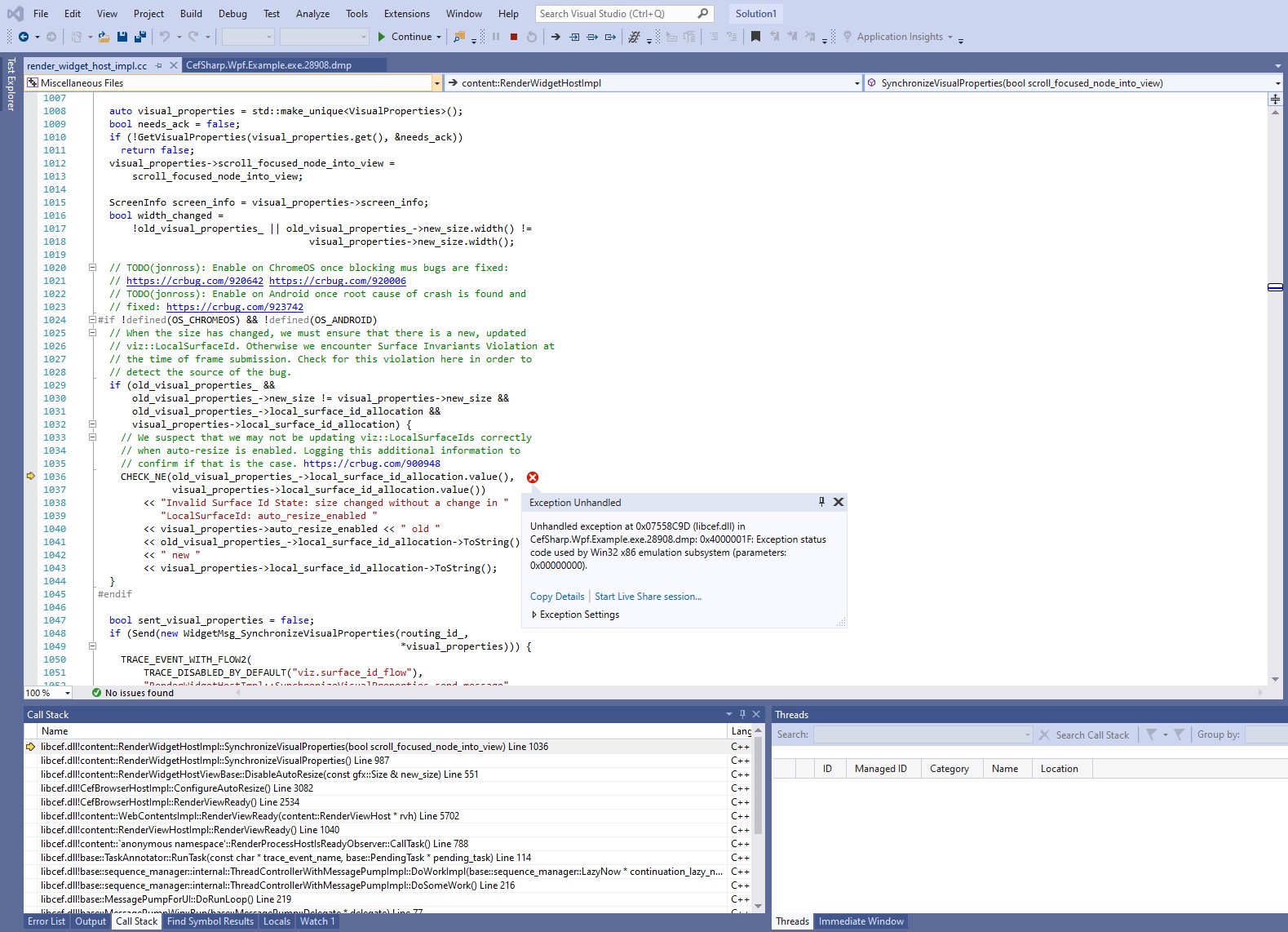
@amaitland I've just found that the hack has reintroduced the uncatchable crash issue that I mentioned a little while ago (caused by a breakpoint in Chromium which was caused by a timer that was doing a delayed resize), but it only occurs for a small number of our users. Those users experience it all the time however when casually switching/selecting email. We're talking maybe 100+ users. It also happens for me but I have to run through sometimes hundreds of messages in extremely rapid succession to trigger it, so it is some kind of race condition.
I've managed to reproduce it in the latest WpfExample in the cefsharp/75 branch (head) if you want to try it yourself. I trigger it by adding another tab and having the app switch rapidly between them. With the hack it crashes almost instantly (though you may have to play around with the delay as it is a race condition I think) and without the hack it does not.
Just add this in MainWindow.xaml.cs in MainWindowLoaded under the first CreateNewTab call (this code then adds the second and the switching):
// Reproduce the hack introduced here: https://github.com/cefsharp/CefSharp/commit/0d67b05513c2f716db8151d763eaf021de993e4f
CreateNewTab();
Task.Run(() =>
{
    try
    {
        while(true)
        {
            Dispatcher.Invoke(new Action(() => TabControl.SelectedIndex = TabControl.SelectedIndex < TabControl.Items.Count - 1 ? TabControl.SelectedIndex + 1 : 0));
            Thread.Sleep(25);
        }
    }
    catch (TaskCanceledException) { } // So it doesn't break in VS on shut down
});
For your convenience here's a screenshot of the crash point in Chromium so you can see the stack trace:
mol
on 14 Aug 2019
@mol I can reproduce the problem with your example. Cancelling the Task used in the hack when the browser goes invisible would be my first though.
Let me have a further think about it.
amaitland
on 15 Aug 2019
After a lot of trial and error I believe I've figured out and fixed the issue. I think the reason why it was crashing was some things were being called out of the expected order, so what I've done is create a queue where all the actions that have an effect on this are run, making sure nothing runs out of order. All of the actions now run on the queue were necessary to avoid the crash. I didn't change anything except have those things now run in order.
It's not the prettiest and currently the queue is used even if you disable the hack, but it has no adverse effect that I've found or can think of, so I think it's fine. Let me know if you want me to completely separate the two though - it's possible it just requires some more work.
The code currently resides in this commit if you want to have a look:
https://github.com/mol/CefSharp/commit/8975bddb69f00882990caf79bd4e12fbbc24e024
It's late here but I can set up a pull request tomorrow with the changes if you'd like, just let me know.
mol
on 16 Aug 2019
After a lot of trial and error I believe I've figured out and fixed the issue
@mol Testing with https://github.com/mol/CefSharp/tree/breakpoint-crash and I'm still seeing a crash on my end ☹️ (I'm running incredibly low on disk space so I don't have the symbols loaded currently, will try and free some space and confirm that it's the same breakpoint, assume it likely is).
In cases when the browser is visible then very quickly becomes invisible we should likely cancel running the hack, hopefully before it even starts to actually avoid making the Resize calls.
amaitland
on 16 Aug 2019
@amaitland with just the code in that branch, or did you modify it? I tried some more things today and I finally got it crashing again by having tabs open and close while switching and resizing the window as well. Just switching alone doesn't crash for me anymore.
I'll try something around cancelling the hack and report back.
mol
on 16 Aug 2019
@mol Just a clean checkout of your branch was used, I loaded the pdb and the crash is coming from RenderWidgetHostImpl::SynchronizeVisualProperties
amaitland
on 16 Aug 2019
@amaitland yeah that's the place.
Actually I didn't realize this but I had the hack disabled when I managed to get the crashing to occur again, so it's possible to get it to crash there even without the hack. I'm working on getting it to stop crashing now without the hack.
This is the more elaborate test that will cause the crash even with the hack disabled (in case you want to try it without my "hack fix" code). The part where I'm modifying the size is unsurprisingly the bit that makes it crash:
private void MainWindowLoaded(object sender, RoutedEventArgs e)
{
    CreateNewTab(CefExample.DefaultUrl, true);

    // Reproduce the hack introduced here: https://github.com/cefsharp/CefSharp/commit/0d67b05513c2f716db8151d763eaf021de993e4f
    CreateNewTab();
    CreateNewTab();

    Task.Run(() =>
    {
        try
        {
            var random = new Random();

            while(!loopCancelSource.Token.IsCancellationRequested)
            {
                Dispatcher.Invoke(new Action(() =>
                {
                    WindowState = WindowState.Normal;
                    Width = Width > 500 ? Width - 5 : 1000;
                    Height = Height > 500 ? Height - 5 : 1000;

                    // Get all indexes but the selected one
                    var indexes = new List<int>();
                    for (int i = 0; i < TabControl.Items.Count; i++)
                        if (TabControl.SelectedIndex != i)
                            indexes.Add(i);

                    // Select a random unselected tab
                    TabControl.SelectedIndex = indexes[random.Next(0, indexes.Count)];

                    // Close a tab and create a tab once in a while
                    if (random.Next(0, 5) == 0)
                    {
                        CloseTab(BrowserTabs[Math.Max(1, TabControl.SelectedIndex)]); // Don't close the first tab
                        CreateNewTab();
                    }
                }));

                // Sleep random amount of time
                Thread.Sleep(random.Next(1, 61));
            }
        }
        catch (TaskCanceledException) { } // So it doesn't break in VS on shut down
    });
}
@amaitland if I disable the hack and comment all 3 host.WasHidden calls out (1 in OnIsVisibleChanged, 2 in OnWindowStateChanged) then I can no longer reproduce the crash, so it seems somehow they're responsible.
I see those calls were added a long time ago, so maybe there's a new way to accomplish the same thing?
mol
on 18 Aug 2019
@amaitland if I set multiThreadedMessageLoop in CefSharp.Wpf.Example.App.xaml.cs to false, it will also not crash (provided the hack is disabled).
So to sum up my findings so far:
- Disabling hack and setting
multiThreadedMessageLoop = falsemeans no crash. Though the app does freeze a lot when it disposes the managedCefBrowserAdapter, but a Task.Run solved that for testing purposes. - Disabling hack and keeping
multiThreadedMessageLoop = trueand removing the 3WasHiddencalls means no crash.
mol
on 18 Aug 2019
I see those calls were added a long time ago, so maybe there's a new way to accomplish the same thing?
@mol That's the only way to make the OSR browser hidden that I'm aware of.
- Though the app does freeze a lot when it disposes the managedCefBrowserAdapter, but a Task.Run solved that for testing purposes.
Can you elaborate? What freeze are you seeing?
Explicitly running the WasResized/Hidden commands on the CEF UI thread might be an option.
As a side note I believe it's a fix for one of the following that introduced the SynchronizeVisualProperties calls.
https://bitbucket.org/chromiumembedded/cef/issues/2614/osr-resizing-issue-surface-invariants
https://bitbucket.org/chromiumembedded/cef/issues/2627/osr-resizing-sometimes-causes-the
amaitland
on 19 Aug 2019
Can you elaborate? What freeze are you seeing?
Just that when I set MultiThreadedMessageLoop to false then the app (UI thread) sometimes blocks for a second or two when it runs managedCefBrowserAdapter.Dispose. Just because of the speed or disposes when testing I think so probably nothing to worry about. I just added a Task.Run around the managedCefBrowserAdapter.Dispose while testing and it was fine.
mol
on 19 Aug 2019
@mol Based on your previous observation regarding MultiThreadedMessageLoop I've made some changes, all WasResized/WasHidden calls are now performed on the CEF UI Thread regardless of MultiThreadedMessageLoop. Relevant commit is https://github.com/cefsharp/CefSharp/commit/6636525656ab674925f4a7d16fb2882cc3f8bfca
As yet I've been unable to trigger the assertion in RenderWidgetHostImpl::SynchronizeVisualProperties
For testing I took the example provided in https://github.com/cefsharp/CefSharp/issues/2779#issuecomment-522319378 and merged it into my DispatcherTimer from previous testing. I only had about 20mins during lunch, so I just merged your example into my existing one rather than reconstruct a few missing pieces from yours. It's at https://github.com/amaitland/CefSharp/commit/1267e6381d8dbbf0514f2e0d27a1d0e828cca0c9 for reference. If you can upload your full example I'll give it for a run when I have a minute.
amaitland
on 19 Aug 2019
@amaitland unfortunately the crash was still happening for me in your branch here https://github.com/amaitland/CefSharp/tree/reworkedhack2779 - I just checked it out and ran it.
However if I change CefUiThreadRunAsync to run synchronous the crashing stops. I tried to make it work using async, making sure to hook it up properly throughout, awaiting on everything, but I couldn't get it to work without crashing. It must be conflicting with some other parts other than the parts you now have running in that method.
But running it in sync instead works. I have yet to experience a crash. This is a branch where I added an expanded test and those changes: https://github.com/mol/CefSharp/tree/reworkedhack2779
I would have created a pull request but I have that one commit extra where I remove the Windows 8.1 SDK. It should work fine for everyone (as long as you don't use special Windows 10 SDK features it should be backwards compatible) but still, I didn't want to put that in the pull request :)
mol
on 19 Aug 2019
But running it in sync instead works. I have yet to experience a crash. This is a branch where I added an expanded test and those changes: https://github.com/mol/CefSharp/tree/reworkedhack2779
@mol Thanks for the continued feedback 👍
I'd be reluctant to block the UI thread, it's amazing the number of deadlocks reported the couple of times I had previously added a blocking call, there's a lot of people out there with sync operations blocking the UI unfortunately.
From the testing I've done (and it sounds like you've done a lot more than I've had time for) it appears to be much more stable than the current hack implementation, so I'll likely go with the changes as is. I've changed CefUiThreadRunAsync from internal to protected in
https://github.com/cefsharp/CefSharp/commit/8e1e31c7a2c2b0734a69522e28e36ddaa09461a7
So anyone experiencing this problem still and wishing to switch over to a blocking implementation can inherit from ChromiumWebBrowser and override CefUiThreadRunAsync to provide their own implementation that includes an additional Wait().
I'll release an updated 75 set of Nuget packages in a week or so (depends on the number of reported issues between now and then).
amaitland
on 23 Aug 2019
For me it crashes after a few seconds without the Wait, with the expanded test I put in the branch above. I'll probably also add a (long) timeout to the wait so any deadlock would be temporary and logged rather than a complete freeze.
But I understand - I'll just do the override :)
mol
on 23 Aug 2019
For me it crashes after a few seconds without the Wait, with the expanded test I put in the branch above
@mol It takes much longer on my likely much slower machine. Performing an Invoke against the Dispatcher every 1-31ms is much much quicker than any UI interaction I'd expect from an actual user, perhaps I'm mistaken?
amaitland
on 23 Aug 2019
For me it crashes after a few seconds without the Wait, with the expanded test I put in the branch above
@mol It takes much longer on my likely much slower machine. Performing an
Invokeagainst theDispatcherevery1-31msis much much quicker than anyUIinteraction I'd expect from an actual user, perhaps I'm mistaken?
I would assume so as well, unless it's an "automatic" interaction like resizing the browser based on the inner content (like we do) or something like that.
mol
on 25 Aug 2019
Similar upstream report https://bitbucket.org/chromiumembedded/cef/issues/2483/osr-invalidate-does-not-generate-frame#comment-53599855
amaitland
on 29 Aug 2019
@amaitland As you were afraid of we experienced a deadlock in Mailbird with the Wait() that I had to add to avoid the crash for me, due to a place where the CEF UI thread would invoke on the WPF UI thread, that in turn was trying to invoke on the CEF UI thread :)
As a result I went back to the fix and worked on it and I believe I've fixed it so it now runs async without crashing. I can certainly no longer make it crash. I was careful to test and retest after each change I made so all of the code changes (just a few rearrangements really) were strictly necessary to avoid crashing.
This is the end result:
https://github.com/mol/CefSharp/commits/reworkedhack2779
The changes since last time was made in this commit:
https://github.com/mol/CefSharp/commit/47527ee9f1c84a498ae685cecbbc6f455726e6b7
Let me know if you want me to create a pull request somewhere - in that case just let me know which branch to base it off of.
mol
on 30 Aug 2019
There might be a more elegant way to make sure the viewRect is updated when the browser is yet to be initialized though (it needs to run inside the CEF UI thread it seems, to avoid the crash (race condition I think - that would make sense)) but it also needs to run when the browser is yet to be initialized otherwise the sample's first page wouldn't load.
https://github.com/mol/CefSharp/commit/47527ee9f1c84a498ae685cecbbc6f455726e6b7#diff-bfec65df46ec49f4ed79472147689599R1941
mol
on 30 Aug 2019
@mol By all means submit a PR targeted at the 75 branch. I have a few comments, much easier to track a conversation with an actual pr than a branch commit. Thanks
amaitland
on 30 Aug 2019
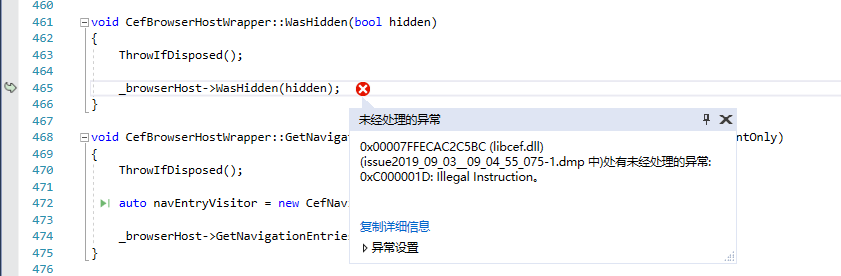
i have a exception on 75.140 CI3251
application: myappliaction.exe
Framework version: v4.0.30319
Description: process aborted due to an unhandled exception.
exception infomation: System.Runtime.InteropServices.SEHException
at CefSharp.Internals.CefBrowserHostWrapper.WasHidden(Boolean)
at CefSharp.Wpf.ChromiumWebBrowser+<>c__DisplayClass324_0.
at System.Threading.Tasks.Task.Execute()
at System.Threading.ExecutionContext.RunInternal(System.Threading.ExecutionContext, System.Threading.ContextCallback, System.Object, Boolean)
at System.Threading.ExecutionContext.Run(System.Threading.ExecutionContext, System.Threading.ContextCallback, System.Object, Boolean)
at System.Threading.Tasks.Task.ExecuteWithThreadLocal(System.Threading.Tasks.Task ByRef)
at System.Threading.Tasks.Task.ExecuteEntry(Boolean)
at
nocanstillbb
on 3 Sep 2019
Just a followup: checked CefSharp.Wpf.78.3.10-CI3357 and problem is still there.
Sticking to 71.0.2 for now as a workaround.
dkrainyk
on 8 Nov 2019
I'm still able to reproduce this behavior with the test app. Checked on:
79.1.310-CI3398
79.1.310-pre
Am I missing some flag to enable workaround?
dkrainyk
on 23 Jan 2020
- What version of the product are you using?
Nuget 73.1.130 and 74.1.130-CI3117 (not reproducible on 71.0.2)- What architecture x86 or x64?
x64- On what operating system?
Win10- Are you using
WinForms,WPForOffScreen?
WPF- What steps will reproduce the problem?
Use TabControl (or similar approach) to launch ~10 tabs of ChromiumWebBrowser pointing to google.com
Switch between tabs and eventually (after 10-20 switches) browser will go blank (according to debug tools browser still works and you can execute JS, change DOM, etc.).Adapted minimal example: dkrainyk/CefSharp.MinimalExample@8fa4bd5
- What is the expected output? What do you see instead?
Browser window goes blank. Page should be visible.- Please provide any additional information below.
debug.log is empty- Does this problem also occur in the
CEFSample Application from http://opensource.spotify.com/cefbuilds/index.html?
N/A
Hi,
We suffer from a similar issue: customers click through the tabs pretty frequently, so from time to time getting blanks.
Could you please help with this issue or at least pop it up in priority list?
Thanks in advance,
Best regards, Sergei
 darkenrix
on 28 Jan 2020
darkenrix
on 28 Jan 2020
The hack previously used in version 75.1.x has been ported to the 79 branch and will be included in the official 79 release. Relevant commit https://github.com/cefsharp/CefSharp/commit/b1d127957debdae304276d3bc13274dda8eb3bbf
The assertion/debug statement in RenderWidgetHostImpl::SynchronizeVisualProperties was removed from Chromium so in theory this should eliminate the crashes seen on occasion in version 75.
Could you please help with this issue or at least pop it up in priority list?
@darkenrix You can track the progress at https://bitbucket.org/chromiumembedded/cef/issues/2483/osr-invalidate-does-not-generate-frame
The best we can do is hack around this issue until it's properly resolved in CEF.
amaitland
on 28 Jan 2020
@amaitland i'm using the version 79.1.360 and facing this issue. can you confirm that the fix is included in this version?
 Shankp
on 21 Apr 2020
Shankp
on 21 Apr 2020
The hack previously used in version
75.1.xhas been ported to the79branch and will be included in the official79release. Relevant commit b1d1279
@Shankp As per https://github.com/cefsharp/CefSharp/issues/2779#issuecomment-579205371 the Hack is included in the 79 branch. So yes it's part of the 79.1.360 release.
You can disable the hack and implement your own variation. Review the commit for details on how the current implementation works.
amaitland
on 25 Apr 2020
@amaitland Do you see any reason for this available hack is not working for me.?
Shankp
on 27 Apr 2020
Do you see any reason for this available hack is not working for me.?
@Shankp Is it working on some machines and not others? Can you reliably reproduce the behaviour? The hack probably won't work if you have the browser at size 1x1 as it subtracts one from the height and values less than one are ignored and one is used instead. You can try a variant that increases the size by one https://github.com/cefsharp/CefSharp/commit/b1d127957debdae304276d3bc13274dda8eb3bbf#diff-bfec65df46ec49f4ed79472147689599R2766
As it stands you are the only report so far of issues, and that's not to say there aren't others. Perhaps your software behaves differently or you have a set of hardware (GPU + graphics drivers) and software (windows OS) that behaves different to others.
You can open chrome://gpu/ in the browser to see what Chromium has to say about your system graphics wise. If the problem only reproduces on a sample of your test machines this can be helpful to identify the GPU that has issues.
amaitland
on 28 Apr 2020
Do you see any reason for this available hack is not working for me.?
@Shankp Is it working on some machines and not others? Can you reliably reproduce the behaviour? The hack probably won't work if you have the browser at size
1x1as it subtracts one from the height and values less than one are ignored and one is used instead. You can try a variant that increases the size by one b1d1279#diff-bfec65df46ec49f4ed79472147689599R2766As it stands you are the only report so far of issues, and that's not to say there aren't others. Perhaps your software behaves differently or you have a set of hardware (GPU + graphics drivers) and software (windows OS) that behaves different to others.
You can open
chrome://gpu/in the browser to see whatChromiumhas to say about your system graphics wise. If the problem only reproduces on a sample of your test machines this can be helpful to identify the GPU that has issues.
I see implementation in my code as below
if (ChromiumBrowserView is ChromiumBrowserView view)
{
InvokeExtensions.OnUIThread(() => view.Arrange(new Rect(1, 1, 1, 1)));
}
as you explained this might be the reason.right?? 1*1 size will not reflect your hack.
Shankp
on 11 May 2020
as you explained this might be the reason.right??
@Shankp It's likely though I cannot say for sure without an actual example.
1*1 size will not reflect your hack.
For version 79.1.x that is correct. For version 81.3.x the hack will add one to the size instead of subtracting, see https://github.com/cefsharp/CefSharp/commit/8b40e9bd05a0e14fd8e421e544062c10c994243d
The 81.3.20-pre release is on Nuget.org for testing purposes.
amaitland
on 12 May 2020
@amaitland Would be great if we could expose the the method ResizeHackFor2779() to derived classes. If one sets WasHidden() on other occasions, the method could be reused and has not to be implemented again.
 deonberlin
on 25 May 2020
deonberlin
on 25 May 2020
@deonberlin Is there something stopping you from using reflection?
In this case I'm not keen on making this part of the public API.
amaitland
on 25 May 2020
@amaitland I thought of this, because the properties for configuring this hack are also public and for some use-cases it's a requirement to apply this hack, until the issue is resolved.
But I understand your concerns and will go with reflection.
deonberlin
on 26 May 2020
@amaitland I see that 88.1.0-CI3869 doesn't resize on tab change and this issue is not reproducible there.
Was it finally fixed on upstream?
dkrainyk
on 19 Jan 2021
I see that 88.1.0-CI3869 doesn't resize on tab change and this issue is not reproducible there.
Was it finally fixed on upstream?
@dkrainyk Before a final release I do some testing to see if the problem reproduces, if it does then I manually cherry pick the required commit into the release branch. As yet I haven't done in testing for M88. It would be fantastic if it's fixed. To my knowledge the upstream issue is still open. It's possible that Chromium has changed and we're the beneficiaries, it may also be that it's just harder to reproduce.
amaitland
on 22 Jan 2021
Related issues
amaitland
·
43Comments
amaitland
·
34Comments
 dinoc
·
40Comments
dinoc
·
40Comments
 DaZiYuan
·
19Comments
amaitland
·
52Comments
DaZiYuan
·
19Comments
amaitland
·
52Comments
Most helpful comment
@mol Should be safe to leave out commit https://github.com/cefsharp/CefSharp/commit/30ba69ddc517ee8432954504bd19a8f043d200f0 if you would prefer. I did some checking to see if we'd missed anything or there were any subtle differences in relation to the cefclient reference implementation. The rectangles are both scaled in GetScreenInfo, made no difference to this particular issue. For reference https://github.com/chromiumembedded/cef/blob/c7701b8a6168f105f2c2d6b239ce3958da3e3f13/tests/cefclient/browser/osr_window_win.cc#L960 which calls GetViewRect which does the scaling.