Cefsharp: WinForms - Browser rapidly switches focus when two browser forms shown
What version of the product are you using?
- the latest version
What architecture x86 or x64?
- x64
On what operating system?
- Win10?
Are you using
WinForms,WPForOffScreen?- WinForms
- What steps will reproduce the problem?
- when two browser windows opened at the same time, the window may be flickered
- https://github.com/DaZiYuan/CefSharp.MinimalExample
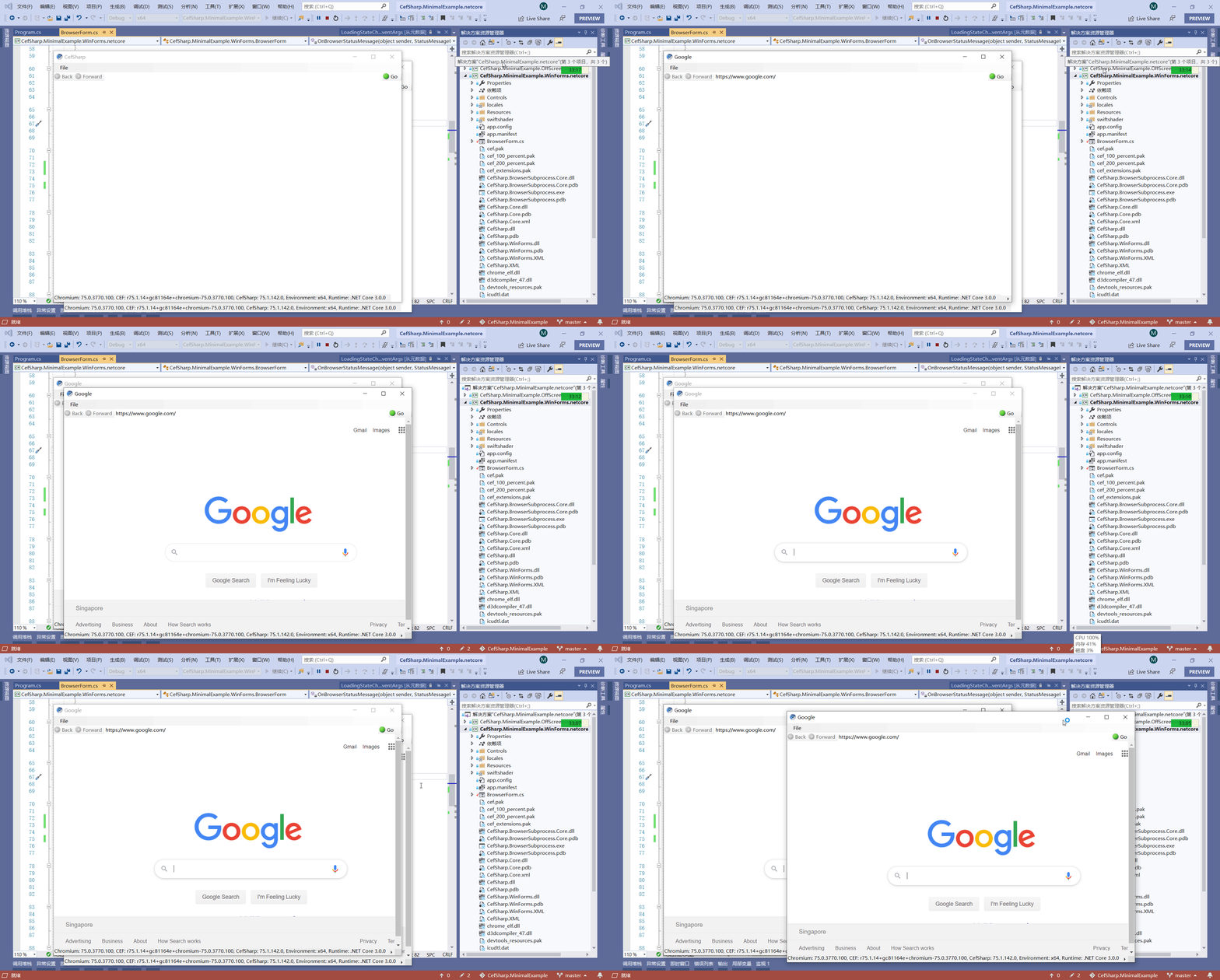
Program.cs
            var browser = new BrowserForm();
            var browser1 = new BrowserForm();
            browser1.Show();
            Application.Run(browser);
BrowserForm.cs
        private void OnLoadingStateChanged(object sender, LoadingStateChangedEventArgs args)
        {
            //SetCanGoBack(args.CanGoBack);
            //SetCanGoForward(args.CanGoForward);
            //this.InvokeOnUiThreadIfRequired(() => SetIsLoading(!args.CanReload));
        }
 DaZiYuan
All 19 comments
What version are you using? Nuget? CI Nuget? build from a branch? If so which branch? Please include the exact version number you are using (no ambiguous statements like Latest from Nuget) e.g. 57.0.0 or 63.0.0-pre01
As per https://github.com/cefsharp/CefSharp/blob/master/.github/ISSUE_TEMPLATE/bug_report.md#bug-report please specify the exact version.
- when two browser windows opened at the same time, the window may be flickered
What do you mean by may be flickered? Please provide a detailed list of steps to reproduce your problem. It seems unlikely just opening two windows is enough to reproduce the problem. The animated screenshot looks fine to me. Are you sure this is a CefSharp problem?
 amaitland
on 9 Oct 2019
amaitland
on 9 Oct 2019
https://user-images.githubusercontent.com/80653/66448163-4625ab80-ea83-11e9-8e40-69051ec386c1.gif
please wait gif file load completed, you should be able to see what happened.
CefSharp.WinForms 75.1.142
DaZiYuan
on 9 Oct 2019
I'm sure if it cefsharp issue. I create a new demo here.
https://github.com/DaZiYuan/CefSharp.MinimalExample/tree/master/winform.test
Work correctly without CEFSharp
        public Form1()
        {
            InitializeComponent();
            //var browser = new ChromiumWebBrowser("www.google.com")
            //{
            //    Dock = DockStyle.Fill,
            //};
            //Controls.Add(browser);
        }
window flickering
        public Form1()
        {
            InitializeComponent();
            var browser = new ChromiumWebBrowser("www.google.com")
            {
                Dock = DockStyle.Fill,
            };
            Controls.Add(browser);
        }

DaZiYuan
on 9 Oct 2019
It's important to remember that CefSharp is just a wrapper around the Chromium embedded framework please read https://github.com/cefsharp/CefSharp/wiki/General-Usage
amaitland
on 9 Oct 2019
Please provide a detailed list of steps to reproduce the problem, what are you doing exactly?
Have you tested with Chromium to see how it behaves with doing whatever it is you are doing?
Exact version still required.
amaitland
on 9 Oct 2019
If you believe it to be a CefSharp issue then remember the source is there, you can debug this yourself.
amaitland
on 9 Oct 2019
I just want to show two browser in same time then I encounted above issue,
I will try to Debug this,but I am not familiar with this project.
I would appreciate if someone can help me.
I am using CefSharp.WinForms 75.1.142
DaZiYuan
on 9 Oct 2019
Again please provide a detailed list of steps to reproduce the problem. What are you doing that causes the flicker? Start your example then what?
amaitland
on 9 Oct 2019
Just start example can causes flicker in my desktop,I already reproduced this in two PC.
press F5 in vs2019。 sometimes it work correctly , but most is flicker
DaZiYuan
on 9 Oct 2019
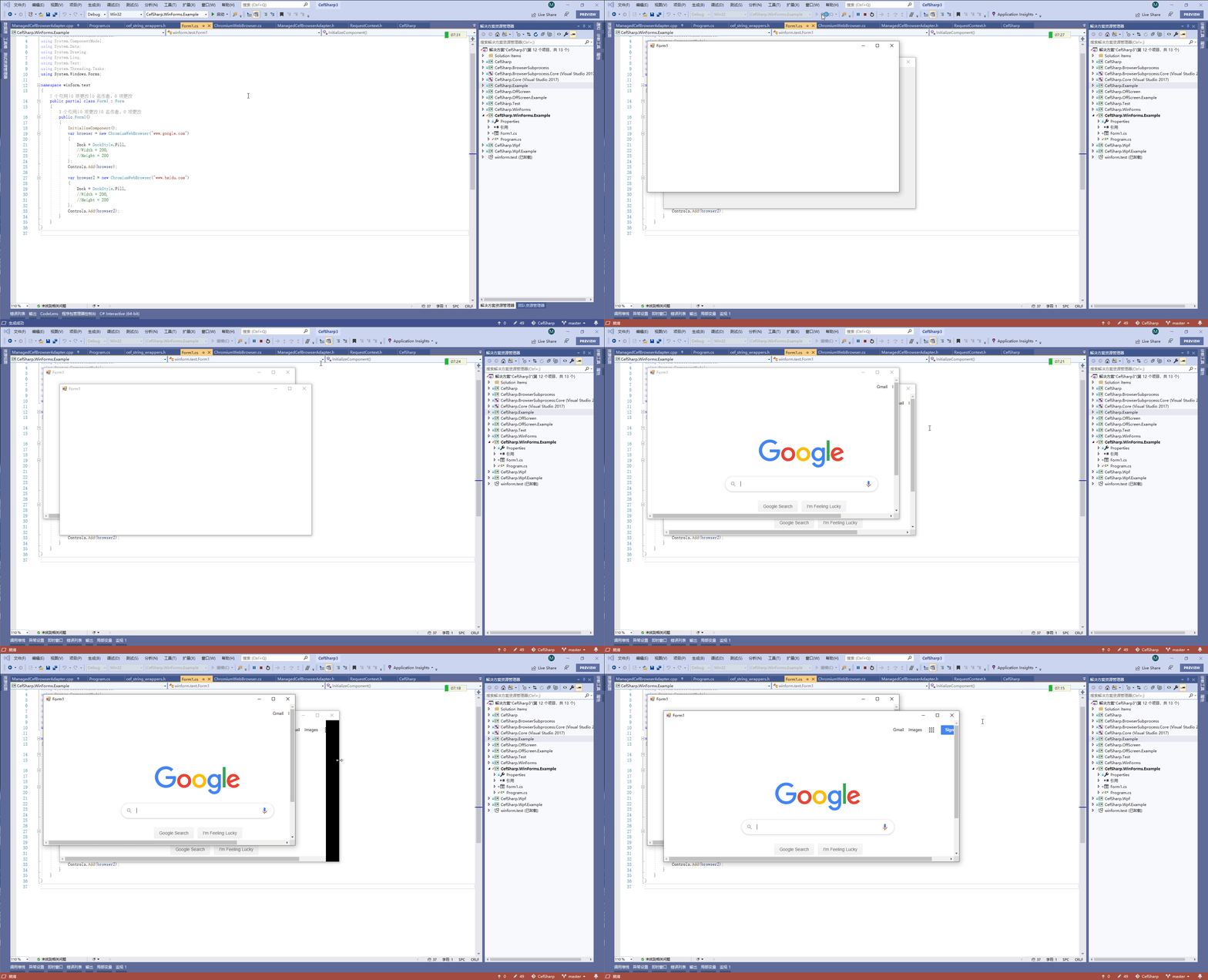
my English is not good ,so I record a gif again , I hope I have clarify the situation.
hope it useful ,thanks for your patience
DaZiYuan
on 9 Oct 2019
so I record a gif again
The second gif is much clearer thank you. For me the problem being described as flickered seems misleading. To me what appears to be happening is the focus is rapidly switching between the two windows. This is an entirely different problem. There are some known Activation/Focus problems, if I have time I'll have a look in a few days.
amaitland
on 10 Oct 2019
I just wanted to say I'm having the same issue when I have 2 winforms windows open with cefsharp browsers in them. They flicker between each other rapidly, stealing focus from any other running applications. If you need more information or need help troubleshooting don't hestitate to ask. :)
 RobotGizmo
on 23 Oct 2019
RobotGizmo
on 23 Oct 2019
To workaround the issue use the old FocusHandler implementation from version 73, sample code looks like this.
```c#
browser.FocusHandler = new CefSharp.WinForms.Example.Handlers.MultiFormFocusHandler();
```c#
// Copyright © 2019 The CefSharp Authors. All rights reserved.
//
// Use of this source code is governed by a BSD-style license that can be found in the LICENSE file.

using CefSharp.WinForms.Internals;

namespace CefSharp.WinForms.Example.Handlers
{
    /// <summary>
    /// Implementation of <see cref="IFocusHandler"/> that shows a workaround
    /// for https://github.com/cefsharp/CefSharp/issues/2928
    /// This version is based on the old behaviour seen in version 71 etc
    /// </summary>
    /// <seealso cref="CefSharp.IFocusHandler" />
    public class MultiFormFocusHandler : IFocusHandler
    {
        /// <summary>
        /// Called when the browser component has received focus.
        /// </summary>
        /// <param name="chromiumWebBrowser">the ChromiumWebBrowser control</param>
        /// <param name="browser">the browser object</param>
        /// <remarks>Try to avoid needing to override this logic in a subclass. The implementation in
        /// DefaultFocusHandler relies on very detailed behavior of how WinForms and
        /// Windows interact during window activation.</remarks>
        void IFocusHandler.OnGotFocus(IWebBrowser chromiumWebBrowser, IBrowser browser)
        {
            //We don't deal with popups as they're rendered by default entirely by CEF
            //For print dialogs the browser will be null, we don't want to deal with that either.
            if (browser == null || browser.IsPopup)
            {
                return;
            }

            var winFormsChromiumWebBrowser = (ChromiumWebBrowser)chromiumWebBrowser;
            // During application activation, CEF receives a WM_SETFOCUS
            // message from Windows because it is the top window
            // on the CEF UI thread.
            //
            // If the WinForm ChromiumWebBrowser control is the
            // current .ActiveControl before app activation
            // then we MUST NOT try to reactivate the WinForm
            // control during activation because that will
            // start a race condition between reactivating
            // the CEF control AND having another control
            // that should be the new .ActiveControl.
            //
            // For example:
            // * CEF control has focus, and thus ChromiumWebBrowser
            //   is the current .ActiveControl
            // * Alt-Tab to another application
            // * Click a non CEF control in the WinForms application.
            // * This begins the Windows activation process.
            // * The WM_ACTIVATE process on the WinForm UI thread
            //   will update .ActiveControl to the clicked control.
            //   The clicked control will receive WM_SETFOCUS as well.
            //   (i.e. OnGotFocus)
            //   If the ChromiumWebBrowser was the previous .ActiveControl,
            //   then we set .Activating = true.
            // * The WM_ACTIVATE process on the CEF thread will
            //   send WM_SETFOCUS to CEF thus staring the race of
            //   which will end first, the WndProc WM_ACTIVATE process
            //   on the WinForm UI thread or the WM_ACTIVATE process
            //   on the CEF UI thread.
            // * CEF will then call this method on the CEF UI thread
            //   due to WM_SETFOCUS.
            // * This method will clear the activation state (if any)
            //   on the ChromiumWebBrowser control, due to the race
            //   condition the WinForm UI thread cannot.
            if (winFormsChromiumWebBrowser.IsActivating)
            {
                winFormsChromiumWebBrowser.IsActivating = false;
            }
            else
            {
                // Otherwise, we're not being activated
                // so we must activate the ChromiumWebBrowser control
                // for WinForms focus tracking.
                winFormsChromiumWebBrowser.InvokeOnUiThreadIfRequired(() =>
                {
                    winFormsChromiumWebBrowser.Activate();
                });
            }
        }

        /// <summary>
        /// Called when the browser component is requesting focus.
        /// </summary>
        /// <param name="chromiumWebBrowser">the ChromiumWebBrowser control</param>
        /// <param name="browser">the browser object</param>
        /// <param name="source">Indicates where the focus request is originating from.</param>
        /// <returns>Return false to allow the focus to be set or true to cancel setting the focus.</returns>
        bool IFocusHandler.OnSetFocus(IWebBrowser chromiumWebBrowser, IBrowser browser, CefFocusSource source)
        {
            //We don't deal with popups as they're rendered by default entirely by CEF
            if (browser.IsPopup)
            {
                return false;
            }
            // Do not let the browser take focus when a Load method has been called
            return source == CefFocusSource.FocusSourceNavigation;
        }

        /// <summary>
        /// Called when the browser component is about to lose focus.
        /// For instance, if focus was on the last HTML element and the user pressed the TAB key.
        /// </summary>
        /// <param name="chromiumWebBrowser">the ChromiumWebBrowser control</param>
        /// <param name="browser">the browser object</param>
        /// <param name="next">Will be true if the browser is giving focus to the next component
        /// and false if the browser is giving focus to the previous component.</param>
        void IFocusHandler.OnTakeFocus(IWebBrowser chromiumWebBrowser, IBrowser browser, bool next)
        {
            //We don't deal with popups as they're rendered by default entirely by CEF
            if (browser.IsPopup)
            {
                return;
            }

            var winFormsChromiumWebBrowser = (ChromiumWebBrowser)chromiumWebBrowser;

            // NOTE: OnTakeFocus means leaving focus / not taking focus
            winFormsChromiumWebBrowser.InvokeOnUiThreadIfRequired(() => winFormsChromiumWebBrowser.SelectNextControl(next));
        }
    }
}
I tried using the FocusHandler code above and the 2 browser windows still fight for focus. :(
RobotGizmo
on 31 Oct 2019
need help troubleshooting don't hestitate to ask
@RobotGizmo If you have time then by all means do some debugging and report back what you find. I don't have to look into this further at the moment.
The example I tested with initially is at https://github.com/cefsharp/CefSharp/commit/06b7549b0b82133860e40dc6d17ab8a89e8723b2
Just have to switch to using the AppContext at https://github.com/cefsharp/CefSharp/commit/06b7549b0b82133860e40dc6d17ab8a89e8723b2#diff-f142d024925e73816b0fabd620d2f71dR98
amaitland
on 3 Nov 2019
It looks like the OffScreen browser is also affected by this when running multiple browsers and taking screenshots in parallel. Then sometimes the screenshot from one browser is also returned by another one.
Using an IFocusHandler and with the same logic in OnSetFocus as describe in https://github.com/cefsharp/CefSharp/issues/2928#issuecomment-546772753 fixes the issue for me.
c#
        bool IFocusHandler.OnSetFocus(IWebBrowser chromiumWebBrowser, IBrowser browser, CefFocusSource source)
        {
            //We don't deal with popups as they're rendered by default entirely by CEF
            if (browser.IsPopup)
            {
                return false;
            }
            // Do not let the browser take focus when a Load method has been called
            return source == CefFocusSource.FocusSourceNavigation;
        }
 campersau
on 18 Feb 2020
campersau
on 18 Feb 2020
https://github.com/DaZiYuan/CefSharp.MinimalExample/tree/master/winform.test
Using this as a starting point
- Add an ApplicationContext to load the forms (which in my opinion is the correct method of starting multiple forms)
- Add FocusHandler implementation as detailed in https://github.com/cefsharp/CefSharp/issues/2928#issuecomment-546772753 (minor update to use
BeginInvokeinstead ofInvokeOnUiThreadIfRequiredwhich is now internal). - Upgrade to
79.1.360(current version)
Changes are in commit https://github.com/cefsharp/CefSharp.MinimalExample/commit/98830e03e80073acd4e509b4ce2a1fcece21a6d7
The focus behaves as expected.
amaitland
on 2 Apr 2020
The old FocusHandler behaviour has been restored in commit https://github.com/cefsharp/CefSharp/commit/917480da3b36cb64d8ba77eb7825d078a848561c
amaitland
on 6 Apr 2020
The v81.3.20-pre packages are now on Nuget.org.
You will in most cases need to use an ApplicationContext to load multiple forms concurrently. There is a very basic example at https://github.com/cefsharp/CefSharp.MinimalExample/commit/98830e03e80073acd4e509b4ce2a1fcece21a6d7#diff-a910132c7c8b09d7e87360acdd52f409R8
Closing this now as the FocusHandler behaviour has been reverted. Any other behaviour differences you are seeing are likely as a result of a newer CEF/Chromium version.
amaitland
on 10 May 2020
Related issues
 Jovan-Cheng
·
22Comments
Jovan-Cheng
·
22Comments
 MIvoylov
·
26Comments
MIvoylov
·
26Comments
 brock8503
·
23Comments
amaitland
·
20Comments
brock8503
·
23Comments
amaitland
·
20Comments
 8
·
39Comments
8
·
39Comments