Caseflow: Motion to Vacate | Create a motion to vacate task from case details
Story
As a Lit Support Member, I need the ability to create a motion to vacate task from a Veteran's Case Details page in the event that a motion comes through channels other than the mail portal.
AC:
- [ ] Should already exist: A Lit Support user has the "Add a new task" button on the Case Details page
- [ ] Should already exist: One of the action options is the existing "Motion to Vacate", which creates a VacateMotionMailTask
- [ ] New: Assigned_by on the created task is set to the user who creates it
- [ ] ~Selecting this option creates a "Motion to Vacate" task assigned to the Lit Support organization~
- [ ] ~This MotionToVacateTask is equivalent to the MotionToVacateMailTask assigned to the Lit Support organization, and can be assigned to a Motions Attorney, where they get the same actions and instructions~
Designs
These are screenshots of existing functionality we want to extend to Lit Support. Please mimic them (but do not include "mail task" in the header of the new task modal).

(this wouldn't say "mail task" at the top)

Technical notes
According to some recent batteam activity, this functionality may have been available previously for Lit Support users but it's no longer available. I'm not sure if this applies to the "Add new task" link or to actions on specific tasks.
Check that logic depending on being a child of the MTV mail task also applies to this task.
 jimruggiero
All 13 comments
@geronimoramos @rutvigupta-design Can you provide an update on the progress of this design?
jimruggiero
on 13 Oct 2019
@geronimoramos @rutvigupta-design I think this ticket resolves the concern that Straight Vacate tasks might not come from the mail portal.
I think we need to decide who should be able to create these tasks, and then if we want different actions for the different types of post decision motions, and then another page where they select, or if we want to have a separate action for each post decision motion type (motion to vacate being one of them).
Personally I'm a fan of having an action for each type right now, since VacateMotionMailTask has it's own action right now. But I'm open to what you think and any research insight you might have.
 leikkisa
on 23 Nov 2019
leikkisa
on 23 Nov 2019
@jimruggiero @leikkisa
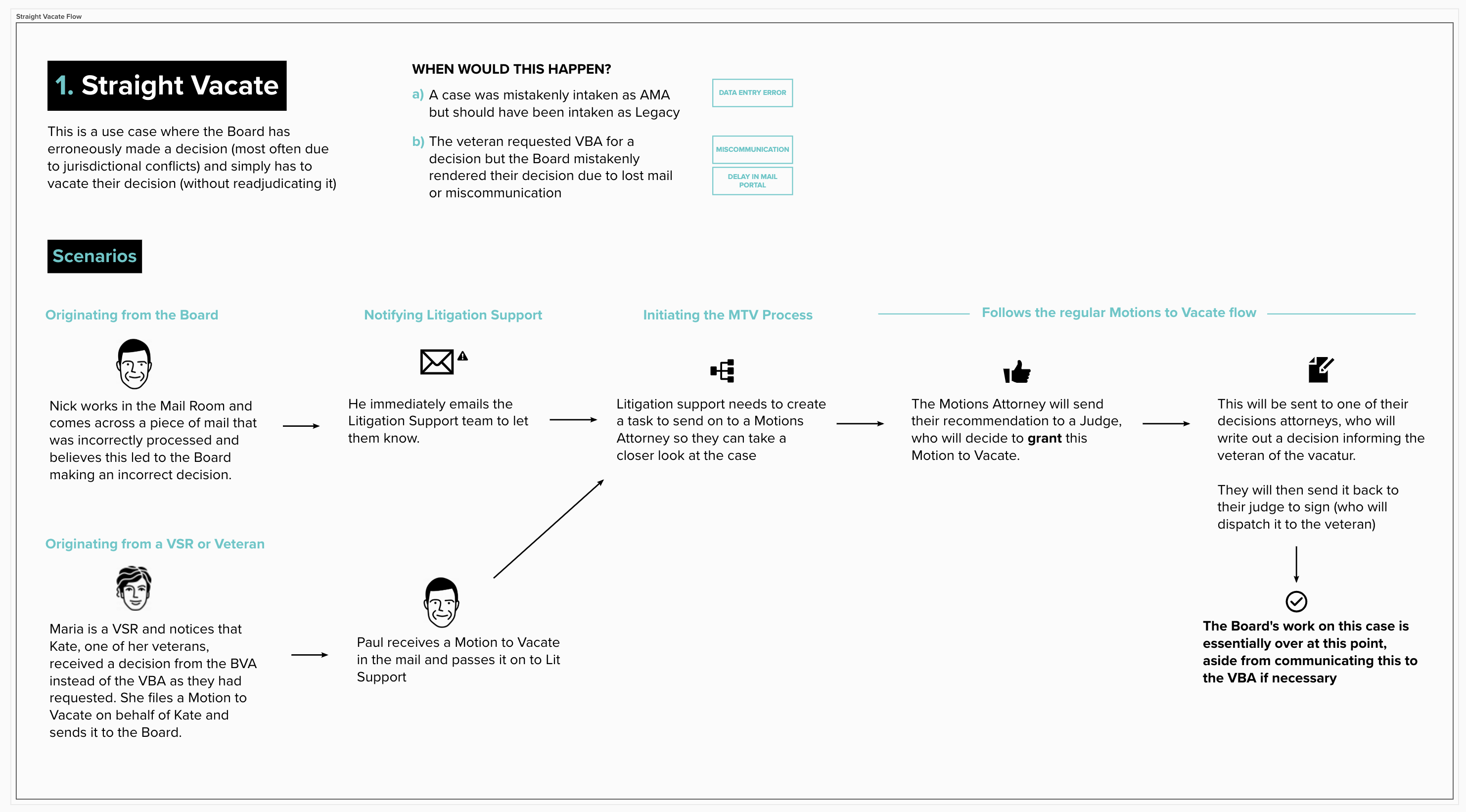
@rutvigupta-design and I are noodling on this functionality right now and looking to learn where a Straight Vacate may be initiated. From our current knowledge, it would be a Lit Support lead who would initiate a Straight Vacate (no readjudicate) flow and we've been thinking about how would they create this task type? Would it be from the case details page actions dropdown or elsewhere? How else do users create task types?
Here's a diagram for reference on Straight Vacates
 geronimoramos
on 3 Dec 2019
geronimoramos
on 3 Dec 2019
I updated the title/scope of this ticket to just handle motions to vacate (not all post-decisional motions). I figure we worry about the other types when work is being done on those flows.
leikkisa
on 5 Dec 2019
Investigation
- Currently, the "Add a new task" button shows up if there is an "actionable"
RootTaskfor the given user. This is determined by the presence of any actions for the given task/user combo. Effectively, this equates to checking if the length of the array returned byRootTask.available_actions(user)> 0 RootTaskcurrently has logic that adds the CREATE_MAIL_TASK action to available_actions, but only if the given user has access to the MailTeam org
So under current logic, if LitSupport users don't have access to the MailTeam org, they won't have access to "Add a new task" button
 jcq
on 13 Dec 2019
jcq
on 13 Dec 2019
Design question:
Did we decide that we want to go with a general UX where we disable submit buttons if form fields are invalid? I was going to use the existing QueueFlowModal component here, which has a concept of (optional) form validation, but doesn't currently have a mechanism for disabling the submit button. I think it makes the most sense to just build that capability in, with the button being disabled if validation fails; however, this would affect all of the many interfaces that use QueueFlowModal, so I'd want to be sure that's the desired behavior.
cc @geronimoramos @rutvigupta-design @carodew
jcq
on 13 Dec 2019
I defer to @carodew for any potential design system changes globally.
My 2 cents, I want to say yes so we can minimize room for error in the handoff process between users and in the exchange of information.
geronimoramos
on 13 Dec 2019
What's the norm in the rest of the application? (apologies, that's not a micro-interaction I've noticed).
My suggestion is to follow the established pattern, but I would love to revisit this decision in January, when I'm planning to really focus in on the design system and getting that effort rolling.
 carodew
on 13 Dec 2019
carodew
on 13 Dec 2019
What's the norm in the rest of the application?
That's a good question! I don't think I have seen an established pattern across the app as a whole, and it seems validation states seem like an afterthought in a lot of cases. I think we have begun to establish a pattern of disabling the submit when invalid on components that we have been developing recently, but that's at least partially because the indications of required fields, invalid states, etc aren't always particularly obvious.
jcq
on 13 Dec 2019
@carodew Since there doesn’t seem to be a consistent pattern/norm for this
across Caseflow, I’m going to second Geronimo’s recommendation to disable.
Since you’re focusing on design system work starting on Jan and we plan to
run this through the feature rollout process next month too, we’ll all see
what this will look/feel like during that internal testing. We’re also
making users at the Board test as well before we start trainings or launch,
so plenty of opportunity to get feedback. Thoughts?
On Fri, Dec 13, 2019 at 5:22 PM jcq notifications@github.com wrote:
What's the norm in the rest of the application?
That's a good question! I don't think I have seen an established pattern
across the app as a whole, and it seems validation states seem like an
afterthought in a lot of cases. I think we have begun to establish a
pattern of disabling the submit when invalid on components that we have
been developing recently, but that's at least partially because the
indications of required fields, invalid states, etc aren't always
particularly obvious.—
You are receiving this because you were mentioned.
Reply to this email directly, view it on GitHub
https://github.com/department-of-veterans-affairs/caseflow/issues/12283?email_source=notifications&email_token=AMQLBLAP2ENHJ2NRG3MLD2TQYQDLBA5CNFSM4I5CF5V2YY3PNVWWK3TUL52HS4DFVREXG43VMVBW63LNMVXHJKTDN5WW2ZLOORPWSZGOEG3NP7I#issuecomment-565630973,
or unsubscribe
https://github.com/notifications/unsubscribe-auth/AMQLBLGHNIRRAS6CLCJZUA3QYQDLBANCNFSM4I5CF5VQ
.
jimruggiero
on 14 Dec 2019
Based on this Slack conversation:
https://dsva.slack.com/archives/C54QCEHAL/p1576527665026800
We are updating the AC for this to be to set the assigned_by user on VacateMotionMailTask to the user who creates the task. We may in the future create a more generic "Create task" modal, where Lit Support sees the specific tasks they need to create. We can change the task types later if we need to differentiate mail tasks from non-mail tasks, but currently we don't see any downsides to re-using the existing mail task.
leikkisa
on 16 Dec 2019
@leikkisa
set the assigned_by user on VacateMotionMailTask to the user who creates the task
This is actually already the default behavior of tasks, best I can tell.
cc @hschallhorn
jcq
on 16 Dec 2019
Closing due to revised AC already being present — ticket is moot.
jcq
on 17 Dec 2019
Related issues
 amprokop
·
6Comments
amprokop
·
6Comments
 lomky
·
4Comments
lomky
·
4Comments
 hschallhorn
·
4Comments
hschallhorn
·
4Comments
 araposo-tistatech
·
5Comments
araposo-tistatech
·
5Comments
 laurjpeterson
·
5Comments
laurjpeterson
·
5Comments
Most helpful comment
I updated the title/scope of this ticket to just handle motions to vacate (not all post-decisional motions). I figure we worry about the other types when work is being done on those flows.