Caseflow: Caseflow navigation among queues and products
Context and Background questions
We've built quite a few applications, now becoming more connected by queue functionality. It's time to evaluate top level Caseflow navigation.
How can Caseflow users navigate:
1. from their individual queue to their organization queue
- As a quality review attorney, I want to view cases that were assigned to me for QR and also all cases that have a QR task (QR org queue).
- As a VSO rep, I want to see all cases that have elected my organization as their VSO (e.g. VFW queue) as well as cases I have been assigned for writing an IHP (VFW rep individual queue).
- Some attorneys can be acting judges. As an acting judge, they conduct a hearing for a Veteran and therefore have to sign the decision. How should an attorney toggle/navigate between their individual view (attorney view) of cases to draft decisions for and their view of cases to sign decisions for (judge view). Note, these acting judges will also need to navigate to Hearing Prep. They do not have a team of attorneys writing decisions for them.
- Former ideas around acting judges: https://github.com/department-of-veterans-affairs/caseflow/issues/5385
2. from one organization queue to another organization queue
- As a VSO rep accredited with both VFW and DAV, I want to see all cases that have elected VFW as their VSO (VFW queue) and all cases that have elected DAV as their VSO (DAV queue), along with cases I have been assigned to write an IHP (individual queue(s)).
- Open question: Is this one or two individual queues? If one, how would we distinguish the IHP tasks?
- LP thinks there should be just one individual queue.
3. from Case details back to an individual application like Hearing Schedule or back to an organization queue
- A hearing schedule user clicks Case details to view information about the Veteran/appellant they are scheduling the hearing for. How should they get back to the Hearing Schedule view (whatever that is).
- Right now, the Caseflow logo navigates users to their individual queue. How does a user navigate directly from Case details to an organization queue?
- A user searches for a case by clicking Search cases in the nav bar, then a Veteran/appellant's name and gets to Case details. They click View all cases and navigate to another Case's details. How does this user get to their organization queue (not their individual queue).
4. from their queue to another application like Hearing Prep
- As a judge, I want to view all of my work in one place. I have to Review cases for signing, Assign cases to attorneys, and prepare for my hearings. Today, I have to navigate to a completely different link to get to Hearing Prep. How might judges navigate from "queue" to "hearing prep".
- As a hearing coordinator, I want to navigate to scheduling hearings from viewing cases assigned to me for other tasks. Note: this is a future story. I believe Hearing Schedule team has decided their users don't have individual queues right now, but could in the future - e.g. processing mail tasks
Additional details:
- organization queues:
- users can assign cases to individuals from organization queues
- users can see the entire team's workload from organization queues
User stories & Corresponding mocks (for Navigation components)
Allow the user to easily navigate from their queue (Caseflow Queue) to another application such as Caseflow Hearing Prep, or Caseflow Hearing Schedule, and back to Caseflow Queue.
- check to see which Caseflow applications each user has permissions to access, based on their user-type
- ensure that when within a product, if the user clicks the product name and caseflow logo, that they'd be taken to the "home" view of that product.
For Queue, "Your cases"(Individual Queue) is home
For Reader and Case Details, the product name will still display as "Caseflow Queue" in the Navigation.
For Hearing Schedule, "Welcome to Hearing Schedule" is home
For Hearing Prep, "Your Hearing Days" is home
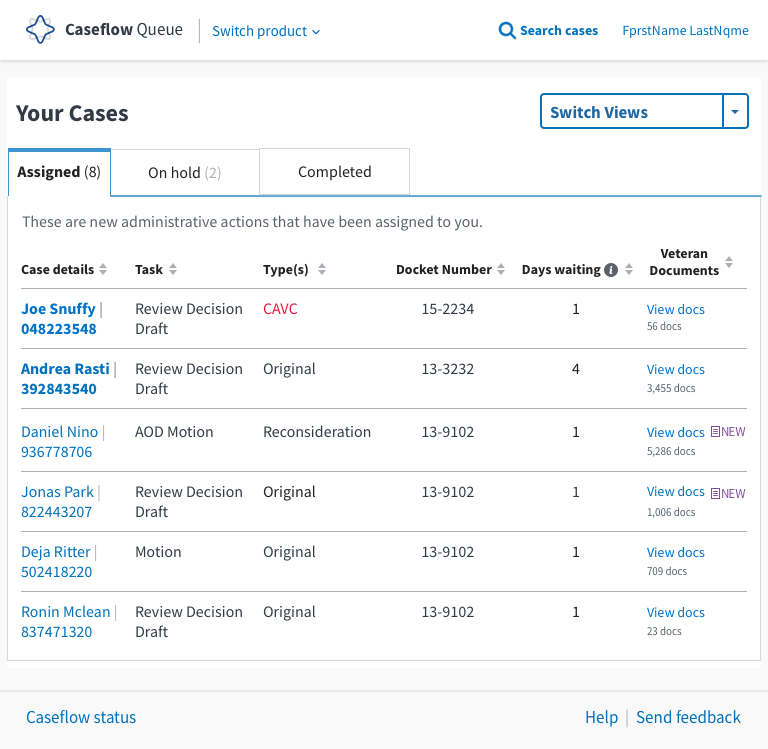
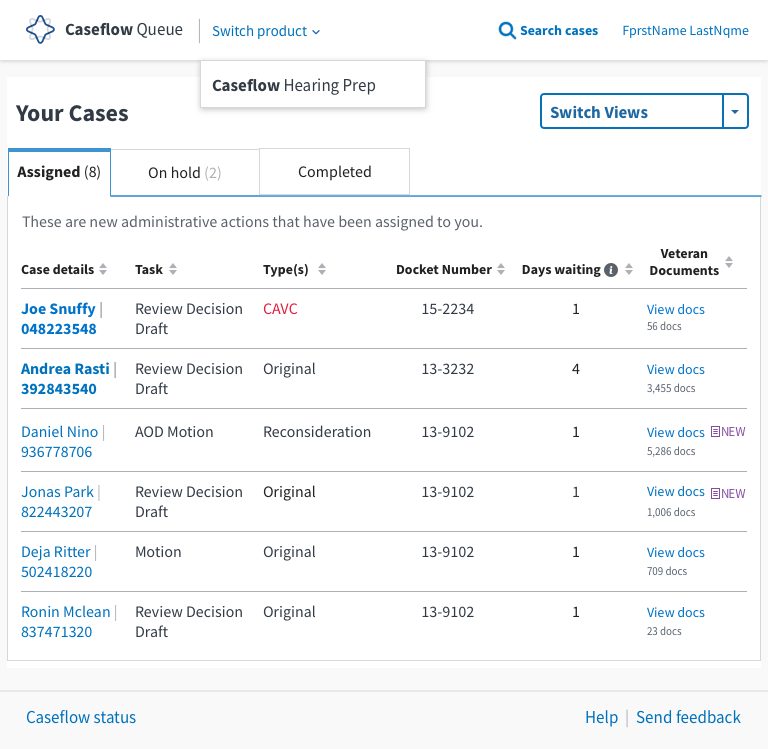
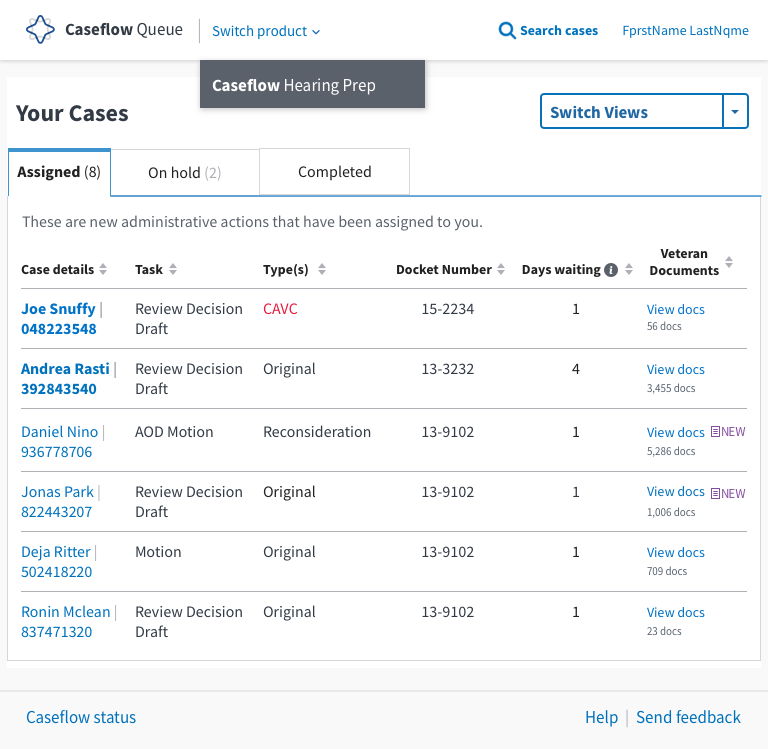
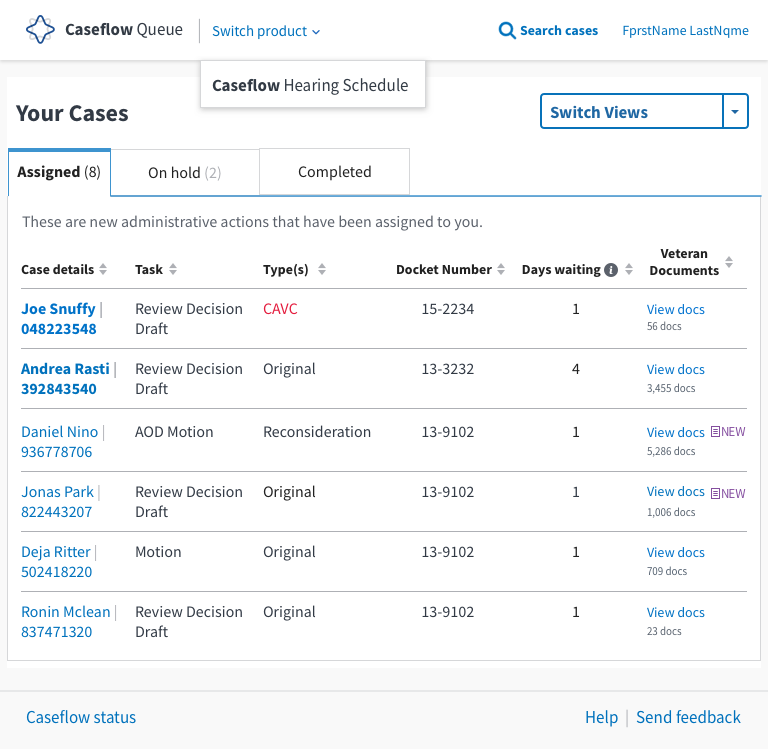
Allow the user to navigate back by one screen within the product that they're in, by displaying a relative hyperlink breadcrumb on a secondary navigation bar.
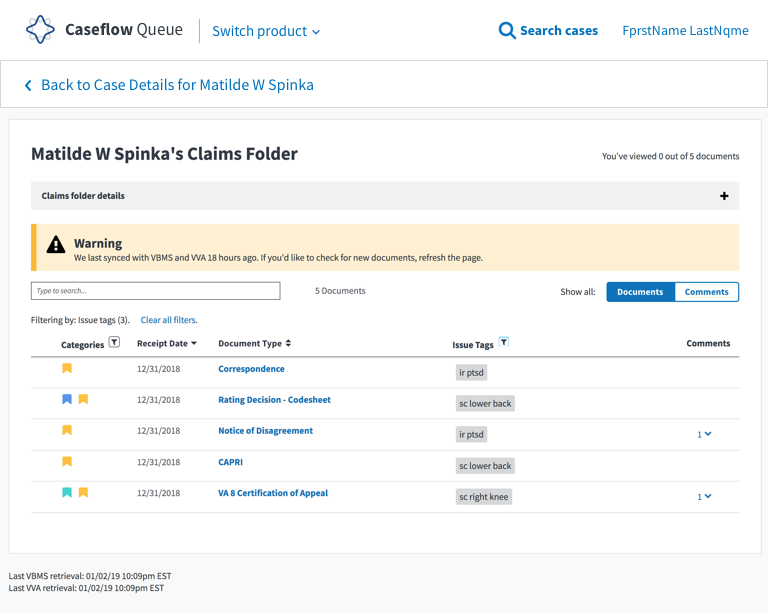
Proposed mocks and logic:
 laurjpeterson
All 8 comments
I think Reader -> Queue could also use improvement.
 mdbenjam
on 23 Oct 2018
mdbenjam
on 23 Oct 2018
For Hearing Prep:
I think we can provide a link to HP app from Queue to open a window (homepage is their upcoming hearing schedule). What are VLJs need in HP outside the worksheet access when they are in Queue?
 annienguyenUSDS
on 23 Oct 2018
annienguyenUSDS
on 23 Oct 2018
Other Hearing navigation issues:
- I'm a hearing coordinator, I search for a Veteran, in search results, I need to be able to click on case details and see the schedule hearing tasks available to me. (Current: case details' actions are queue's -- not the org's)
- +other search navigation flows (needing to navigate back to the app you were)
 MeredithStewart
on 23 Oct 2018
MeredithStewart
on 23 Oct 2018
I wonder if we could consolidate this into two general navigation problems to solve, the first being a combination of 1 and 2 and the second combining 3 and 4.
Selecting different queues (1 and 2)
I am very much in support of using the dropdown to select whichever queue we are displaying to the Board employee at any given point in time (proposed in #5385). We could default to the individual task queue and include different roles (acting judge, attorney) as well as any organizations the person belongs to (VSOs, board teams) in the dropdown menu. Implementing this would not require all that much work from a programming perspective and I think we retain a ton of flexibility by going with this approach.

Inter-application navigation (3 and 4)
I think this will become a more urgent need as more folks have access to case details and search, but I don't have strong opinions about how this should be implemented. Perhaps we could just display a list of applications we have access to beside the Caseflow logo? Maybe something like this:
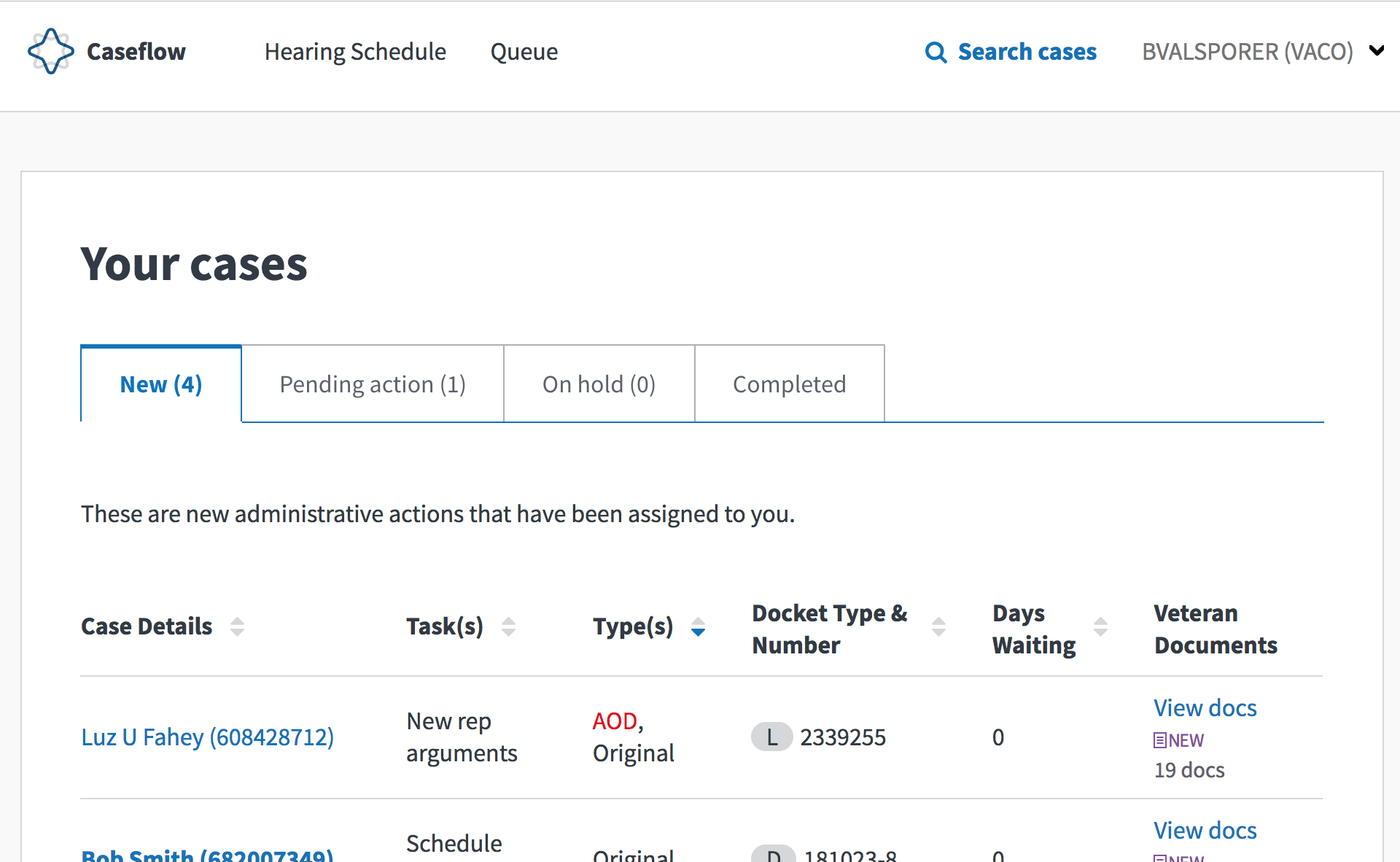
Also, @MeredithStewart if hearing tasks exist that the hearing coordinator should be able to see (tasks assigned directly to the coordinator, or assigned to a team they belong to), then we should already be showing those tasks in the case details page if it has been reached through search. If that doesn't work right now then I think that is a bug.
 lowellrex
on 24 Oct 2018
lowellrex
on 24 Oct 2018
@lowellrex -- It does not work today showing up hearing tasks in case details when you get there from search. @oscarAtNava @sharonwarner
MeredithStewart
on 24 Oct 2018
@lowellrex -- apologies, we think this actually does work! We'll be checking after a PR is merged today.
MeredithStewart
on 24 Oct 2018
Couple of thoughts:
1) We still have breadcrumbs in some of our apps. Do we want to keep them? And if so, should the switch application dropdown be after that?
2) The switch application dropdown is a blue link in the mocks. But our dropdown menu in the top right is currently gray. Do you want them both to be blue or remain gray?
3) In Reader we sill have a title of Reader, but in the mocks above, it's Queue. Should we change that?

mdbenjam
on 1 Feb 2019
Conclusions (cc @mdbenjam )
- Question: We still have breadcrumbs in some of our apps. Do we want to keep them? And if so, should the switch application dropdown be after that?
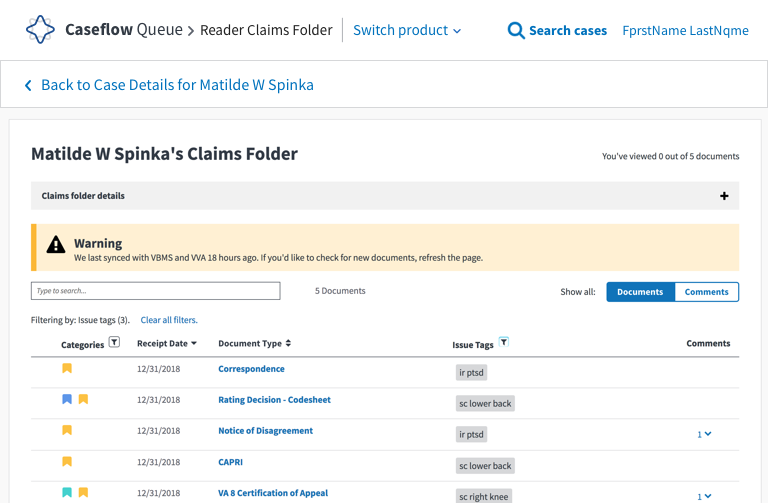
Answer: We will keep breadcrumbs for Reader product. (Any other products' breadcrumbs that surface will be addressed on a case by case basis.) Please see proposed mocks:
1a) When viewing a veteran's claims folder:
1b) When viewing a veteran's document:
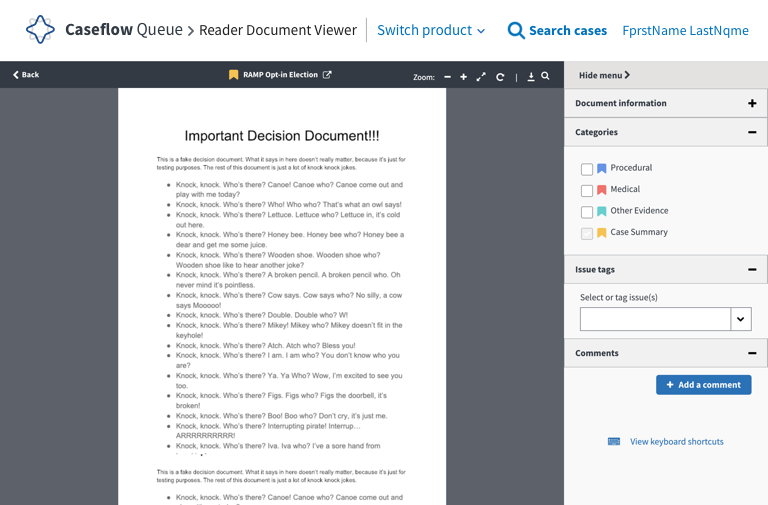
Question: We still have breadcrumbs in some of our apps. Do we want to keep them? And if so, should the switch application dropdown be after that?
Answer: We will have all links in the Navigation bar appear as blue text.Question: In Reader we sill have a title of Reader, but in the mocks above, it's Queue. Should we change that?
Answer: Answered as part of question 1.
 sneha-pai
on 11 Feb 2019
sneha-pai
on 11 Feb 2019
Related issues
 lomaxap
·
3Comments
lomaxap
·
3Comments
 leikkisa
·
4Comments
leikkisa
·
4Comments
 gnakm
·
5Comments
gnakm
·
5Comments
 araposo-tistatech
·
5Comments
araposo-tistatech
·
5Comments
 yoomlam
·
5Comments
yoomlam
·
5Comments