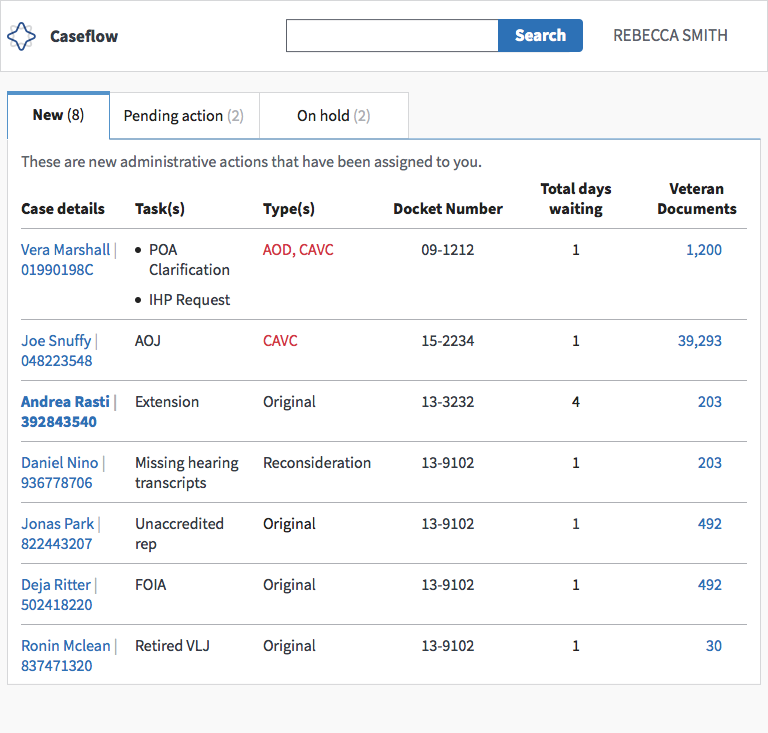
Caseflow: Display all tasks in case details/queue table if multiple tasks are assigned to you for a single case
As a co-located staff member — when an attorney assigns multiple admin actions for the same case, I need to see both of those admin actions in Case details/Case snapshot so I have context before I start working on them.
Acceptance criteria
When multiple tasks are assigned to you for the same case:
- [ ] Display multiple tasks in queue table
- [ ] Display multiple tasks in the case details view
 mkhandekar
All 7 comments
Multiple admin actions in a colocated admin's "new" tab
Multiple admin actions in a colocated admin's case snapshot
small / responsive

wide / full width

mkhandekar
on 18 Jul 2018
@mkhandekar - i moved this back to backlog - unprioritized issues because it is out of scope for our first release/pilot with co-located
 laurjpeterson
on 13 Aug 2018
laurjpeterson
on 13 Aug 2018
Do we need the assigned to field? If we're showing them a task, it must be assigned to them right? (Or maybe the organization they belong to)
 mdbenjam
on 7 Sep 2018
mdbenjam
on 7 Sep 2018
Yes! You are totally right @mdbenjam! No need for assigned to field for co-located staff.
Tagging @sneha-pai who actually did this work <3 (I just posted 'em!)
Sneha, I remember talking about showing the assigned to to all other users as a way to increase transparency around whose court the case is in at any given time. Do you remember this as well?
mkhandekar
on 7 Sep 2018
@mkhandekar @mdbenjam @sneha-pai - instead of assigned to, let's list assigned by so the co-located team member can see which attorney assigned their case
laurjpeterson
on 10 Sep 2018
Handing off to @sneha-pai + @allyceh who will talk with @mdbenjam to get an update on any new multiple admin work, then prioritize with guidance from @laurjpeterson ❤️(per conversation on Oct 10)
mkhandekar
on 10 Oct 2018
We do this! We could enhance this by grouping tasks together in a more obvious way, but closing because we've hit the min. AC
laurjpeterson
on 15 May 2019
Related issues
 lomky
·
3Comments
lomky
·
4Comments
lomky
·
3Comments
lomky
·
4Comments
 hschallhorn
·
5Comments
lomky
·
3Comments
hschallhorn
·
5Comments
lomky
·
3Comments
 yoomlam
·
5Comments
yoomlam
·
5Comments