Cascadia-code: Latin small letter i with ogonek (012F) incorrectly handles Combining diactrical marks
Environment
'''none
Cascadia Code version number: 1911.20
Application (with version) used to display text: Microsoft Word (ver. 2001 build 12430.20264 C2R)
OS platform and version: Windows 10 Pro 18363.657
Screen resolution (i.e. 220dpi): 192dpi, 144dpi, 96dpi
Any other software?
'''
Steps to reproduce
- Type Latin small letter i with ogonek (012F) and any other letter after it.
- Insert a combining diactrical mark after small letter i with ogonek (I've tried Unicode hex 0340, 341, 342).
Expected behavior
The diactrical mark is rendered over latin small letter i with ogonek (012F).
Actual behavior
The diactrical mark is rendered over the next letter but not over latin small letter i with ogonek.
 AlexYash
All 7 comments
@AlexYash, there's a two part reason for this.
(1) The combining marks (03XX) characters are zero width, but the position of the diacritic is off to the right, instead of to the left. This is due to a workflow bug caused by the Glyphs-to-UFO processing (https://github.com/googlefonts/glyphsLib/issues/547). I can resolve this in the UFO.
(2) There are not proper positional marks in the iogonek character to account for additional diacritics as it is not intended to take them. We will need to add a dotless /i with ogonek character to account for use cases such as what you are trying to do.
Out of interest, what language are you trying to use the accented i ogonek? Thanks!
 aaronbell
on 9 Mar 2020
aaronbell
on 9 Mar 2020
@aaronbell Hi, I'm using combining diactrical marks for marking accents in Lithuanian language (we have three types of accent). So far I had to switch back to Cambria, which handles it correctly.
AlexYash
on 9 Mar 2020
Thanks @AlexYash, interesting! I hadn't realized Lithuanian used accents over that glyph. I'll fix it up.
aaronbell
on 10 Mar 2020
@aaronbell Thank you! Actually, it's primarily for the purpose of language studying as normally accents are rarely used in printing. But for educational usage it's very important.
AlexYash
on 10 Mar 2020
Ah! Understood. Yeah, Cascadia Code was developed originally for everyday language use. Thanks for bringing this up!
aaronbell
on 10 Mar 2020
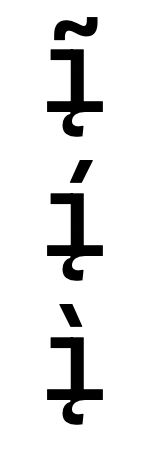
Hello! So after investigating this, it appears that the issue is two-fold.
1) The combining marks that you've tried using are not actually present in the font. As such, there is no way for them to be positioned correctly. Most likely you were seeing a fallback font showing those glyphs.
2) I needed to add an OpenType feature to get rid of the dot on the /i so that as the diacritic mark is added, it doesn't overlap the dot.
Here's how it is looking now:
aaronbell
on 28 Apr 2020
@aaronbell Thank you very much! Looking forward for the next release.
AlexYash
on 28 Apr 2020
Related issues
 pmartin-brierley
·
5Comments
pmartin-brierley
·
5Comments
 rivy
·
5Comments
rivy
·
5Comments
 schorrm
·
7Comments
schorrm
·
7Comments
 hansswolfs
·
3Comments
hansswolfs
·
3Comments
 Quppa
·
4Comments
Quppa
·
4Comments
Most helpful comment
Hello! So after investigating this, it appears that the issue is two-fold.
1) The combining marks that you've tried using are not actually present in the font. As such, there is no way for them to be positioned correctly. Most likely you were seeing a fallback font showing those glyphs.
2) I needed to add an OpenType feature to get rid of the dot on the /i so that as the diacritic mark is added, it doesn't overlap the dot.
Here's how it is looking now:
