Cascadia-code: No visibility for = sign on terminal
Environment
Cascadia Code version number: 1909.16
Application (with version) used to display text: Linux Default Terminal
OS platform and version: Ubuntu
Screen resolution: 1366x768 pixels (96 dpi)
Any other software?
Steps to reproduce
cascadia font
Install cascadia font in the environment mentioned above you will see.
Expected behavior
Equal sign should be visible
Actual behavior
Equal sign in not visible at all
 vipul-vinsol
All 12 comments
After some experimenting, I have found out that it is visible in other application like VSCode but is not in the terminal. Also strangely it also works in the build in vscode terminal, I am not sure what is causing this issue. Is this some resolution thing
vipul-vinsol
on 20 Sep 2019
I'm on Ubuntu 16.04.6 LTS, at 110dpi under XFCE with the same problems as the issue author.
With GNOME Terminal 3.20.2., the < and = signs render as blank, and -> turns into a three-letter wide left-right double arrow (like ⇔) overlaid on the original -.
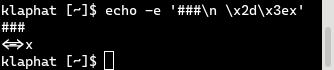
As described, the problem does not manifest in VS Code or its integrated terminal.
 zao
on 20 Sep 2019
zao
on 20 Sep 2019
I don't think VTE-based terminals (such as xfterminal or gnome-terminal) support ligatures. KDE's Konsole does however and it shows up correctly there. cf https://unix.stackexchange.com/questions/278175/do-any-open-source-linux-terminals-and-fonts-support-ligatures
 greatquux
on 20 Sep 2019
greatquux
on 20 Sep 2019
in gVIM also the = symbols is not showing up. :(
 DEMG-DEV
on 20 Sep 2019
DEMG-DEV
on 20 Sep 2019
gVIM needs special configuration to support ligatures.
 DHowett-MSFT
on 20 Sep 2019
DHowett-MSFT
on 20 Sep 2019
Is there some sort of fallback in the font missing for it to work in environments that doesn't do ligatures, or is it intrinsic to how fonts with ligatures are made?
If it's intrinsic, is it possible to have a variant of the font that does not have ligatures for use in those rather prolific applications, or at least document the incompatibility if it's unfixable?
zao
on 20 Sep 2019
Wha? The fallback for when ligatures aren't supported (or: are disabled!) is to render the individual characters,
DHowett-MSFT
on 20 Sep 2019
So the underlying problem with VTE (and thus GNOME Terminal) is that they incorrectly attempt to implement ligatures, and if they hadn't tried that hard, they would have been rendering individual characters fine?
zao
on 20 Sep 2019
Wha? The fallback for when ligatures aren't supported (or: are disabled!) is to render the individual characters,
Is it possible to have two version of the font(as it is done in Iosevka): one font with all ligatures etc, and another one without ligatures and all the characters of the same width. The latter one is for editors that (a) cannot work with ligatures and (b) forbid to select a font with non-same-width characters - e.g, my gVim refused to use a few fonts or rendered text very ugly until I deleted from those fonts some characters that were wide than the others
 VladimirMarkelov
on 21 Sep 2019
VladimirMarkelov
on 21 Sep 2019
I've tested this on a newer version of Ubuntu (18.04.3 LTS) which has a newer VTE, 0.52. The ligatures do no longer appear and individual glyphs render correctly, which is the good kind of fallback.
This comment claims that the problem was fixed with VTE 0.52 which I can confirm as that's what on my running system, while my original report used VTE 0.44.2 on the previous LTS.
For me the problem is then resolved, "just don't use old glitchy VTE versions". Cheers!
zao
on 23 Sep 2019
It appears that this issue is essentially a request for two versions of the font to be shipped—one with ligatures and one without. Heard!
 aaronbell
on 30 Sep 2019
aaronbell
on 30 Sep 2019
It appears that this issue is essentially a request for two versions of the font to be shipped—one with ligatures and one without. Heard!
Maybe rename this issue? :) All other issues about adding a version ligatures are closed and links points to this one. But this one's title is "No visibility for sign". That's confusing.
VladimirMarkelov
on 13 Nov 2019
Related issues
 dkgreer52
·
4Comments
dkgreer52
·
4Comments
 dreamer
·
4Comments
dreamer
·
4Comments
 pmartin-brierley
·
5Comments
pmartin-brierley
·
5Comments
 ratishphilip
·
3Comments
ratishphilip
·
3Comments
 GustavBrock
·
6Comments
GustavBrock
·
6Comments
Most helpful comment
It appears that this issue is essentially a request for two versions of the font to be shipped—one with ligatures and one without. Heard!