Cartodb: User and organization settings need to be password-protected
For certain operations, the backend will check the last time the user password was entered. If more than 5 minutes have elapsed since the last time the password was entered, the backend will inform the frontend it needs to ask the user to enter the password again before the operation can be fulfilled.
Those operations are:
- [ ] Regular users wanting to modify or add to any personal data field in their profiles (
/u/USERNAME/profile) [ ] Regular users wanting to modify their API keys (
/u/USERNAME/your_apps)[ ] Org admin users wanting to modify the organization profile (
/user/USERNAME/organization/settings)- [ ] Org admin users wanting to modify the organization auth page (
/user/USERNAME/organization/auth) - [ ] Org admin users wanting to modify the organization user page (
/user/USERNAME/organization) - [ ] Org admin users wanting to modify the organization group page (
/user/USERNAME/organization/groups) - [ ] Org admin users wanting to send a notification (
/user/USERNAME/organization/notifications)
 danicarrion
All 23 comments
We need @CartoDB/design to give us the design / guideline for this new flow, a page with the input to insert a password to perform again the operation.
 ivanmalagon
on 5 Apr 2018
ivanmalagon
on 5 Apr 2018
Shouldn't we ask for the password always?
Profile and API keys pages call to endpoints to update the info. Organization pages are sent as a regular form. We need to perform these operations:
- Send the payload / form values.
- Backend performs a check on password timestamp. It needs to save the last time a password was used.
- If expired, it must return a payload error / redirect to a page with some info indicating error.
- Front must show a new page / fields with the password, remembering the form values.
If we ask always for the password
- Backend doesn't need to manage password last use, only needs to check is password is valid.
- Forms are designed showing always the password field. No need to react to password errors, showing new page / fields.
What do you think?
ivanmalagon
on 6 Apr 2018
No strong feelings. I prefer my first proposal from a UX perspective, but I understand it's tricky particularly if some pages are using standard forms.
Up to you unless @agnesgyorfi has a strong opinion herself.
danicarrion
on 6 Apr 2018
I also prefer only re-asking for pw to be input when one of the operational characteristics are met, but from a data protection perspective, not UX.
My idea was to be able to say something like "now, when you want to change your personal data, you'll notice that we ask you to re-enter your password to do so, providing an added layer of security," and if I'm understanding the alternative proposal correctly, users would be prompted to re-enter password anywhere, not just on their profile pages, right? Pero Ivan—if it's MUCH more work do what you gotta do.
 agnesgyorfi
on 6 Apr 2018
agnesgyorfi
on 6 Apr 2018
If I got @ivanmalagon right, he meant asking for the password every time, but only on the affected forms.
danicarrion
on 6 Apr 2018
Aha, v. 5-minute expiration? In that case yes, all for Iván's suggestion.
agnesgyorfi
on 6 Apr 2018
I have two questions about this task:
Do we have an endpoint to check if a password is correct? Besides
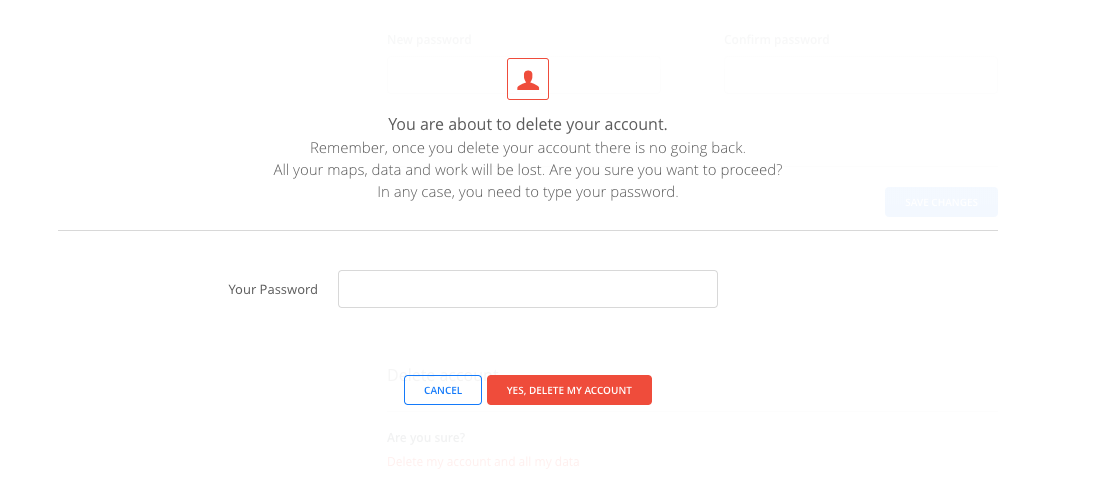
/login.Are we going to wait until design gives us a flow for the password comprobation, or can we reuse already designed modals changing its content to make it adequate to our use case here? I am thinking about the delete account modal.
 jesusbotella
on 4 May 2018
jesusbotella
on 4 May 2018
Hello everyone! I have been talking with @alrocar about how we are going to tackle this issue and some doubts have arisen.
I have checked all the forms above and some are sent via AJAX, but most of them are plain old forms sent via POST. I think it is feasible to show a modal asking for password confirmation on those forms, but there might be some things to sort out.
@alrocar has told me that it will be similar to the delete account scenario, where we add a property named deletion_password_confirmation when sending the request. But, I don't know how we will show the users that their password is wrong, will we show any flash message?.
And there's one case when the user has signed up via OAuth (Google, or GitHub), or another authentication service like LDAP, Kerberos where we don't have any password to compare with. How are we going to handle this case?
jesusbotella
on 7 May 2018
I think we should warn the users if a password is entered incorrectly. If this is tricky, I'd move on and tackle it at the end of the project.
When a user logs in via an external authentication service, all the forms will work without the password check. I don't see an easy way for us to handle session validation with external providers.
danicarrion
on 7 May 2018
Yes, I think we should warn them too, @alrocar and I are sorting this out :)
jesusbotella
on 7 May 2018
In the cases of old school forms, how do we deal with other incorrect data? I mean, it's likely there's already a mechanism to warn the user about the form completion via a flash banner. In those cases, we can use that.
In case of Ajax requests, how do we deal currently with the same issue? (Form saved successfully, a validation error...)
ivanmalagon
on 7 May 2018
Yes, there's an already implemented mechanism based on flash messages in both cases to give feedback to users about the form submission, whether it is successful or not. So we thought that the best idea is to use that for that new warnings as well.
jesusbotella
on 7 May 2018
I have done a first approach to the solution, here I show you the whole flow in a GIF. Please let me know what you think:

jesusbotella
on 7 May 2018
@asimcox I think you can help us here! :)
We need some copies for the modal above, you can watch the GIF for more context, but basically it is a password confirmation to save changes. I attach a static image of the current state of the modal.

We need the title and the subtitle, or any other text layout configuration if you think it is better. Thank you! :)
jesusbotella
on 8 May 2018
@jesusbotella I like the text you chose in the GIF :)
agnesgyorfi
on 8 May 2018
@jesusbotella agree with Agi - I prefer the text in the gif.
The text in the static image is redundant: "Please confirm your password" and "Please type your password" <--- the latter isn't necessary. And I enjoyed the tone of "Hey ho, let's go!" The Ramones lyrics make it into our product ;)
 asimcox
on 8 May 2018
asimcox
on 8 May 2018
@asimcox hahaha I don't know if it fits into our current "product strategy" 😂.
Yes, both texts were _placeholders_ for the actual text. So, what do you want me to put? 😁
jesusbotella
on 9 May 2018
Functionality:
- Assuming if you hit
cancelon the pop-up modal then it returns you to the original pages and gives you our standard notification that the changes were not saved.
Design:
✅ Reuse the delete account modal
- [ ] Check with the design team about the red treatment of the "button" for
confirm. I think they might reserve red for operations where you're deleting something -- it gives it the tone of "are you sure you want to do this action?" In this case, it's just confirming, so probably blue? or whatever are UI element style guide dictates.
Copy:
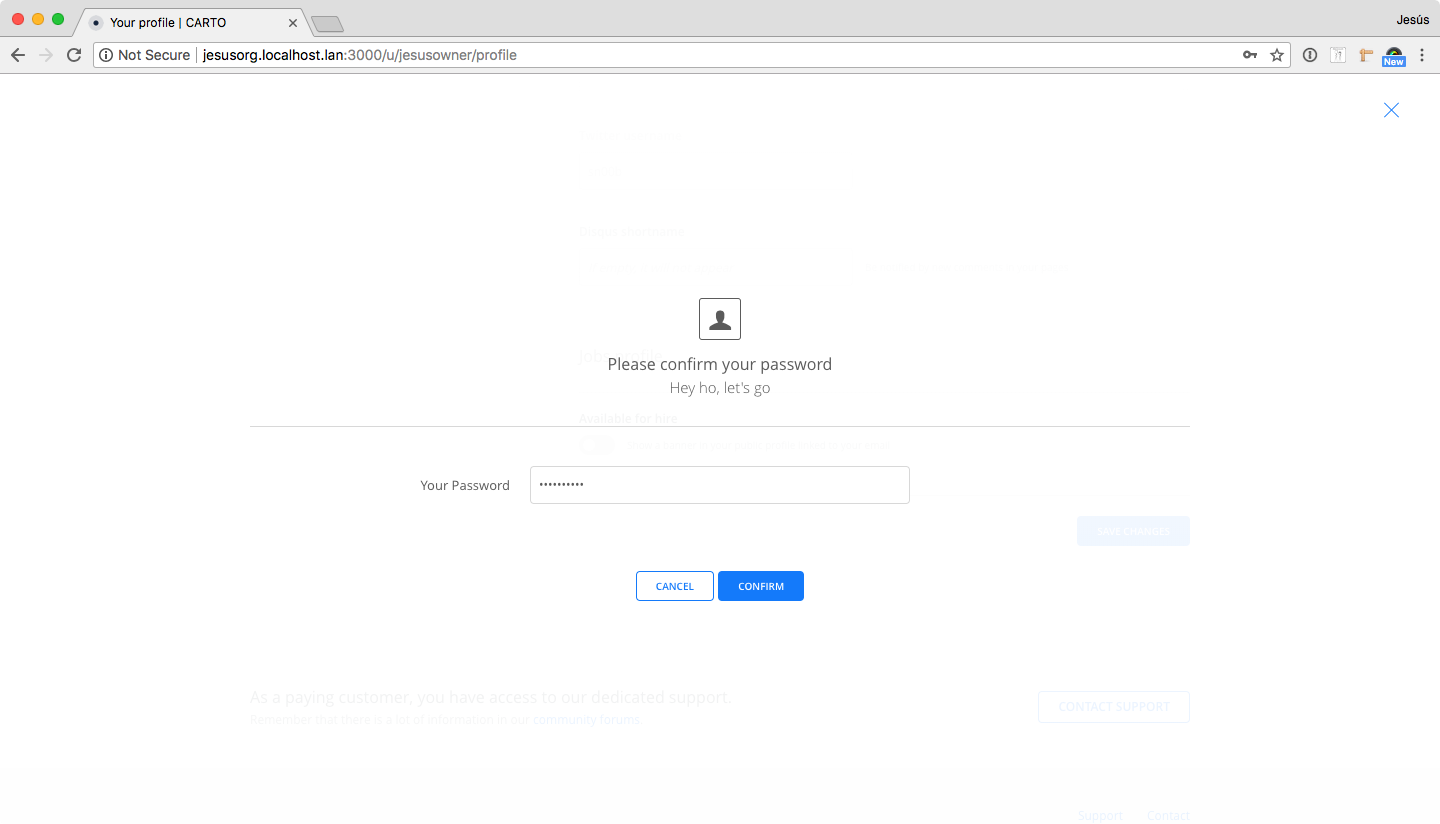
Please confirm your password.
_"Hey, ho! Let’s Go!"_
Password: [Field]
^^^^ Not sure what you mean by not being aligned with our product strategy :) but hit me up on slack to clarify and we can post the resolution here.
asimcox
on 10 May 2018
The red button is no longer there. It was just the first test I did. Following the same design as in the other modals to keep consistency, it is now blue:
The thing about the product strategy was a joke, I'll talk to you on Slack later to clarify this :)
jesusbotella
on 11 May 2018
Password-protected actions list
[ ] Regular users wanting to modify or add to any personal data field in their profiles (
/u/USERNAME/profile)[ ] Org admin users wanting to modify the organization profile (
/user/USERNAME/organization/settings)[ ] Org admin users regenerating API Keys for all your organization users (Button inside organization settings) (
/user/USERNAME/organization/settings)[ ] Org admin users wanting to modify the organization auth page (
/user/USERNAME/organization/auth)[ ] Org admin users wanting to send a notification (
/user/USERNAME/organization/notifications)[ ] Org admin users adding users or deleting users from a group (
/user/USERNAME/organization/groups/GROUP)[ ] Org admin users deleting a group (
/user/USERNAME/organization/groups/GROUP/edit)[ ] Org admin users creating a new organization user (
/user/USERNAME/organization/users/new)[ ] Org admin users deleting or modifying organization users (
/user/USERNAME/organization/users/ORGUSER/edit)[ ] Org admin regenerating all API Keys of an organization user (
/user/USERNAME/organization/users/ORGUSER/edit)
jesusbotella
on 21 May 2018
Acceptance
Password-protected actions list
❌ Regular users wanting to modify or add to any personal data field in their profiles.
The form is not saved even if it says that everything went OK.✅ Org admin users wanting to modify the organization profile.
❌ Org admin users regenerating API Keys for all your organization users (Button inside organization settings)
The keys get regenerated even when you send the wrong password.✅ Org admin users wanting to modify the organization auth page.
❌ Org admin users wanting to send a notification
I entered the right password but it says that it's not the right one.❌ Org admin users adding users or deleting users from a group.
When adding / deleting the second user and entering the password, a bug page shows up (instead of the error banner on top).✅ Org admin users deleting a group.
✅ Org admin users creating a new organization user.
❌ Org admin users deleting or modifying organization users.
I entered a wrong password. Then, when clicking onSave changesit doesn't ask me for the password again and the form fails like using the wrong one. It's like the password gets cached.❌ Org admin regenerating all API Keys of an organization user.
Same as above
ivanmalagon
on 21 May 2018
I have just uploaded a new assets version fixing all the bugs up there.
Everything should be alright.
Just one _warning_ ⚠️
The URL changes from /u/USERNAME/organization/users/USER/edit to /u/USERNAME/organization/users/USER when modifying organization users and password entered is wrong, but everything is working right and talking with @javitonino said that that happens in other router as well.
And the same happen when regenerating all API Keys of an organization user, the route will change to /u/USERNAME/organization/users/USER/regenerate_api_key, and you cannot refresh because it will crash, but 🤷♂️
jesusbotella
on 22 May 2018
Acceptance
Password-protected actions list
✅ Regular users wanting to modify or add to any personal data field in their profiles.
✅ Org admin users wanting to modify the organization profile.
✅ Org admin users regenerating API Keys for all your organization users (Button inside organization settings)
✅ Org admin users wanting to modify the organization auth page.
✅ Org admin users wanting to send a notification
✅ Org admin users adding users or deleting users from a group.
✅ Org admin users deleting a group.
✅ Org admin users creating a new organization user.
✅ Org admin users deleting or modifying organization users.
✅ Org admin regenerating all API Keys of an organization user.
🇯🇲
ivanmalagon
on 22 May 2018
Related issues
 atlefren
·
3Comments
atlefren
·
3Comments
 rochoa
·
3Comments
jesusbotella
·
4Comments
rochoa
·
3Comments
jesusbotella
·
4Comments
 santisaez
·
5Comments
santisaez
·
5Comments
 ramiroaznar
·
4Comments
ramiroaznar
·
4Comments
Most helpful comment
Acceptance
Password-protected actions list
✅ Regular users wanting to modify or add to any personal data field in their profiles.
✅ Org admin users wanting to modify the organization profile.
✅ Org admin users regenerating API Keys for all your organization users (Button inside organization settings)
✅ Org admin users wanting to modify the organization auth page.
✅ Org admin users wanting to send a notification
✅ Org admin users adding users or deleting users from a group.
✅ Org admin users deleting a group.
✅ Org admin users creating a new organization user.
✅ Org admin users deleting or modifying organization users.
✅ Org admin regenerating all API Keys of an organization user.
🇯🇲