Cartodb: render embed maps inside tab panes for mobile
Context
as part of the embed mobile project we should start by rendering the embed map inside a tabpane for mobile viewports
link to the invision in the project issue
 matallo
All 9 comments
We have a couple of questions regarding this issue.
Right now, in Builder you have some configuration to show the toolbar and the legends:
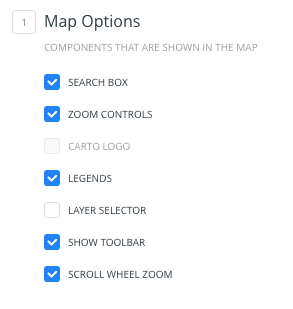
What should we do in the mobile view with the legends? Show the tab disabled? Hide both tabs? And what about the toolbar? Should we hide the title?
cc @piensaenpixel
 rubenmoya
on 18 Jan 2018
rubenmoya
on 18 Jan 2018
Talked in person
- If the user doesn't select the toolbar, we don't show the title (they are related)
- If the user hides the legends, we don't show the tabs and the map is full size.
 piensaenpixel
on 18 Jan 2018
piensaenpixel
on 18 Jan 2018
cc: @micagm -> perhaps you could test this in our staging environment once it's ready.
 alonsogarciapablo
on 29 Jan 2018
alonsogarciapablo
on 29 Jan 2018
I tried this in staging and it's working like a charm. Great job @rubenmoya!
I sent an email to some folks to notify them and see if they have something to say before we push the 🔴 button. Let's release this tomorrow unless we encounter any blocker.
alonsogarciapablo
on 30 Jan 2018
Thank you @alonsogarciapablo! I was lucky to pair with @jesusbotella :D
rubenmoya
on 31 Jan 2018
@piensaenpixel just told me that the couple of issues that he saw yesterday are solved, so 🎉.
I also removed Rubber Band effect when scrolling which was providing a poor UX in iOS.
 jesusbotella
on 31 Jan 2018
jesusbotella
on 31 Jan 2018
in production! 🚀
matallo
on 31 Jan 2018
BRAVO, BRAVO! 👏 👏 👏
alonsogarciapablo
on 31 Jan 2018
VAMOS! 💪
jesusbotella
on 31 Jan 2018
Related issues
 santisaez
·
5Comments
santisaez
·
5Comments
 ramiroaznar
·
4Comments
ramiroaznar
·
4Comments
 rochoa
·
4Comments
rochoa
·
4Comments
 arianaescobar
·
4Comments
arianaescobar
·
5Comments
arianaescobar
·
4Comments
arianaescobar
·
5Comments
Most helpful comment
in production! 🚀