Cartodb: Style By Aggregation often times out for zooms 7+
Context
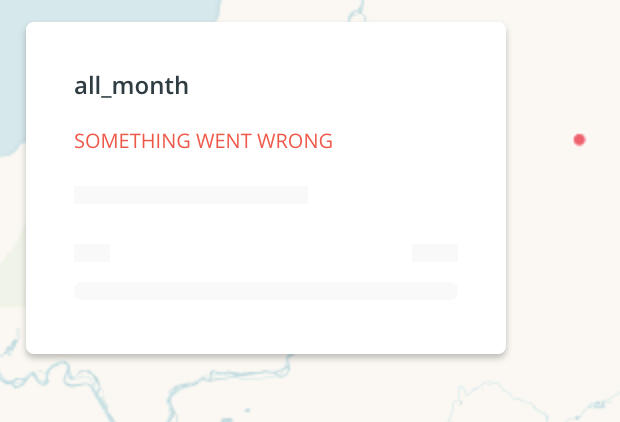
While working with Style By Aggregation Squares in Builder, @zingbot and I were not able to make city-level aggregation for a city government client. It worked for zooms 6 - 0, but 7+ did not produce the requested aggregated squares and we received an error in the legend:
The console says this:
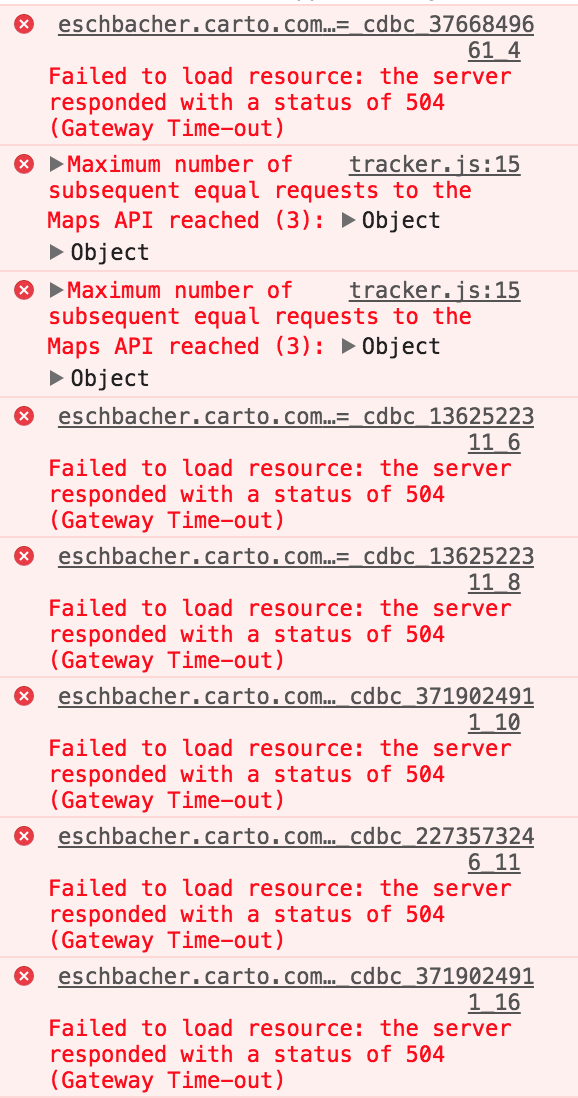
Sometimes I get this error:
/**/ typeof _cdbc_3766849661_4 === 'function' && _cdbc_3766849661_4({"errors":["cannot connect to the database"],"errors_with_context":[{"type":"analysis","message":"cannot connect to the database","analysis":{"id":"a0","node_id":"a0","type":"source"}}]});
Other times I get this one:
{"error": ["Request timeout", "Your request took too long to complete."]}
Steps to Reproduce
Please break down here below all the needed steps to reproduce the issue
- Import a dataset like my snapshot of nyc taxi data: https://eschbacher.carto.com/api/v2/sql?q=select+*+from+taxi_50k&format=csv&filename=taxi_50k
- Create a map
- Style by Aggregation Squares when zoomed into NYC
Current Result
Time-outs / no map produced for zoom levels around 8.
Expected result
This style should 'just work' at any zoom level, or we should put limits on some zooms explaining why it won't work
Browser and version
Chrome Version 61.0.3163.100 (Official Build) (64-bit)
macOS 10.12.5 (16F73)
.carto file
Not needed
Additional info
None
 andy-esch
All 26 comments
Hey @andy-esch after digging a little bit on the issue I have found out that the aggregation style works when removing the dots located in NULL island (0, 0):
SELECT * FROM ramirocartodb.taxi_50k
WHERE ST_X(the_geom) <> 0
https://team.carto.com/u/ramirocartodb/builder/d40bc00f-611c-43ea-b52c-334da7ae0e93/embed
Any idea of what this is happening?
 ramiroaznar
on 8 Nov 2017
ramiroaznar
on 8 Nov 2017
My guess on what's happening is that the CDB_RectangleGrid function is creating a grid that covers a huge geographic area and has a large number of rectangles, causing a timeout. If null island is excluded, then the geographic range is drastically shrunk.
I have the same problem if I try to create a Style By Aggregation Squares using an earthquake dataset.
Steps to reproduce:
- Create a map from https://eschbacher.carto.com/api/v2/sql?q=select+*+from+all_month_3&format=csv&filename=all_month_3
- Zoom into an area of interest. I zoomed to zoom level 8, centered on Homer, Alaska, USA
- Select Style By Aggregation Squares.
andy-esch
on 8 Nov 2017
IMHO making square/hexbin aggregation maps in large areas like this one is a bad cartography practice. We can use this error to our advantage. So instead of fixing it, I will go to show a good error explaining the issue. cc @makella
ramiroaznar
on 8 Nov 2017
I agree that that's not ideal, but users may not know that they have to filter out the rest of the world in order to create an aggregated map for her/his area of interest. In the case of the NYC taxi dataset with values at null island, the user would have to know how to filter out the null island values to be able to make the map successfully.
andy-esch
on 8 Nov 2017
Let's move it to RT queue. But I would go for a more informative error.
ramiroaznar
on 8 Nov 2017
@ramiroaznar I don't agree that it is bad cartography practice, either. People want to do interesting things with our platform and making pixel grids of the world is definitely one of those things. This used to work, and I have two customers asking me how to do it so they scale at diff zooms, etc. PEople want to use this on a global scale.
 zingbot
on 8 Nov 2017
zingbot
on 8 Nov 2017
I can also think of some really common use cases: Given a dataset of tweet locations, aggregating at a 10km x 10km grid and seeing the geographic patterns. The tweets would have the same geographic range as the earthquakes (global), and people are interested in neighborhood-scale patterns.
andy-esch
on 8 Nov 2017
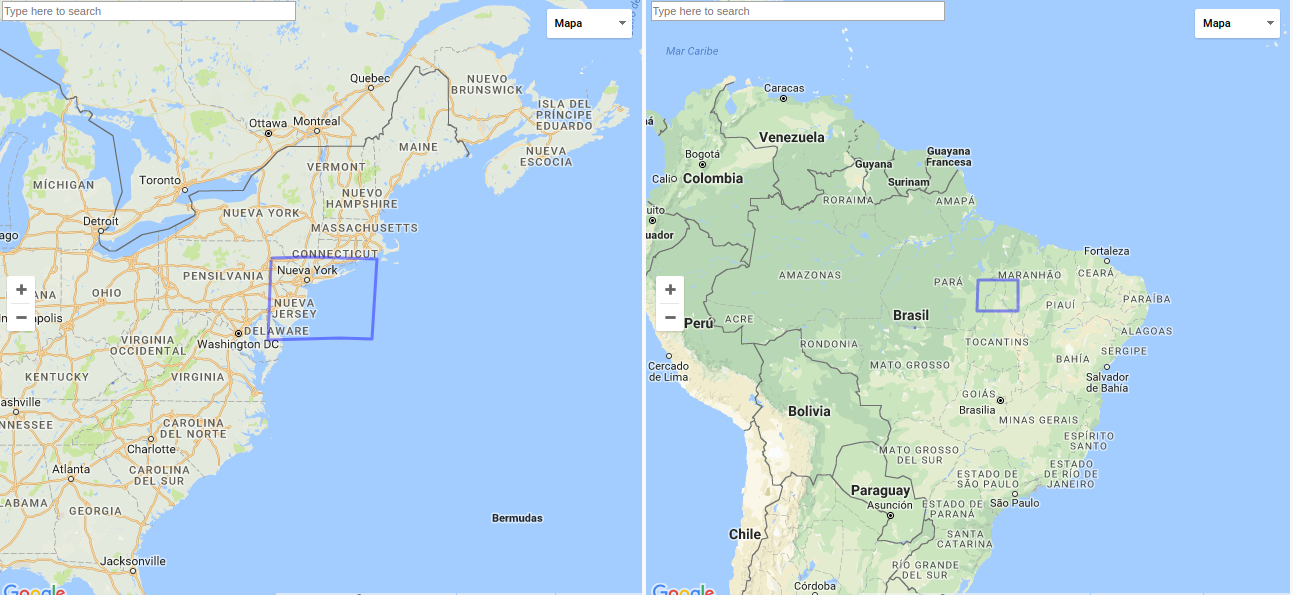
All the use cases make sense. But the way we are aggregating doesn't (in a global scale):
ramiroaznar
on 8 Nov 2017
Good point! What would be the largest scale this aggregation option would be 'correct' to use? 200km x 200km? Maybe the styling option should be restricted to zooms that respect that geographical areas. It'd be pretty killer if we could have a gridding that respects the distortions due to the projection so we didn't have to error on users, warn them about the restrictions of this, or get timeouts!
andy-esch
on 9 Nov 2017
We already suggest users avoid that in the Aggregation styles for point geometries guide. AFAIK the square size is measured in pixels, not in Kms.
I do not know how much time can cost us to improve the query respecting those distortions or fixing the query itself...
ramiroaznar
on 10 Nov 2017
something we did in the past (in a client's onpremise instance) is:
- hacking the
CDB_RectangleGrid()function so it fails before trying to generate more than 1M polygons. This helped to prevent Builder from hanging:
  h GEOMETRY; -- rectangle cell
  hstep FLOAT8; -- horizontal step
  vstep FLOAT8; -- vertical step
  hw FLOAT8; -- half width
  hh FLOAT8; -- half height
  vstart FLOAT8;
  hstart FLOAT8;
  hend FLOAT8;
  vend FLOAT8;
  xoff FLOAT8;
  yoff FLOAT8;
  xgrd FLOAT8;
  ygrd FLOAT8;
  x FLOAT8;
  y FLOAT8;
  srid INTEGER;
BEGIN

  srid := ST_SRID(ext);

  xoff := 0;
  yoff := 0;

  IF origin IS NOT NULL THEN
    IF ST_SRID(origin) != srid THEN
      RAISE EXCEPTION 'SRID mismatch between extent (%) and origin (%)', srid, ST_SRID(origin);
    END IF;
    xoff := ST_X(origin);
    yoff := ST_Y(origin);
  END IF;

  --RAISE DEBUG 'X offset: %', xoff;
  --RAISE DEBUG 'Y offset: %', yoff;

  hw := width/2.0;
  hh := height/2.0;

  xgrd := hw;
  ygrd := hh;
  --RAISE DEBUG 'X grid size: %', xgrd;
  --RAISE DEBUG 'Y grid size: %', ygrd;

  hstep := width;
  vstep := height;

  -- Tweak horizontal start on hstep grid from origin
  hstart := xoff + ceil((ST_XMin(ext)-xoff)/hstep)*hstep;
  --RAISE DEBUG 'hstart: %', hstart;

  -- Tweak vertical start on vstep grid from origin
  vstart := yoff + ceil((ST_Ymin(ext)-yoff)/vstep)*vstep;
  --RAISE DEBUG 'vstart: %', vstart;

  hend := ST_XMax(ext);
  vend := ST_YMax(ext);

  --RAISE DEBUG 'hend: %', hend;
  --RAISE DEBUG 'vend: %', vend;

  IF ((hend - hstart)/hstep)* ((vend - vstart)/vstep) > 1000000 THEN
      RAISE EXCEPTION 'The requested grid is too big to be rendered';
  END IF;

  x := hstart;
  WHILE x < hend LOOP -- over X
    y := vstart;
    h := ST_MakeEnvelope(x-hw, y-hh, x+hw, y+hh, srid);
    WHILE y < vend LOOP -- over Y
      RETURN NEXT h;
      h := ST_Translate(h, 0, vstep);
      y := yoff + round(((y + vstep)-yoff)/ygrd)*ygrd; -- round to grid
    END LOOP;
    x := xoff + round(((x + hstep)-xoff)/xgrd)*xgrd; -- round to grid
  END LOOP;

  RETURN;
END
- We also modified the frontend function so it generates a different, more performant query, rather than
CDB_RectangleGrid. We applied the changes directly to the production javascript file, but I believe in the code it's here :
WITH hgrid AS (
  SELECT st_expand(
    st_snaptogrid(
      the_geom_webmercator,
      CDB_XYZ_Resolution(<%= z %>) * <%= size %>,
      CDB_XYZ_Resolution(<%= z %>) * <%= size %>),
      CDB_XYZ_Resolution(<%= z %>) *  <%= size %> * 0.5)
    as cell
  FROM <%= table %> __i
  WHERE the_geom_webmercator && !bbox!
  GROUP BY 1
  )
SELECT
  hgrid.cell as the_geom_webmercator,
  <%= agg %> as agg_value,
  <%= agg %> /power( <%= size %> * CDB_XYZ_Resolution(<%= z %>), 2 ) as agg_value_density,
  row_number() over () as cartodb_id
FROM hgrid, <%= table %> i
WHERE ST_Intersects(i.the_geom_webmercator, hgrid.cell)
GROUP BY hgrid.cell
 ernesmb
on 15 Nov 2017
ernesmb
on 15 Nov 2017
@ramiroaznar about modifying the query, I opened this some time ago https://github.com/CartoDB/cartodb/issues/10815
BTW, that would only make rectangles keep the screen-size at different zoom levels, but it wouldn't solve the issue with the projection
ernesmb
on 15 Nov 2017
Thank @ernesmb, I think we need to fix this and just suggest users not to do this on a global scale (what @csobier have already noted on the proper guide).
ramiroaznar
on 15 Nov 2017
ramiroaznar
on 30 Nov 2017
User SB/15698789 is also having the same issue (table ~ 1500 points dispersed globally). I recommended him to use a workaround: intersect with second layer + world_borders.
ramiroaznar
on 26 Jan 2018
As an immediate fix I think the best option is to limit the maximum size of the generated grid as in @ernesmb version of CDB_RectangleGrid above. That would break the cases of Null-island points, etc with a meaningful error message, so the user could take action. I'll see if we can use some performance optimization, too.
I'd like to see this reimplemented using our new aggregation API , because it would be faster and users would not have a problem if data exists far away from the area they're viewing, because the grid would only be generated within the affected tiles, not for the whole dataset extent as now.
But this requires aggregation features not yet implemented (square placement) and would not support hexgrids (at least easily), so I leave it here as a future proposal (and we should then consider #10815 as well).
 jgoizueta
on 7 Feb 2018
jgoizueta
on 7 Feb 2018
For the record, the aggregation queries are generated by the frotnend here:
The link that appears in a previous comment is for a similar query from the old Editor wizards:
- https://github.com/CartoDB/cartodb/blob/0cb92d6bdd3daa2b8cc8f12f7a388bf7e810a2f8/lib/assets/javascripts/cartodb/models/carto.js#L511-L514
- https://github.com/CartoDB/cartodb/blob/0cb92d6bdd3daa2b8cc8f12f7a388bf7e810a2f8/lib/assets/javascripts/cartodb/table/menu_modules/wizards/density_wizard.js#L21-L22
jgoizueta
on 7 Feb 2018
The problem is not exactly as I had imagined: It does not occur when generating tiles, but when computing the colour ramp. Tiles are no problem because the grid is generated for the tile extents. But to compute the ramp, stats are collected executing the query for the whole dataset extents, which can lead to generate a huge grid (which is slow and can even crash postgres).
First idea I've had is to set a maximum number of grid cells when calling the grid functions for the ramp (so that the grid cell is adjusted when that limit is exceeded. But the problem is that for the default COUNT aggregation (and for SUM too) this would alter the values and the resulting ramp would not be appropriate... so another idea, albeit not so simple to implement, would be to reduce the extents when collecting the stats (limiting again the size of the grid).
jgoizueta
on 7 Feb 2018
Options I'm considering:
- Simply limit the maximum number of cells in the grid functions and fail when exceeded.
A case like the first one here will break at intantiation saying: "Cannot create a grid with such extent and such cell size".
Then, the user can:
- Try to eliminate far data, such as null island, to reduce the extent
- Increase the pixel size of the grid
- Avoid using a ramp (e.g. use solid color) (of course the user wouldn't know about this)
- Limit the grid size as above (so that we don't crash/timeout the db while creating tiles)
and find a way to compute the ramp successfully (avoid generating the whole grid for this).
Then a map like the case here will success initially and only fail if the user zooms out too much.
I don't know how to implement #2 😅 so I'll go for #1.
It's simple and the nice part is that if the map is instantiated successfully it shouldn't fail at any zoom level. Now I have to determine what's a sensible limit for the grid size. But first I'll try some optimization for the squares grid.
jgoizueta
on 7 Feb 2018
Note that my first idea of limiting the cell size of the grid to avoid exceeding some number of total cells could work but the results would be a little strange to the users:
- When they create a map like here, zoomed into NYC, the grid will render, but the ramp will not be properly computer for the actual values.
- When they zoom out, at some point the cells will begin to grow (and the ramp will make more sense).
jgoizueta
on 7 Feb 2018
I tried some optimizations to the grid functions that didn't optimize anything. 😞
I've experimented the two approaches above. The second wasn't as bad as I expected in terms of the user experience about grid cell size changing dynamically, but the count/sum aggregations were really badly styled with the fixed ramp, this is an example of the varying-size grid (to avoid huge grids) with the default COUNT aggregation:
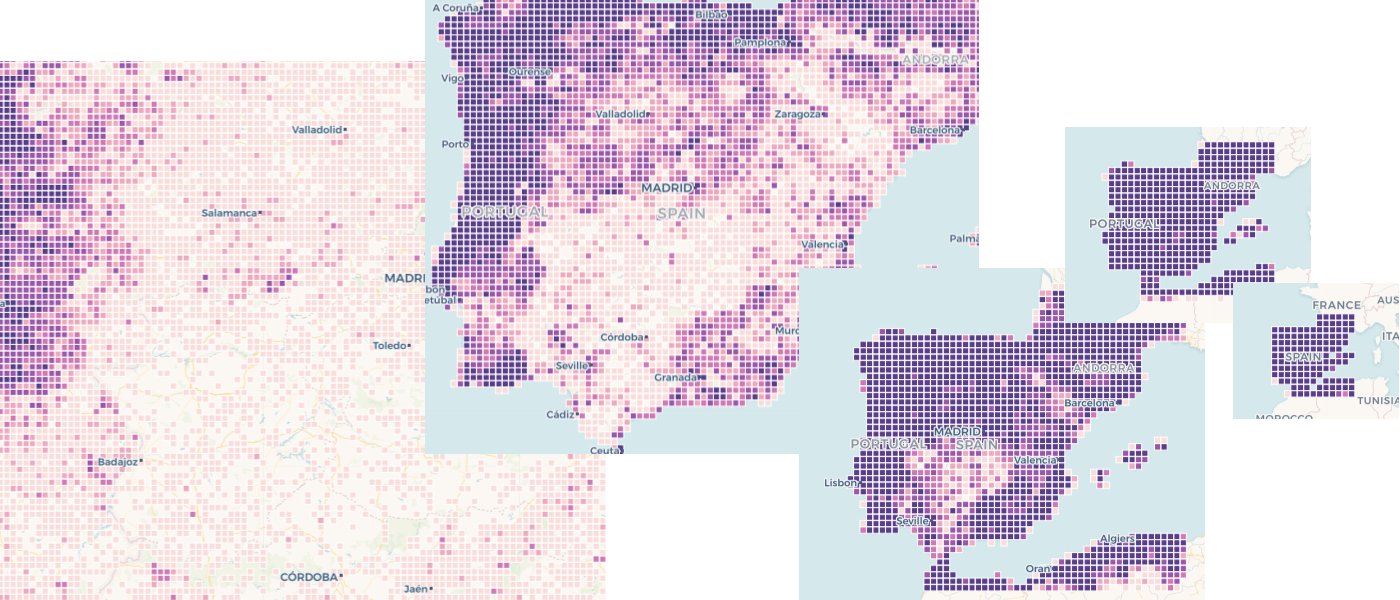
For low zoom all values end up in the higher end of the ramp (grid cells are large so count values are all higher). For higher zoom all values would change to the low end (small cells, so small counts).
With AVG aggregation the result looks better:
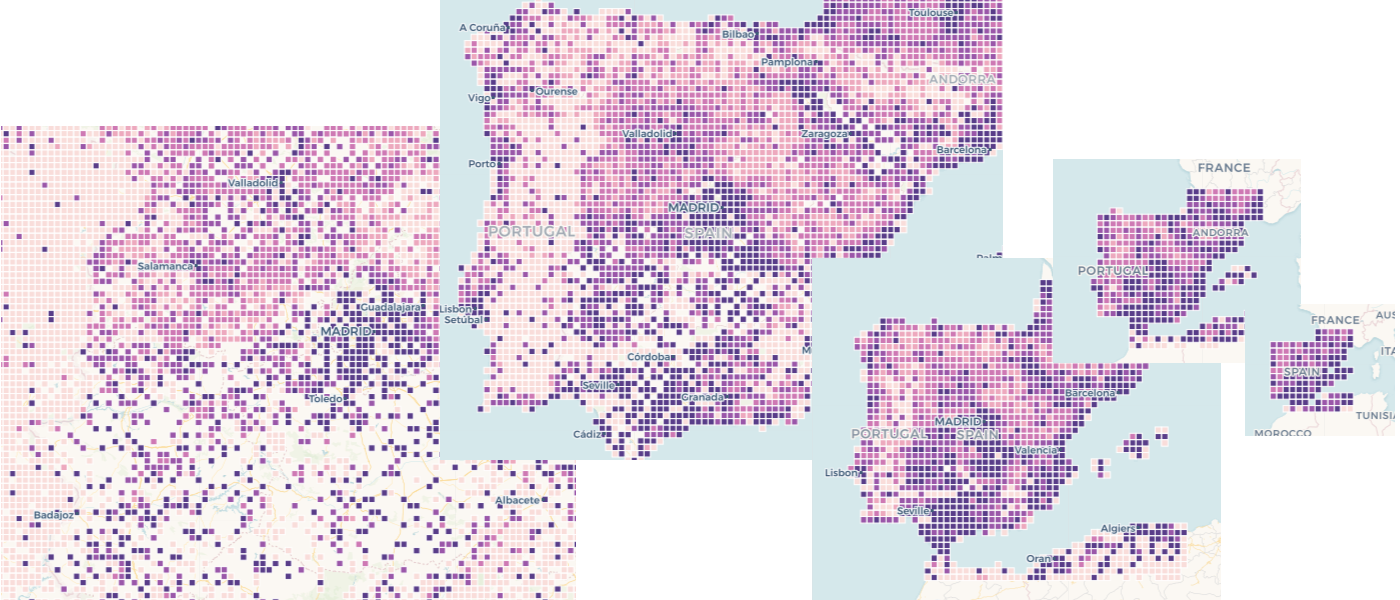
Anyway, I think the right thing to do now is just limit the maximum grid size and produce an error when exceeded. @ramiroaznar has checked this solution in staging. If the user tries to create a map with a small cells size (i.e. at a high zoom level) and data exists far away (e.g. in NULL island) the analysis will fail right away with a message like this:

jgoizueta
on 8 Feb 2018
Thank @jgoizueta. Nice explanation, the pictures help a lot to understand the differences. @alonsogarciapablo right now we are going to "fix" this issue, showing a proper message but this feature will need love in the future.
ramiroaznar
on 8 Feb 2018
@jgoizueta could you please add here some notes about the fix that you finally implemented in https://github.com/CartoDB/cartodb-postgresql/pull/322 ? thanks!
 rafatower
on 19 Feb 2018
rafatower
on 19 Feb 2018
The fix in https://github.com/CartoDB/cartodb-postgresql/pull/322 simply limits the grid functions generate a maximum of 262144 cells (this is the default value of a parameter added to the SQL functions, so it could be changed in the front end code). When the grid exceeds this size an exception occurs.
The result is that cases like the first one in this ticket will fail at map instantiation time (because a grid for the full dataset will need to be generated to compute the colour ramp) with a message that indicates the grid is too large. (so hopefully the intelligent user will try a bigger cell size, e.g. by zooming out, or she could reduce the dataset e.g. by pruning null island points). The nicest part is that we avoid expensive computations on the server size.
The fix is included in release 0.21.0 of the cartodb extension.
jgoizueta
on 19 Feb 2018
And deployed to production to all users. Closing this
rafatower
on 19 Feb 2018
Vamos!
ramiroaznar
on 19 Feb 2018
Related issues
 rochoa
·
3Comments
rochoa
·
3Comments
 xavijam
·
3Comments
xavijam
·
3Comments
 saleiva
·
4Comments
saleiva
·
4Comments
 piensaenpixel
·
4Comments
piensaenpixel
·
4Comments
 noguerol
·
5Comments
noguerol
·
5Comments
Most helpful comment
The fix in https://github.com/CartoDB/cartodb-postgresql/pull/322 simply limits the grid functions generate a maximum of 262144 cells (this is the default value of a parameter added to the SQL functions, so it could be changed in the front end code). When the grid exceeds this size an exception occurs.
The result is that cases like the first one in this ticket will fail at map instantiation time (because a grid for the full dataset will need to be generated to compute the colour ramp) with a message that indicates the grid is too large. (so hopefully the intelligent user will try a bigger cell size, e.g. by zooming out, or she could reduce the dataset e.g. by pruning null island points). The nicest part is that we avoid expensive computations on the server size.
The fix is included in release 0.21.0 of the cartodb extension.