Cartodb: Edit field in Custom Value dropdowns
Context
Based on @ztephm comments on https://github.com/CartoDB/cartodb/issues/11903 we need to enable a field edit feature in the Custom Value dropdowns that enables users to edit the field and not only rewriting it from scratch.
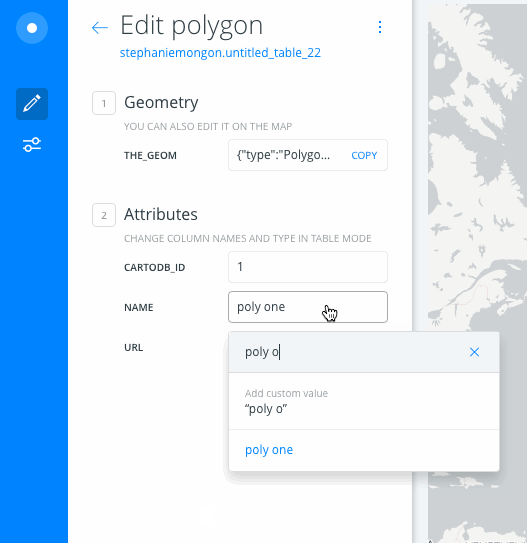
Steps to Reproduce
- Look for a Custom Value dropdown (e.g. in infowindows)
- Try to edit a previous value
Current Result
No way to edit the field without rewriting it entirely
Expected result
Be able to edit the content, like, for example, in the table view.
 noguerol
All 9 comments
Don't you think it should start in design, trying to find a way to do it, and then move it to development?
 xavijam
on 11 Jul 2017
xavijam
on 11 Jul 2017
Also I have doubts about if it should be tackled in the response team...
xavijam
on 11 Jul 2017
This is a bug, as the component was originally designed to be editable. But summoning @urbanphes so he can shed more light.
cc @saleiva
noguerol
on 11 Jul 2017
There is nothing else to design. When you've entered a custom value, you should be able to edit it by editing the content of the input directly. That would be reflected on the dropdown as well.
 saleiva
on 11 Jul 2017
saleiva
on 11 Jul 2017
When you enter a custom value and it is applied, it is not a custom value anymore!. So it is not that easy to edit it.
xavijam
on 11 Jul 2017
For the dropdown component clicking on the already written value an filling the text field with it (so you're able to edit it) should work. That said, I can't find a reason for using that component in Geometry edition; you should be able to directly edit the value in the text field itself, right?
noguerol
on 17 Jul 2017
@noguerol remember that functionality of autocompleting is very useful when working on categorized maps – which is quite common when creating datasets from scratch
saleiva
on 17 Jul 2017
True. Then we can fix the component as I said.
noguerol
on 17 Jul 2017
On production
 rjimenezda
on 10 Aug 2017
rjimenezda
on 10 Aug 2017
Related issues
 ivanmalagon
·
3Comments
ivanmalagon
·
3Comments
 arianaescobar
·
4Comments
arianaescobar
·
4Comments
 atlefren
·
3Comments
arianaescobar
·
5Comments
atlefren
·
3Comments
arianaescobar
·
5Comments
 santisaez
·
5Comments
santisaez
·
5Comments
Most helpful comment
On production