Cartodb: line-offset makes the tile borders visible
Context
Trying to style a layer using line-offset and the tiles borders become visible as a side effect
Steps to Reproduce
- Create a map from a polygon dataset or from scratch with an empty layer, and then draw a polygon by hand
- Style the layer with an extra border with Npx offset as
#layer {
  polygon-fill: #374c70;
  polygon-opacity: 0;
  line-width: 2;
  line-color:red;
  line-opacity: 1;
}
#layer::2 {
  polygon-fill: #374c70;
  polygon-opacity: 0;
  line-width: 2;
  line-color: blue;
  line-opacity: 1;
  line-offset:-3;
}
Current Result
red lines: actual polygon border
blue lines: polygon border with offset
If offset is < 0: the tiles that intersect my polygon has visible borders inside the polygon

If offset = 0: Behavior as expected

if offset > 0: the tiles that intersect my polygon has visible borders outside the polygon

Expected result
Just no tiles borders :)
Browser and version
Any
.carto file
Additional info
Please add any information of interest here below
 AbelVM
All 15 comments
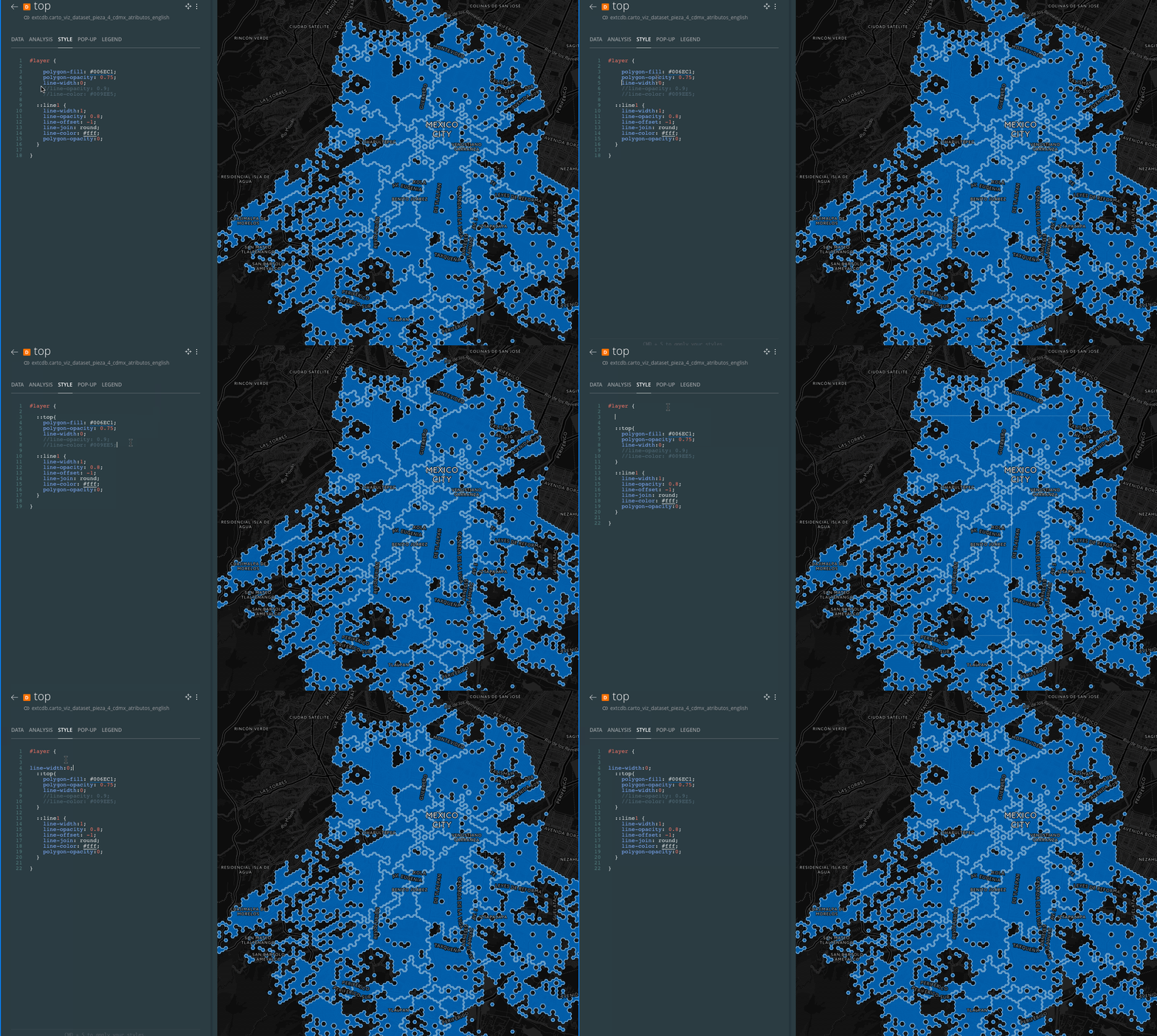
Sorry I never posted, but found a temporary workaround haven't tested lately, but you can see here
 makella
on 28 Feb 2018
makella
on 28 Feb 2018
It can be reproduced easily in local, with and without metatiling. I could not confirm it yet, but I'm pretty sure the bug is within mapnik, most likely around these lines:
https://github.com/mapnik/mapnik/pull/2955/files
(offset converter, line symbolizer)
Aside, as @makella pointed out, there's a workaround to it, that I reproduce:
#layer {

  // Use just one layer w/ 2 styles
  // this line-width below prevents the grid effect
  line-width: 0;

  ::top {
    polygon-fill: #374c70;
    polygon-opacity: 0;
    line-width: 2;
    line-color:red;
    line-opacity: 1;
  }
  ::2 {
    polygon-fill: #374c70;
    polygon-opacity: 0;
    line-width: 2;
    line-color: blue;
    line-opacity: 1;
    line-offset: -3;
  }
}
I created a PR reverting the suspect change: https://github.com/CartoDB/mapnik/pull/59
but did not have time to test it. Mind that this is just a hail mary pass in an attempt of quickly fixing it...
 rafatower
on 11 May 2018
rafatower
on 11 May 2018
Indeed my intuition was correct, reverting that change fixes the bug:
- mapnik
v3.0.15-cartobranch:

- mapnik
revert_offset_converter_fixbranch:

(the slight change in style is just to avoid caching between tests)
but it breaks other things (see the polygon vertex and the many visual tests broken).
Fixing this would require some c++ & mapnik expertise, finesse keeping the good parts and amending the bad ones, and some extra test for it.
rafatower
on 11 May 2018
I'm having a look into into this. It can be solved by disabling line-clip in the second layer:
#layer {
  polygon-fill: #374c70;
  polygon-opacity: 0;
  line-width: 2;
  line-color:red;
  line-opacity: 1;
}
#layer::2 {
  polygon-fill: #374c70;
  polygon-opacity: 0;
  line-width: 2;
  line-color: blue;
  line-opacity: 1;
  line-offset:-3;
  line-clip: false; //<<<<<<<<<<
}
 Algunenano
on 24 May 2018
Algunenano
on 24 May 2018
I have it partially fixed (it was an issue in where the clipping was being done):
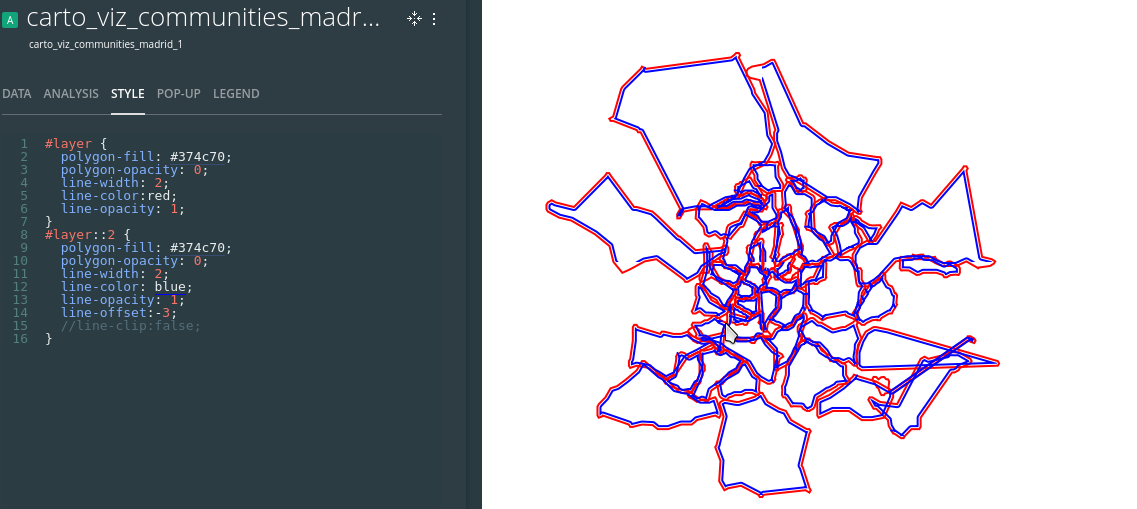
But I've noticed that the clipping has some issues (you can see some lines disappearing now) so I'm looking into this with a minimal test case to have it shipped together:

Left = no clipping, Right = with clipping
Algunenano
on 4 Jun 2018
The issue is found in how the offsetted points are calculated. After some changes I see both improvements and deterioration in the visual tests, so this is really tricky to get it right:
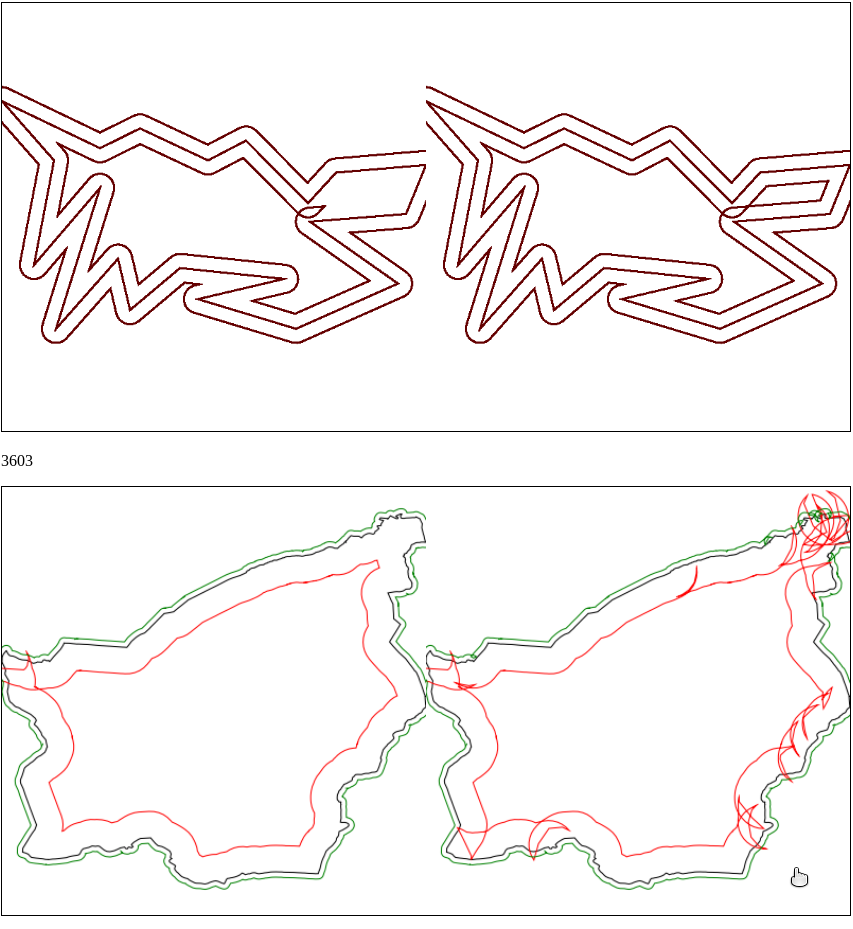
I'll see if I can find a better compromise since the issue with the test from my previous message is that after clipping the points are too close (closer than the static threshold) so it decides to skip them. I'll look into making that threshold more dynamic (based on the properties of the CartoCSS) or increase the distance to the clipping grid.
Algunenano
on 4 Jun 2018
Should be fixed with https://github.com/CartoDB/mapnik/pull/63
Since it requires review, performance regression tests and multiple intermediate releases it might take a while to get it into production. I'll let you know once it's ready.
Algunenano
on 5 Jun 2018
Moving this out of RT. It'll be deployed with the next Mapnik release
Algunenano
on 11 Jun 2018
 ramiroaznar
on 29 Jun 2018
ramiroaznar
on 29 Jun 2018
@ramiroaznar I'm not sure that this is related to #14124.
I think it's related to mapnik (engine).
 Jesus89
on 29 Jun 2018
Jesus89
on 29 Jun 2018
Yeah, it's not related to #14124. I'm keeping this open until the fix is released and installed in production.
Algunenano
on 29 Jun 2018
Sorry! Yes, I see it is not the same problem.
ramiroaznar
on 29 Jun 2018
Yeah, it's not related to #14124. I'm keeping this open until the fix is released and installed in production.
Well, it's only taken me ~13~ 15 months but it's now in production.
Algunenano
on 15 Apr 2019
woot!!
makella
on 15 Apr 2019
:100:
ramiroaznar
on 16 Apr 2019
Related issues
 javitonino
·
5Comments
makella
·
3Comments
javitonino
·
5Comments
makella
·
3Comments
 noguerol
·
5Comments
noguerol
·
5Comments
 fernando-carto
·
5Comments
fernando-carto
·
5Comments
 xavijam
·
5Comments
xavijam
·
5Comments
Most helpful comment
Well, it's only taken me ~13~ 15 months but it's now in production.