Cartodb: Infowindows behaviour turns weird when you edit the HTML behind
Context
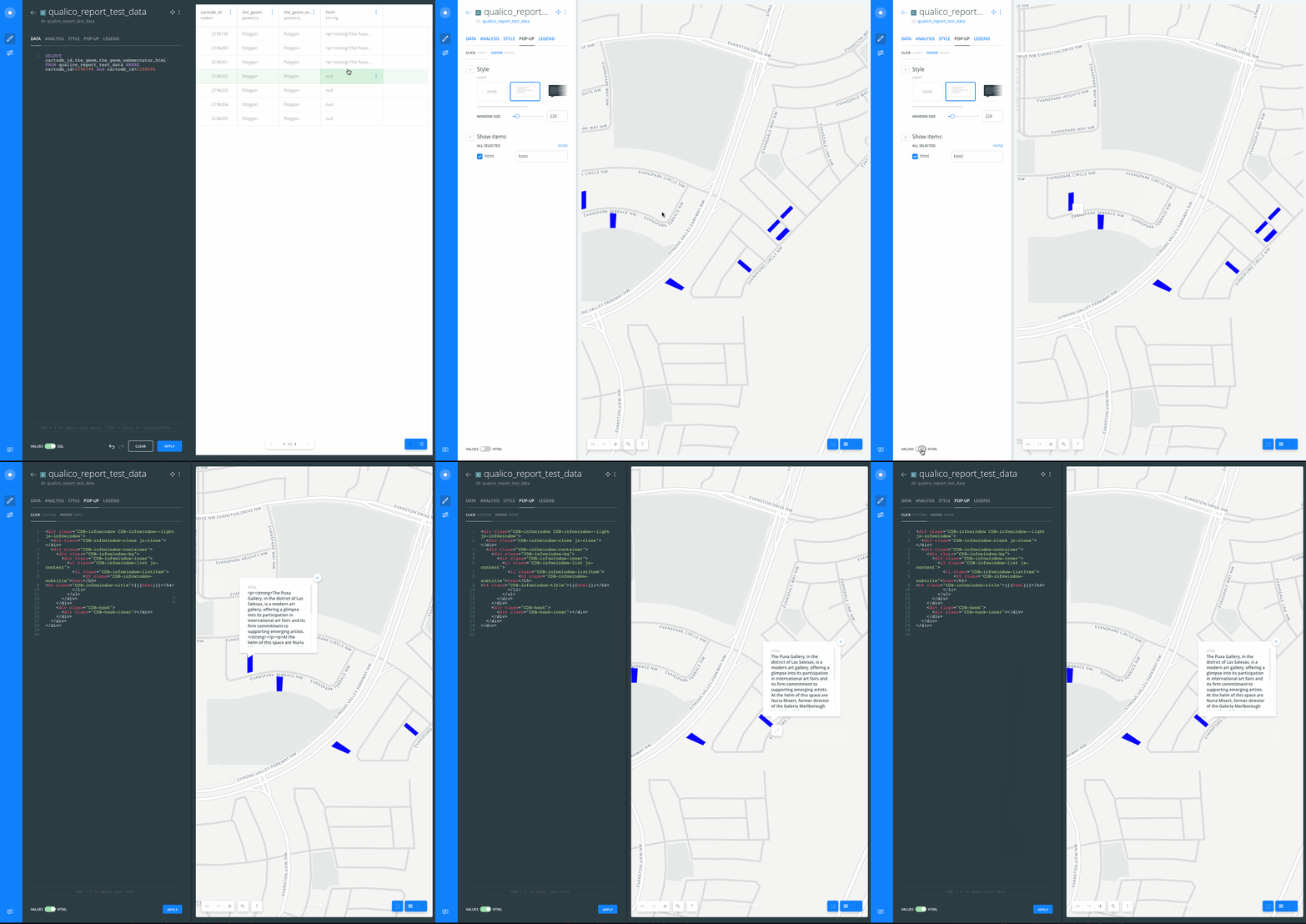
The default parsing/rendering behavior of the infowindows is overridden when user apply any change to the infowindow template using the HTML editor.
Steps to Reproduce
- Take any dataset with some string column
- Edit that string for an specific row and add HTML code to it, something like
<p><strong>The Puxa Gallery, in the district of Las Salesas, is a modern art gallery, offering a glimpse into its participation in international art fairs and its firm commitment to supporting emerging artists.</strong></p><p>At the helm of this space are Nuria Misert, former director of the Galería Marlborough Madrid, and Ángel Antonio Rodríguez, journalist and art critic. Ardent defenders of freedom from indoctrination, in favour of permanent debate, they seek to disseminate the work of new artists whilst promoting their dialogue with emblematic authors from other generations.</p>
- In a different row, set that column to
NULL - Create a map from it
- Add an infowindow to the layer, and select at least the string column above
- Check the infowindows of both features
- Go to HTML editor for the infowindow, add an space at the end and apply the changes
- Check the infowindows of both features again
Current Result
(step 8)
- The infowindow of the feature @ step 2 displays HTML tags in the linked field
- The infowindow of the feature @ step 3 displays the column title and
NULLor empty string value
Expected result
(step 6)
- The infowindow of the feature @ step 2 displays plain text, the tags have been sanitized
- The infowindow of the feature @ step 3 if the column value is null, the linked field is not displayed at all (not even the title)
Browser and version
Not relevant
.carto file
Not needed
Additional info
cc @piensaenpixel
 AbelVM
All 8 comments
Not sure if it is something already fixed or I missed any step in the path, but it is working fine IMHO, attaching GIF:
 xavijam
on 13 Jul 2017
xavijam
on 13 Jul 2017
@noguerol, two things here:
What @AbelVM mentioned was that the behavior with NULL values was different depending on the context (with current popup UI or with the "HTML editor"). So right now it is working properly now, at least the null values are displayed in both contexts, but we are in doubts if it is the best option. Should we display rows with null values within the infowindow?. IMHO, we should, because imagine if an infowindow only displays one column and that value is NULL, what should we display in the infowindow then? -> empty? 💃 .
If you check the GIF above, there is a possibility to "sanitize" the row value in the HTML editor just using the triple {}, but that's something not specified anywhere. Should we add it at the end of the editor? like the one describing CMD + S.
xavijam
on 13 Jul 2017
- OK
- OK
 noguerol
on 17 Jul 2017
noguerol
on 17 Jul 2017
Doing then the second point 💋 .
xavijam
on 17 Jul 2017
Morning!!
So, as far as I've understood (I'm a little espeso this morning):
- We keep the current behaviour
- We add a text explaining
{{{ }}}
Is that right? In case it is, what should be the text?
I've been looking and I think we don't have any tips in the application with more than 1 line, so if the text is long we will have to change that template a little bit to allow multiple lines.
 rubenmoya
on 24 Jul 2017
rubenmoya
on 24 Jul 2017
This issue has been automatically marked as stale because it has not had recent activity. It will be closed if no further activity occurs. Thank you for your contributions.
![stale[bot] picture](https://avatars.githubusercontent.com/in/1724?v=4&s=40) stale[bot]
on 26 Jul 2018
stale[bot]
on 26 Jul 2018
F*CK U STALE BOT
:trollface:
AbelVM
on 31 Jul 2018
This issue has been automatically marked as stale because it has not had recent activity. It will be closed if no further activity occurs. Thank you for your contributions.
stale[bot]
on 31 Jul 2019
Related issues
 arianaescobar
·
4Comments
arianaescobar
·
4Comments
 saleiva
·
4Comments
saleiva
·
4Comments
 makella
·
3Comments
noguerol
·
5Comments
makella
·
3Comments
noguerol
·
5Comments
 javitonino
·
5Comments
javitonino
·
5Comments