Carthage/Build/iOS remains empty when depending on Firebase binaries
I do have the feeling I am doing something stupid or missing something, but till not long ago the expected results were actually happening.
- carthage install method: [ ] .pkg, [ ] homebrew, [ ] source: Definetly not source. Cannot remember if installed from brew or pkg.
which carthage:/usr/local/bin/carthagecarthage version:0.36.0xcodebuild -version:Xcode 12.2 Build version 12B45b- Are you using
--no-build?no - Are you using
--no-use-binaries?no - Are you using
--use-submodules?no - Are you using
--cache-builds?no - Are you using
--new-resolver?no
Cartfile
binary "https://dl.google.com/dl/firebase/ios/carthage/FirebaseAnalyticsBinary.json"
binary "https://dl.google.com/dl/firebase/ios/carthage/FirebaseMessagingBinary.json"
binary "https://dl.google.com/dl/firebase/ios/carthage/FirebaseProtobufBinary.json"
Carthage Output
Executing carthage update --platform iOS I get this output
*** Downloading binary-only framework FirebaseProtobufBinary at "https://dl.google.com/dl/firebase/ios/carthage/FirebaseProtobufBinary.json"
*** Downloading binary-only framework FirebaseAnalyticsBinary at "https://dl.google.com/dl/firebase/ios/carthage/FirebaseAnalyticsBinary.json"
*** Downloading binary-only framework FirebaseMessagingBinary at "https://dl.google.com/dl/firebase/ios/carthage/FirebaseMessagingBinary.json"
*** xcodebuild output can be found in /var/folders/5b/lk58nh995vv7x4kytrj2npbw0000gq/T/carthage-xcodebuild.c9xvjs.log
*** Downloading binary-only framework FirebaseAnalyticsBinary at "https://dl.google.com/dl/firebase/ios/carthage/FirebaseAnalyticsBinary.json"
*** Downloading binary-only framework FirebaseMessagingBinary at "https://dl.google.com/dl/firebase/ios/carthage/FirebaseMessagingBinary.json"
*** Downloading binary-only framework FirebaseProtobufBinary at "https://dl.google.com/dl/firebase/ios/carthage/FirebaseProtobufBinary.json"
Actual outcome
Carthage/Build folder is empty (besides for the hidden files .FirebaseAnalyticsBinary.version, .FirebaseMessagingBinary.version and .FirebaseProtobufBinary.version
Expected outcome
Carthage should have populated the Build/iOS folder with the necessary .framework files.
 codedbypm
All 9 comments
I can't verify ATM but something is probably off with their packaging by what you describe.
Try pinning a specific version like ~> 7.0.1
 tmspzz
on 25 Nov 2020
tmspzz
on 25 Nov 2020
I can't verify ATM but something is probably off with their packaging by what you describe.
Try pinning a specific version like ~> 7.0.1
Tried that but no luck.
What kind of packaging errors do you think are happening? If you can confirm it is on their side I will open a ticket on their github.
codedbypm
on 25 Nov 2020
Have you tried pinning an older, known, working version?
tmspzz
on 25 Nov 2020
Have you tried pinning an older, known, working version?
Oh man. Your hint to frameworksInDirectory led me to the solution.
TL;DR;
The installation of Omni Graffle(!!!!) screwed up Carthage.
After I installed Omni Graffle few weeks ago, all files with extension .framework has been automatically assigned to the Omni Graffle app (see below)
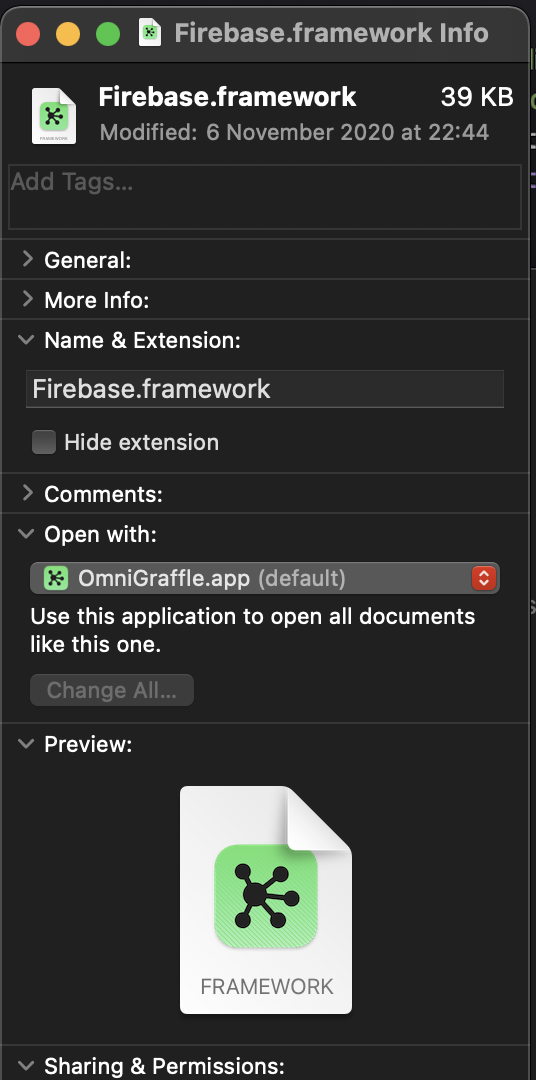
After your last reply, I checked out master and run Carthage attaching the Xcode debugger. I narrowed down more and more till I hit the method filesInDirectory. In my case, the returned signal was never emitting any value. In fact, the filter operation at line 1372 (on the master branch) always returns false to me because UTTypeConformsTo(identifier as CFString, typeIdentifier as CFString) always returns false. And you know why? Look below
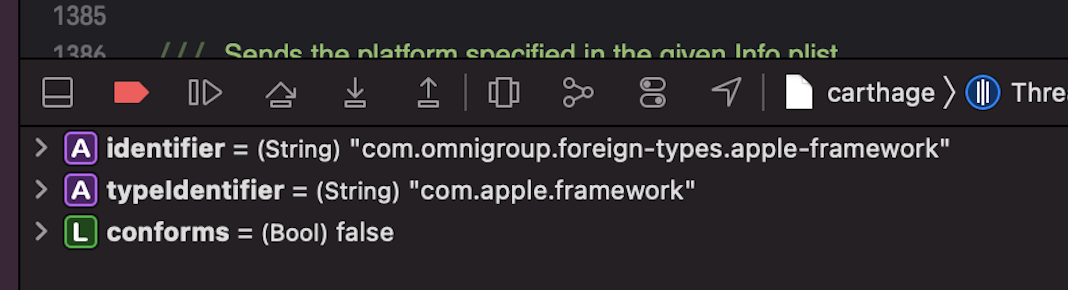
LOOOL when I saw that omni-group thingie in the type identifier a bell did actually ring!
I will now try to restore the old and proper identifier for Swift frameworks and close this ticket.
But hey, this is a big-time screwed up from the guys at the Omni Group. They took over a crucial file extension for apple developers.
Perhaps you on your side could spit out some warnings to a Carthage user? For example: if a file has the form Foo.framework but its URL identifier is not com.apple.framework then you could say "hey we think we found a Swift framework but we are not sure. Could you please check that out?"
codedbypm
on 25 Nov 2020
FYI: I restored the Uniform Type Identifier by resetting the LaunchServices database with the help of this article.
codedbypm
on 26 Nov 2020
@codedbypm does this happed by default when installing OmniGraffle? Maybe someone from there should be notified?
tmspzz
on 26 Nov 2020
@codedbypm does this happed by default when installing OmniGraffle? Maybe someone from there should be notified?
https://twitter.com/omnigraffle/status/1331738638795804673?s=21
codedbypm
on 26 Nov 2020
Thanks for letting us know! This has been fixed for the upcoming OmniGraffle 7.18.1 release, and you can grab the latest test build of that release here:
https://omnistaging.omnigroup.com/omnigraffle/
(Sorry for the trouble! We added that UTI declaration over a decade ago—before the system had declared its own UTIs for frameworks—when we switched over to the then-modern NSDocument API that required UTIs. We're definitely glad to be using the standard com.apple.framework UTI now that it exists!)
 kc-omni
on 26 Nov 2020
kc-omni
on 26 Nov 2020
Wow, thanks for working the problem @codedbypm!
I still had this problem even after updating to OmniGraffle 7.18.2, but I was able to fix it by running:
/System/Library/Frameworks/CoreServices.framework/Versions/A/Frameworks/LaunchServices.framework/Versions/A/Support/lsregister -kill -r -domain u -domain s -domain l -v -seed
 jonathanellis
on 9 Feb 2021
jonathanellis
on 9 Feb 2021
Related issues
 mdiep
·
3Comments
mdiep
·
3Comments
 faustperic
·
3Comments
faustperic
·
3Comments
 chrislconover
·
3Comments
chrislconover
·
3Comments
 abbeyjackson
·
3Comments
abbeyjackson
·
3Comments
 rogernolan
·
3Comments
rogernolan
·
3Comments
Most helpful comment
Thanks for letting us know! This has been fixed for the upcoming OmniGraffle 7.18.1 release, and you can grab the latest test build of that release here:
https://omnistaging.omnigroup.com/omnigraffle/
(Sorry for the trouble! We added that UTI declaration over a decade ago—before the system had declared its own UTIs for frameworks—when we switched over to the then-modern NSDocument API that required UTIs. We're definitely glad to be using the standard
com.apple.frameworkUTI now that it exists!)