Carthage: Errors with Invalid Bundle - The bundle at 'MNCore.framework' contains disallowed file 'Frameworks'. and many more.
carthage version: 0.27.0xcodebuild -version: Xcode 9.2 Build version 9C40b- Are you using
--no-build? No - Are you using
--no-use-binaries? No - Are you using
--use-submodules? No - Are you using
--cache-builds? No
Cartfile
github "untitledstartup/pusher-websocket-swift" "latest_release"
I am getting errors from iTunes:
Invalid Bundle - The bundle at 'Mighty Networks Staging 4.app/Frameworks/MightybellCore.framework' contains disallowed nested bundles.
Invalid Bundle - The bundle at 'Mighty Networks Staging 4.app/Frameworks/MightybellCore.framework' contains disallowed file 'Frameworks'.
Invalid Bundle - The bundle at 'Mighty Networks Staging 4.app/Frameworks/MightybellUI.framework' contains disallowed file 'Frameworks'.
Invalid Bundle - The bundle at 'Mighty Networks Staging 4.app/Frameworks/MightyControls.framework' contains disallowed file 'Frameworks'.
I tried to integrate a framework into our project and it works fine, We are running Carthage in one of our submodules in our models submodule. But when uploading to iTunes I get these errors. I tried to set the Always Embed Swift Standard Libraries flags like others suggested, also adding a run script to remove the frameworks folder before the copy frameworks step for Carthage(like in the docs) but no luck.
* Fetching pusher-websocket-swift
Checking out pusher-websocket-swift at "50aade14a6fa3aeffd693cdc650476acefe31d8d"
xcodebuild output can be found in /var/folders/2d/0rf8h8p14h3d6055x6k206_w0000gn/T/carthage-xcodebuild.fLHfZs.log
* Building scheme "PusherSwift" in PusherSwift.xcworkspace
Carthage Output
https://gist.github.com/chauvincent/0126fe6799122e6ec6b5a384addaf0cd#file-gistfile1-txt
 chauvincent
All 12 comments
It sounds like you have this:
- .app
- Frameworks
- A.framework
- Frameworks
- B.framework
You can't nest B inside of A. Instead, you need to do this:
- .app
- Frameworks
- A.framework
- B.framework
This isn't a Carthage issue.
 mdiep
on 15 Dec 2017
mdiep
on 15 Dec 2017
@mdiep Thanks for the quick response! I work with @chauvincent and am looking into this issue. We added the copy-frameworks step to our build phases (following the ReadMe), but the framework is not being moved, or stripped of the unsupported architectures (x86_64 and i386). Taking a look at the DerivedData folder it looks like the .dSYM for the framework in question got moved to the root, but the actual .framework file did not.
To test I added another step to our build phases which moves the framework file, from the nested folder to the root, and deletes the empty nested Frameworks folder. This got rid of the "Nested Framework" error, but we are still getting the "Unsupported Architectures" error. Which points to the copy-frameworks script not working.
One idea I had as a next step is to manually remove the architectures and move the framework with the script in this comment https://github.com/Carthage/Carthage/issues/188#issuecomment-66214537, which is on the original issue where copy-frameworks got created.
Any ideas on next steps or other items to check would be helpful.
Just to reiterate, here are the raw errors we are getting from ITC with just the copy-frameworks step:
ERROR ITMS-90087: "Unsupported Architectures. The executable for Mighty Networks Staging 4.app/Frameworks/PusherSwift.framework contains unsupported architectures '[x86_64, i386]'."
ERROR ITMS-90635: "Invalid Mach-O Format. The Mach-O in bundle "Mighty Networks Staging 4.app/Frameworks/PusherSwift.framework" isn’t consistent with the Mach-O in the main bundle. The main bundle Mach-O contains armv7(bitcode) and arm64(bitcode), while the nested bundle Mach-O contains X86_64ALL(machine code). Verify that all of the targets for a platform have a consistent value for the ENABLE_BITCODE build setting."
ERROR ITMS-90685: "CFBundleIdentifier Collision. There is more than one bundle with the CFBundleIdentifier value 'com.pusher.PusherSwift' under the iOS application 'Mighty Networks Staging 4.app'."
ERROR ITMS-90209: "Invalid Segment Alignment. The app binary at 'Mighty Networks Staging 4.app/Frameworks/PusherSwift.framework/PusherSwift' does not have proper segment alignment. Try rebuilding the app with the latest Xcode version."
ERROR ITMS-90205: "Invalid Bundle. The bundle at 'Mighty Networks Staging 4.app/Frameworks/MightybellCore.framework' contains disallowed nested bundles."
ERROR ITMS-90206: "Invalid Bundle. The bundle at 'Mighty Networks Staging 4.app/Frameworks/MightybellCore.framework' contains disallowed file 'Frameworks'."
ERROR ITMS-90125: "The binary is invalid. The encryption info in the LC_ENCRYPTION_INFO load command is either missing or invalid, or the binary is already encrypted. This binary does not seem to have been built with Apple's linker."
 addbrick
on 16 Dec 2017
addbrick
on 16 Dec 2017
I'm going to close this issue since there is no activity. Please feel free to follow up here anyways.
 tmspzz
on 30 Mar 2018
tmspzz
on 30 Mar 2018
I also encountered the problem 'contains disallowed nested' and 'code signature missing' because use nested dependencies.
My incorrect example:
    App
            # use copy-frameworks script for MyLib and AFNetworking
            MyLib.framework
                    # use copy-frameworks script for AFNetworking
                    AFNetworking.framework
The problem is the copy-frameworks script in MyLib.framework. It will copy AFNetworking.framework to MyLib.framework/Frameworks/ when you run carthage build in App, It will cause that app store report 'contains disallowed nested'. So I need remove the copy-frameworks script in MyLib.framework.
The finally correct example:
        App
            # use copy-frameworks script for MyLib and AFNetworking
            MyLib.framework //Linked Frameworks
                    AFNetworking.framework


    MyLibExample
            # use copy-frameworks script for AFNetworking
            MyLib.framework # Embeded Binaries
                    AFNetworking.framework
 zzdhidden
on 19 May 2018
zzdhidden
on 19 May 2018
Can confirm @zzdhidden 's conclusion
 daneov
on 15 Jun 2018
daneov
on 15 Jun 2018
It sounds like you have this:
- .app
  - Frameworks
    - A.framework
      - Frameworks
        - B.framework
You can't nest B inside of A. Instead, you need to do this:
- .app
  - Frameworks
    - A.framework
    - B.framework
This isn't a Carthage issue.
This is what worked for me, Thank you dear
 diepox
on 11 Mar 2020
diepox
on 11 Mar 2020
It sounds like you have this:
- .app
  - Frameworks
    - A.framework
      - Frameworks
        - B.framework
You can't nest B inside of A. Instead, you need to do this:
- .app
  - Frameworks
    - A.framework
    - B.framework
This isn't a Carthage issue.
This is what worked for me, Thank you dear
Hi @diepox ! How did manage to un-nest the frameworks? can you please show your frameworks hierarchy?
 lironxyz
on 16 Mar 2020
lironxyz
on 16 Mar 2020
It sounds like you have this:
- .app
  - Frameworks
    - A.framework
      - Frameworks
        - B.framework
You can't nest B inside of A. Instead, you need to do this:
- .app
  - Frameworks
    - A.framework
    - B.framework
This isn't a Carthage issue.
This is what worked for me, Thank you dear
Hi @diepox ! How did manage to un-nest the frameworks? can you please show your frameworks hierarchy?
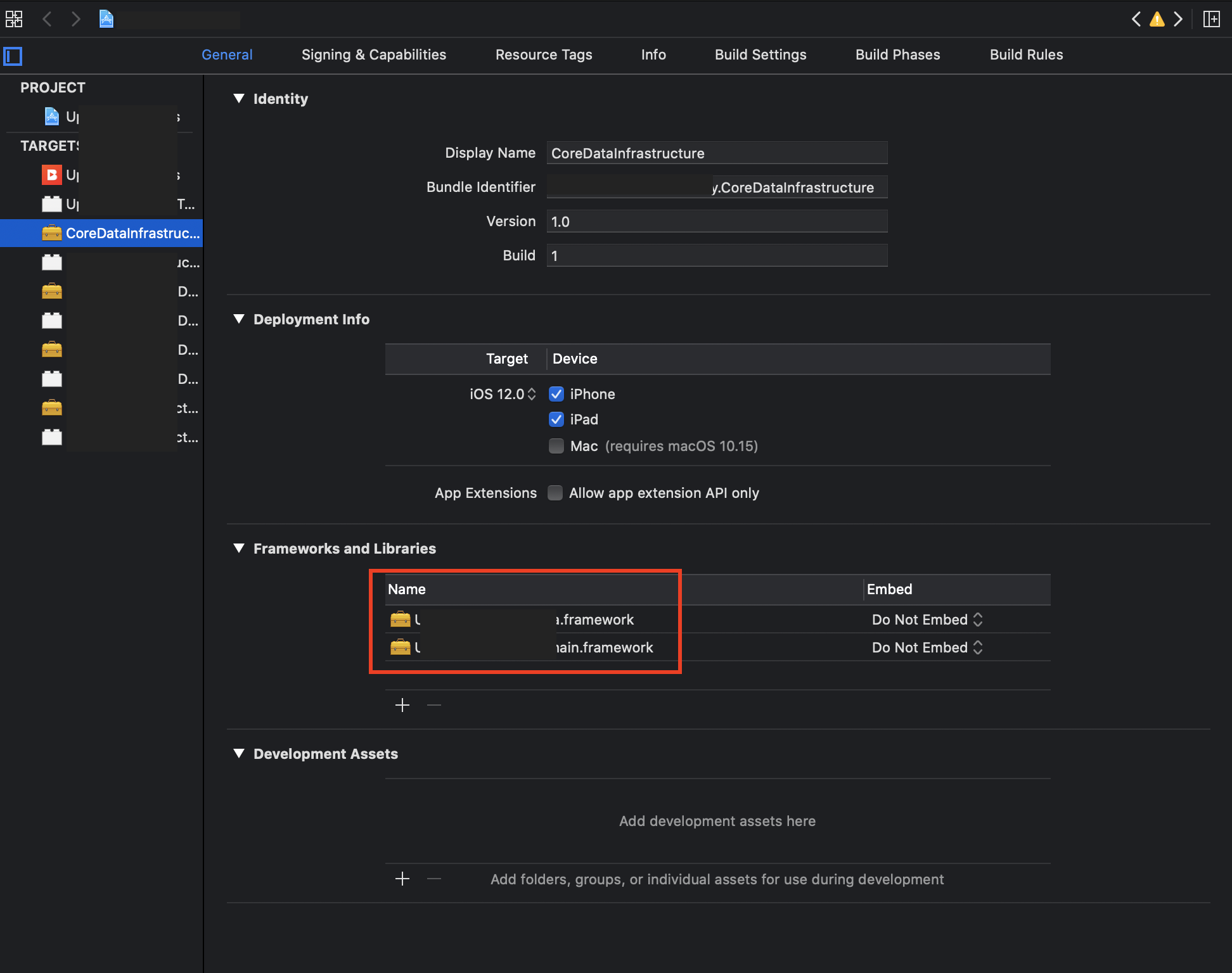
What i did is i went to each framework's general setting, and i removed those embed frameworks from there, and it work i tried my app in device and worked, and also it's fine when uploading to itunes connect.
--
diepox
on 16 Mar 2020
@diepox thank you so much for the explanation! Will try it right away
lironxyz
on 16 Mar 2020
@diepox thank you so much for the explanation! Will try it right away
You're welcome, let me know if it's working for you too ;)
diepox
on 16 Mar 2020
Hey @diepox It works! I changed Embed & Sign to Do Not Embed and the frameworks hierarchy was fixed! Thanks a lot :)
lironxyz
on 17 Mar 2020
Thank you @mdiep Its works perfectly. you save my day
 prdpsingh402
on 9 Jun 2020
prdpsingh402
on 9 Jun 2020
Related issues
 josercc
·
3Comments
josercc
·
3Comments
 3lvis
·
3Comments
3lvis
·
3Comments
 billypchan
·
3Comments
billypchan
·
3Comments
 Ogerets
·
3Comments
Ogerets
·
3Comments
 willhains
·
3Comments
willhains
·
3Comments
Most helpful comment
I also encountered the problem 'contains disallowed nested' and 'code signature missing' because use nested dependencies.
My incorrect example:
The problem is the copy-frameworks script in MyLib.framework. It will copy AFNetworking.framework to MyLib.framework/Frameworks/ when you run
carthage buildin App, It will cause that app store report 'contains disallowed nested'. So I need remove the copy-frameworks script in MyLib.framework.The finally correct example: