Carthage: Excessive memory consumption performing carthage update --no-build --no-checkout
carthage version: 0.25.0xcodebuild -version: Xcode 9.0, Build version 9A235- Are you using
--no-build? yes - Are you using
--no-use-binaries? yes - Are you using
--use-submodules? no - Are you using
--cache-builds? no
Cartfile
github "kingfai/carthage_test_assets.git" "3.0.0"
github "kingfai/carthage_test_autheng.git" "4.0.3"
github "kingfai/carthage_test_loginkit.git" "5.0.3"

github "kingfai/carthage_test_thekit" "5.0.0"
Carthage Output
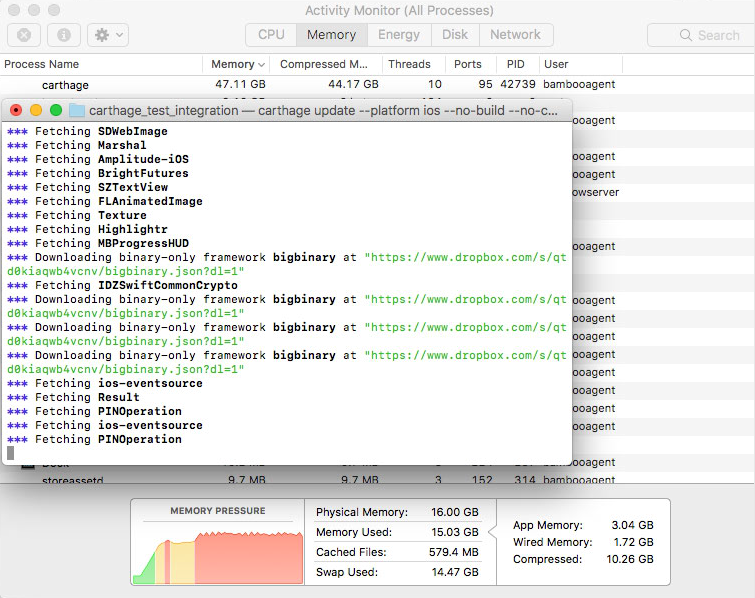
*** Fetching carthage_test_thekit
*** Fetching XCGLogger
*** Cloning UICKeyChainStore
*** Fetching Alamofire
*** Fetching carthage_test_autheng
*** Fetching Locksmith
*** Fetching RxSwift
*** Fetching ios-client
*** Fetching SDWebImage
*** Fetching Marshal
*** Fetching Amplitude-iOS
*** Fetching BrightFutures
*** Fetching SZTextView
*** Fetching FLAnimatedImage
*** Fetching Texture
*** Fetching Highlightr
*** Fetching MBProgressHUD
*** Downloading binary-only framework bigbinary at "https://www.dropbox.com/s/qtd0kiaqwb4vcnv/bigbinary.json?dl=1"
*** Fetching IDZSwiftCommonCrypto
*** Downloading binary-only framework bigbinary at "https://www.dropbox.com/s/qtd0kiaqwb4vcnv/bigbinary.json?dl=1"
*** Downloading binary-only framework bigbinary at "https://www.dropbox.com/s/qtd0kiaqwb4vcnv/bigbinary.json?dl=1"
*** Downloading binary-only framework bigbinary at "https://www.dropbox.com/s/qtd0kiaqwb4vcnv/bigbinary.json?dl=1"
*** Fetching ios-eventsource
*** Fetching Result
*** Fetching PINOperation
*** Fetching ios-eventsource
*** Fetching PINOperation
We have a project which includes a large binary, PSPDFKit in one of the Cartfiles, which consumes an excess of 50GB of memory when running
carthage update --platform ios --no-build --no-checkout --no-use-binaries
Sometimes the update finishes, often times, it fails running out of memory or is killed by the Mac OS kernel.
One important note: The excess memory consumption is only reproducible on Macs with two cores such as a Mac Mini or a VM set to only have 2 cores. On our 4 core MacBook Pros, the memory consumption is still high, but not fatal.
In my sample Cartfiles, with the root Cartfile pasted above, I have replaced PSDPFFKit with an arbitrary binary that is around the same size: ~100MB.
We see the update task fetch the binary at least 4 times in the logs.
 kingfai
All 13 comments
I was able to narrow the problem down a bit. I can still reproduce the memory leak after commenting out the bigbinary:
https://github.com/kingfai/carthage_test_thekit/commit/f0091e34c4ce580f1bc9d7dbad9a0ad46a576280
$ carthage update --no-use-binaries --no-checkout --no-build --platform ios
*** Cloning carthage_test_loginkit
*** Cloning carthage_test_assets
*** Cloning carthage_test_autheng
*** Cloning carthage_test_thekit
*** Cloning NYTPhotoViewer
*** Cloning Focus
*** Cloning onepassword-extension
*** Cloning XCGLogger
*** Cloning Locksmith
*** Cloning Alamofire
*** Cloning RxSwift
*** Cloning ios-client
*** Cloning SDWebImage
*** Cloning Marshal
*** Cloning Amplitude-iOS
*** Cloning BrightFutures
*** Cloning SZTextView
*** Cloning FLAnimatedImage
*** Cloning Texture
*** Cloning Highlightr
*** Cloning MBProgressHUD
*** Cloning IDZSwiftCommonCrypto
*** Cloning UICKeyChainStore
*** Cloning PINRemoteImage
*** Cloning PINCache
*** Cloning libwebp
*** Cloning ios-eventsource
*** Cloning Result
*** Cloning PINOperation
Killed: 9
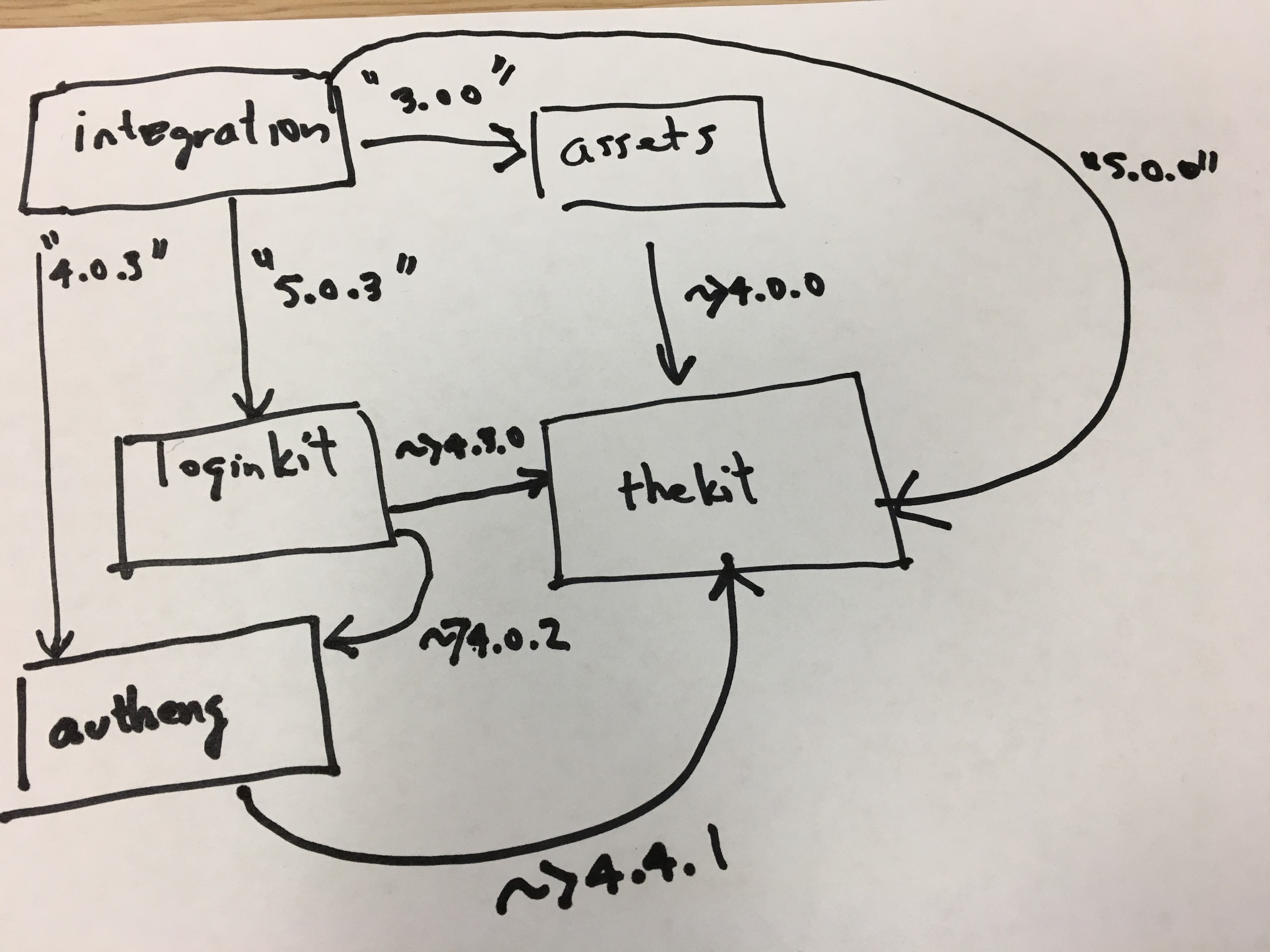
Here's the relationship between the Cartfiles which I think has something do to with the issue.
kingfai
on 6 Oct 2017
thanks for delving deeper (great diagram) and updating the issue (especially the retitle, super appreciated and helpful) 👏
 jdhealy
on 7 Oct 2017
jdhealy
on 7 Oct 2017
I'm having this same issue. I'm running a MacBook Pro 2016 with 16GB RAM and a quad core. I'm not experiencing issues with it being killed by the system, just yet. But whenever I run carthage it uses so much memory and becomes so slow that it takes about half a workday to perform the operation which is 3-4 hours of wasted time.
Just for claritys sake I'm running XCode 9, macOS 10.13 and carthage 0.25.0.
 petaren
on 7 Oct 2017
petaren
on 7 Oct 2017
Same problem here, XCode 9, macOS 10.13 and carthage 0.25.0
My iMac has only 8GB of RAM: I start a carthage update, kills it when it reaches 6GB of memory used and start again until its done. Otherwise it's completely stuck and I have to reboot my computer.
I don't have such problem when I run a carthage bootstrap
 guillaume-laures
on 10 Oct 2017
guillaume-laures
on 10 Oct 2017
0.26 Seems to fix the problem 👍
guillaume-laures
on 11 Oct 2017
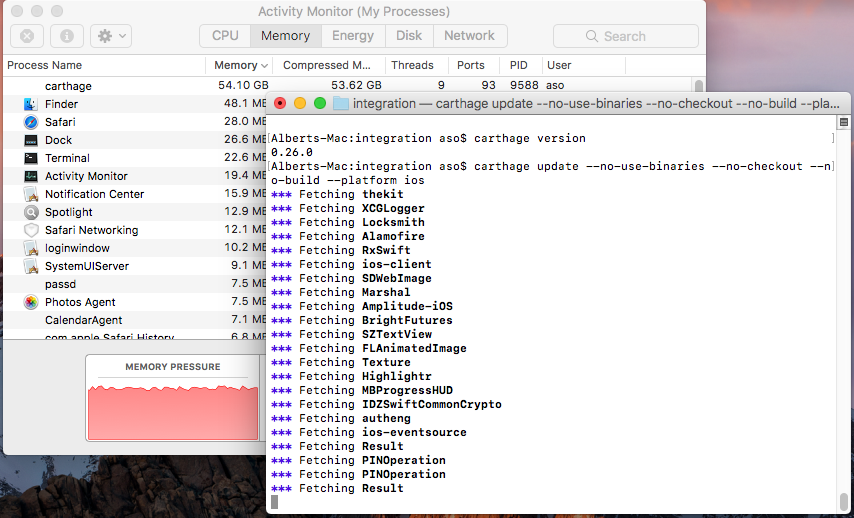
Unfortunately, I'm still seeing the problem with 0.26.0.
kingfai
on 11 Oct 2017
The problem is back for me with 0.26.2 😟
guillaume-laures
on 16 Oct 2017
same problem here with carthage 0.26.2
 mateo666
on 18 Oct 2017
mateo666
on 18 Oct 2017
I'm having the same issue with 0.26.2.
 tkvindi
on 25 Oct 2017
tkvindi
on 25 Oct 2017
Same problem with 0.26.2
github "akashivskyy/GoogleAnalytics-Framework"
github "SnapKit/SnapKit" ~> 4.0.0
github "onevcat/Kingfisher" == 3.13.1
github "vikmeup/SCLAlertView-Swift" "master"github "ReactiveX/RxSwift" ~> 3.0
github "Moya/Moya"
github "sunshinejr/Moya-ModelMapper"github "realm/realm-cocoa"
github "RxSwiftCommunity/RxRealm"
 sadiq81
on 26 Oct 2017
sadiq81
on 26 Oct 2017
same problem with xcode 9.0 and carthage 0.26.2
 yasuradodo
on 31 Oct 2017
yasuradodo
on 31 Oct 2017
Carthage 0.26.2, high sierra, Xcode 9.1 ate 64GB RAM during a full build. Didn’t finish because it consumed the entire battery in the process.
Did
Carthage update —platform iOS —cache-builds
 amccarri
on 14 Nov 2017
amccarri
on 14 Nov 2017
Related issues
 hamchapman
·
3Comments
hamchapman
·
3Comments
 yonaskolb
·
3Comments
yonaskolb
·
3Comments
 faustperic
·
3Comments
faustperic
·
3Comments
 shift00
·
3Comments
shift00
·
3Comments
 jdecarlo
·
3Comments
jdecarlo
·
3Comments