Carthage build failed with `Xcode 9 beta 6`
carthage version: 0.24.0xcodebuild -version: 9.0 (9M214v)- Are you using
--no-build? No - Are you using
--no-use-binaries? No - Are you using
--use-submodules? No - Are you using
--cache-builds? No
Cartfile
# vim: filetype=ruby

github "omise/omise-swift" ~> 0.8.0
github "ReactiveX/RxSwift" ~> 3.0.0
github "mixpanel/mixpanel-swift" ~> 2.0
github "couchbase/couchbase-lite-ios" "master"
github "DaveWoodCom/XCGLogger" "swift_3.0"
github "RxSwiftCommunity/RxDataSources" ~> 1.0.0
github "kishikawakatsumi/KeychainAccess"
github "AgileBits/onepassword-extension" "add-framework-support"
Carthage Output
Failed to write to /Users/pitiphong.p/Work/omise-dashboard-ios/Carthage/Build/iOS/Omise.framework: Error Domain=NSCocoaErrorDomain Code=260 "The file “Omise.framework” couldn’t be opened because there is no such file." UserInfo={NSURL=file:///Users/pitiphong.p/Library/Caches/org.carthage.CarthageKit/DerivedData/omise-swift/v0.8.0/Build/Products/Debug-iphoneos/Omise.framework, NSFilePath=/Users/pitiphong.p/Library/Caches/org.carthage.CarthageKit/DerivedData/omise-swift/v0.8.0/Build/Products/Debug-iphoneos/Omise.framework, NSUnderlyingError=0x7feac4734400 {Error Domain=NSPOSIXErrorDomain Code=2 "No such file or directory"}}
I found that Carthage try to build for Debug-iphoneos first and then Debug-iphonesimulator. The problem I found is that after the iPhoneOS one is finished and Carthage is about to build for the simulator, Omise.framework in Debug-iphoneos is disappeared.
Please note that when I switch Xcode to version 8.3.3, building is success. And IIRC, Xcode 9 beta 5 also works just fine without this issue
Here's the command
carthage build --platform iOS omise-swift --configuration Debug
 pitiphong-p
All 12 comments
Hmmm, this sounds like a reappearance of #2026 but that should be fixed in version 0.24 (#2053). Although these changes have been superceded in the master branch by completely removing the clean, since we separate derived data by dependency & xcode version.
Can you try with the latest master and see if it still reproduces?
 BobElDevil
on 22 Aug 2017
BobElDevil
on 22 Aug 2017
It was using the new build system (by setting in the WorkSpaceSetting.xcsettings) then I change it back to the old one but this issue still persisted.
I'll try with the latest master tomorrow (here at Bangkok is almost midnight now). But could you give me a guide on how to test with the latest master?
pitiphong-p
on 22 Aug 2017
Sure, you can follow the instructions here. The make commands listed should get a copy installed from whatever code is in your repo
BobElDevil
on 22 Aug 2017
I just try it and the issue still persist
pitiphong-p
on 22 Aug 2017
Same error here
 fnazarios
on 22 Aug 2017
fnazarios
on 22 Aug 2017
On logs, when I run with --verbose, compilations works, and after, this error happen
** BUILD SUCCEEDED **

Failed to write to /Users/fernando.souza/Projects/fnazarios/zazcar-ios/Carthage/Build/iOS/ZazKit.framework: Error Domain=NSCocoaErrorDomain Code=260 "The file “ZazKit.framework” couldn’t be opened because there is no such file." UserInfo={NSURL=file:///Users/fernando.souza/Library/Caches/org.carthage.CarthageKit/DerivedData/zazkit-ios/retryWhen/Build/Products/Release-iphoneos/ZazKit.framework, NSFilePath=/Users/fernando.souza/Library/Caches/org.carthage.CarthageKit/DerivedData/zazkit-ios/retryWhen/Build/Products/Release-iphoneos/ZazKit.framework, NSUnderlyingError=0x7f8dfff25dc0 {Error Domain=NSPOSIXErrorDomain Code=2 "No such file or directory"}}
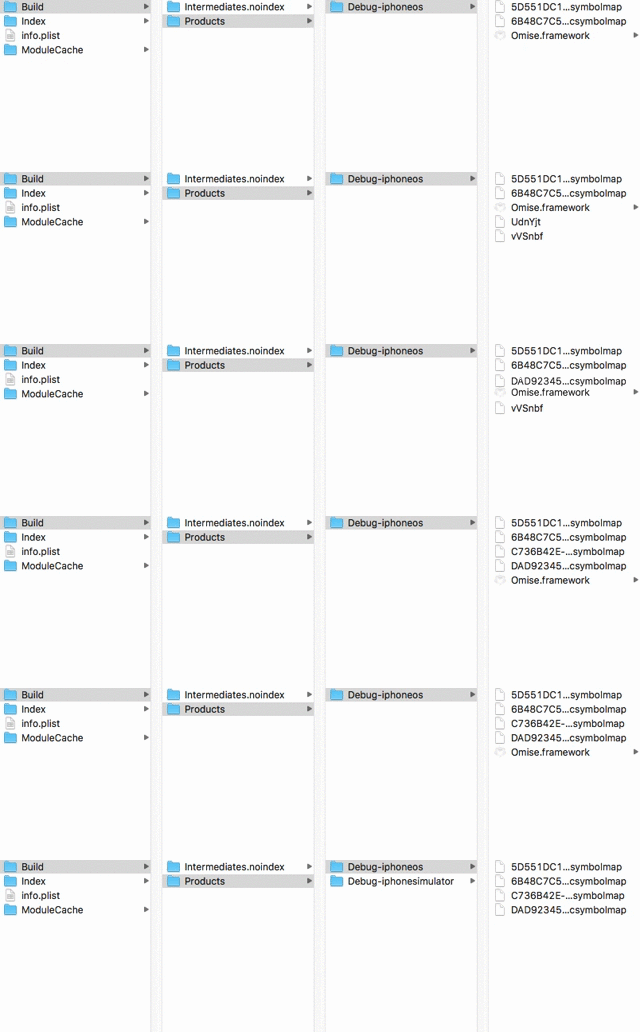
This is a screen recording when Carthage was running
pitiphong-p
on 23 Aug 2017
I'm experiencing the same exact error with Xcode 9 beta 6 when building iOS frameworks. Disabling the new build system for those dependencies resolved it for me.
 zachwaugh
on 25 Aug 2017
zachwaugh
on 25 Aug 2017
@zachwaugh I thought it was because the new build system too. I accidentally committed the WorkSpaceSettings.xcsettings into the new tag and ran carthage update then I realized that and pushed a new commit that untracked that file out and try again. The result was the same.
However, your comment made me realized that maybe git didn't clear the untracked file for me so I deleted the folder of that repo and try again and it works!!!
So Thank you, @zachwaugh :D
pitiphong-p
on 25 Aug 2017
Ok, then this is definitely a re-appearance of #2026 in some other variant. We aren't cleaning anymore so I don't know why the build product would even be disappearing this time. Hopefully I'll get some time to look into it next week.
If someone else wants to dive into it, the previous issue before was that the new build system 'clean' deletes a much larger chunk of the derived data, so when we attempt to merge the device and simulator architectures, we can't find the device framework because it got deleted. In the current master, we don't clean at all, but maybe something else the new build system is doing (maybe just moving the built product?) must be getting in the way of our merging of the frameworks
BobElDevil
on 25 Aug 2017
This is still an issue with Xcode 9 GM and Carthage 0.25.
 mbuchetics
on 14 Sep 2017
mbuchetics
on 14 Sep 2017
Yeah definitely the issue is the New Build System @mbuchetics I was able to fix it using the Standard Build System using Xcode 9 and Carthage 0.25
 Vkt0r
on 21 Sep 2017
Vkt0r
on 21 Sep 2017
Related issues
 pmhood
·
3Comments
pmhood
·
3Comments
 willhains
·
3Comments
willhains
·
3Comments
 justinmakaila
·
4Comments
justinmakaila
·
4Comments
 3lvis
·
3Comments
3lvis
·
3Comments
 shift00
·
3Comments
shift00
·
3Comments