Hi all,
I recently ran into an issue and the solution turned out to be somewhat google resistant. This github issue will serve two purposes:
- Document the problem and solution in a place where google will index it
- Ask if the community wants to document things like this in a Documentation/Gotchas.md file (or perhaps a closed but googleable github issue is sufficient for the solution to become known)
The problem is that unit tests don't work (the tests "fail" but Xcode didn't actually run them at all) in an iOS framework which includes another iOS framework (pulled in via Carthage).
I'll illustrate this with a more concrete example.
I've created an iOS Cocoa Touch Framework named FrameworkA.

FrameworkA's implementation is trivial:

FrameworkA has a trivial unit test which passes:

We then create FrameworkB, which uses FrameworkA.

FrameworkB's Cartfile looks like this:
git "../FrameworkA" "master"
We configure FrameworkB's Framework Search Paths to include the appropriate carthage build folder:

FrameworkB builds successfully.
We add a trivial unit test to FrameworkB:

However, when we run the unit tests, Xcode claims they failed. Examining the Report Navigator, we see that _no tests were actually run_, and we see this in the Logs tab:
Test target FrameworkBTests encountered an error (Early unexpected exit, operation never finished bootstrapping - no restart will be attempted)

Looking at the console, we see more specific errors about the dynamic linker failing to load FrameworkA:
2015-12-17 17:24:46.373 xctest[6701:5666799] The bundle “FrameworkBTests” couldn’t be loaded because it is damaged or missing necessary resources. Try reinstalling the bundle.
2015-12-17 17:24:46.390 xctest[6701:5666799] (dlopen_preflight(/Users/jpepas/Library/Developer/Xcode/DerivedData/FrameworkB-dooxtpkyrktrlxfqloozouhmeqoz/Build/Products/Debug-iphonesimulator/FrameworkBTests.xctest/FrameworkBTests): Library not loaded: @rpath/FrameworkA.framework/FrameworkA
Referenced from: /Users/jpepas/Library/Developer/Xcode/DerivedData/FrameworkB-dooxtpkyrktrlxfqloozouhmeqoz/Build/Products/Debug-iphonesimulator/FrameworkBTests.xctest/FrameworkBTests
Reason: image not found)
Program ended with exit code: 82

The solution is to add the carthage build directory to the Runpath Search Paths build setting on the unit test target.

Now the unit tests run.

 cellularmitosis
All 9 comments
The related section is in README:
Adding frameworks to unit tests or a framework
Using Carthage for the dependencies of any arbitrary target is fairly similar to using Carthage for an application. The main difference lies in how the frameworks are actually set up and linked in Xcode.
Because non-application targets are missing the “Embedded Binaries” section in their build settings, you must instead drag the [built frameworks][Carthage/Build] to the “Link Binaries With Libraries” build phase.
In rare cases, you may want to also copy each dependency into the build product (e.g., to embed dependencies within the outer framework, or make sure dependencies are present in a test bundle). To do this, create a new “Copy Files” build phase with the “Frameworks” destination, then add the framework reference there as well.
 ikesyo
on 18 Dec 2015
ikesyo
on 18 Dec 2015
Ah! I totally missed that. Thanks!
cellularmitosis
on 18 Dec 2015
No problem! :grin:
ikesyo
on 18 Dec 2015
Here is my note on this https://github.com/onmyway133/TestTarget
This contains demo with Cocoapods and Carthage as well
@cellularmitosis @mdiep Do you have any idea why configuring runpath works?
 onmyway133
on 2 Apr 2016
onmyway133
on 2 Apr 2016
Runpath Search Paths
- Go to Test target Build Settings
- Add
$(FRAMEWORK_SEARCH_PATHS)
Are you asking about this, @onmyway133?
That's not a good idea. It'll work on your machine, but the built application won't work on other machines (or on your machine if you delete the checkout).
If you're asking something else, you'll need to be more specific. I'd suggest opening a new issue.
 mdiep
on 2 Apr 2016
mdiep
on 2 Apr 2016
@mdiep yeah, I'm asking about that runpath configuration.
After configuring the runpath like that, I could be able to run test on the iOS device. But that is for test target only. Application target is OK. Not sure about Mac OSX
onmyway133
on 2 Apr 2016
@cellularmitosis Thank you so much for filing this issue to document both the problem and how to fix it!
I've been trying to solve this exact problem for about an hour and now it's fixed by using your solution 🎉
 peterjenkins
on 28 Nov 2016
peterjenkins
on 28 Nov 2016
my tests are working again ahhhh thank you @cellularmitosis 🎉
 Ronaldoh1
on 12 Nov 2017
Ronaldoh1
on 12 Nov 2017
I have the exact same issue as the OP, but the suggested solution somehow isn't working.
my Carthage directory is one level above where the xcodeproj is, so I added:
$(PROJECT_DIR)../Carthage/Build/iOS
and just in case, to be safe, also:
$(PROJECT_DIR)/Carthage/Build/iOS
My Build Phases tab looks like this:
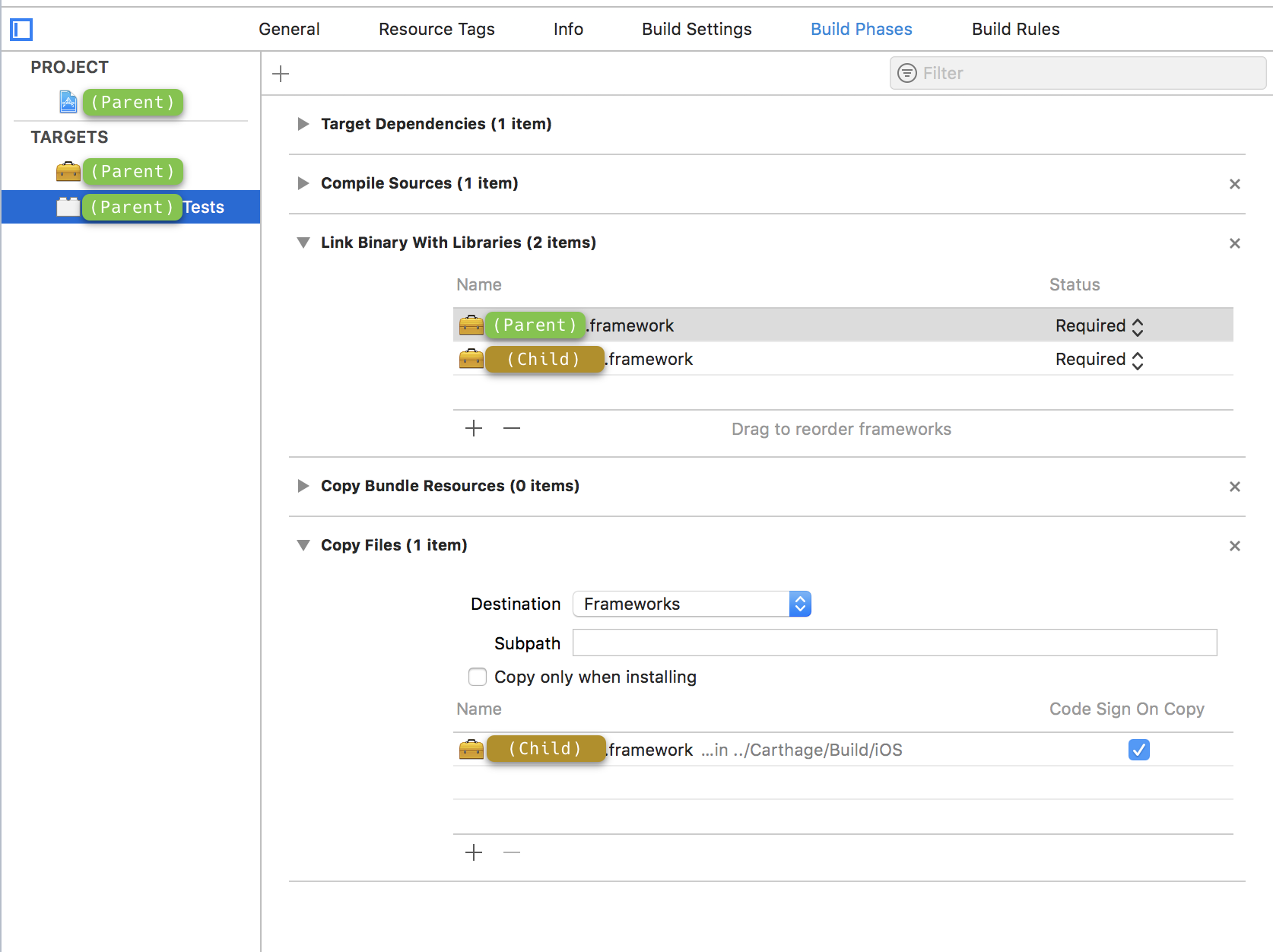
Well, I deleted the test target and started from scratch, and it's working now.
I added $(PROJECT_DIR)/../Carthage/Build/iOS instead of $(PROJECT_DIR)/Carthage/Build/iOS because the repository of my outermost framework has the framework project one level deeper (to make room for a separate, demo app project and a workspace encompassing both). This makes perfect sense.
But I am still confused: I didn't need to add a "Copy Files" build phase to my test target. Indeed, the test target isn't even listing the innermost framework under "Target Dependencies" or "Link Binary with Libraries" (only the outermost framework being tested is listed)
I was under the assumption that the test target needed to be linked directly to both frameworks, the same that an app using the outermost framework still needs to link directly to both (even though it does not reference symbols in the innermost framework directly) so that its code is available at runtime.
Perhaps I will run into trouble once my tests go beyond trivial and actually call code on the outermost framework that in turn depends on the innermost one? , nope tested that too right now and it seems to work.
 nicolas-miari
on 14 May 2018
nicolas-miari
on 14 May 2018
Related issues
 faustperic
·
3Comments
faustperic
·
3Comments
 justinmakaila
·
4Comments
justinmakaila
·
4Comments
 pmhood
·
3Comments
pmhood
·
3Comments
 abbeyjackson
·
3Comments
abbeyjackson
·
3Comments
 yonaskolb
·
3Comments
yonaskolb
·
3Comments
Most helpful comment
Are you asking about this, @onmyway133?
That's not a good idea. It'll work on your machine, but the built application won't work on other machines (or on your machine if you delete the checkout).
If you're asking something else, you'll need to be more specific. I'd suggest opening a new issue.