Carla: synchronous mode API question
Looking at the 0.9.5 version of the synchromous_mode.py example, at line 119,120, and 121 there are:
clock.tick()
world.tick()
ts = world.wait_for_tick()
In order to put Carla in synchronous mode are these three calls all needed?
Btw, Carla document is great in giving an introduction but it will probably help a lot to have a more detail description in https://carla.readthedocs.io/en/latest/python_api/.
Thanks.
 mango009
All 6 comments
Hi @mango009,
Yes, we're currently working in documenting each function in Python API.
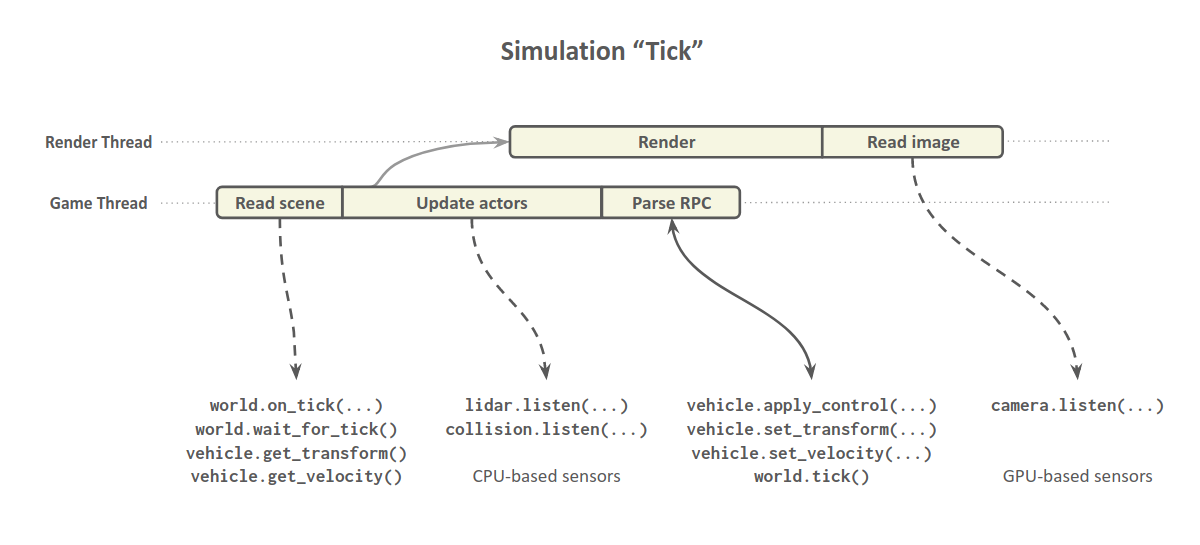
clock.tick()this is a pygame function, I believe it's only used to count the FPS.world.tick()makes the simulator advance to the next tick (only has effect in sync mode).world.wait_for_tick()waits until a new tick from the simulator is received.
This picture may help understanding when ticks are produced
 nsubiron
on 25 Apr 2019
nsubiron
on 25 Apr 2019
Awesome! Thanks a lot.
mango009
on 26 Apr 2019
@nsubiron world.wait_for_tick() never receives a new tick from the server and gets stuck in the loop forever. Are there any reasons for this in spite of following all the steps correctly? Is there any other easy implementation other than synchromous_mode.py in which we can send control and receive the sensor data in synchronous mode?
 pranavAL
on 24 Aug 2019
pranavAL
on 24 Aug 2019
wait_for_tick() should not be used in synchronous mode, this issue is outdated. The tick function now does the wait_for_tick for you, thus waiting a second time results in a dead-lock. Basically, both functions were merged so we "atomically" advance one step avoiding race conditions between client and server. We didn't get rid of wait_for_tick because is still useful for other cases, but I admit is quite confusing.
nsubiron
on 24 Aug 2019
How do I get to know how much simulation time is there between each tick? And how can i set/change that?
 Harsharma2308
on 17 Mar 2020
Harsharma2308
on 17 Mar 2020
@Harsharma2308 Not sure this issue is the place to ask a question about the API, but I stumbled across it so here you go : )
How do I get to know how much simulation time is there between each tick?
Via the timestamp object in the world snapshot. E.g., (silly example but it illustrates the point):
t_prev = world.get_snapshot().timestamp.elapsed_seconds
world.tick()
t_curr = world.get_snapshot().timestamp.elapsed_seconds
t_between_ticks = t_curr - t_prev
And how can i set/change that?
In syncrhonous mode, you directly set this value in the world settings.
settings = world.get_settings()
settings.synchronous_mode = True
settings.fixed_delta_seconds = 0.05      # same as fps=20
world.apply_settings(settings)
 davebiagioni
on 10 May 2020
davebiagioni
on 10 May 2020
Related issues
 kartikye
·
3Comments
kartikye
·
3Comments
 rowanmcallister
·
3Comments
rowanmcallister
·
3Comments
 phzeller
·
3Comments
phzeller
·
3Comments
 mhusseinsh
·
3Comments
mhusseinsh
·
3Comments
 chankim
·
3Comments
chankim
·
3Comments