Carla: use of generate_waypoint() method
Hi,
I just wanted to know what is the use of generate_waypoint(distance) method in carla API?
it says, it will generate waypoints all over the map at a particular distance?
For example if i give:
........
world = client.get_world()
map = world.get_map()
map_waypoints = map.generate_waypoints(0.1) -------------------------(1)
..........
waypoint = map.get_waypoint(ego.get_location()) ------------------------(2)
.......
1) Will this generate waypoints for every 0.1m in the entire map?
2) based on (1) , will it get a waypoint that is very close at 0.1m apart.
For the above questions, MY understanding is that Map already has a set of waypoints at a predefined distance. They basically refer to center points of each Lane.
I just clearly want to understand the use of generate_waypoint(distance) method
 aravindSwamy94
All 6 comments
Hi @aravindSwamy94,
Waypoints are generated on demand, the Map does not have any waypoint stored.
- (1) Generates waypoints all over the map at approximately 0.1 meters distance between them.
- (2) Generates a waypoint at the center of a lane closest to the location provided.
There is also get_topology(), that generates pairs of waypoints defining the topology of the map, i.e. for each lane on each road segment generates a pair of waypoints, first for "this" lane, and second for the successor lane on the next road segment. It is useful for planning routes, the output can be fed to libraries like networkx.
 nsubiron
on 25 Feb 2019
nsubiron
on 25 Feb 2019
@aravindSwamy94 its always useful to visualize things. When I first used the map.generate_waypoints(), I used it as:
waypoint_list = map.generate_waypoints(2.0)
# function to extract transform values from the waypoints
transform_list = extract_transforms(waypoint_list)
# function to plot the positions in the transforms.
plot_waypoints(transform_list)
The result was something like this. (its quite self explanatory)
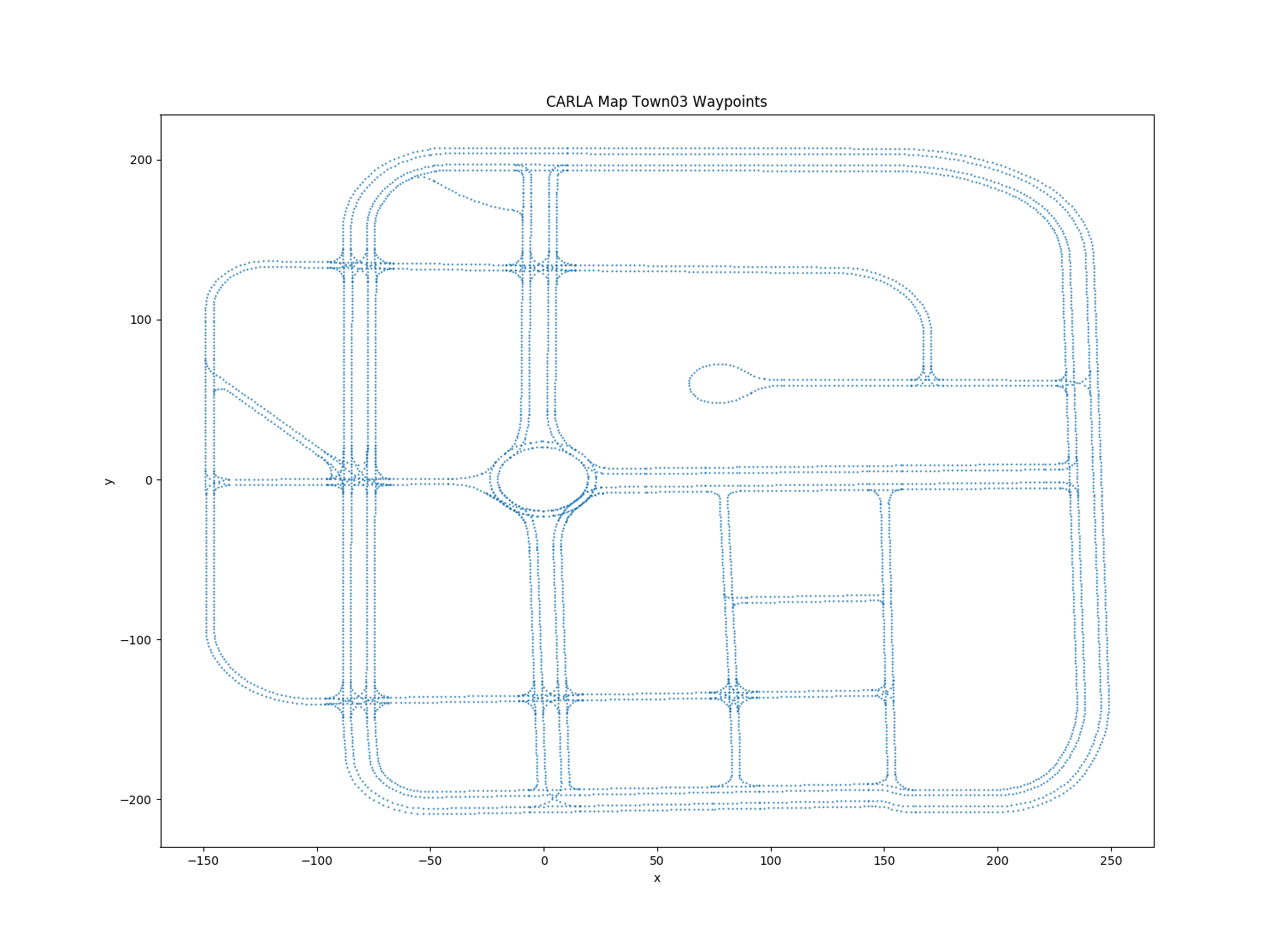
Also #992 might prove to be useful to you.
 YashBansod
on 26 Feb 2019
YashBansod
on 26 Feb 2019
@YashBansod and @nsubiron : Thanks for your input. Really helped me
aravindSwamy94
on 26 Feb 2019
Hi @YashBansod , could you please specify where to use the code you mentioned?
 anna-srl
on 28 Apr 2020
anna-srl
on 28 Apr 2020
@anna-srl you have a documented example here.
 marcgpuig
on 28 Apr 2020
marcgpuig
on 28 Apr 2020
@marcgpuig Many thanks!
anna-srl
on 28 Apr 2020
Related issues
 qixiaoshuai0120
·
3Comments
qixiaoshuai0120
·
3Comments
 tgrel
·
3Comments
tgrel
·
3Comments
 rowanmcallister
·
3Comments
rowanmcallister
·
3Comments
 jinfagang
·
3Comments
jinfagang
·
3Comments
 chankim
·
3Comments
chankim
·
3Comments
Most helpful comment
@aravindSwamy94 its always useful to visualize things. When I first used the
map.generate_waypoints(), I used it as:The result was something like this. (its quite self explanatory)

Also #992 might prove to be useful to you.