Carla: Feature Request: Bulk Client Requests to the Simulation Server
The issue mentioned in #1258 and the asynchronous nature of the server-client interaction in CARLA, opens up some possibilities of some undesirable events.
Lets say you want to know the transform, velocity, acceleration and control of the player on the client side. You implement the following routines in your client:
transform = self._player.get_transform()
accel = self._player.get_acceleration()
vel = self._player.get_velocity()
ctrl = self._player.get_control()
There exists a possibility, howsoever infinitesimal that the world is updated between execution of these routines (say after acceleration is parsed but before velocity is parse). This causes a lot of problems even in data collection (which I think is the key point in using a simulator).
To alleviate these problems, I have 2 possible feature requests:
- Similar to the issue #784, an interface of sorts can provided where we pass a dictionary / list of function_handles to be executed by the simulator. This could also greatly reduce the number of calls the client needs to make to the server. The prototype could be something like:
input_dict = {"transform": self._player.get_transform, "accel": self._player.get_acceleration, "vel": self._player.get_velocity, ...}
output_dict = get_data(input_dict)
transform = output_dict["transfrom"]
accel = output_dict["accel"]
...
- Similar to the issue #1244, a method to pause / resume the simulation cycle. The whole communication can still run asynchronously for optimal performance, however, just a call can be implemented to the server to pause / resume the simulation cycle. The prototype could be something like:
world.pause_simulation()
transform = self._player.get_transform()
accel = self._player.get_acceleration()
...
world.resume_simulation()
I understand that these features may be quite complicated to implement. I may even be completely ignorant about the complications caused by such an approach. But, I think that having such routines would greatly increase the usability of the simulator.
 YashBansod
All 11 comments
Hi @YashBansod,
Thanks for the observations! Indeed what you're describing is something not so unlikely to happen.
I'll add some more comments on how this works internally since our docs are not very clear.
The simulator has a "world observer" sensor that read the state (transforms, velocities, etc.) of each actor at the beginning of each frame and broadcasts the data to every client connected. Each client subscribes to the world observer sensor by adding a callback (just as any other sensor). Each time this callback is executed we call it "world tick". (The functions world.wait_for_tick() and world.on_tick(...) refer to this world tick).
Now, when we want to retrieve an actor's transform, it's orders of magnitude faster if we fetch the transform received in the last world tick instead of calling the simulator and awaiting response. So this is precisely what we do, internally, every actor has a reference to some internal "episode" class, the episode class contains a pointer to an "episode state". The episode state consists of the bulk of actor dynamic states (transforms, velocities, etc.) at a given frame. This episode state is created from the data sent by the world observer in the world tick. And, to avoid locking, we simply update the pointer to point to the newly created episode state each world tick.
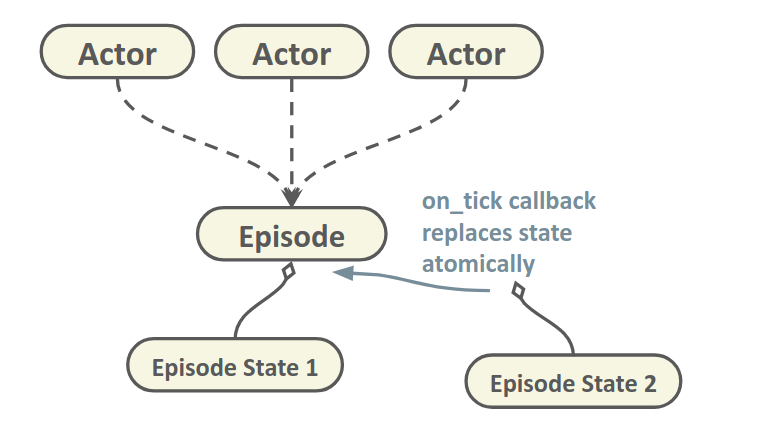
This is very fast, however it only guarantees that when you fetch the episode state, you're going to get an episode state, but not which episode state. Thus, any time in the middle of your calculations the episode state might update in the background and your transform changes. This is fine for a lot of applications, but sometimes you may want to know the exact transform of your actor at a given frame. This is an issue we are aware of, but we haven't implemented a fix yet.
With the synchronous mode #1244 that is coming in 0.9.4 you can achieve this in practice. Pretty much what you propose in 2nd solution, except that the simulation pauses automatically every frame, and waits for you to call world.tick() (tells the sim to execute next tick)
timestamp = world.wait_for_tick()
frame = timestamp.frame_count # In case you want to tag this frame.
transform = self._player.get_transform()
accel = self._player.get_acceleration()
...
world.tick()
However, synchronous mode has a big overhead cause it blocks the simulation every tick. Some use cases may not require that much.
What I had in mind is to return somehow a snapshot of a given frame, linked to a given episode state, thus you make sure everything in this snapshot belongs to a single frame and it's not going to change in the background. I think this can be super useful for a lot of applications and at the same time quite easy to implement with the current design
snapshot = world.get_snapshot()
frame = snapshot.timestamp.frame_count
for actor in snapshot:
    t = actor.get_transform()
and even we can pass it to the on_tick callback, so you have a way of calling your methods each time a new snapshot is generated, without any synchronization issues. This should fix the problem you mentions in #1258.
 nsubiron
on 20 Feb 2019
nsubiron
on 20 Feb 2019
Hello @nsubiron Thanks for such a detailed reply. I really appreciate the effort that CARLA's team puts in supporting its users.
I was unaware of the fact that the methods like Actor.get_transform() were being read from the previous snapshot. I always assumed that it required requesting the information to the server and waiting for the reply. Its really interesting to know that this is infact not the case.
I had the wrong assumption based on the reasoning that the actor state like transform, velocity etc. were not visible in the python debugger. As you mentioned that every actor has a reference to a hidden internal "episode" class, which in turn contains the pointer to the episode state which contains all the data sent by the world observer. I guess that is the reason that the actor state variables aren't visible in the debugger.
Correct me if I am wrong, but this essentially means that accessing all information using the getter routines of various actors is equivalent to getting a deepcopy of the contents of the "episode" class.
Indeed the possibility of accessing a snapshot of a given frame would solve the problem in this issue.
It is great to know that you guys already have considered about the solution.
However, I think it would still not solve the problems I had mentioned in #1258.
Essentially the problem is that occasionally the agent.get_transform() (even when implemented in a world.on_tick() routine gives same transform for a few cycles and then suddenly jumps to a new value. I assume that this is caused by synchronisation mismatch between the world.on_tick() and the updating of the agent states via the world observer.
Based on the idea you had mentioned, the problem would actually be solved if you could access the snapshot of any desired frame. Something like this:
frame = snapshot.timestamp.frame_count
snapshot = world.get_snapshot(frame)
for actor in snapshot:
    t = actor.get_transform()
Maybe a buffer limit can be set to cache the keyed snapshots few time steps in history, if maintaining a list of all the snapshots in memory is infeasible.
YashBansod
on 20 Feb 2019
The problems you mention might be related to other problems indeed. I'm fixing several synchronization issues related to the episode state that could affect this. It could also be the simulator producing few frames with very low delta time, followed by a frame with a big delta time. Have you tried running at fixed time-step? You can also check the timestamp to see if there is something off.
It's strange, the on_tick callbacks are executed in the same thread as the new episode state is received and parsed, it seems to me very odd not retrieving the right content in that callback. I'll take a look after fixing this issues to see if I can reproduce it.
Correct me if I am wrong, but this essentially means that accessing all information using the getter routines of various actors is equivalent to getting a deepcopy of the contents of the "episode" class.
Yes, exactly. We could even add a method for dumping the whole content to a Python dictionary, that seems handy.
nsubiron
on 21 Feb 2019
Yes, the problem I mentioned is also happening in fixed time-step mode. I am using the following command to initiate the simulation server:
./CarlaUE4.sh -benchmark -fps=10.0
As I understand this only tells the number of simulation steps to take in every simulation time second. It doesn't enforce the simulator to run 10 simulation cycles every real time second. (A feature like this would be helpful too :) )
I checked the timestamps and I do not see a jump in those values. They are evenly separated by about 0.1 seconds. I think this might be due to the fact that the timestamps are in simulation time rather than the real time.
So, I checked the timestamps generated by time.time() and saved them as world_timestamps. I notice that every time this synchronisation issue happens, there is first a small increase in the simulation time step and then a huge reduction in the consecutive frame. Example:
The values here are not exact
| index | delta dist | delta sim time | delta real time |
|--------|-------------|-------------------|-------------------|
| 72 | 0.60... | 0.1... | 0.048... |
| 73 | 0.61... | 0.1003... | 0.050... |
| 74 | 1.18... | 0.1... | 0.052... |
| 75 | 0.0 (exact) | 0.1... | 0.0009... |
| 76 | 0.56... | 0.1003... | 0.027... |
| 77 | 0.56... | 0.1... | 0.039... |
Also the problem increases quite a lot if the quality is set to low and the resolution of camera images is reduced to 320x240. The server runs at almost 120 FPS on my system but I get jumps spanning to 3-4 indices.
Also, to make your job easier in checking this issue, I will be posting the python codes of the pseudo sensor code and the parser code that I am using in the following comments.
YashBansod
on 21 Feb 2019
The Sensor Code
# ******************************************    Class Declaration Start     ****************************************** #
class OdometryPseudoSensor(object):

    def __init__(self, parent_actor, hud, tag):

        self._player = parent_actor
        self._hud = hud
        self._world = self._player.get_world()
        self._map = self._world.get_map()
        self._dataset_dir = os.getcwd() + "/Recordings/" + tag + "/Annotations/"
        self._dataset_path = self._dataset_dir + "{:0>8d}.json"
        self._recording = False

        if self._recording:
            if not os.path.exists(self._dataset_dir):
                os.makedirs(self._dataset_dir)

        self._id = -1
        self._timestamp = 0.0
        self._world_time = 0.0
        self._loc = {"x": 0.0, "y": 0.0, "z": 0.0}
        self._rot = {"yaw": 0.0, "pitch": 0.0, "roll": 0.0}
        self._vel = {"x": 0.0, "y": 0.0, "z": 0.0}
        self._accel = {"x": 0.0, "y": 0.0, "z": 0.0}
        self._ctrl = {"brake": 0.0, "hand_brake": False, "reverse": False, "steer": 0.0, "throttle": 0.0}
        self._wp = {"loc": {"x": 0.0, "y": 0.0, "z": 0.0}, "rot": {"yaw": 0.0, "pitch": 0.0, "roll": 0.0},
                    "lane_width": 0.0, "road_id": -np.inf, "lane_id": -np.inf}

        self._datasample = {"id": self._id, "timestamp": self._timestamp, "location": self._loc, "rotation": self._rot,
                            "velocity": self._vel, "acceleration": self._accel, "control": self._ctrl, "wp": self._wp,
                            "world_time": self._world_time}

    # ******************************        Class Method Declaration        ****************************************** #
    def toggle_recording(self):
        self._recording = not self._recording
        self._hud.notification('Recording of VehicleData %s' % ('On' if self._recording else 'Off'))

        if self._recording:
            if not os.path.exists(self._dataset_dir):
                os.makedirs(self._dataset_dir)

    # ******************************        Class Method Declaration        ****************************************** #
    def add_datasample(self, timestamp):

        if not self._player.is_alive or not self._recording:
            return

        self._world_time = time.time()

        transform = self._player.get_transform()
        accel = self._player.get_acceleration()
        vel = self._player.get_velocity()
        ctrl = self._player.get_control()
        loc = transform.location
        rot = transform.rotation
        wp = self._map.get_waypoint(loc)

        self._id = timestamp.frame_count
        self._timestamp = timestamp.elapsed_seconds

        rot.yaw = degree_180_to_m180(rot.yaw)
        rot.pitch = degree_180_to_m180(rot.pitch)
        rot.roll = degree_180_to_m180(rot.roll)

        wp_loc = wp.transform.location
        wp_rot = wp.transform.rotation
        wp_rot.yaw = degree_180_to_m180(wp_rot.yaw)
        wp_rot.pitch = degree_180_to_m180(wp_rot.pitch)
        wp_rot.roll = degree_180_to_m180(wp_rot.roll)

        self._loc = {"x": loc.x, "y": loc.y, "z": loc.z}
        self._rot = {"yaw": rot.yaw, "pitch": rot.pitch, "roll": rot.roll}
        self._vel = {"x": vel.x, "y": vel.y, "z": vel.z}
        self._accel = {"x": accel.x, "y": accel.y, "z": accel.z}
        self._ctrl = {"brake": ctrl.brake, "hand_brake": ctrl.hand_brake, "reverse": ctrl.reverse, "steer": ctrl.steer,
                      "throttle": ctrl.throttle}
        self._wp = {"loc": {"x": wp_loc.x, "y": wp_loc.y, "z": wp_loc.z},
                    "rot": {"yaw": wp_rot.yaw, "pitch": wp_rot.pitch, "roll": wp_rot.roll},
                    "lane_width": wp.lane_width, "road_id": wp.road_id, "lane_id": wp.lane_id}

        self._datasample = {"id": self._id, "timestamp": self._timestamp, "location": self._loc, "rotation": self._rot,
                            "velocity": self._vel, "acceleration": self._accel, "control": self._ctrl, "wp": self._wp,
                            "world_time": self._world_time}

        self.write_dataset(self._dataset_path.format(self._id), self._datasample)

    # ******************************        Class Method Declaration        ****************************************** #
    @staticmethod
    def write_dataset(dataset_path, data_sample):
        with open(dataset_path, "w") as outfile:
            json.dump(data_sample, outfile)

# ******************************************    Class Declaration End       ****************************************** #
The Parser Code
# ******************************************    Class Declaration Start     ****************************************** #
class AnnotationParser(object):

    def __init__(self, root_path):
        self._root_path = root_path if root_path.endswith("/") else root_path + '/'
        self._root_path = self._root_path if "Annotations/" in self._root_path else self._root_path + "Annotations/"
        self._path_list = [self._root_path + path for path in sorted(listdir(self._root_path))]

        self.dataset_len = len(self._path_list)

        self.timestamp = None
        self.world_time = None
        self.transform = None
        self.velocity = None
        self.acceleration = None
        self.control = None
        self.waypoint = None

    # ******************************        Class Method Declaration        ****************************************** #
    def read_dataset_raw(self):
        self.timestamp = np.empty(shape=self.dataset_len, dtype=np.float64)
        self.world_time = np.empty(shape=self.dataset_len, dtype=np.float64)
        self.transform = np.empty(shape=(6, self.dataset_len), dtype=np.float32)
        self.velocity = np.empty(shape=(3, self.dataset_len), dtype=np.float32)
        self.acceleration = np.empty(shape=(3, self.dataset_len), dtype=np.float32)
        self.control = np.empty(shape=(5, self.dataset_len), dtype=np.float32)
        self.waypoint = np.empty(shape=(9, self.dataset_len), dtype=np.float32)

        with open(self._path_list[0]) as annot_file:
            annotation = json.load(annot_file)
            start_index = annotation["id"]

        for index in range(0, self.dataset_len):
            with open(self._path_list[index]) as annot_file:
                annotation = json.load(annot_file)
                exp_id = start_index + index
                assert annotation["id"] == exp_id, "The dataset entry %d was missing." % exp_id
                self.read_data_sample(index=index, annotation=annotation)

    # ******************************        Class Method Declaration        ****************************************** #
    def read_data_sample(self, index, annotation):

        self.timestamp[index] = annotation["timestamp"]
        self.world_time[index] = annotation["world_time"]

        self.transform[0, index] = annotation["location"]["x"]
        self.transform[1, index] = annotation["location"]["y"]
        self.transform[2, index] = annotation["location"]["z"]
        self.transform[3, index] = annotation["rotation"]["yaw"]
        self.transform[4, index] = annotation["rotation"]["pitch"]
        self.transform[5, index] = annotation["rotation"]["roll"]

        self.velocity[0, index] = annotation["velocity"]["x"]
        self.velocity[1, index] = annotation["velocity"]["y"]
        self.velocity[2, index] = annotation["velocity"]["z"]

        self.acceleration[0, index] = annotation["acceleration"]["x"]
        self.acceleration[1, index] = annotation["acceleration"]["y"]
        self.acceleration[2, index] = annotation["acceleration"]["z"]

        self.control[0, index] = annotation["control"]["brake"]
        self.control[1, index] = float(annotation["control"]["hand_brake"])
        self.control[2, index] = float(annotation["control"]["reverse"])
        self.control[3, index] = annotation["control"]["steer"]
        self.control[4, index] = annotation["control"]["throttle"]

        self.waypoint[0, index] = annotation["wp"]["loc"]["x"]
        self.waypoint[1, index] = annotation["wp"]["loc"]["y"]
        self.waypoint[2, index] = annotation["wp"]["loc"]["z"]
        self.waypoint[3, index] = annotation["wp"]["rot"]["yaw"]
        self.waypoint[4, index] = annotation["wp"]["rot"]["pitch"]
        self.waypoint[5, index] = annotation["wp"]["rot"]["roll"]
        self.waypoint[6, index] = annotation["wp"]["lane_width"]
        self.waypoint[7, index] = annotation["wp"]["road_id"]
        self.waypoint[8, index] = annotation["wp"]["lane_id"]

# ******************************************    Class Declaration End       ****************************************** #
Code to process the data to get trajectory sequences where speed is between 15 to 25 for more than 100 simulation steps
velocity = 3.6 * np.sqrt(np.sum(np.square(annotations.velocity), axis=0))
count, start_index, stop_index = 0, 0, 0
max_speed, min_speed = 25.0, 15.0
min_seq_len = 100
tuple_list = []

for index in range(len(velocity)):
    if max_speed > velocity[index] > min_speed:
        if count == 0:
            start_index = index
            count += 1
        else:
            count += 1
    else:
        if count > min_seq_len:
            stop_index = index
            tuple_list.append((start_index, stop_index))
            count = 0
        else:
            count = 0

    if index == (len(velocity) - 1) and count > min_seq_len:
        stop_index = index
        tuple_list.append((start_index, stop_index))
        count = 0

start, stop = tuple_list[0]
x_list = annotations.transform[0, start:stop]
y_list = annotations.transform[1, start:stop]
sim_time = annotations.timestamp[start:stop]
real_time = annotations.world_time[start:stop]
When running at fixed time-step what we do is decoupling simulation-time from real-time, so the simulation can run as fast as possible. In this case real-time is irrelevant (except for measuring performance), what matters in this mode is that in every step we simulate 0.1 seconds. And that seems to be consistent. These frames may arrive to the client at any time (and even potentially in the wrong order), but it doesn't matter, what matters is that each of them is consistent with an increment of 0.1 seconds. If you tag all your measurements with their simulation time-stamp and then "replay them" at 10 FPS you would see a consistent simulation. I believe this is working fine no?
nsubiron
on 22 Feb 2019
@nsubiron As is evident from the table I had posted in my previous comment, this is not the case.
I am tagging all my measurements with the simulation time stamp and the vehicle states recorded are not consistent. For convenience I will post the table here again.
| index | delta dist | delta sim time | delta real time |
|--------|-------------|-------------------|-------------------|
| 72 | 0.60... | 0.1... | 0.048... |
| 73 | 0.61... | 0.1003... | 0.050... |
| 74 | 1.18... | 0.1... | 0.052... |
| 75 | 0.0 (exact) | 0.1... | 0.0009... |
| 76 | 0.56... | 0.1003... | 0.027... |
| 77 | 0.56... | 0.1... | 0.039... |
We see that at index 75, the delta sim time was 0.1 but the change in vehicle location (calculated as euclidean distance between consecutive locations) was exactly zero.
We can also observe that at index 74 the change in vehicle location was almost twice the normal values.
My guess on the reason for this happening is this:
- The simulation timestamp comes from the
timestampvariable that is available to theworld.on_tick()method through the simulator. Therefore, the simulation step is in fact 0.1 simulation second. But this is not in sync with the updating of theepisodeclass from the world_observer. - As you mentioned, in your previous comments, the
player.get_transform()gets the values from the internalepisodeclass that is updated asynchronously using the world_observer sensor data. Essentially, what the table implies is that there is a mismatch in the synchronization of execution of the callback_function executed throughworld.on_tick()and updating of the contents of theepisodeclass from the world_observer
If I replay the simulation, visually I won't see any jumps since these are happening at the rate of 1-2 times every 10 frames. But, if you analyse the data analytically you see this discrepancy.
YashBansod
on 22 Feb 2019
ahaa ok, sorry, I missed the "delta dist" column. Yes, you're right, since there is no synchronization between the callback and the get transform function there can be this sort of discrepancies.
Since callbacks are completely async, it could have happened that frame 75 is executed before (or during) the callback of frame 74, thus when you do a get_transform() on callback 74, you're getting the state of frame 75 already. I believe passing a "snapshot" to the callbacks will solve this issue, cause the snapshot will always have the right transform, even if 75 is executed before 74.
Thanks for sharing all this info, it's helping me a lot understanding all the implications of calling these callbacks asynchronously.
nsubiron
on 22 Feb 2019
Yeah, as you mentioned in https://github.com/carla-simulator/carla/issues/1274#issuecomment-466368575,
These frames may arrive to the client at any time (and even potentially in the wrong order), but it doesn't matter, what matters is that each of them is consistent with an increment of 0.1 seconds.
However, since the order of the frames is not ensured, AND the timestamp passed to the world.on_tick() is not in sync with the world_observer, If I try to replay the recording, I get something like this:
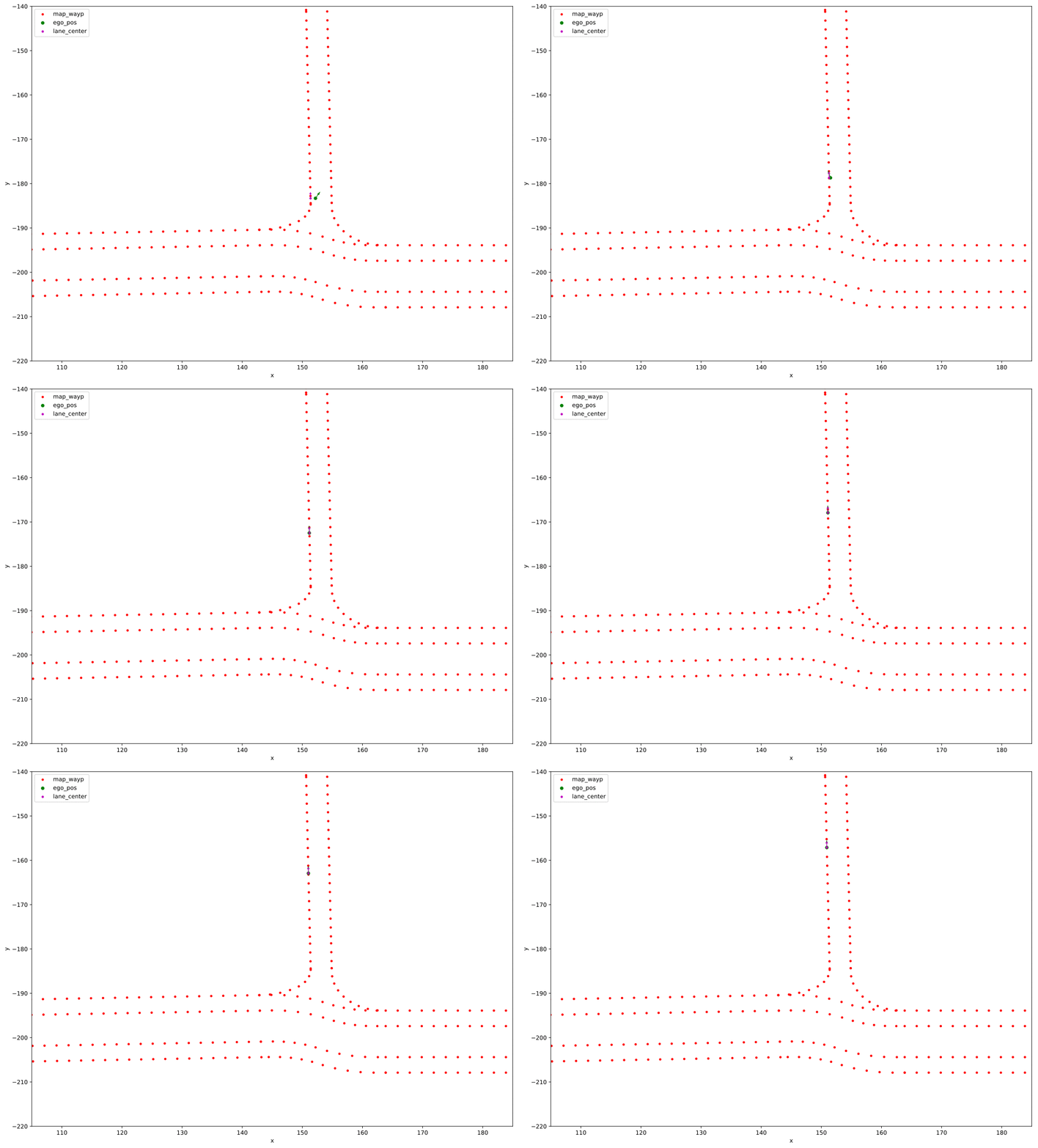
I would recommend watching the GIF in full screen for clarity.
This is a GIF created using the sequential time-stamped readings from the PseudoOdometrySensor created using world.on_tick() method. Observe that the readings show that the vehicle is jumping back and forth. However, it is actually moving at a constant velocity of around 20 Kmph.
As you mentioned in https://github.com/carla-simulator/carla/issues/1274#issuecomment-466385988
Passing the snapshot from the world_observer to the world.on_tick() will solve this problem. I hope such a thing would be available in CARLA in the near future.
YashBansod
on 28 Feb 2019
Yes, we have a similar issue with the no_rendering_mode.py script, you can observe this jumping in the NPCs because sometimes you get the transform of a different frame (ahead or behind).
I've been wanting to add this snapshot functionality for a while, but there has always been something with higher priority. I'll try to push this to come after this coming release, but that would be 0.9.5.
nsubiron
on 28 Feb 2019
This issue has been automatically marked as stale because it has not had recent activity. It will be closed if no further activity occurs. Thank you for your contributions.
![stale[bot] picture](https://avatars.githubusercontent.com/in/1724?v=4&s=40) stale[bot]
on 29 Apr 2019
stale[bot]
on 29 Apr 2019
Related issues
 gkahn13
·
24Comments
gkahn13
·
24Comments
 iFuSiiOnzZ
·
149Comments
iFuSiiOnzZ
·
149Comments
 ajax98
·
64Comments
ajax98
·
64Comments
 najibghadri
·
23Comments
najibghadri
·
23Comments
 sandman
·
51Comments
sandman
·
51Comments
Most helpful comment
Yes, we have a similar issue with the
no_rendering_mode.pyscript, you can observe this jumping in the NPCs because sometimes you get the transform of a different frame (ahead or behind).I've been wanting to add this snapshot functionality for a while, but there has always been something with higher priority. I'll try to push this to come after this coming release, but that would be 0.9.5.