I am trying to get the camera reading by printing object of Image and Camera0 (which is in the client example) but it always print a value which is cameradepth:
So I want to now how to get the value of camera (BGRA Array)
Thank you very much.
 sherifdarwish92
All 5 comments
Hi @sherifdarwish92 ,
If you want to save camera image as jpeg or png files, you can use default arrays which are sent to "self.img_vec" in 'carla_manual_control.py'. Sample code snippet to save images as jpeg, is as follows. It uses, PIL library.
im = Image.fromarray(self.labels_vec[0])
background = Image.new("RGB", im.size, (255, 255, 255))
background.paste(im, mask=im.split()[3]) # 3 is the alpha channel
background.save(name)
Hope this helps.
 n-akram
on 17 Jan 2018
n-akram
on 17 Jan 2018
Hi @sherifdarwish92,
This is how you do it with the 0.7.0 API and later.
The sensor.Camera object defines a new sensor that is going to be added to the car, you need to add it to the settings object (please check out our client_example.py for a whole example)
settings = CarlaSettings()
my_camera = Camera('MyCamera', PostProcessing='Depth')
settings.add_sensor(my_camera)
# ...
carla_client.load_settings(settings)
For each camera you add, you retrieve a sensor.Image object every frame
measurements, sensor_data = carla_client.read_data()
image = sensor_data['MyCamera']
Now from that image object you can be extract the data in different formats
# Image as a buffer of uint8s.
image.raw_data

# Default format (depends on the camera PostProcessing but always a numpy array).
image.data

# numpy BGRA array.
image_converter.to_bgra_array(image)

# numpy RGB array.
image_converter.to_rgb_array(image)
If you wish to save the image as PNG
image.save_to_disk('image.png')
 nsubiron
on 17 Jan 2018
nsubiron
on 17 Jan 2018
Thank you very much for your help your info is really helpful and
supportive.
Thank you again.
On Wed, Jan 17, 2018 at 12:03 PM, n-akram notifications@github.com wrote:
Hi @sherifdarwish92 https://github.com/sherifdarwish92 ,
If you want to save camera image as jpeg or png files, you can use default
arrays which are sent to "self.img_vec" in 'carla_manual_control.py'.
Sample code snippet to save images as jpeg, is as follows. It uses, PIL
library.im = Image.fromarray(self.labels_vec[0])
background = Image.new("RGB", im.size, (255, 255, 255))
background.paste(im, mask=im.split()[3]) # 3 is the alpha channel
background.save(name)Hope this helps.
—
You are receiving this because you were mentioned.
Reply to this email directly, view it on GitHub
https://github.com/carla-simulator/carla/issues/144#issuecomment-358256001,
or mute the thread
https://github.com/notifications/unsubscribe-auth/AgJ7m5kPrJ8BKw7RYWF7uvMN1JeYs8yuks5tLcV9gaJpZM4RhDBH
.
sherifdarwish92
on 18 Jan 2018
Hello,
I have printed the camera reading but when I printed It wasn't very descriptive as when I printed the camera while making the mode Semantic I found the output as in this photo

However I expected the data to contain the number from 0:12 as described in the docs that objects varies from number 0:12 in the semantic mode.
and when I get the data by the mode of Scene final I found the output as in this pictures
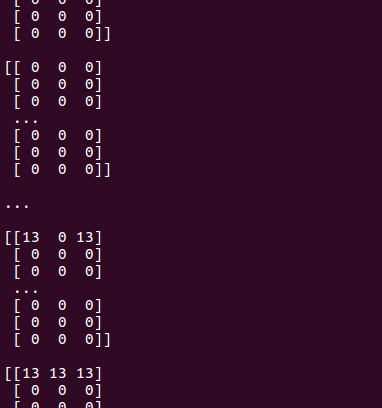
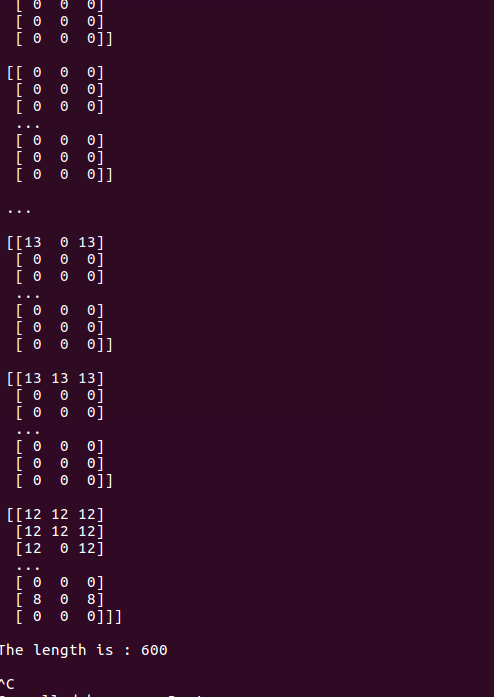
which was very ambiguous for me as I need to transfer the data from the camera
even when I print the size of the BGRA array the output is 600
so could you please provide me with the description of the output of the camera in the three modes( semantic - depth - scene final) in order to be able to send the value of the output of the camera.
Thank you very much for your help.
sherifdarwish92
on 22 Jan 2018
The output is weird indeed. This is what you are supposed to get:
Using the built-in "save_to_disk" function
image.save_to_disk('my_image.png')
SceneFinal
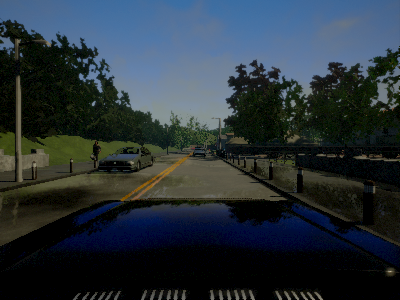
Depth
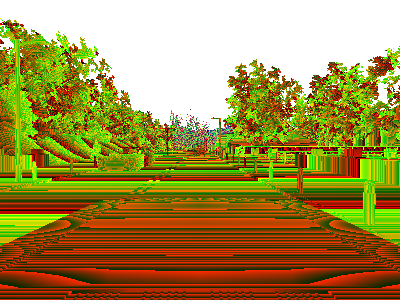
SemanticSegmentation
_Dark tones of red._
and printing the RGB array
print(image_converter.to_rgb_array(image))
SceneFinal
[[[ 66  98 137]
  [ 66  98 137]
  [ 66  96 137]
  ...,
  [ 73  98 133]
  [ 73  98 133]
  [ 71  95 129]]

 [[ 69  98 135]
  [ 69  98 136]
  [ 69  98 137]
  ...,
  [ 73  98 132]
  [ 73  98 131]
  [ 73  97 129]]
Depth
[[255 255 255]
  [255 255 255]
  [255 255 255]
  ...,
  [255 255 255]
  [255 255 255]
  [255 255 255]]

 ...,
 [[ 70  38   0]
  [ 70  38   0]
  [ 70  38   0]
  ...,
  [ 70  38   0]
  [ 70  38   0]
  [ 70  38   0]]
SemanticSegmentation
 [[ 0  0  0]
  [ 0  0  0]
  [ 0  0  0]
  ...,
  [ 0  0  0]
  [ 0  0  0]
  [ 0  0  0]]

 ...,
 [[10  0  0]
  [10  0  0]
  [10  0  0]
  ...,
  [10  0  0]
  [10  0  0]
  [10  0  0]]
Related issues
 pleukefeld
·
23Comments
pleukefeld
·
23Comments
 rikardomarenzzi
·
39Comments
rikardomarenzzi
·
39Comments
 nicksunyang
·
25Comments
nicksunyang
·
25Comments
 bigsheep2018
·
20Comments
bigsheep2018
·
20Comments
 iFuSiiOnzZ
·
149Comments
iFuSiiOnzZ
·
149Comments
Most helpful comment
Hi @sherifdarwish92,
This is how you do it with the 0.7.0 API and later.
The
sensor.Cameraobject defines a new sensor that is going to be added to the car, you need to add it to the settings object (please check out our client_example.py for a whole example)For each camera you add, you retrieve a
sensor.Imageobject every frameNow from that image object you can be extract the data in different formats
If you wish to save the image as PNG