Cardview: tapped item nested
hi
i use nested i want to tapp item
how can do it?
i use collectionview instead of main carouselview .
i want tapped items but not worked
can u help me?
 hamidish
All 11 comments
Hi, how about adding TapGestureRecognizer or TouchEffect from XamarinCommunityToolkit?
 AndreiMisiukevich
on 24 Dec 2020
AndreiMisiukevich
on 24 Dec 2020
i use tapgesture for carouselview template but not worked.
and use selectionchange for collectionview not worked
hamidish
on 24 Dec 2020
Can you build a small sample?
AndreiMisiukevich
on 24 Dec 2020
in cs
VerticalOptions="Center"
Padding="0"
HasShadow="True"
CornerRadius="10"
AbsoluteLayout.LayoutFlags="All"
AbsoluteLayout.LayoutBounds="0, 0, 1, 1">
<Image Source="{Binding ImageLink}"
Aspect="AspectFill"
AbsoluteLayout.LayoutFlags="All"
AbsoluteLayout.LayoutBounds="0, 0, 1, 1"/>
<Label Text="{Binding Titr}"
TextColor="#81ffff"
BackgroundColor="#66000000"
FontFamily="entfont"
Margin="0,5,10,5"
AbsoluteLayout.LayoutFlags="All"
AbsoluteLayout.LayoutBounds="0,1, 1,0.4"
FontSize="24"/>
</AbsoluteLayout>
</Frame>
<Line Y1="0"
X2="80"
Y2="0"
X1="0"
HorizontalOptions="Center"
Stroke="#e40081"
StrokeThickness="9"
VerticalOptions="StartAndExpand"
Margin="0,0,0,0"
AbsoluteLayout.LayoutFlags="All"
AbsoluteLayout.LayoutBounds="0, 1, 1, 0.25"/>
</AbsoluteLayout>
</DataTemplate>
<DataTemplate x:Key="TopItemTemplate">
<Grid RowSpacing="0" IsClippedToBounds="True" Padding="0" >
<Grid.RowDefinitions>
<RowDefinition Height="Auto"/>
<RowDefinition Height="Auto"/>
</Grid.RowDefinitions>
<Grid.ColumnDefinitions>
<ColumnDefinition Width="1*"/>
<ColumnDefinition Width="1*"/>
</Grid.ColumnDefinitions>
<Label Text=" viewall >"
Grid.Column="0"
TextColor="#e40081"
FontFamily="entfont"
FontSize="20"
VerticalTextAlignment="Center"
HorizontalTextAlignment="Center"
Margin="10,30,0,0"
Grid.Row="0"
HorizontalOptions="Start" >
</Label>
<Label Text="{Binding NameGroup}"
VerticalTextAlignment="Center"
HorizontalTextAlignment="Center"
Margin="0,30,10,0"
Padding="0"
Grid.Column="1"
Grid.Row="0"
HorizontalOptions="End"
FontAttributes="Bold"
FontFamily="entfont"
FontSize="20"
TextColor="Black" />
<cv:CoverFlowView Grid.RowSpan="2"
Grid.ColumnSpan="2"
Padding="0" IsClippedToBounds="True"
PositionShiftValue="135"
HeightRequest="280"
Margin="0,0,0,-60"
IsCyclical="True"
ItemTemplate="{StaticResource NestedItemTemplate}"
ItemsSource="{Binding Items}"
IsRightToLeftFlowDirectionEnabled="True"
SelectedIndex="{Binding Id}"
IsHorizontalOrientation="True">
<x:Arguments>
<proc:CoverFlowProcessor ScaleFactor="0.75" OpacityFactor="0.25" />
</x:Arguments>
</cv:CoverFlowView>
</Grid>
</DataTemplate>
Margin="5,20,5,0"
x:Name="collvideo"
SelectionMode="Single">
ViewModel = new NestedViewModel();
collvideo.ItemsSource = ViewModel.Items;
hamidish
on 25 Dec 2020
and i get data all data dynamically
hamidish
on 25 Dec 2020
That's why I asked to build a sample (A small project that I can run and see the problem)
AndreiMisiukevich
on 25 Dec 2020
That's why I asked to build a sample (A small project that I can run and see the problem)
ok
hamidish
on 26 Dec 2020
hamidish
on 26 Dec 2020
hamidish
on 26 Dec 2020
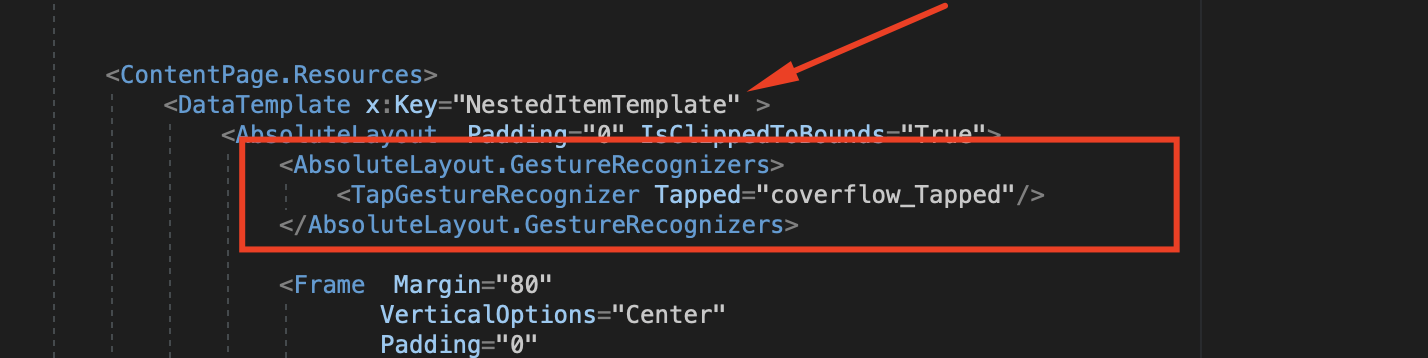
Just move TapGestureRecognizer to NestedItemTemplate
Every item will handle taps (the same as the entire view handles taps)
AndreiMisiukevich
on 28 Dec 2020
Just move TapGestureRecognizer to NestedItemTemplate
Every item will handle taps (the same as the entire view handles taps)
thx so much
hamidish
on 28 Dec 2020
Related issues
 morhung
·
7Comments
morhung
·
7Comments
 troyvnit
·
8Comments
troyvnit
·
8Comments
 jolugarbe
·
8Comments
jolugarbe
·
8Comments
 toshitani23
·
6Comments
toshitani23
·
6Comments
 PauchardThomas
·
7Comments
PauchardThomas
·
7Comments
Most helpful comment
Just move TapGestureRecognizer to NestedItemTemplate
Every item will handle taps (the same as the entire view handles taps)