Describe the bug
Used this before with similar code, this code is for a college assignment.
Code: https://pastebin.com/BScTBZQG
Options: Seti - PHP
To Reproduce
Steps to reproduce the behavior:
- Paste code into the editor.
- Click export and save as .PNG.
3.Nothing happens.
Expected behavior
To download the code as an image with the format (.PNG)
Screenshots
N/A
Info (please complete the following information):
- OS [e.g. macOS, Linux, Windows, iOS]: Windows
- Browser [e.g. chrome, safari]: Chrome
Code Snippet (If Applicable)
https://pastebin.com/BScTBZQG
 DubStepMad
All 16 comments
I would try it again and wait awhile. It took a few seconds on my computer to work, and is a pretty large image by Carbon's standards:

 mfix22
on 17 Dec 2018
mfix22
on 17 Dec 2018
Edit
LOVE! 😍 the new UI updates!
This happened to me as well just now with this code:
function ellipsis(str, maxWords = 2) {
  let i = 0
  let spaces = 0
  let result = ''

  while (spaces < maxWords && i < str.length) {
    const c = str.charAt(i++)
    if (c == ' ') ++spaces
    result += c
  }

  return `${result}${spaces < 2 ? '' : '...'}`
}
This is error I get:

Here is my CARBON_STATE from local storage:
aspectRatio: 1.2608972639484979
background: "rgba(0,0,0,0)"
backgroundColor: "rgba(171,184,195,100)"
backgroundMode: "color"
dropShadow: true
dropShadowBlurRadius: "68px"
dropShadowOffsetY: "20px"
exportSize: "2x"
fontFamily: "IBM Plex Mono"
fontSize: "17px"
language: "javascript"
lineHeight: "149%"
lineNumbers: false
loading: false
marginHorizontal: "45px"
marginVertical: "45px"
online: true
paddingHorizontal: "32px"
paddingVertical: "48px"
preset: null
squaredImage: true
theme: "one-dark"
timestamp: true
titleBar: ""
uploading: false
watermark: false
widthAdjustment: true
windowControls: false
windowTheme: "none"
_initialState: {background: "rgba(0,0,0,0)", theme: "dracula", language: "auto", dropShadow: "true",…}
background: "rgba(0,0,0,0)"
code: "import React from 'react';↵import { StyleSheet, Text, View } from 'react-native';↵import styled from 'styled-components/native';↵import { ApolloProvider } from 'react-apollo';↵import { client } from './src/apollo.client';↵import { Font } from 'expo';↵↵import { Title } from './src/components/title';↵import { Icon } from './src/components/icon';↵import { Bullet } from './src/components/bullet';↵↵const StyledText = styled.Text`↵  font-family: 'montserrat-bold';↵`;↵↵export default class App extends React.Component {↵  state = {↵    fontLoaded: false,↵  };↵↵  async componentDidMount() {↵    await Font.loadAsync({↵      'montserrat-regular': require('./assets/fonts/Montserrat-Regular.ttf'),↵      'montserrat-medium': require('./assets/fonts/Montserrat-Medium.ttf'),↵      'montserrat-semi-bold': require('./assets/fonts/Montserrat-SemiBold.ttf'),↵      'montserrat-bold': require('./assets/fonts/Montserrat-Bold.ttf'),↵    });↵↵    this.setState({ fontLoaded: true });↵  }↵↵  render() {↵    if (!this.state.fontLoaded) return null;↵↵    return (↵      <ApolloProvider client={client}>↵        <View style={styles.container}>↵          {/* <Title>(primary) Hello World</Title> */}↵          <Bullet />↵          <Bullet type="note" />↵          <Bullet type="event" />↵          {/* <Icon name="ios-help" size={50} />↵          <Title secondary>(seconday) Hello World</Title>↵          <Text>Open up App.js to start working on your app!</Text>↵          <Text>Changes you make will automatically reload.</Text>↵          <StyledText>Shake your phone to open the developer menu.</StyledText> */}↵        </View>↵      </ApolloProvider>↵    );↵  }↵}↵↵const styles = StyleSheet.create({↵  container: {↵    flex: 1,↵    backgroundColor: '"
dropShadow: "true"
language: "auto"
lineNumbers: "false"
paddingHorizontal: "57px"
paddingVertical: "43px"
theme: "dracula"
widthAdjustment: "true"
windowControls: "true"
 ericadamski
on 20 Dec 2018
ericadamski
on 20 Dec 2018
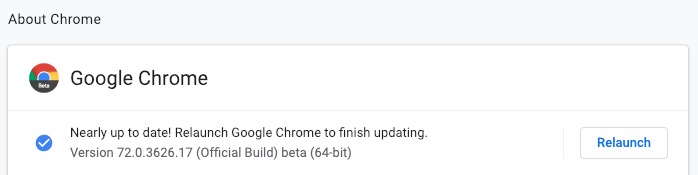
Hey @ericadamski 👋 can you post your Browser (including version) here? I think this could be a Chrome bug for one of the earlier Chrome versions.
Thanks for the kind words and help with this problem though 👍
mfix22
on 20 Dec 2018
Edit
Bug still persists after update:
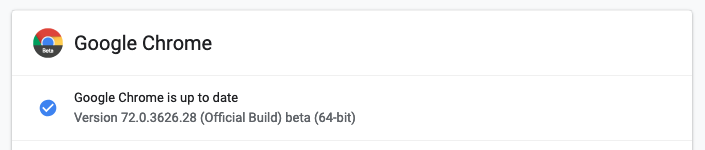
Haven't relaunched, I will relaunch and let you know if it works
ericadamski
on 21 Dec 2018
Edit
Bug still persists after update:
Haven't relaunched, I will relaunch and let you know if it works
@mfix22 I can confirm I have the same version as @ericadamski , I believe it might be due to the version since it worked in college for me but event with a few lines of code it does not work.
DubStepMad
on 23 Dec 2018
Attached is my console log.
DubStepMad
on 23 Dec 2018
Console log of Edge.

DubStepMad
on 23 Dec 2018
Having the same problem ("Tainted canvases can't be exported"), also trying to use the Open button.
 FiloSottile
on 24 Dec 2018
FiloSottile
on 24 Dec 2018
@mfix22 I can take a look at this more this Thursday Friday ish
ericadamski
on 25 Dec 2018
@ericadamski that would be very much appreciated 🙏
mfix22
on 28 Dec 2018
This seems to be an issues with domtoimage :( https://github.com/tsayen/dom-to-image/issues/267
ericadamski
on 2 Jan 2019
This is probably just a bug in Chromium v72. The latest non-beta Chromium is v71 (which is the version of Carbon we actively support), and there seems to be related bug reports open for v72 of Chromium (https://bugs.chromium.org/p/chromium/issues/detail?id=918460&q=tainted%20canvas&colspec=ID%20Pri%20M%20Stars%20ReleaseBlock%20Component%20Status%20Owner%20Summary%20OS%20Modified)
mfix22
on 3 Jan 2019
This persists in Chrome v73 - Version 73.0.3664.3 (Official Build) dev (64-bit)
index.js:1 Uncaught (in promise) DOMException: Failed to execute 'toBlob' on 'HTMLCanvasElement': Tainted canvases may not be exported.
    at https://carbon.now.sh/_next/static/wKA~pQKLLAvfzELjdPZRJ/pages/index.js:1:140489
    at new Promise (<anonymous>)
    at canvasToBlob (https://carbon.now.sh/_next/static/wKA~pQKLLAvfzELjdPZRJ/pages/index.js:1:140463)
Update: the fix noted here is merged into v73.0.3667.2, which isn't available in dev-channel yet - https://bugs.chromium.org/p/chromium/issues/detail?id=918460
 elithrar
on 12 Jan 2019
elithrar
on 12 Jan 2019
The latest Chrome dev channel build, as of this comment, is Version 73.0.3669.0 (Official Build) dev (64-bit), which fixes this bug (PNG export now works!).
elithrar
on 16 Jan 2019
@elithrar awesome 🙌 Is this good to close then?
mfix22
on 16 Jan 2019
Yep! Folks just need to be on that release or greater!
On Wed, Jan 16, 2019 at 12:03 PM Michael Fix notifications@github.com
wrote:
@elithrar https://github.com/elithrar awesome 🙌 Is this good to close
then?—
You are receiving this because you were mentioned.
Reply to this email directly, view it on GitHub
https://github.com/dawnlabs/carbon/issues/609#issuecomment-454857813,
or mute the thread
https://github.com/notifications/unsubscribe-auth/AABIcKYX-r0sBbRwu6wIM5RWGKzl2nbLks5vD1tkgaJpZM4ZWvXo
.
elithrar
on 16 Jan 2019
Related issues
 TitoMikani
·
4Comments
TitoMikani
·
4Comments
 qw-in
·
3Comments
qw-in
·
3Comments
 UlisesGascon
·
3Comments
UlisesGascon
·
3Comments
 tibuurcio
·
4Comments
tibuurcio
·
4Comments
 shaonkabir8
·
5Comments
shaonkabir8
·
5Comments
Most helpful comment
Yep! Folks just need to be on that release or greater!
On Wed, Jan 16, 2019 at 12:03 PM Michael Fix notifications@github.com
wrote: