Canvasblocker: cosmetics: toolbar icon badge
as requested from #225
kkapsner said
The badge for the toolbar icon is a good idea - I could use A, B and C for the label:
A(udio),B(oth) andC(anvas) ;)
My only question would be, how would you add in extra feature notification in future - I guess we cross that bridge when we come to it. Currently extra feature suggestions such as history.length, windows.name, rel=noopener would not require anything
 Thorin-Oakenpants
All 16 comments
I think your suggestion with the number is better.
 kkapsner
on 21 Aug 2018
kkapsner
on 21 Aug 2018
IDK .. I like B (and almost suggested it in my initial statement) but thought it was a bit cheesy. B can stand for Both or Blocks/blocking. ABC is kinda neat. But then it really probably only transitions nicely in English.
The toobar icon dropdown panel or whatever you want to call it, could expand to include info in future if there is any need to show what is blocked. Maybe this is how it should be done from the start. Just show a count, and in the panel list the blocked items eg (made up example, I know we're not doing fonts):
- badge:
[3] - panel (at top): Audio, Canvas, Fonts (single line for each entry)
^^ but this raises questions on the color. Green is fine and all, but what if a user is only protecting from 2 of 3 threats, then it should be red (been a while since I looked at the whitelisting - is it a general whitelist, or a whitelist per feature block?)
Needs a bit of a UIX, design input from someone
Thorin-Oakenpants
on 21 Aug 2018
We already have the page action popup (in the address bar) that tells the user what was blocked/faked.
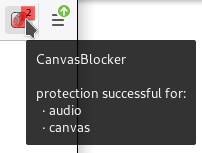
But we have the tooltip text:

kkapsner
on 21 Aug 2018
kkapsner
on 21 Aug 2018
OK, I didn't realize that the urlbar was becoming a colored counter - IMO the counter (badge) should be on the toolbar icon, and just like decentraleyes, when you expand the panel, it tells you which components were blocked - and the panel can still have links to tests, etc
The urlbar icon, honestly, I never knew it existed kkapsner TOLD me one day to enable it when trying to troubleshoot something. The urlbar icon can still function for extra duties, eg canvas details etc.
I'm also getting confused. RED=danger in my opinion. So the above badge indicates that the site is not protected from audio and canvas blocking
Thorin-Oakenpants
on 22 Aug 2018
The badge is on the toolbar icon not the urlbar icon.
The toolbar icon changes color when something is faked/blocked. But you can disable this behaviour. I'm no sure how I should detect if something is not protected (despite just reading the settings - but this was the dicision of the user at some point).
kkapsner
on 22 Aug 2018
The badge is on the toolbar icon not the urlbar icon.
Sorry, not with it today. I see now that's the toolbar icon and the info is a toolbartip :heavy_check_mark:
Thorin-Oakenpants
on 22 Aug 2018
The intent of the green/red will make sense (and people will get used to it) when the badge numbers show. With a badge counter, I'm probably personally going to disable the color
I'm no sure how I should detect if something is not protected
Yeah, I don't think it's feasible. Other extensions have the same issue - it's like having to do two passes and compare.
but this was the dicision of the user at some point
That's what's missing IMO - can you tell if a website is whitelisted (yup) - then change the badge to a W ?
Thorin-Oakenpants
on 22 Aug 2018
There are more ways to whiteliste a website: use the whitelist, change the block mode for the website, disabling only one API for the website.
Not sure how to display/distinguish these.
kkapsner
on 22 Aug 2018
I updated the text for the tooltip to make things clearer:
kkapsner
on 22 Aug 2018
Not sure how to display/distinguish these
Just as a means for the end user knowing (with a millisecond eye glance) that the domain was added it to the whitelist (i.e no action taken by the extension whatsoever) - not as a means to distinguish different settings.
Eg decentraleyes changes the icon color to greyscale, but does no such thing to determine settings such as blocking/not-blocking cdn content (eg "block requests for missing resources" as an extra setting in DC's options) - it's just based on the whitelisting feature
Personally, I'm not bothered, as I do not whitelist anything - but it would be a nice touch :)
Thorin-Oakenpants
on 23 Aug 2018
"W" will be the window API (name and opener).
kkapsner
on 23 Aug 2018
I'm confused. I meant the badge would show nothing, or 1,2, 3 etc if it's blocking (and the tooltip shows that windows.name is blocked), and could show w if its in the whitelist.
Thorin-Oakenpants
on 23 Aug 2018
I also wouldn't show window.name , history.length etc, rel=no-opener etc as they apply to all pages. It would just clutter it - every page would then have a badge, which kinda defeats the purpose IMO - eg I like when I go to reddit that the icon is red - it informs me that reddit is trying to extract a FP. I don't need or want to be told on every page that windows.name is protected. If that makes sense
Thorin-Oakenpants
on 23 Aug 2018
They do not apply to all pages. They would only show if the something was faked.
Example:
- let's say we have a page that ready window.opener, window.name and history.length (if nothing is read nothing will be showed)
- now the page is opener in a new tab by entering the URL --> no Badge is shown as the faked values are the same as the real value
- now the page performs history.pushState() to increase the history and reads the length --> still no Badge as now 2 is returned
- page performs history.pushState() again and redas --> Badge is shown because the real value is 3 and 2 is returned
- (new tab to reset everything)
- now the page changes the name of the window and reads it --> no Badge is shown as I return the real value for window.name if it's changed by the page itself
- after reload the Badge is shown as the browser returns the previously changed name but I return ""
I have no metric how many "false" positives this would give but I want to notify the use if something was faked.
I could go the usual CB route and just add a setting which API notifications should be ignored.
kkapsner
on 24 Aug 2018
Please test the badge on RC3 (Please test https://github.com/kkapsner/CanvasBlocker/releases/tag/0.5.3-RC3). For the "whitelisting" marker I would prefer to have a separate issue.
kkapsner
on 31 Aug 2018
Related issues
 hotx
·
3Comments
kkapsner
·
5Comments
hotx
·
3Comments
kkapsner
·
5Comments
 thiagoroberio
·
6Comments
thiagoroberio
·
6Comments
 concatime
·
7Comments
concatime
·
7Comments
 Kherby
·
6Comments
Kherby
·
6Comments
Most helpful comment
We already have the page action popup (in the address bar) that tells the user what was blocked/faked.

But we have the tooltip text: