Camunda-modeler: Input/output tab disappears when using element template
__Describe the Bug__
Input/output parameters tab disappears in Camunda Modeler 4.4.0 after applying element template even if entriesVisible _all is set to true.
__Steps to Reproduce__
- Create element template, for example:
[
    {
      "name": "Test task",
      "id": "TestTask",
      "appliesTo": [
        "bpmn:ServiceTask"
      ],
      "properties": [
        {
          "type": "Hidden",
          "value": "test",
          "binding": {
            "type": "camunda:inputParameter",
            "name": "TestInputParameter"
          }
        }
      ],
      "entriesVisible": {
        "_all": true
      }
    }
]
- Apply newly created template on service task.
- Input/output parameters tab disappears.
The expected behavior is that if element template contains entriesVisible _all set to true then Input/output tab is visible after applying template to task. It is working correctly on version 4.2.0 but not on 4.4.0.
Result on Camunda Modeler 4.2.0:
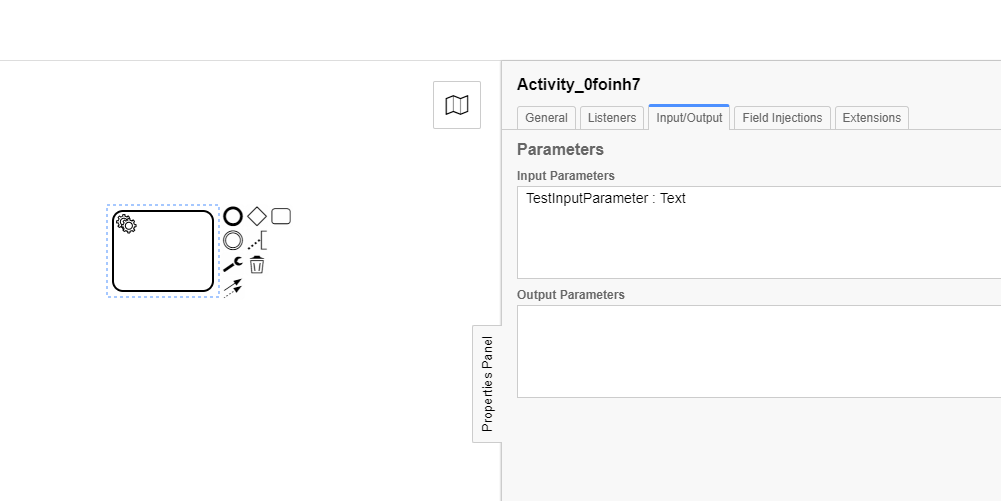
Result on Camunda Modeler 4.4.0:

__Environment__
- OS: Windows 10
- Camunda Modeler Version: 4.4.0
 szerie
👍1
All 2 comments
I can reproduce your issue.
 nikku
on 12 Nov 2020
nikku
on 12 Nov 2020
👍2
Closing this as it is the same issue as https://github.com/camunda/camunda-modeler/issues/2018.
 philippfromme
on 17 Nov 2020
philippfromme
on 17 Nov 2020
Was this page helpful?
0 / 5 - 0 ratings
Related issues
 wiciok
·
3Comments
nikku
·
4Comments
wiciok
·
3Comments
nikku
·
4Comments
 NPDeehan
·
5Comments
NPDeehan
·
5Comments
 pinussilvestrus
·
5Comments
pinussilvestrus
·
5Comments
 r-n-aliev
·
3Comments
r-n-aliev
·
3Comments
Most helpful comment
I can reproduce your issue.