Camunda-modeler: Cursor Not Reset after Showing Not Allowed
__Describe the Bug__
Cursor behavior changing while connecting tasks module using arrow option.
When 2 objects are close and trying to connected the flow using arrow icon available from object tool bar. After mouse release inside another object also, cursor icon not changed from not-allowed mode to default mode.End user felt that its not allowed to add text or do other activities. Its changing only after the arrow icon from object tool tip.
Please find the attachment video for more clarity.
May 23 2019 12_52 PM.zip
__Steps to Reproduce__
Steps to reproduce the behavior: cf. video above
- Start creating a connection between to close elements
- Drag the connection to target in a very quick manner
Hint: This does not occur every time, but in certain situations
__Expected Behavior__
not-allowed cursor should be removed when the connection is allowed.
__Environment__
Please complete the following information:
- OS: [Windows 10]
- Camunda Modeler Version: [3.*]
__Additional Context__
dragging.out->connect.outis not fired in certain situations, so theconnect-not-okmarker is not cleaned up properly frombpmn:Processelement.
Related to SUPPORT-6128
Related to SUPPORT-6143
 RamjiRamachandran
All 16 comments
Not an issue anymore?
 nikku
on 23 May 2019
nikku
on 23 May 2019
Hi Nikku, Thanks for reopening the issue, I proposed my solutions and given merge request. I expect your team to validate and merge the code.
RamjiRamachandran
on 23 May 2019
PR to close this issue: https://github.com/camunda/camunda-modeler/pull/1387
nikku
on 24 May 2019
We should check, if we can reliably reproduce this. I could observe this a few times, too, though not with a clear path to reproduce.
nikku
on 23 Jun 2019
I also experienced this a couple of times ago. I'll try to find a reproducible path.
 pinussilvestrus
on 25 Jun 2019
pinussilvestrus
on 25 Jun 2019
Please refer code for the fix..
Pull request
https://github.com/camunda/camunda-modeler/pull/1387
RamjiRamachandran
on 25 Jun 2019
@RamjiRamachandran can you also verify whether the bug is still present on your environment with the latest nightly build?
pinussilvestrus
on 25 Jun 2019
Regarding the bug described in the video, I was able to reproduce it on current nightly:
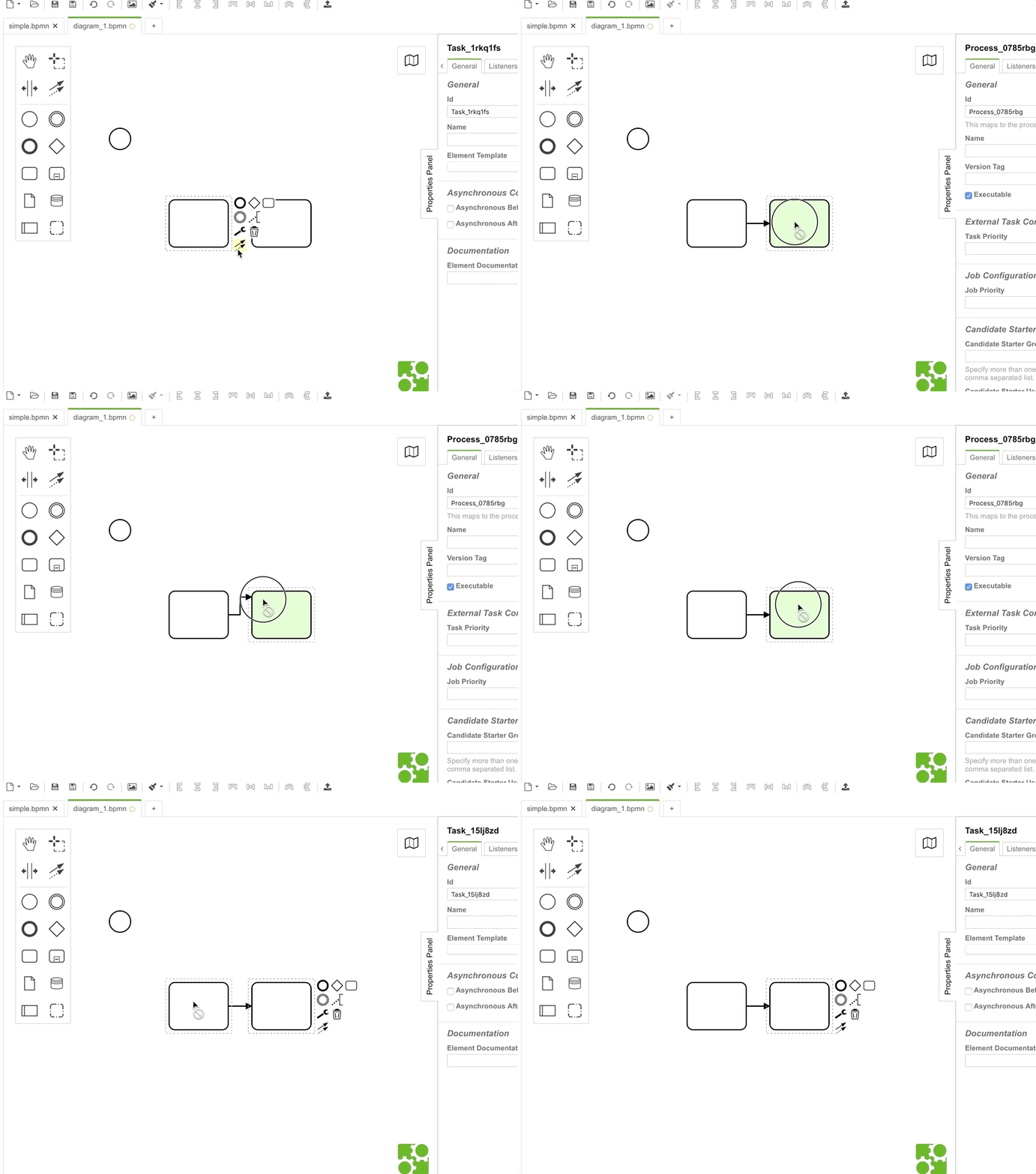
It sets the connect-not-ok marker to the root element and never does a clean-up. We have several scenarios, where it looks like events got fired too quickly and the marker cleanup will simply be skipped. dragging.out, connect.out and connect.cleanup is not fired for the root element for some reason.
pinussilvestrus
on 25 Jun 2019
Is it a regression? Can you reproduce it in v3.1.x, too?
nikku
on 25 Jun 2019
Yes I can reproduce it on v3.1.x and also on v3.0.0.
pinussilvestrus
on 25 Jun 2019
So, let's conclude: As it's not a regression, let's postpone this for the moment.
It's also very hard to create a test case for this since the problem seems to be caused by a missing fired dragging.out event when the cursor leaves the bpmn:Process elements, which results in a missing cleanup of the connect-not-ok marker.
@RamjiRamachandran we are still open for external contribution which fixes the situation in diagram-js (cf. it's not correctly cleaning up, since dragging.out --> connect.out is not fired).
pinussilvestrus
on 27 Jun 2019
I updated the issue description to fill the expectations.
pinussilvestrus
on 27 Jun 2019
This may be related to https://github.com/bpmn-io/bpmn-js/issues/1123.
It seems like recent versions of Chrome are more likely to swallow the hover event.
nikku
on 25 Jul 2019
Related to SUPPORT-6143
 garima-camunda
on 29 Jul 2019
garima-camunda
on 29 Jul 2019
After another try of debugging the root cause, it reveals also the svg node native mouseout event isn't thrown, which leads to the opinion it depends on the browser that sometimes, on fast interactions, some events are not thrown.
After an internal discussion, we should go for cleaning up cursor states in a proper way, since we can NOT guarantee all events are always fired properly. This is quite a similar problem with the HoverFix
pinussilvestrus
on 1 Aug 2019
nikku
on 5 Aug 2019
Related issues
pinussilvestrus
·
5Comments
nikku
·
4Comments
 yanavasileva
·
5Comments
yanavasileva
·
5Comments
 akifhazarvi
·
5Comments
nikku
·
3Comments
akifhazarvi
·
5Comments
nikku
·
3Comments