Calva: VS Code doesn't connect to nREPL - Part 2
I have Calva working fine on my Linux machine but when I try the same setup on my Mac VS Code Calva does not connect to the running nREPL. The Calva commands can't seem to be found. Please see screenshot:

I've attached my ~/.lein/profiles.clj file (which works fine on Linux).
Any idea what's wrong?
Thank you for your help,
Eric
 eatobin
All 28 comments
Hello,
Sorry for late response. Missed that there was a new issue.
I have experienced this lately as well, on Both Mac and Linux. Seems to be something with the latest Code. Not sure but there might be a pattern to it, when code starts up with showing release notes or some other virtual document.
For me it works restarting code with a Clojure file opened. Let me know if that works for you too.
We will investigate what it is (not) going on.
 PEZ
on 15 May 2018
PEZ
on 15 May 2018
Hello Peter,
Thanks for your reply. (I thought it was pretty quick!)
I will try your suggestion later today and report back. I also have one
more Linux machine to install and will tell you how that goes.
Thank you,
Eric
Sent from my rotary phone.
On Tue, May 15, 2018, 06:50 Peter Strömberg notifications@github.com
wrote:
Hello,
Sorry for late response. Missed that there was a new issue.
I have experienced this lately as well, on Both Mac and Linux. Seems to be
something with the latest Code. Not sure but there might be a pattern to
it, when code starts up with showing release notes or some other virtual
document.For me it works restarting code with a Clojure file opened. Let me know if
that works for you too.We will investigate what it is (not) going on.
—
You are receiving this because you authored the thread.
Reply to this email directly, view it on GitHub
https://github.com/BetterThanTomorrow/calva/issues/40#issuecomment-389139014,
or mute the thread
https://github.com/notifications/unsubscribe-auth/AA1JKjkoHgM7hTCKgKkp34vRvwpmUgrEks5tysEOgaJpZM4T-xiT
.
eatobin
on 15 May 2018
Hello Peter,
Just finished my second Linux install and it is working fine:
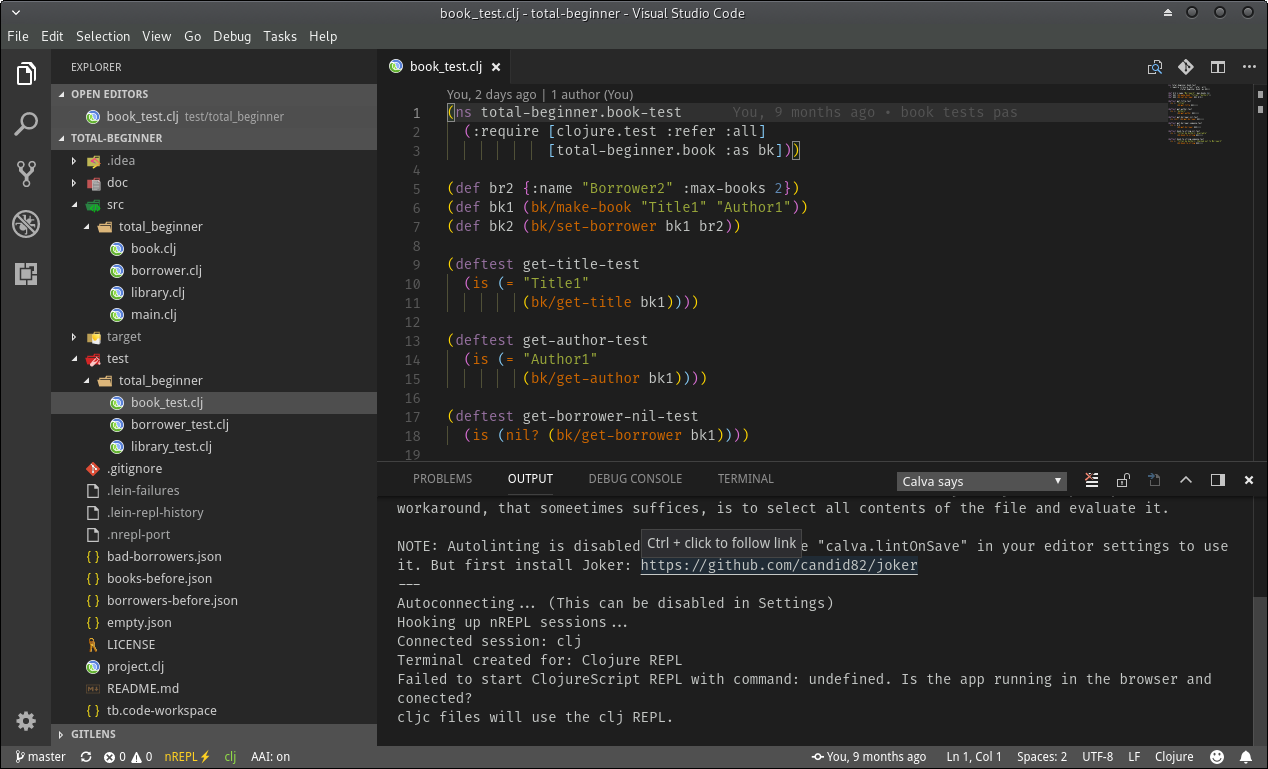
Unfortunately, I've tried several times to get my Mac install working. No luck - still broken.
Looking forward to your research.
Thank you,
Eric
eatobin
on 16 May 2018
Hi @eatobin,
That's very weird. 😬 What happens if you disable Calva, reload VS Code, and then enable it again? I'm using macOS but I haven't seen that problem before.
 pedrorgirardi
on 16 May 2018
pedrorgirardi
on 16 May 2018
Hi @pedrorgirardi,
Thanks. I tried your suggestion but still not able to make an nREPL connection on my Mac:

Maybe it's something besides the REPL - the Calva commands are not being found (according to the error)?
Eric
eatobin
on 16 May 2018
Can you see a Calva says drop-down item in the OUTPUT panel? I suspect that Calva is not initialized, but don't know why.
pedrorgirardi
on 16 May 2018
That ”command not found” means the extension does not activate. Which is very strange. Are you using the same versions of Code and Calva on the Linux machine and on Mac?
PEZ
on 16 May 2018
Hello again, I have published a new version of Calva that has an explicit Activate command: ctrl+alt+v ctrl+alt+v. Can you try that one out and see if it helps with this issue or not, @eatobin?
PEZ
on 16 May 2018
Yes, all of my machines are using the same versions of Code and Calva. I
will try your newest version in a little while and let you know. E.
Sent from my rotary phone.
On Wed, May 16, 2018, 01:53 Peter Strömberg notifications@github.com
wrote:
That ”command not found” means the extension does not activate. Which is
very strange. Are you using the same versions of Code and Calva on the
Linux machine and on Mac?—
You are receiving this because you were mentioned.
Reply to this email directly, view it on GitHub
https://github.com/BetterThanTomorrow/calva/issues/40#issuecomment-389414126,
or mute the thread
https://github.com/notifications/unsubscribe-auth/AA1JKlWogHTJ7sIoPZbLmGsCeJlg-3R8ks5ty8zTgaJpZM4T-xiT
.
eatobin
on 16 May 2018
Hello Peter and @pedrorgirardi,
Good news! Your latest commit fixed the problem on my Mac and Calva activates as soon as I open a source file with a running REPL - just like Linux. No explicit activation required. :-)

One last quick question. This is the same screen on Linux:

Notice the missing "thumbs-up" on Linux after "all passing" on the test results line? Could you tell me how I can get the same char here in Linux as on Mac? On both platforms: "terminal.integrated.fontFamily": "", and "editor.fontFamily": "Fira Code",. So, no difference I know of for different output?
Thank you very much for fixing this and doing it so quickly! I enjoy using your plug-in and think it is very helpful.
My best,
Eric
eatobin
on 16 May 2018
It is a bit strange that the unicode character doesn't work on your Linux box. I'll check what happens on my machine.
PEZ
on 16 May 2018
I think this may be a problem with my Linux distro, Manjaro (based on Arch Linux)...
On Mac:
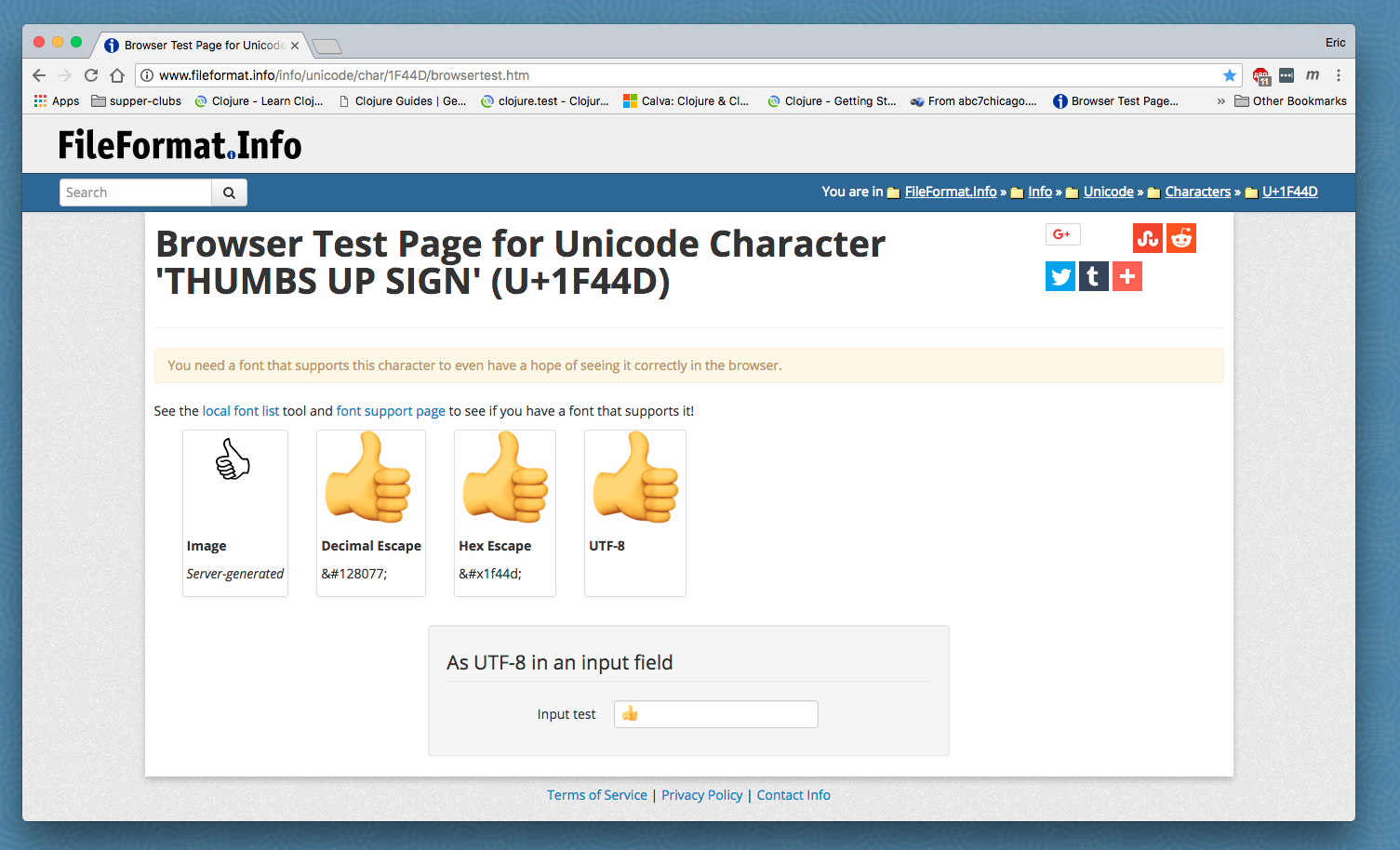
On Manjaro:
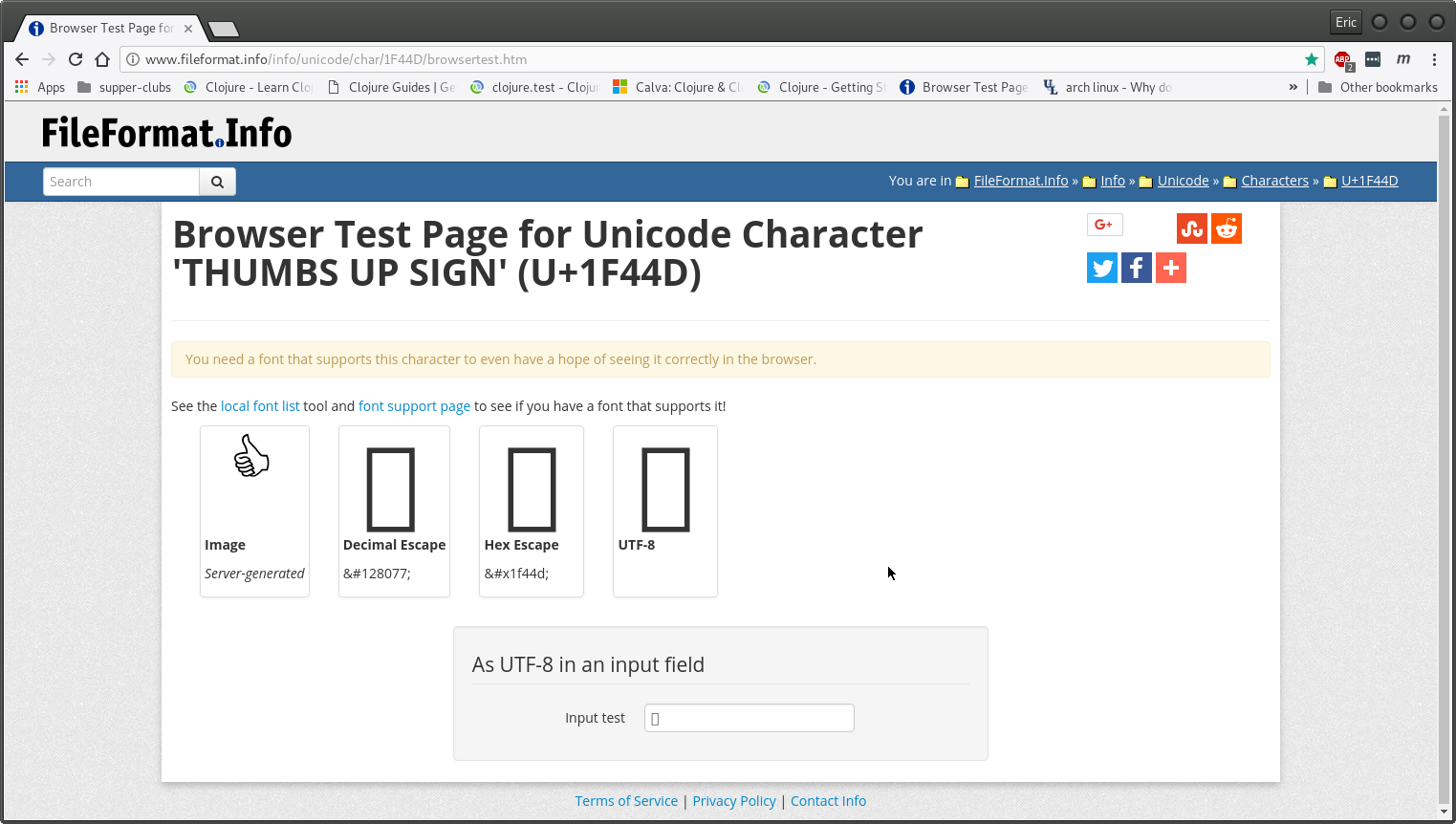
Am using Arial in both places in Chrome as Standard Font. Could not determine the font used in the VS Code Output Panel.
Thanks,
Eric
eatobin
on 17 May 2018
PS - the "problems found" monkey looks fine!
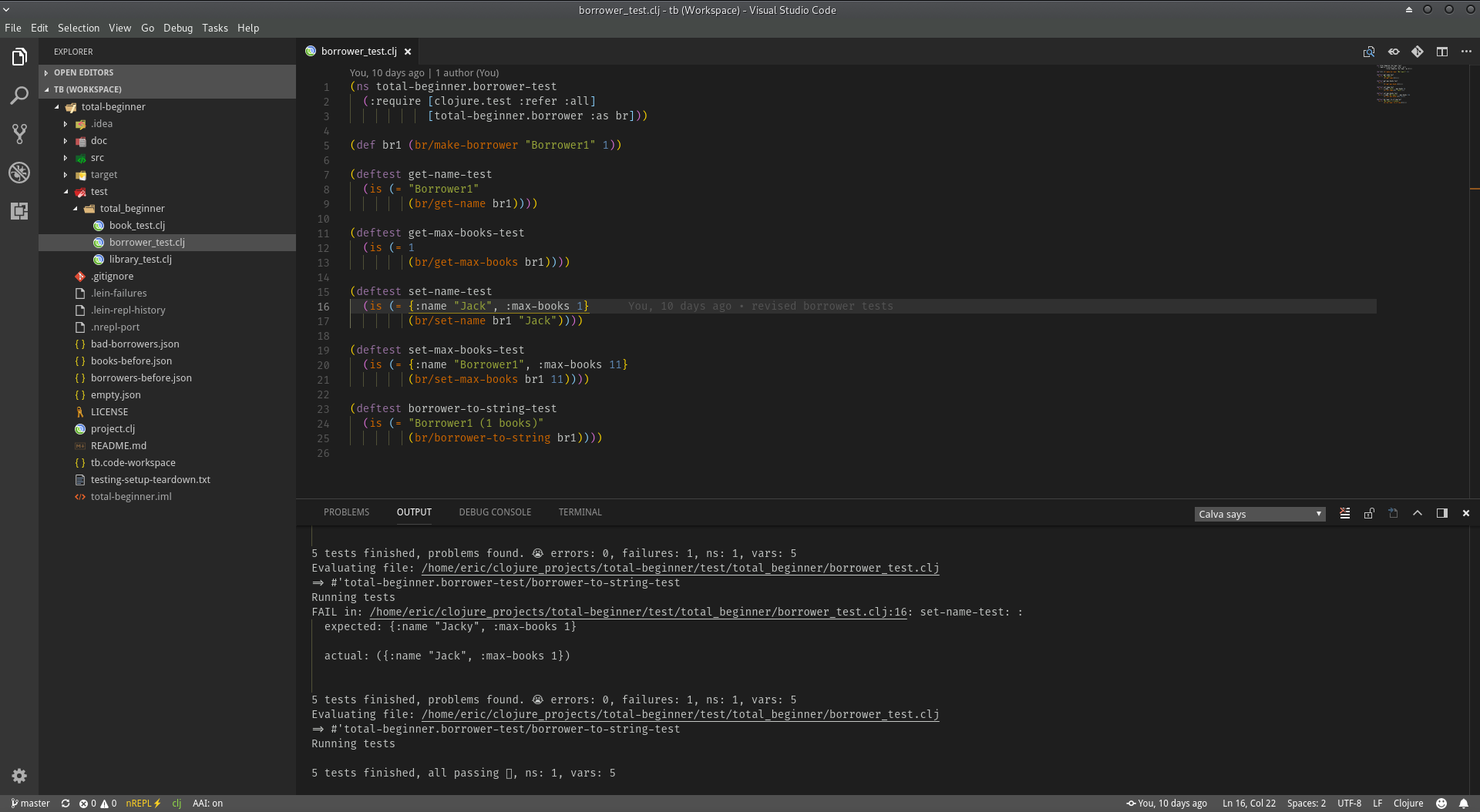
eatobin
on 17 May 2018
Hello,
I have the same problem as it is described in this issue.
I'm working on a Mac using the latest VS Code and Calva versions. I also couldn't activate Calva with the new Activate command, because the command was not found.
Restarting VS Code like @PEZ proposed, solved the problem.
If anyone needs some more information to investigate, let me know.
 christoph-feb22
on 10 Jul 2018
christoph-feb22
on 10 Jul 2018
Hi @PEZ and others,
I haven't experienced any of these issues with previous versions of Calva/VS Code. However, it happens now. Maybe there was some change after the recent Calva update?
Running code . in a Clojure project folder leads to the problem described in this thread. However, running code project.clj connects to the REPL, or, enables the calva.connect command to work.
Curious on any solutions to this.
 robert-johansson
on 21 Oct 2018
robert-johansson
on 21 Oct 2018
Hi @robert-johansson! The latest Calva update tried to fix this problem, but failed. I think it could be something with how VS Code enters Clojure mode. Your workaround to force Code to start with a Clojure file never occurred to me, but it is the best I know of right now.
PEZ
on 21 Oct 2018
An even better workaround might be to start VS Code with code project.clj ., with the extra dot. That will also open the sidebar and not only the clj file.
robert-johansson
on 21 Oct 2018
I think I might have fixed the problem with Calva not being activated now. Please let me know if it shows up for you.
PEZ
on 16 Nov 2018
My Calva is 1.3.51. That's the latest release, right?
Unfortunately the error is still there. (command 'calva.connect' not found)
robert-johansson
on 16 Nov 2018
Grrrrr
PEZ
on 16 Nov 2018
@robert-johansson It was the latest release until a few seconds ago. Now I have made a change that explicitly only activates Calva when a Clojure-ish file is open. And changed the ”Getting Started” instructions in the README accordingly. I would like to let users connect Calva to the REPL without requiring a Clojure file to be open, but I just fail in all attempts to support that, so for now this. I hope it will make it a lot easier to get started with Calva.
PEZ
on 16 Nov 2018
I don't know if this has been solved. I'm still getting the error "command 'calva.connect' not found.
 gregsugiyama
on 16 Nov 2018
gregsugiyama
on 16 Nov 2018
@gregsugiyama Even if you first open a clojure file?
PEZ
on 17 Nov 2018
I am sorry about this eternal issue, people. It is really a sign that the activation code is too messy.
The latest version of Calva is yet another attempt to fix the issue. All tests I can come up with tells me it is gone. But as I have thought so before many times, I again ask for your help in reporting the absence or presence of this bug back to me via this ticket. Thanks in advance!
PEZ
on 17 Nov 2018
@PEZ Yeah, the problem still persists. Even after upgrading to the latest version. Here are the steps:
- Open vscode.
- Start a lein repl
- Open a .clj file
- run 'calva connect'
- presented with "command 'calva.connect' not found.
I've also tried this same method while opening a .clj file first, I still get the same error
gregsugiyama
on 17 Nov 2018
@gregsugiyama Can you open the developer tools window (from the Help menu) when this error has happened and copy paste the contents here? I can't reproduce the problem with latest Calva (1.3.54) so it is very hard to try fix it. But if I can get at those error messages maybe I get some clues.
PEZ
on 18 Nov 2018
@PEZ Developer tools solved the problem. Turns out, I had clptn-Paredit v0.1.1 _AND_ Calva Paredit v0.1.21 installed. Something about clptn-Paredit blocks Calva from running. I deleted clptn-Paredit and now, Calva works like a charm.
Thanks for your help!
gregsugiyama
on 19 Nov 2018
@gregsugiyama great to hear that you got it working! And also good to know about the conflict causing the problem.
PEZ
on 20 Nov 2018
Related issues
 frankadrian314159
·
4Comments
frankadrian314159
·
4Comments
 TwiceII
·
6Comments
TwiceII
·
6Comments
 frantic
·
5Comments
frantic
·
5Comments
 bpringe
·
3Comments
PEZ
·
5Comments
bpringe
·
3Comments
PEZ
·
5Comments