Calva: Copy pretty-printed eval result
Would be nice to have a command that copies the result of the evaled expression to the clipboard. Currently VSCode doesn't allow selecting the inline output Calva adds.
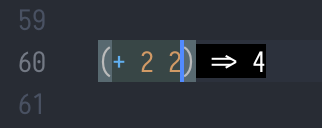
For example, executing "Calva: Evaluate and copy" would result in this output and 4 being in your system clipboard.
 frantic
All 5 comments
I like it!
It is similar to a thing I have been planning to add: A command for pretty printing and paste the result as a comment. But this is better since I won't have to figure out where to put that comment and the user can do it with the copied results himself.
 PEZ
on 9 Dec 2018
PEZ
on 9 Dec 2018
A command to copy the last result (*1) would be awesome. It would also prevent having to doulble up on all commands (Eval, eval and copy, eval file, eval file and copy, ...).
 marcomorain
on 9 Dec 2018
marcomorain
on 9 Dec 2018
Even better! Maybe how we should do with some of the other commands as
well? Pretty print (which doesn't even work today) and replace inline, for
instance.
PEZ
on 9 Dec 2018
So, now there's a command for copying the last results to the clipboard. It doesn't pretty print it yet, but that is because I need to do something about pretty printing as such. Let me know how this works and wether pretty printing is very missed. (Default keybindings are ctrl+alt+v ctrl+c).
PEZ
on 10 Dec 2018
Update: With the new Calva, the keybindings are ctrl+alt+c ctrl+c. Can this issue be closed now?
 bpringe
on 27 Aug 2019
bpringe
on 27 Aug 2019
Related issues
 lspector
·
5Comments
lspector
·
5Comments
 frankadrian314159
·
4Comments
PEZ
·
5Comments
frankadrian314159
·
4Comments
PEZ
·
5Comments
 denistakeda
·
6Comments
PEZ
·
3Comments
denistakeda
·
6Comments
PEZ
·
3Comments
Most helpful comment
So, now there's a command for copying the last results to the clipboard. It doesn't pretty print it yet, but that is because I need to do something about pretty printing as such. Let me know how this works and wether pretty printing is very missed. (Default keybindings are
ctrl+alt+v ctrl+c).