Calendar: Subscribed calendar not shown after upgrading to 2.0.1
After upgrading Calendar to 2.0.1 on Nextcloud 17.0.2, my subscribed calendar (from Google Calendar) no longer shows. The native calendar on Nextcloud works as normal.
May be related to #1894 but not sure.
Steps to reproduce
- upgrade calendar to 2.0.1
- Only native calendar shows. The one subscribed from Google does not.
- I've tried to delete and re-import the Google calendar, but still not shown.
Expected behaviour
Both my calendars (one on Nextcloud one subscribed from Google)
Actual behaviour
The calendar subscribed from Google does not show.
Calendar app
Calendar app version: 2.0.1
CalDAV-clients used: N/A
Client configuration
Browser: Chromium 78.0
Firefox 68.4.1 esr
Operating system: (e.g. Arch Linux)
Debian GNU/Linux
Server configuration
Operating system: Debian Buster
Web server: Apache 2.4.38
Database: MariaDB 10.3.18
PHP version: 7.3.11
Nextcloud Version: 17.0.2
Updated from an older installed version or fresh install:
Upgraded from older installed version
List of activated apps:
Enabled:
- accessibility: 1.3.0
- activity: 2.10.1
- admin_audit: 1.7.0
- bruteforcesettings: 1.5.0
- calendar: 2.0.1
- cloud_federation_api: 1.0.0
- comments: 1.7.0
- contacts: 3.1.8
- dav: 1.13.0
- federatedfilesharing: 1.7.0
- files: 1.12.0
- files_accesscontrol: 1.7.0
- files_external: 1.8.0
- files_markdown: 2.2.0
- files_mindmap: 0.0.15
- files_pdfviewer: 1.6.0
- files_rightclick: 0.15.1
- files_sharing: 1.9.0
- files_trashbin: 1.7.0
- files_versions: 1.10.0
- files_videoplayer: 1.6.0
- firstrunwizard: 2.6.0
- gallery: 18.4.0
- logreader: 2.2.0
- lookup_server_connector: 1.5.0
- nextcloud_announcements: 1.6.0
- notes: 3.1.1
- notifications: 2.5.0
- oauth2: 1.5.0
- password_policy: 1.7.0
- polls: 1.0.0
- privacy: 1.1.0
- provisioning_api: 1.7.0
- recommendations: 0.5.0
- registration: 0.4.7
- richdocuments: 3.5.1
- serverinfo: 1.7.0
- spreed: 7.0.2
- support: 1.0.1
- survey_client: 1.5.0
- systemtags: 1.7.0
- text: 1.1.1
- theming: 1.8.0
- twofactor_backupcodes: 1.6.0
- updatenotification: 1.7.0
- viewer: 1.2.0
- workflowengine: 1.7.0
Disabled: - encryption
- federation
- sharebymail
- user_ldap
Nextcloud configuration:
{
"system": {
"instanceid": "REMOVED SENSITIVE VALUE",
"passwordsalt": "REMOVED SENSITIVE VALUE",
"secret": "REMOVED SENSITIVE VALUE",
"trusted_domains": [
"nextcloud.slat.org"
],
"datadirectory": "REMOVED SENSITIVE VALUE",
"overwrite.cli.url": "https:\/\/nextcloud.slat.org",
"dbtype": "mysql",
"version": "17.0.2.1",
"dbname": "REMOVED SENSITIVE VALUE",
"dbhost": "REMOVED SENSITIVE VALUE",
"dbport": "",
"dbtableprefix": "oc_",
"dbuser": "REMOVED SENSITIVE VALUE",
"dbpassword": "REMOVED SENSITIVE VALUE",
"installed": true,
"mail_from_address": "REMOVED SENSITIVE VALUE",
"mail_smtpmode": "smtp",
"mail_smtpauthtype": "LOGIN",
"mail_domain": "REMOVED SENSITIVE VALUE",
"mail_smtphost": "REMOVED SENSITIVE VALUE",
"mail_smtpport": "587",
"mail_smtpauth": 1,
"mail_smtpname": "REMOVED SENSITIVE VALUE",
"mail_smtppassword": "REMOVED SENSITIVE VALUE",
"maintenance": false,
"theme": "",
"loglevel": 2,
"updater.release.channel": "stable",
"memcache.local": "\OC\Memcache\Redis",
"memcache.locking": "\OC\Memcache\Redis",
"redis": {
"host": "REMOVED SENSITIVE VALUE",
"port": 6379
},
"mail_sendmailmode": "smtp",
"updater.secret": "REMOVED SENSITIVE VALUE",
"filelocking.enabled": true,
"mysql.utf8mb4": true
}
}

 fweng322
All 21 comments
@fweng322 Please fill the __entire issue template__ and provide the requested logs.
 georgehrke
on 24 Jan 2020
georgehrke
on 24 Jan 2020
Logs
Web server error log (e.g. /var/log/apache)
nextcloud_error.log
nextcloud_access.log
Log file (data/nextcloud.log)
Browser log
a) The javascript console log
nextcloud.slat.org-web-console-1579868713451.log
b) The network log
nextcloud.slat.org.har.network.log
fweng322
on 24 Jan 2020
The nextcloud.log was too big so I just capture logs in one or two hours.
fweng322
on 24 Jan 2020
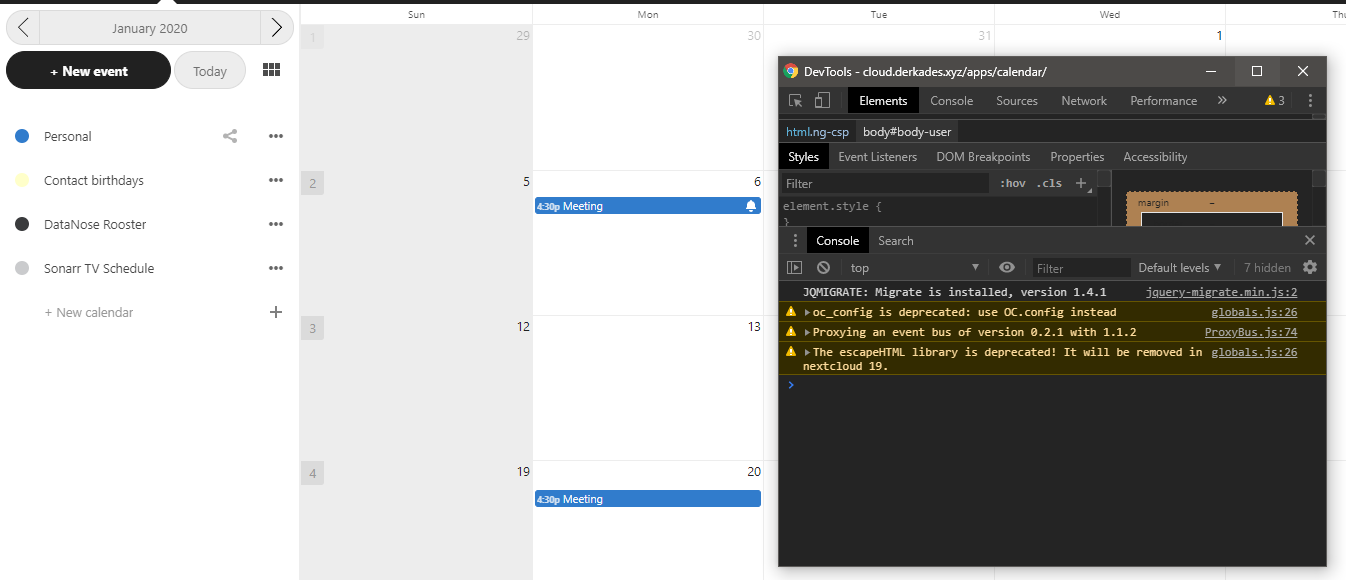
Same issue, after the update only my personal calendar items are shown.
 Derkades
on 24 Jan 2020
Derkades
on 24 Jan 2020
@Derkades Please check https://github.com/nextcloud/calendar/issues/1843#issuecomment-575996362. Is the cron job properly configured? Is the calendarobjects table filled as expected?
georgehrke
on 24 Jan 2020
Thanks, I was not aware that the calendar app now depends on the cronjob. Apparently I set it to cronjob but the cron file got lost in a reinstall and I totally forgot about it. I'm surprised that I haven't run into more issues when not having a functional cronjob for a couple of months. oc_jobs contains 16018 rows..
EDIT: After first cron job ran for 20 minutes (and receiving a lot of emails from appointments a while back), my calendar is working now, The calendar app is much better with this new version!
Derkades
on 24 Jan 2020
@fweng322 Are you aware that you just posted your entire calendar data?
georgehrke
on 24 Jan 2020
This is the row corresponding to the Google calendar:
(64481,'OCA\\DAV\\BackgroundJob\\RefreshWebcalJob','{\"principaluri\":\"principals\\/users\\/Franklin\",\"uri\":\"calendargooglecom\"}',0,1579831232,0,0)
The 0 after the json data indicates that it was never executed. Please configure a proper cron-job instead.
georgehrke
on 24 Jan 2020
@fweng322 Are you aware that you just posted your entire calendar data?
uh... no.
fweng322
on 24 Jan 2020
This is the row corresponding to the Google calendar:
(64481,'OCA\\DAV\\BackgroundJob\\RefreshWebcalJob','{\"principaluri\":\"principals\\/users\\/Franklin\",\"uri\":\"calendargooglecom\"}',0,1579831232,0,0)The 0 after the json data indicates that it was never executed. Please configure a proper cron-job instead.
Before upgrading I set to AJAX which means it should reload every time I go to the calendar page, right? Not sure why it does not work now.
BTW, the job seems to be stuck now since the first time executing from the cron table.
fweng322
on 24 Jan 2020
Before upgrading I set to AJAX which means it should reload every time I go to the calendar page, right?
Not exactly. And to prevent timeouts a proper cron-job is the recommended cron type.
BTW, the job seems to be stuck now since the first time executing from the cron table.
The cron table was very full and since it was not reserved for any particular timespot (but just marked as execute me whenever there are free resources), it was still not executed.
georgehrke
on 24 Jan 2020
Before upgrading I set to AJAX which means it should reload every time I go to the calendar page, right?
Not exactly. And to prevent timeouts a proper cron-job is the recommended cron type.
Yes, sometimes it timed out, but eventually it would work, until upgraded to 2.0.1.
Do you have any idea why AJAX not worked anymore? Even no cron-job was set it is supposed to work anyway.
BTW, the job seems to be stuck now since the first time executing from the cron table.
The cron table was very full and since it was not reserved for any particular timespot (but just marked as execute me whenever there are free resources), it was still not executed.
Seems executing since the status of the process is updating. Waiting for it being done...
fweng322
on 24 Jan 2020
Yes, sometimes it timed out, but eventually it would work, until upgraded to 2.0.1.
Do you have any idea why AJAX not worked anymore?
We changed the way subscriptions work in 2.0.0. In Version 1.x they were not fetched by cron job.
georgehrke
on 24 Jan 2020
Yes, sometimes it timed out, but eventually it would work, until upgraded to 2.0.1.
Do you have any idea why AJAX not worked anymore?We changed the way subscriptions work in 2.0.0. In Version 1.x they were not fetched by cron job.
I see. Thanks for your answer and hard work.
BTW, does it mean that AJAX no longer worked? If so it should be removed in the admin/settings I think.
fweng322
on 24 Jan 2020
The first cron job finished, however the calendar still not shown.
fweng322
on 24 Jan 2020
BTW, does it mean that AJAX no longer worked? If so it should be removed in the admin/settings I think.
It is, but only for very small instances where cron is not available. If possible, you should always configure a proper cron.
The first cron job finished, however the calendar still not shown.
It does not run all jobs in oc_jobs every time. Only a couple of them at a time.
Can you check that table again to see if the number after the json data is still 0?
(64481,'OCA\\DAV\\BackgroundJob\\RefreshWebcalJob','{\"principaluri\":\"principals\\/users\\/Franklin\",\"uri\":\"calendargooglecom\"}',0,1579831232,0,0)
Given how big your oc_jobs table was and that the RefreshWebcalJob is at the end it can take some time until it actually executed.
georgehrke
on 24 Jan 2020
The cronjob stops after 14 minutes: https://github.com/nextcloud/server/blob/master/cron.php#L114-L116. I'd say leave it running every 15 minutes and check back the next day
Derkades
on 24 Jan 2020
It does not run all jobs in oc_jobs every time. Only a couple of them at a time.
Can you check that table again to see if the number after the json data is still 0?
(64481,'OCA\\DAV\\BackgroundJob\\RefreshWebcalJob','{\"principaluri\":\"principals\\/users\\/Franklin\",\"uri\":\"calendargooglecom\"}',0,1579831232,0,0)
The last for number became 1579887017,1579930206,0,1
So I think yes, it was executed for several times, but I still couldn't see my google calendar.
Given how big your oc_jobs table was and that the
RefreshWebcalJobis at the end it can take some time until it actually executed.
Could you please tell me what do the last two numbers mean? Thanks.
fweng322
on 25 Jan 2020
Is anyone else still seeing this not working properly? My calendar is now at 2.1.2, and I have a calendar synced from office365. The initial pull was fine - I'm seeing my cron jobs successfully run - and yet - an event that was added to my calendar is not appearing in my nextcloud calendar. Or should I just open a new bug that it still isn't syncing properly?
 darmbrust
on 15 Dec 2020
darmbrust
on 15 Dec 2020
@darmbrust The default sync interval is quite low (one week!), you probably want to increase it: https://docs.nextcloud.com/server/20/admin_manual/groupware/calendar.html#refresh-rate. I set mine to every 2 hours.
Derkades
on 15 Dec 2020
Thank you for that @Derkades - wouldn't have stumbled across that easily. Not sure who they had in mind when they made that default choice.... that is pretty close to useless for a calendar with daily schedules.
Thanks for the pointers. For others - to sync every 5 minutes (assuming your cron runs every 5 minutes)
sudo -u www-data php ./occ config:app:set dav calendarSubscriptionRefreshRate --value "PT5M"
darmbrust
on 15 Dec 2020
Related issues
georgehrke
·
4Comments
 juliushaertl
·
4Comments
juliushaertl
·
4Comments
 brylie
·
3Comments
brylie
·
3Comments
 cloud2018
·
3Comments
cloud2018
·
3Comments
 BornToBeRoot
·
3Comments
BornToBeRoot
·
3Comments