Please add an agenda view to the nextcloud calendar. In case you don't know, what I'm referring to, an agenda view is basically a list of the upcoming events in your calendar.
The view button could be placed right beside the day view, week view, month view buttons, e.g.
Of course, this view type should also be available for public calendars.
There is a $45 open bounty on this issue. Add to the bounty at Bountysource.
 RiSK1979
All 55 comments
I totally agree with this feature request. I would very much like to be able to use an Agenda view (or List view, as others would call it). The point of it is that I am not much interested in the days without any events, and I assume that the Agenda view (or List view) would allow much more space to instantly display the full name and the specifics of the event (attendees and location).
 kbeerepoot
on 29 Apr 2017
kbeerepoot
on 29 Apr 2017
Please refrain from commenting when you can't add anything new. Use Github Reactions instead.
 georgehrke
on 29 Apr 2017
georgehrke
on 29 Apr 2017
Dear Georg,
I hope you do not mind me using this channel to express my ardent wish for this feature again. I realise it is nothing new (see my comment of 29 April 2017) but my users (and I assume many others all over the world) could really use this feature. Is there any idea about when it could possibly be implemented ?
I would love to do it myself, but unfortunately I can not program my way out of a wet paper bag.
Again, my apologies if I should not have written this comment.
kbeerepoot
on 3 Sep 2018
Hints for implementation:
List View: fullcalendar.io/docs/list-view-demo doc: fullcalendar.io/docs/list-view
todo: implement own Full-calendar view: fullcalendar.io/docs/custom-view-with-js
github.com/fullcalendar/fullcalendar/blob/master/packages/list/src/ListEventRenderer.ts#L75L94
 jakobroehrl
on 5 Sep 2019
jakobroehrl
on 5 Sep 2019
Hello
Is it possible that in the top bar, near the notification icon, an agenda icon could show the next events in a small list view.
thanks
 phoezelle
on 24 Oct 2019
phoezelle
on 24 Oct 2019
Embedding a Calendar into a Website is a cool feature.

But Inside a Website I don't need a Classic Calendar view. I need a List-view because I do not have Dates all week I wish to present, With this list-view I also wish to present some more Information.
May I could be able to set some settings inside the embed link.
eg.:
<iframe width="400" height="215" src="/apps/calendar/embed/y5oPHcErXyr2jJ6S?view=list&range=-2d+5w&show-field=Description,category,enddate"></iframe>
 Mannshoch
on 30 Oct 2019
Mannshoch
on 30 Oct 2019
@Mannshoch It's possible to specify the used view in v2.0.
 tcitworld
on 30 Oct 2019
tcitworld
on 30 Oct 2019
@tcitworld could you be more explicit on how to use this view in 2.0 within an iframe.
 briner
on 30 Oct 2019
briner
on 30 Oct 2019
Calendar 2.0 (which is still in beta and not a stable release so far) does not come with list view yet. But you will be able to set the embedded iframe to a certain view and even a certain time-range if you wish to.
you will be able to do it like apps/calendar/embed/token123/month/now or apps/calendar/embed/token123/month/2019-11-01
Once the list view was implemented, you will be able to do the same, just with list instead of month.
georgehrke
on 30 Oct 2019
I just added 15$ on the bounty for this. Hope it will get some traction.
briner
on 30 Oct 2019
@georgehrke , thank you for the reply.
briner
on 30 Oct 2019
@briner
I wanted to bring the calendar entries to a (wordpress) website.
Solved it with the plugin "Event Organiser" to get it from nextcloud and show it as list on the website.
jakobroehrl
on 30 Oct 2019
Hints for implementation:
List View: fullcalendar.io/docs/list-view-demo doc: fullcalendar.io/docs/list-viewtodo: implement own Full-calendar view: fullcalendar.io/docs/custom-view-with-js
github.com/fullcalendar/fullcalendar/blob/master/packages/list/src/ListEventRenderer.ts#L75L94
@briner I would love to implement this feature. But, can you guide me a little as in which classes/pages to play around to test this feature properly?
 ahmedmohiduet
on 14 Dec 2019
ahmedmohiduet
on 14 Dec 2019
@ahmedmohiduet, I'm not really sure what you ask for. But, the idea is to show the calendar as a list so that it can be read on a smartphone.
And to be able to click on an event a to get a detailed view.
briner
on 14 Dec 2019
@briner Thank you for the prompt response. I am kind off new to nextcloud server. So I wasn't sure how to setup my local test environment for testing new UI implementations. So far, I am thinking, you are looking to have different views like ListView for users event calendar
ahmedmohiduet
on 14 Dec 2019
@briner @ahmedmohiduet In my opinion the motivation for a list view is not just so that it can be read on a smartphone. I'd very much like to have the list view available on my laptops also.
But to me the main advantages of a list view would be:
- to not have the days in view where I have no meetings/appointments
- to be able to see (not just) the full meeting title (which is now usually shown truncated), but also start and end time, location and description without having to 'open' the meeting by clicking on it.
- to be able to print a list of my upcoming meetings
kbeerepoot
on 14 Dec 2019
@kbeerepoot: Got it. I believe I can imlement this. Will begin tomorrow
ahmedmohiduet
on 14 Dec 2019
@ahmedmohiduet Hey, Thank you for picking up this issue! I would appreciate if you could post a small proposal / your planned steps first, so that we can make sure that we end up with a mergeable pull-request. Thanks
georgehrke
on 15 Dec 2019
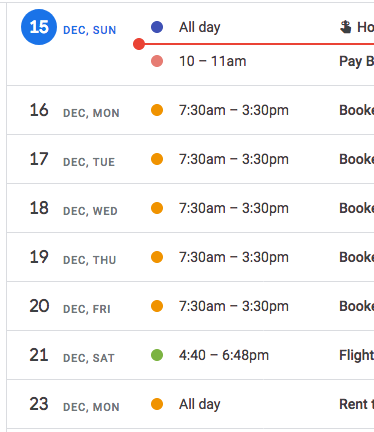
For a quick reference, here is the Schedule view of a calendar in
Google. It lists items by Date - Calendar Color - Times - Title & Location
On Sun, Dec 15, 2019 at 2:16 AM Georg Ehrke notifications@github.com
wrote:
@ahmedmohiduet https://github.com/ahmedmohiduet Hey, Thank you for
picking up this issue! I would appreciate if you could post a small
proposal / your planned steps first, so that we can make sure that we end
up with a mergeable pull-request. Thanks—
You are receiving this because you are subscribed to this thread.
Reply to this email directly, view it on GitHub
https://github.com/nextcloud/calendar/issues/402?email_source=notifications&email_token=AANUKZRC24WENW4PUVMAL73QYX7XRA5CNFSM4DGDZFO2YY3PNVWWK3TUL52HS4DFVREXG43VMVBW63LNMVXHJKTDN5WW2ZLOORPWSZGOEG4VWMA#issuecomment-565795632,
or unsubscribe
https://github.com/notifications/unsubscribe-auth/AANUKZWIEWEWQR6CDKSPHR3QYX7XRANCNFSM4DGDZFOQ
.
 sunjam
on 15 Dec 2019
sunjam
on 15 Dec 2019
@ahmedmohiduet Hey, Thank you for picking up this issue! I would appreciate if you could post a small proposal / your planned steps first, so that we can make sure that we end up with a mergeable pull-request. Thanks
Hi @georgehrke! Sorry for the late reply. I was browsing through nexcloud (https://play.google.com/store/apps/details?id=com.nextcloud.client&hl=en) android app UI. It appears it only has a tiny 'Sync calendar & contacts' menu item and no other calendar options and pointing me to a paid 'DAVx5-CalDAV/CardDAV Client' app. So, my question is, can I test the calendar portion of the app(https://play.google.com/store/apps/details?id=com.nextcloud.client&hl=en) locally without a 'DAVx5-CalDAV/CardDAV Client' app?
ahmedmohiduet
on 15 Dec 2019
This issue has absolutely nothing to do with Android, it's about the calendar in the Nextcloud webinterface.
Also, the Nextcloud Android app does not provide its own calendar UI, it's just allowing you to edit the Nextcloud calendar through the standard calendar app on Android.
Edit: As @tcitworld pointed out correctly, the connection between Nextcloud and Android is obviously provided by DAVx5, not Nextcloud itself.
georgehrke
on 15 Dec 2019
Also, the Nextcloud Android app does not provide its own calendar UI, it's just allowing you to edit the Nextcloud calendar through the standard calendar app on Android.
That's DAVx5, not the Nextcloud Android App, for clarification.
tcitworld
on 15 Dec 2019
@georgehrke Ahh sorry. I misread it. My bad. Alright, I am going through documentation and setting up my local Nexcloud server instance at the moment. So far, I am looking to 1) setup my nextcloud server, 2) check out calendar UI on laptop browser 3) update my UI(HTML,JS,CSS) 4)test calendar UI on my laptop browser 5) test them on android, make sure designs are responsive 6) test UI on iPhone 7) commit and PR...
ahmedmohiduet
on 15 Dec 2019
Just a few further hints from my side:
- You can add a new view button in here
- Make sure to add it in here and here.
- Fullcalendar already offers a list view, but I'm not satisfied with it. It's lacking information like location and (the first line) of the description
- To add these properties to the view, you will have to create your own view. You can find documentation about creating your own view here. You obviously don't have to extend View and write everything from scratch, but you can just extend ListView.
- Here is the important piece of code for the list view, that requires modification.
- Please write unit tests for the files you are adding. If an existing file you are editing is not covered by unit tests yet, it would be nice if you write unit tests that cover what you added.
georgehrke
on 15 Dec 2019
@ahmedmohiduet If you have any further questions or need any assistance, please don't hesitate to ask :)
georgehrke
on 9 Jan 2020
Dear Georg, I am exploring nexcloud-calendar codebase at the moment. Check out https://trello.com/b/nqa1HOhF/nextcloud-calendar-ui . I have lots of No OC found warnings with my fresh nexcloud-calendar checkout during jest tests (npm test)(without phpunit tests). Any ideas what these No OC found warnings might mean?
ahmedmohiduet
on 10 Jan 2020
If you are referring to this:
 PASS  tests/javascript/unit/utils/illustration.test.js
  ● Console

    console.warn node_modules/@nextcloud/l10n/dist/index.js:56
      No OC found
    console.warn node_modules/@nextcloud/l10n/dist/index.js:56
      No OC found
    console.warn node_modules/@nextcloud/l10n/dist/index.js:56
      No OC found
    console.warn node_modules/@nextcloud/l10n/dist/index.js:56
      No OC found
You can safely ignore that for now. It's just giving a warning that it's not running inside an actual Nextcloud environment but using some fallbacks instead for now.
What's important is that you don't have any failed tests:
Test Suites: 49 passed, 49 total
Tests:       155 passed, 155 total
Snapshots:   0 total
Time:        32.846s
Ran all test suites.
got it. Can I ignore failing php tests? I have a couple of failing phpunit tests regarding email server
ahmedmohiduet
on 10 Jan 2020
Can I ignore failing php tests? I have a couple of failing phpunit tests regarding email server
Since you didn't change them(?), you can ignore that. But I'm wondering why they are failing for you. They are running just fine on CI. Can you post the error message? :)
georgehrke
on 10 Jan 2020
@ahmedmohiduet I saw the screenshot of the list view you provided at https://www.dropbox.com/s/8m7l8q3tbn5kwl7/nextcloud-calendar-dev.png?dl=0
It looks great , but I noticed you provided the four fields you used horizontally on one line. I could also very well live with a view where these fields are provided vertically below each other (or at least the location and description field respectively on a second and third line. This would make for much easier reading of especially a description field with a lot of content. It probably also would make it easier to implement this view in a mobile phone app version.
kbeerepoot
on 11 Jan 2020
@ahmedmohiduet I saw the screenshot of the list view you provided at https://www.dropbox.com/s/8m7l8q3tbn5kwl7/nextcloud-calendar-dev.png?dl=0
It looks great , but I noticed you provided the four fields you used horizontally on one line. I could also very well live with a view where these fields are provided vertically below each other (or at least the location and description field respectively on a second and third line. This would make for much easier reading of especially a description field with a lot of content. It probably also would make it easier to implement this view in a mobile phone app version.
@kbeerepoot Its actually showing first line of description. Incase very long first line, it still may pose problems. Good idea with vertical location+description. we have a couple of options lying ahead of us, (i) Leave horizontal location+description and have vertical location,description (ii) Have horizontal location+description with limited numbers of characters truncating long first line+following a '...' (iii) introduce another view selector for Listview and have both horizontal and semi-vertical view for listView
ahmedmohiduet
on 12 Jan 2020
@georgehrke My output for my command phpunit --bootstrap tests/php/unit/bootstrap.php tests/php/unit/ looks like:
PHP Fatal error:  Uncaught Error: Class 'ChristophWurst\Nextcloud\Testing\TestCase' not found in /var/www/nextcloud/calendar/tests/php/unit/Controller/ContactControllerTest.php:30
Stack trace:
#0 /usr/share/php/PHPUnit/Util/FileLoader.php(57): include_once()
#1 /usr/share/php/PHPUnit/Util/FileLoader.php(45): PHPUnit\Util\FileLoader::load('/var/www/nextcl...')
#2 /usr/share/php/PHPUnit/Framework/TestSuite.php(540): PHPUnit\Util\FileLoader::checkAndLoad('/var/www/nextcl...')
#3 /usr/share/php/PHPUnit/Framework/TestSuite.php(618): PHPUnit\Framework\TestSuite->addTestFile('/var/www/nextcl...')
#4 /usr/share/php/PHPUnit/Runner/BaseTestRunner.php(70): PHPUnit\Framework\TestSuite->addTestFiles(Array)
#5 /usr/share/php/PHPUnit/TextUI/Command.php(183): PHPUnit\Runner\BaseTestRunner->getTest('tests/php/unit/', '', Array)
#6 /usr/share/php/PHPUnit/TextUI/Command.php(162): PHPUnit\TextUI\Command->run(Array, true)
#7 /usr/bin/phpunit(42): PHPUnit\TextUI\Command::main()
#8 {main}
  thrown in /var/www/nextcloud/calendar/tests/php/unit/Controller/ContactControllerTest.php on line 30
I'm looking into at the moment find which php files I have misplaced accidentally inside nextcloud root dir.
Btw, do you have a mock nextcloud server setup inside nextcloud-calendar that dynamically starts during test start and terminates upon finishing all tests? It would save us a whole nexcloud server setup time.
ahmedmohiduet
on 12 Jan 2020
The error message you are seeing looks like some composer packages are missing. It should work if you run make composer-init.
georgehrke
on 12 Jan 2020
@kbeerepoot Its actually showing first line of description. Incase very long first line, it still may pose problems. Good idea with vertical location+description. we have a couple of options lying ahead of us, (i) Leave horizontal location+description and have vertical location,description (ii) Have horizontal location+description with limited numbers of characters truncating long first line+following a '...' (iii) introduce another view selector for Listview and have both horizontal and semi-vertical view for listView
@ahmedmohiduet Option (i) could be a good idea, provided the various lines of output would wrap if they run of the provided screen width. That wrapping would not be necessary on most monitors, but would come in handy when shown on a narrow screen width (mobile phones)
Option (iii), if implementable, might be a good idea although it would complicate things somewhat and I prefer to keep things simple. The whole idea of the List view for me is to have a view that shows a maximum of available information and that is easy to print out to provide users with a list of upcoming events with the maximum of available information about them.
kbeerepoot
on 14 Jan 2020
@ahmedmohiduet Feel free to open a pull-request, so we can discuss your changes :)
georgehrke
on 14 Jan 2020
@kbeerepoot Its actually showing first line of description. Incase very long first line, it still may pose problems. Good idea with vertical location+description. we have a couple of options lying ahead of us, (i) Leave horizontal location+description and have vertical location,description (ii) Have horizontal location+description with limited numbers of characters truncating long first line+following a '...' (iii) introduce another view selector for Listview and have both horizontal and semi-vertical view for listView
@ahmedmohiduet Option (i) could be a good idea, provided the various lines of output would wrap if they run of the provided screen width. That wrapping would not be necessary on most monitors, but would come in handy when shown on a narrow screen width (mobile phones)
Option (iii), if implementable, might be a good idea although it would complicate things somewhat and I prefer to keep things simple. The whole idea of the List view for me is to have a view that shows a maximum of available information and that is easy to print out to provide users with a list of upcoming events with the maximum of available information about them.
@kbeerepoot Let me come up with a more improved Option(i). I am at the moment merging new Fullcalendar ListView into nextcloud-calendar plugin.
ahmedmohiduet
on 15 Jan 2020
@ahmedmohiduet What's the current status on the List view?
If you have any questions, please don't hesitate to ask :)
georgehrke
on 18 Feb 2020
@georgehrke I had been on a vacation. Got back yesterday. I am exploring nextcloud-calendar codebase at the moment and doing some study on Vuejs
ahmedmohiduet
on 19 Feb 2020
@georgehrke One quick question. Can you point me to vuejs template file which containing <table> <tr> tags of fullcalendar month grid view? I can inspect<table>, <tr> tags right in my chrome dev tools but cant seem to find any *.vue files containing them. Are they generating from some elsewhere?
ahmedmohiduet
on 30 Mar 2020
Fullcalendar is an external library, which is not Vue.js based. It's plain javascript.
However it's extensible. You can hook into the rendering of a day cell here and the rendering of an event here
georgehrke
on 30 Mar 2020
So for the list view, you can't rely on vue, but you will have to implement it yourself: https://fullcalendar.io/docs/custom-view-with-js
georgehrke
on 30 Mar 2020
@georgehrke, it appears my adding new view item not updating in my app calendar navigation header view menu in my calendar app inside my local running nextcloud server instance. Steps I'm following for deploying new calendar into my local running nextcloud srvr instance:
rm -rf js
webpack --config webpack.dev.js
sudo cp -r js/* "$NEXTCLOUD_SERVER_ROOT_DIR/apps/calendar/"
sudo systemctl restart mysql
sudo systemctl restart apache2
Let me know if I am missing something
Meantime, I have a standalone working extended list(location+description) PoC demo at: https://github.com/ahmedmohiduet/calendar/tree/master/fc4-extended-list-demo-wip. steps for running:
download directory
npm run clean
webpack
xdg-open index.html
It appears FC5 contains lot of changes+improvements. Let me know if FC5 fixes #402
ahmedmohiduet
on 11 May 2020
Hello Ahmed, how are you doing, and how is work on the list view progressing? Is there a new screenshot available by any chance? Sorry if I sound pushy, but I am so eagerly hoping/waiting/praying for the list view functionality ...
kbeerepoot
on 13 May 2020
@kbeerepoot check out: https://trello.com/c/FieJooxi/34-fine-tune-ui . The demo at: https://github.com/ahmedmohiduet/calendar/tree/master/fc4-extended-list-demo-wip
Thare are some caveats: 1) its not FC5 compatible. 2) js file have to be refactored(eslinted) 3) have to add css media queries and test on smartphones+tablet 4) listitem click to get detailed view in todo.
ahmedmohiduet
on 14 May 2020
@georgehrke let me know if I'm missing something. I am stuck at https://github.com/nextcloud/calendar/issues/402#issuecomment-623357473
ahmedmohiduet
on 14 May 2020
Without knowing what I was doing I took a stab at it and implemented the list feature as provided by FC5.
 jean-gui
on 19 Aug 2020
jean-gui
on 19 Aug 2020
Without knowing what I was doing I took a stab at it and implemented the list feature as provided by FC5.
Thanks @jean-gui, that sounds great !! I could really use that feature in the live version. I had a look at your screenshots at #2476, but could not see if the location of the appointments is also part of the list view(s). Is it ? Is it possible to post a screenshot that shows it? And it is possible to post a screenshot of an appointment with a specific timeslot instead of 'all day' ?
Thanks for your efforts. It is immensely appreciated. I am very curious when this will show up in the live version ...
kbeerepoot
on 19 Aug 2020
@kbeerepoot Something like that?
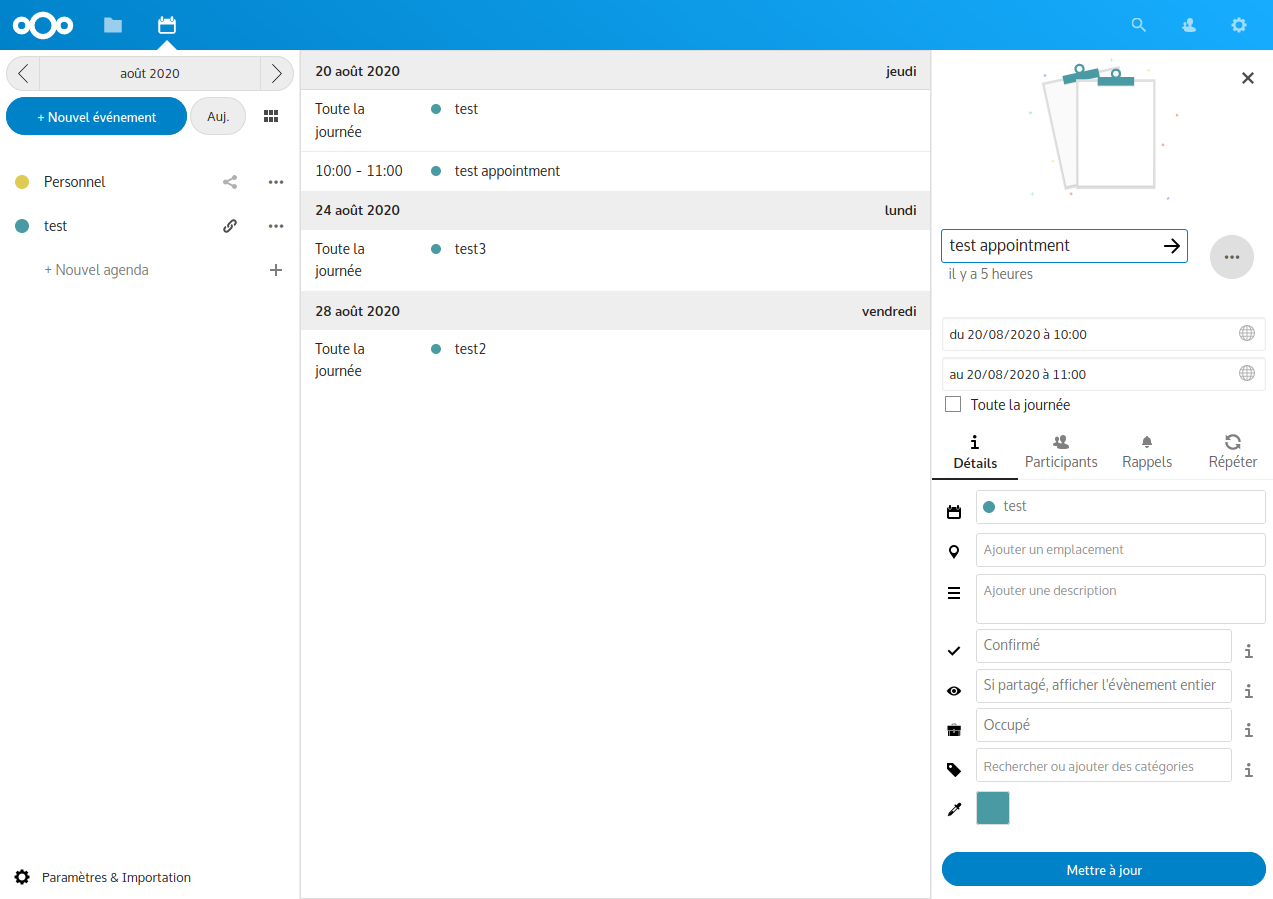
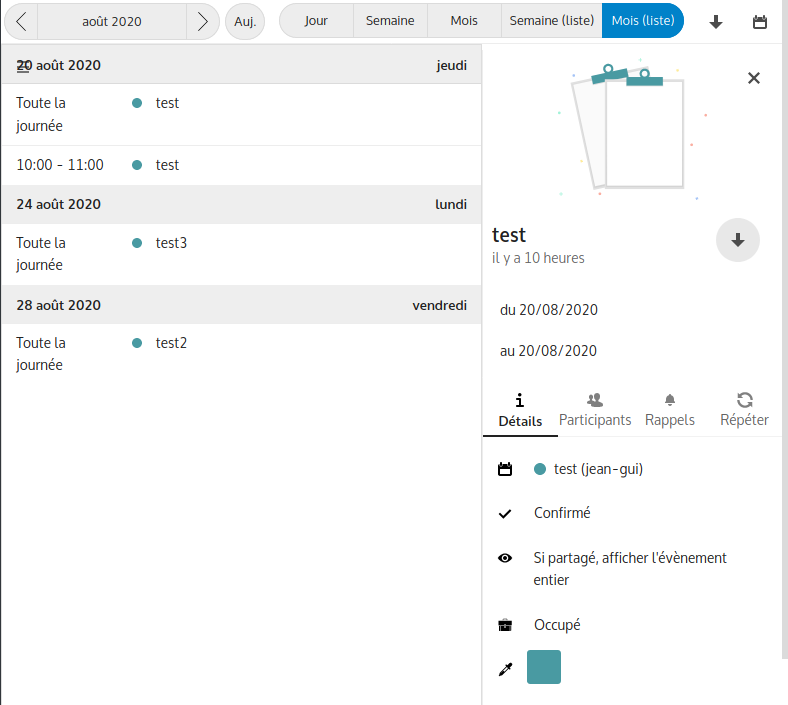
jean-gui
on 20 Aug 2020
@kbeerepoot Something like that?
Thanks for providing an adjusted screenshot, with a specific timeslot showing. Does this mean that the location (emplacement) will not be showing in the final version of the list view? That would be a pity. Of course I do understand that not all fields will be showing, but the at least the foursome of name, date, timeslot and location would be ideal in my opinion ...
Thanks again for your efforts.
kbeerepoot
on 20 Aug 2020
I managed to do it by adding the extra info in the event object and display it in fullcalendar/eventRender.js.
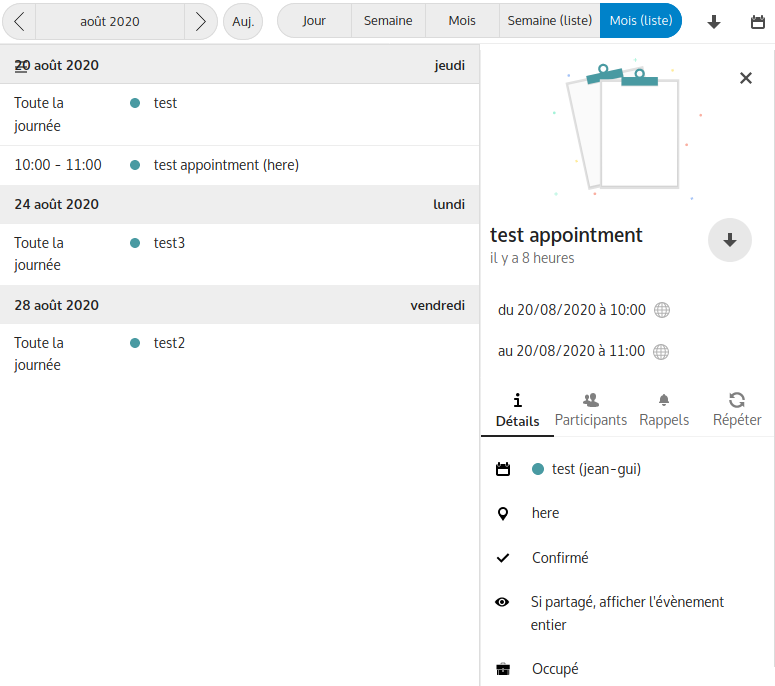
jean-gui
on 20 Aug 2020
I managed to do it by adding the extra info in the event object and display it in fullcalendar/eventRender.js.
Great !! That seems quite workable to me, and has the added advantage that the location field is not using any unnecessary extra space this way.
I can imagine that coding purists might object to this method, though. We'll have to wait and see if there are any reactions to it. But if this combined event object is only used in the list views I can't see any valid objections (I am not a programmer, though).
I can't wait to see this solution appear in the live version. Thanks again for your efforts ...
kbeerepoot
on 20 Aug 2020
Hmm, I realize that the location is now also displayed in grid views, which may not be desirable. I'll look tomorrow if I can change that.
jean-gui
on 20 Aug 2020
Do you see a possibility that user could configure the list view a bit to own needs?
e.g. If I close the right window, I wish that location, category name, and a paper-clip (If something attached) appear in the listview.
(Most time I attach a link to Polls, Forms or to a Note to a calendar Item)
Mannshoch
on 21 Aug 2020
That's certainly possible but probably much more complicated and I don't think I know the code enough to do it. That should probably be introduced in another issue/MR when/if this one is accepted.
Meanwhile, I fixed the bug described in https://github.com/nextcloud/calendar/issues/402#issuecomment-677784750.
jean-gui
on 21 Aug 2020
Related issues
 juliushaertl
·
4Comments
juliushaertl
·
4Comments
 deanforrest
·
4Comments
deanforrest
·
4Comments
 raimund-schluessler
·
3Comments
raimund-schluessler
·
3Comments
 cappuMUC
·
4Comments
georgehrke
·
3Comments
cappuMUC
·
4Comments
georgehrke
·
3Comments
Most helpful comment
I managed to do it by adding the extra info in the event object and display it in fullcalendar/eventRender.js.
