Calculator: Remove space when we copy/paste a number
Describe the bug
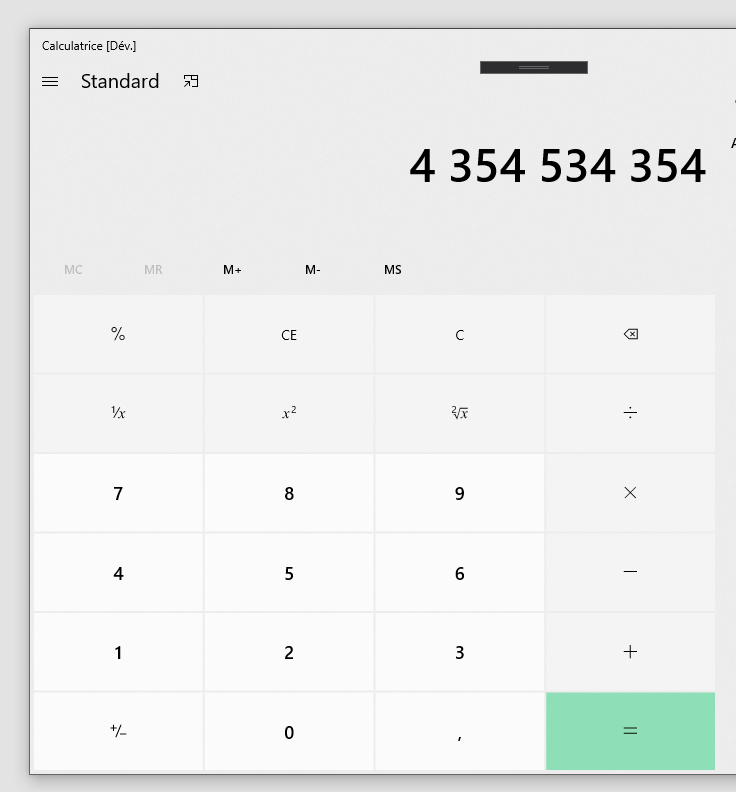
When we copy the result of a calc, we got a number with space character between numbers (Eg: "2 365 596")
Steps To Reproduce
Steps to reproduce the behavior:
- Calc 568 * 568 * 568
- Copy the result
- Clic on "C"
- Paste the previous number
- Invalid number ("Entrée non valide" on a French app)
Expected behavior
Remove spaces when we copy it.
Device and Application Information
- OS Build: 1903
- Architecture: x64
- Application Version: ?
- Region: FR_fr
I'm just reporting this problem. I don't want to fix it.
 Maxou44
All 7 comments
This is your friendly Microsoft Issue Bot. I've seen this issue come in and have gone to tell a human about it.
 MicrosoftIssueBot
on 24 Jan 2020
MicrosoftIssueBot
on 24 Jan 2020
Thanks for the detailed bug report! @rudyhuyn, can you help confirm the desired behavior here?
 grochocki
on 28 Jan 2020
grochocki
on 28 Jan 2020
@grochocki, yes but it's by design, white space is used as the thousands separator in French (, in US, . in Germany, ...).
We have 3 solutions:
- Remove all thousands separators, whatever the character used
- Remove thousands separators but only when the character used is white space
- Keep the current behavior.
 rudyhuyn
on 10 Apr 2020
rudyhuyn
on 10 Apr 2020
When we copy the result of the calc and paste it again, we get a "Entrée invalide" error, the number isn't parsed as the same way it's dislayed.
Maxou44
on 12 Apr 2020
When we copy the result of the calc and paste it again, we get a "Entrée invalide" error, the number isn't parsed as the same way it's dislayed.
This certainly makes things worse.
We have 3 solutions...
I can imagine use cases for both copying the value with and without separators. A possible fourth option here might be to functionally support both copying _value_ (i.e., "1234.567") and copying _display value_ (i.e., "1,234.567" or "1 234.567" etc.). I imagine copying value would be the default, with copying the display value could be added to the context menu.
grochocki
on 13 Apr 2020
(Note: the shortcut Ctrl+C already removes thousands separators, the issue is only when we select the text and copy/paste).
5th solution: we use a regex to automatically remove spacing characters before a group of 3 digits (or more, depending on grouping settings) when a text is pasted and only when the local thousands separator is " "
@maxou44, Je suis français (pas loin de Nantes), je vais personnellement me charger de corriger ce soucis dans les prochaines 24 heures.
rudyhuyn
on 14 Apr 2020
@rudyhuyn Amazing! Thanks ☺️
Edit: If you are near Nantes, I'll paid you a bier for this fix ;)
Maxou44
on 14 Apr 2020
Related issues
 InfoLibre
·
17Comments
InfoLibre
·
17Comments
 milos321
·
19Comments
milos321
·
19Comments
 imchau
·
27Comments
imchau
·
27Comments
 Diggsey
·
20Comments
Diggsey
·
20Comments
 g-plane
·
55Comments
g-plane
·
55Comments