Calculator: Date picker on date calculator stretches too far down
Describe the bug
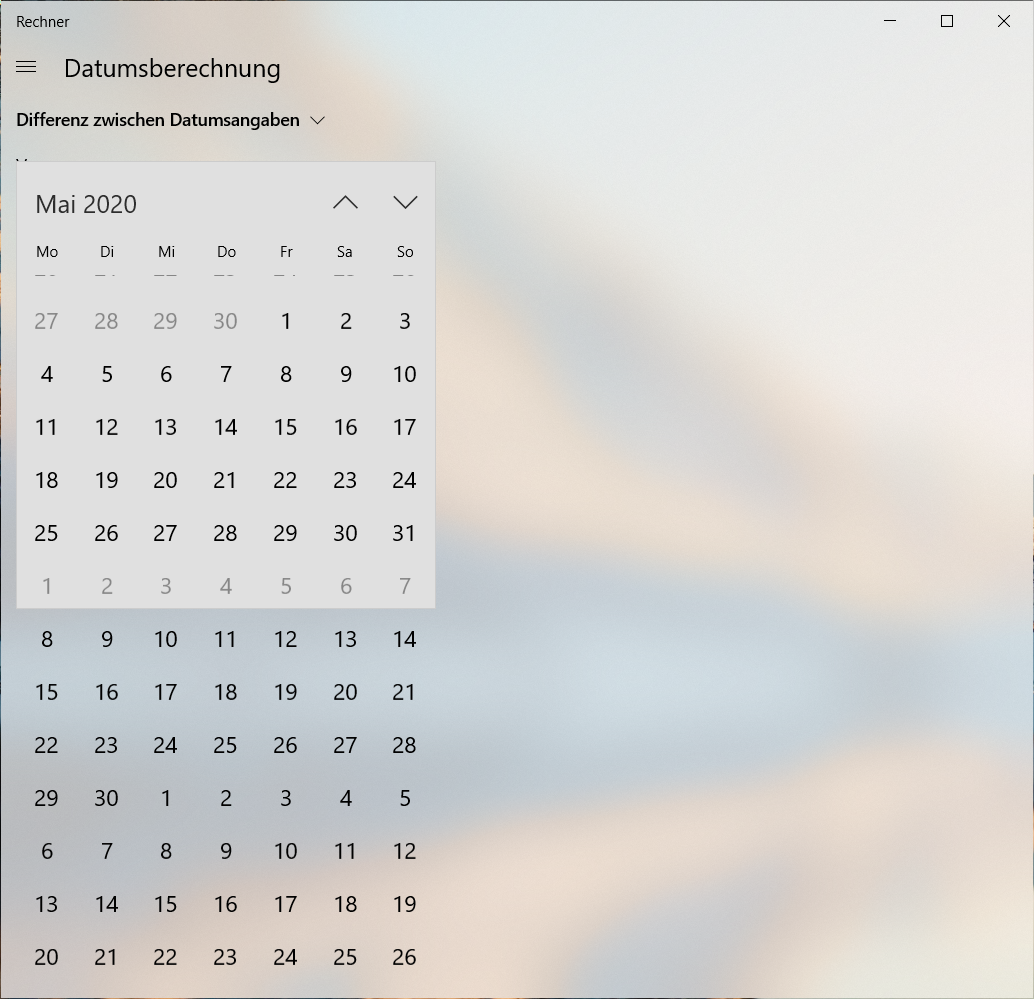
In the date calculator, there are two date picker buttons. Clicking any of them spawns the date picker, but it extends too far down. One can see the rectangle where it should be in, but there are days even below that rectangle. However, no dates can be selected below the rectangle.
Steps To Reproduce
- Open the date calculator.
- Click a date picker.
Expected behavior
The date picker should remain within its designated rectangle.
Screenshots
Device and Application Information
- OS Build: 10.0.18362.145
- Architecture: x64
- Application Version: 10.1904.31.0
- Region: de-DE
- Dev Version Installed: No
Requested Assignment
I'm just reporting this problem. I don't want to fix it.
 adrianghc
All 5 comments
Thanks for the detailed bug report! I can reproduce the issue easily on my machine.
 grochocki
on 5 Jun 2019
grochocki
on 5 Jun 2019
This is your friendly Microsoft Issue Bot. I've seen this issue come in and have gone to tell a human about it.
 MicrosoftIssueBot
on 6 Jun 2019
MicrosoftIssueBot
on 6 Jun 2019
It seems like this issue appears only with scaling higher than 100%.
adrianghc
on 1 Jul 2019
It seems like this issue appears only with scaling higher than 100%.
Do you mean scaling settings in Windows Settings -> Display -> Scale and layout menu?
Cannot reproduce it on my local machine with latest master at the moment :(
 mr1sunshine
on 1 Oct 2019
mr1sunshine
on 1 Oct 2019
Yes, that is what I mean. However, the issue seems to be fixed since the last app update, which I forgot to report here. Or maybe it was a bug with the calendar control itself that got fixed with a Windows update.
adrianghc
on 1 Oct 2019
Related issues
MicrosoftIssueBot
·
19Comments
 ThiefMaster
·
30Comments
ThiefMaster
·
30Comments
 patrick-compass
·
22Comments
MicrosoftIssueBot
·
16Comments
patrick-compass
·
22Comments
MicrosoftIssueBot
·
16Comments
 InfoLibre
·
17Comments
InfoLibre
·
17Comments