Calculator: Add the ability for users to pin Calculator on top of other windows
Problem Statement
When attempting to use Calculator with other application, such as a spreadsheet, Calculator will lose focus when you click on the other app (e.g. to scroll/copy). Users have requested the ability to pin Calculator on top of other windows to facilitate ongoing use with other apps.
Evidence or User Insights
This is our second-highest customer feedback request in Feedback Hub with some users reporting their only alternative is to pay for an app which is sticky.
Proposal
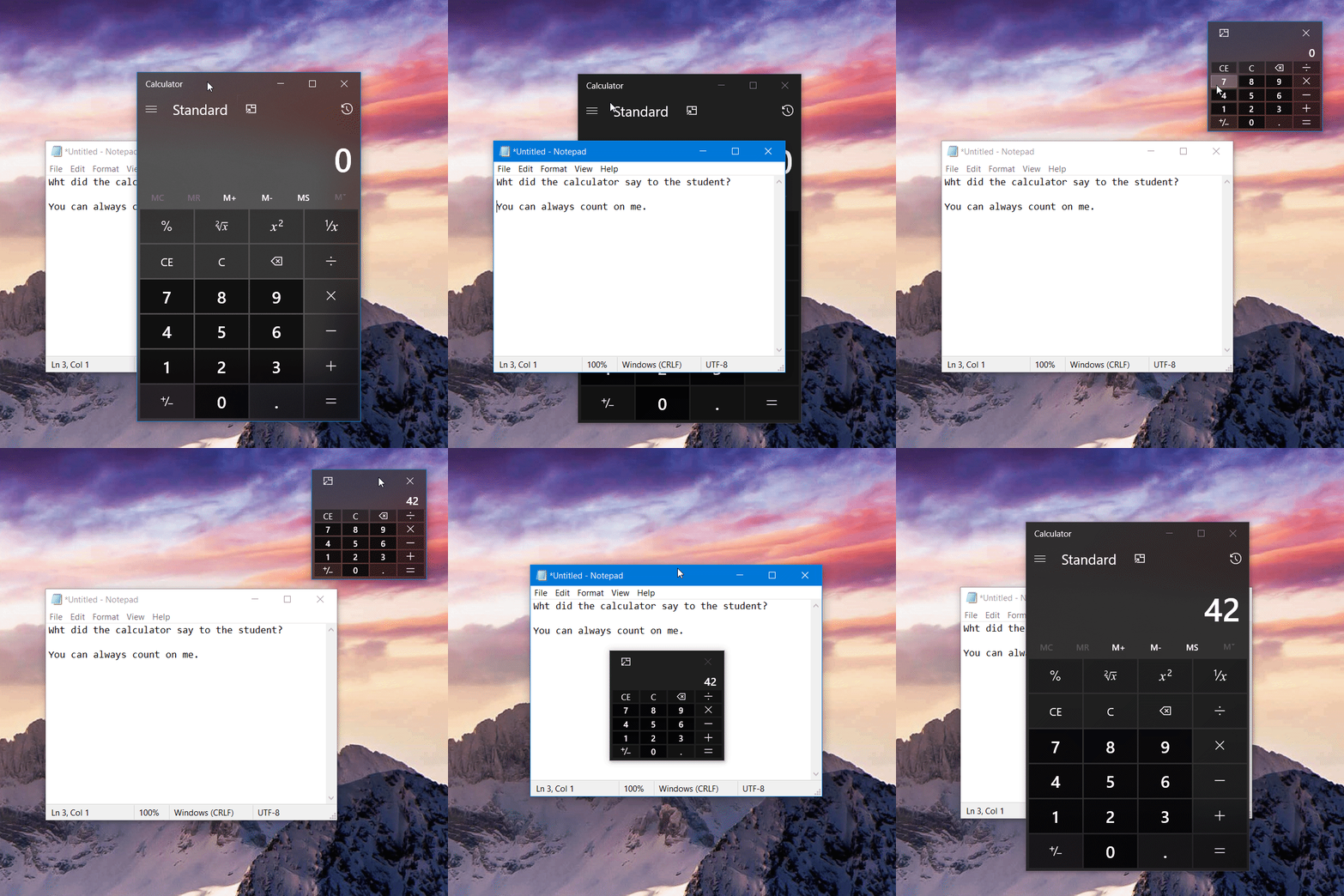
Add the ability for users to pin Calculator on top of other windows.
Goals
- Users can easily pin/unpin the Calculator window on top
- Users can easily continue with other tasks while Calculator is pinned
- Users have access to full Calculator functionality, but can always perform at least basic calculations when in the more compact view (smaller than currently allowed minimum window sizing)
Non-Goals
- Parity with the full version of the app when in smallest of layout states
Low-Fidelity Concept
Here is a quick concept showing what the smallest of modes might look like. There are still several open questions to address for this layout state as well as determining the best way to enter/exit this mode:

 MicrosoftIssueBot
All 19 comments
This is your friendly Microsoft Issue Bot. I created this issue automatically as requested by a team member.
MicrosoftIssueBot
on 28 Feb 2019
Would this use Compact Overlay mode then?
 michael-hawker
on 6 Mar 2019
michael-hawker
on 6 Mar 2019
This is awesome, I was planning to do this for a lot of apps
 salmanmkc
on 6 Mar 2019
salmanmkc
on 6 Mar 2019
Yes, compact overlay would be great, I currently have a calculator app that does this but when calculator gets this it will take its place.
 yaichenbaum
on 6 Mar 2019
yaichenbaum
on 6 Mar 2019
I suggest this: Once it's pinned, it could still be controlled by number pad. Even it's not focused.
 SteeveGL
on 7 Mar 2019
SteeveGL
on 7 Mar 2019
@steevegldev I don't think that would be good when using it to calculate numbers in say a word document, if the mouse is focused on the document the user will not want numbers being typed in to it.
yaichenbaum
on 7 Mar 2019
About that specific example. Why would you use number pad to type numbers in Word. You naturally use the one above the letter. This how you learn typing on keyboard.
But maybe it could be a separate feature. I know keyboard with real calculator embedded exist.
SteeveGL
on 7 Mar 2019
Oh, I see now that you wrote the number pad. I agree this would be a neat trick for pro users.
yaichenbaum
on 7 Mar 2019
Can someone please make the num keys has the same colors as the whole other keys? I just cannot tolerate it.
 aofathy
on 7 Mar 2019
aofathy
on 7 Mar 2019
I really hope that "always on top" will be added. I don't need any other improvement than this.
 Wiredframe
on 7 Mar 2019
Wiredframe
on 7 Mar 2019
I feel like windows itself needs a "pin on top" option for all windows
 Kurtoid
on 7 Mar 2019
Kurtoid
on 7 Mar 2019
Ubuntu OS have such pin on top option. It would be good if windows too got that option by default.
 naveenraju9
on 7 Mar 2019
naveenraju9
on 7 Mar 2019
I usually use DeskPins for this, but it doesn't seem to work with this version of Calculator.
I agree with @Kurtoid – this functionality shouldn't be limited to the Calculator application.
 glen-84
on 10 Mar 2019
glen-84
on 10 Mar 2019
About CompactOverlay. Why do we plan to use it?
- Technical limitation, it's the only UWP API available but we would prefer a real way to pin the window on top, similar to some Win32 apps.
- By design and by choice.
CompactOverlay is great for videos, less for apps (especially when you need also to support 150epx x 150epx windows)
If the answer is 1, I can submit this week a PR adding a toggle to pin/unpin a UWP window without changing its size and still giving access to all features, the solution is hacky but it only uses fully supported APIs.
 rudyhuyn
on 1 Apr 2019
rudyhuyn
on 1 Apr 2019
Using CompactOverlay is by design and by choice. Among other reasons, where possible, we want to let the system make windowing decisions for us.
I can submit this week a PR adding a toggle to pin/unpin a UWP window
Most issues that we have been addressing so far are defects (i.e., bugs), but we follow a slightly different process for new features and tend to do a bit more upfront background research/design work before submitting PRs. We'll have more to share on this soon, as there have already been a ton of great ideas submitted, and we would like to start moving forward with some of them!
the solution is hacky but it only uses fully supported APIs.
I am sure there are more creative ways to implement this, though we tend to avoid these whenever possible due to support requirements 🙂
 grochocki
on 2 Apr 2019
grochocki
on 2 Apr 2019
I am sure there are more creative ways to implement this, though we tend to avoid these whenever possible due to support requirements 🙂
To be honest, it works well but is probably a little too creative (and limited to Desktop). If the Calculator app can motivate the platform team to add a MinimumSize property for the CompactOverlay mode, it will be great for all UWP developers! I look forward to seeing what you're preparing!
rudyhuyn
on 2 Apr 2019
Even better, if the On Top Windows can launch at specific coordinates.
1) Microsoft can just add the permission like Android "Drawing over other apps" and current Maximum size could solve some malicious issue.
2) Maximum size must be permit explicitly and carefully etc...maybe only up till 45% of screeen.
Feature request: Launch at specific coordinates
Microsoft might be careful thought up how Drawing over other app is going to have bad malicious effect like: Someone overlay password box on screen at specific coordinates. It can be solve as Microsoft highlight the Compact Overlay App's Windows while it get focus or even typing (But it is UX problem for certain case). Sometimes people can be mind wandering can focus only less than 500px x 500px, and the highlight border might get overlook 1% over the whole time.
 meteorsnows
on 13 Apr 2019
meteorsnows
on 13 Apr 2019
I created calculator-specs/alwaysOnTop to track progress. For more information on next steps, check out our spec workflow.
grochocki
on 21 Jun 2019
This feature is ready for spec review! We will leave Microsoft/calculator-specs#10 open for a little while to give the community the chance to review and provide feedback. Keep in mind that not all ideas that make it into spec review are guaranteed to make it to release. For more information on next steps, check out our new feature process and spec workflow.
![msftbot[bot] picture](https://avatars2.githubusercontent.com/in/26612?v=4&s=40) msftbot[bot]
on 22 Jun 2019
msftbot[bot]
on 22 Jun 2019
Related issues
 Diggsey
·
20Comments
Diggsey
·
20Comments
 ThiefMaster
·
30Comments
ThiefMaster
·
30Comments
 arcadiogarcia
·
19Comments
arcadiogarcia
·
19Comments
 drizo72
·
28Comments
drizo72
·
28Comments
 ialhashim
·
14Comments
ialhashim
·
14Comments
Most helpful comment
I feel like windows itself needs a "pin on top" option for all windows