Calculator: Project not compiling with default compiler options on system with Chinese as default language
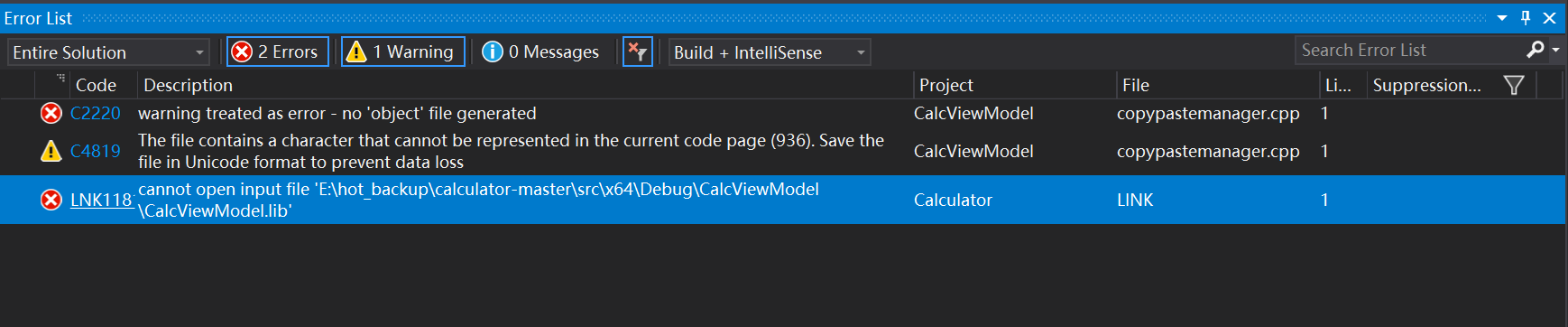
The project cannot be compiled because of the following error:
Code: LNK1181
Description: cannot open input file 'E:\hot_backup\calculator-master\src\x64\Debug\CalcViewModel\CalcViewModel.lib'
Project: Calculator
File: E:\hot_backup\calculator-master\src\Calculator\LINK
Line: 1
Suppression State:
Steps To Reproduce
Steps to reproduce the behavior:
- Open the project in Visual Studio 2017
- Set build options to Debug, x64, click on 'build' - 'Build Solution'
- Wait for a while
- Compilation stops with the mentioned error report.
Expected behavior
The project should compile.
Screenshots
Device and Application Information
- OS Build: Windows 10, Enterprise LTSC, 17763.437
- Architecture: x64
- Region: Mainland China
Additional context
Default language of the local operating system: Chinese (simplified).
 Northurland
All 9 comments
additional information: the same problem occurs with 'Release, x64', though the file involved becomes \src\x64\Release\CalcViewModel\CalcViewModel.lib .
Northurland
on 3 May 2019
@Northurland, I checked out master branch and ran Build Solution for Debug|x64. The build was successful. On the main page, our CI status shows our build is successful. Most likely, this issue is limited to your machine.
From the screenshot you shared, you are looking at the Error List. Can you switch to the Output tab at the bottom and show us the first error that appeared in the output?
 danbelcher-MSFT
on 3 May 2019
danbelcher-MSFT
on 3 May 2019
@danbelcher-MSFT ,
here are the contents of output:
1>------ Build started: Project: CalcViewModel, Configuration: Debug x64 ------
1>CopyPasteManager.cpp
1>e:\hot_backup\calculator-master\src\calcviewmodel\common\copypastemanager.cpp(1): error C2220: warning treated as error - no 'object' file generated
1>e:\hot_backup\calculator-master\src\calcviewmodel\common\copypastemanager.cpp(1): warning C4819: The file contains a character that cannot be represented in the current code page (936). Save the file in Unicode format to prevent data loss
1>Done building project "CalcViewModel.vcxproj" -- FAILED.
2>------ Build started: Project: Calculator, Configuration: Debug x64 ------
2>LINK : fatal error LNK1181: cannot open input file 'E:\hot_backup\calculator-master\src\x64\Debug\CalcViewModel\CalcViewModel.lib'
2>Done building project "Calculator.vcxproj" -- FAILED.
========== Build: 0 succeeded, 2 failed, 1 up-to-date, 0 skipped ==========
========== Deploy: 0 succeeded, 0 failed, 0 skipped ==========
I pasted everything here. Also, I will try building on another machine. If it's successful then that might be some kind of problem with VS here.
Thank you very much.
Northurland
on 3 May 2019
@Northurland, I checked out master branch and ran Build Solution for Debug|x64. The build was successful. On the main page, our CI status shows our build is successful. Most likely, this issue is limited to your machine.
From the screenshot you shared, you are looking at the Error List. Can you switch to the Output tab at the bottom and show us the first error that appeared in the output?
I've tried building on another machine. The same problem still occurs.
System information of the other computer: Windows 10, Home, 1803, build 17134.648; Region: Mainland China; Default language: Chinese (simplified). VS2017 still used.
Northurland
on 3 May 2019
This is caused by https://github.com/Microsoft/calculator/blob/9f01c8168b921a82ada80be24203de7729b1b6fa/src/CalcViewModel/Common/CopyPasteManager.cpp#L548 and other currencies listed in this file, while it is not marked as utf8. There is a switch you can use with cl that makes it great all input as utf8: https://docs.microsoft.com/en-us/cpp/build/reference/utf-8-set-source-and-executable-character-sets-to-utf-8?view=vs-2019
 janisozaur
on 3 May 2019
janisozaur
on 3 May 2019
@janisozaur
That works. Thank you very much.
Northurland
on 3 May 2019
This is your friendly Microsoft Issue Bot. I've seen this issue come in and have gone to tell a human about it.
 MicrosoftIssueBot
on 3 May 2019
MicrosoftIssueBot
on 3 May 2019
This is caused by
and other currencies listed in this file, while it is not marked as utf8. There is a switch you can use with cl that makes it great all input as utf8: https://docs.microsoft.com/en-us/cpp/build/reference/utf-8-set-source-and-executable-character-sets-to-utf-8?view=vs-2019
Good find!
Obviously VS has some issues to detect utf-8 when the system is in Chinese.
IMO, we should create a PR to explicitly force VS to use utf-8 (with this extra compiler option) to prevent this issue in the future.
 rudyhuyn
on 7 May 2019
rudyhuyn
on 7 May 2019
Agreed. This seems like a great idea. I've marked the idea as approved and tagged this as help wanted if anybody would like to submit a PR.
 Geveffe
on 15 May 2019
Geveffe
on 15 May 2019
Related issues
 milos321
·
19Comments
milos321
·
19Comments
 ivadham
·
18Comments
MicrosoftIssueBot
·
20Comments
ivadham
·
18Comments
MicrosoftIssueBot
·
20Comments
 grochocki
·
25Comments
grochocki
·
25Comments
 patrick-compass
·
22Comments
patrick-compass
·
22Comments
Most helpful comment
Good find!
Obviously VS has some issues to detect utf-8 when the system is in Chinese.
IMO, we should create a PR to explicitly force VS to use utf-8 (with this extra compiler option) to prevent this issue in the future.