Problem Statement
More UWP Control Yea.
Evidence or User Insights
Third Party like Telerik have it.
Third party Telerik
Proposal
Have a sample like Telerik.
Goals
Official UWP Control for the win. Microsoft The best.
Non-Goals
More Choice
Low-Fidelity Concept
High Fidelity from Syncfusion
 meteorsnows
All 8 comments
This is a nice idea! You should also post your idea on the Microsoft Community Toolkit page too:
https://github.com/windows-toolkit/WindowsCommunityToolkit/issues
Someone posted a similar idea some years ago but didn't receive enough upvotes, but Windows changed a lot since Windows 8.1 as well as usage, so you should suggest it again!
 rudyhuyn
on 13 Apr 2019
rudyhuyn
on 13 Apr 2019
This is your friendly Microsoft Issue Bot. I've seen this issue come in and have gone to tell a human about it.
 MicrosoftIssueBot
on 15 Apr 2019
MicrosoftIssueBot
on 15 Apr 2019
Thanks for your idea! This is really interesting, and this repo does feel like the right home for discussions on this issue, but I think we need to iron out a few more details first. For example, while we certainly _could_ do this, I think we would want to better understand how many developers would utilize this feature. Leaving this open for discussion to develop the pitch further.
 grochocki
on 15 Apr 2019
grochocki
on 15 Apr 2019
You could enable the Windows UI Library to take in a version of the calculator engine/core and then some common button types/templates that it can use. I could see it as the equivalent of the Calendar pop-up control, which can be used on a Numeric TextBox - Perhaps a variation of it called CalculatorTextBox.
This Numeric TextBox could also include:
- validation for numbers;
- arrow up and down to increment the number;
- inline calculations | like the value "13 + 5" which when pressing enter changes to 18
- extensions for value masking | like telephone numbers, IP addresses, etc
For examples of the incrementing value and inline calculations - just take a look at the Adobe Creative software suite.
Like Date Picker and Calculator controls.
 mdtauk
on 16 Apr 2019
mdtauk
on 16 Apr 2019
Yeah I agree @mdtauk, I'd see this as more of a special numerical picker type use-case or having a 'smart text-box' like some facet of an excel/one note usage which knows how to process 5 + 3 = into a result...?
 michael-hawker
on 16 Apr 2019
michael-hawker
on 16 Apr 2019
I agree with both of you, it would be a lot easier and faster to create a new C# templated control based on a TextBox (but it can use CalcEngine for calculations) than create a control using the current Calculator UI (because native, it doesn't support Microsoft Community Toolkit animations/helpers, big refactoring to extract some controls to create a windows runtime component lib, disable access keys, probably some conflicts with localizations, etc...) and CalcViewModel (unfortunately not a Windows Runtime component, so a refactoring will be necessary to be used by a managed UWP app).
Here is how I imagine the feature:
A Textbox allowing users to directly type via keyboard a number or an operation (= 12 + 3)
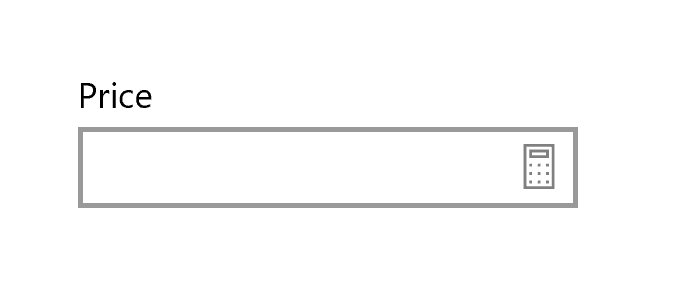
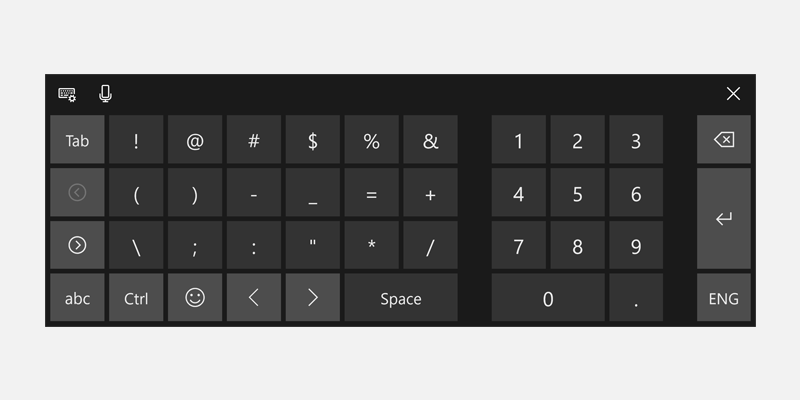
using this on-screen keyboard layout for tablets and touch screens:
and a "calculator" button displaying a Calculator UI, I think about 2 different solutions:
- My favorite: the button will open a FlyoutPopup hosting a basic calculator UI (similar to the DatePicker control), similar to Telerik/SyncFusion.
- Alternative: the button will launch the real Calculator application with
Launcher.LaunchUriForResultsAsync(...)but the Calculator UI will display an extra button: "Send result to". But careful, the calculator isn't available on all Windows 10 platforms (xbox for example).
rudyhuyn
on 17 Apr 2019
@rudyhuyn I too would favour a simple calculator UI like DatePicker/Calendar similar to Bing/Google search results too.
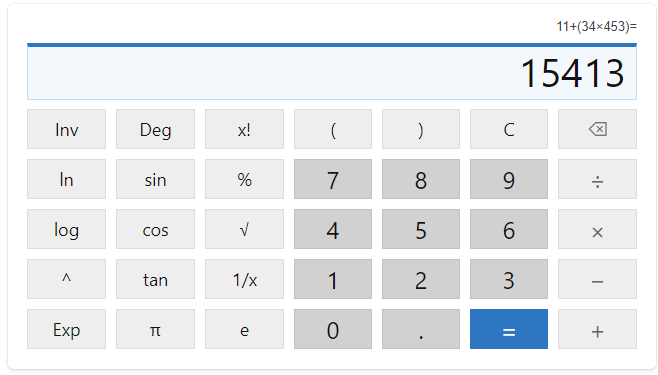
However your second suggestion may be better done as a picker. So like the photo picker on Windows Phone, you tap the control, it opens an instance of calculator, showing only the simple/standard layout, and pressing Enter will offer two results. One with Order of Operations, and one Iterative Calculation.
You then tap the result you want, and it places the new value into the textbox. It can be awaited, and all async of course. Probably should be in a modal dialog with only a close button in the titlebar.

Apologies for the crude mockup (about to update my insider install, so no access to Photoshop, and I wanted to illustrate the thought.
I think a NumericTextBox or NumericBox can have those basic 13+24 calculations as with the Adobe software "spinner" boxes. As well as the up and down arrow to increment or decrement the value in there.
And then the full on Calculator popup/flyout.
Not sure if there is a need to support Programming or Scientific modes, but I guess it is possible to have that be an option, like when a TextBox hints to the virtual keyboard what layout to use. CalculatedPicker.CalculatorLayout = CalculatorLayout.Scientific
mdtauk
on 17 Apr 2019
Thanks everyone for the great discussion on this idea. We had the chance to review this pitch more closely and felt that while this is a great idea, delivering it via the Calculator app may not be the best approach. Coincidentally, microsoft/microsoft-ui-xaml#483 discusses a _very_ similar idea that I think may address the developer need discussed in this thread. I am going to close this issue here, but I encourage everyone to jump into he conversation in the WinUI project.
grochocki
on 21 May 2019
Related issues
 ThiefMaster
·
30Comments
ThiefMaster
·
30Comments
 milos321
·
19Comments
MicrosoftIssueBot
·
20Comments
milos321
·
19Comments
MicrosoftIssueBot
·
20Comments
 janisozaur
·
15Comments
janisozaur
·
15Comments
 TristanYoung
·
28Comments
TristanYoung
·
28Comments
Most helpful comment
Thanks everyone for the great discussion on this idea. We had the chance to review this pitch more closely and felt that while this is a great idea, delivering it via the Calculator app may not be the best approach. Coincidentally, microsoft/microsoft-ui-xaml#483 discusses a _very_ similar idea that I think may address the developer need discussed in this thread. I am going to close this issue here, but I encourage everyone to jump into he conversation in the WinUI project.