Calcite-components: Bug: Changing `disabled` attribute of calcite-switch visually removes disabled, but the toggle will not work.
Summary

It seems like the input in the shadow dom has disabled persisted even though disabled has been removed from the switch itself.

Couldn't reproduce using straight JS in a codepen, but can using Stencil.
Actual Behavior
Switch is not disabled but cannot be toggled
Expected Behavior
Switch should be "switchable"
Reproduction Steps
See this component:
https://github.com/ethanbdev/calcite-switch-disabled-bug/tree/main/src/components/my-component
(clone, npm install, npm start)
Relevant Info
 ethanbdev
All 6 comments
It seems like the disabled property needs to be watched for changes and update the input. @macandcheese @paulcpederson @eriklharper who can take this one?
 driskull
on 19 Feb 2021
driskull
on 19 Feb 2021
I can take a look at this one. Would be good while I'm in there to remove the proxy input stuff too.
 eriklharper
on 19 Feb 2021
eriklharper
on 19 Feb 2021
I can take a look at this one. Would be good while I'm in there to remove the proxy input stuff too.
Thanks Erik, if you do remove the proxy input can that be in the same release as this fix? I am using that to workaround, like so:
<calcite-switch switched={this.enableLogarithmic === true && this.minBound > 0} disabled={this.minBound <= 0} onCalciteSwitchChange={this.enableLogScale}>
    <input disabled={this.minBound <= 0} type="checkbox" />
</calcite-switch>
Thanks for taking a look!
ethanbdev
on 19 Feb 2021
Sure thing Ethan! I've done a proxy input removal before, and it is pretty straightforward, so definitely doable in the same release 👍
eriklharper
on 19 Feb 2021
I bumped into this in parallel. What I saw was if the calcite-switch is initially disabled, it stays permanently disabled because the "disabled" attribute is added to the <input> tag when the component is created (in addition to the <calcite-switch> tag). If initially enabled, it's possible to change its disable state because "disabled" attribute changes only affect the <calcite-switch>.
Here's a web page that reproduces the behavior outside of Stencil:
<!doctype html>
<html>
<head>
  <link rel="stylesheet" type="text/css" href="https://unpkg.com/@esri/[email protected]/dist/calcite/calcite.css"/>
  <script type="module" src="https://unpkg.com/@esri/[email protected]/dist/calcite/calcite.esm.js"></script>
  <script nomodule="" src="https://unpkg.com/@esri/[email protected]/dist/calcite/calcite.js"></script>
</head>
<body>
  <label><calcite-switch id="lockSwitch" scale="s"></calcite-switch> unlock</label>

  <br/><br/>
  <div>
    <calcite-label>input:<label><calcite-input id="inputElem"></calcite-input></label></calcite-label>
    <label><calcite-switch id="switchElem1" scale="s"></calcite-switch> Feature 1</label>
    <label><calcite-switch id="switchElem2" scale="s"></calcite-switch> Feature 2</label>
  </div>

  <script>
    var locked = true;

    function updateLocked() {
      locked = !locked;
      setLocked();
    }

    function setLocked() {
      document.getElementById("inputElem").disabled = locked;
      document.getElementById("switchElem1").disabled = locked;
      document.getElementById("switchElem2").disabled = locked;
    }

    document.getElementById("lockSwitch").addEventListener("calciteSwitchChange", updateLocked);
    setLocked();
  </script>
</body>
</html>
 MikeTschudi
on 19 Feb 2021
MikeTschudi
on 19 Feb 2021
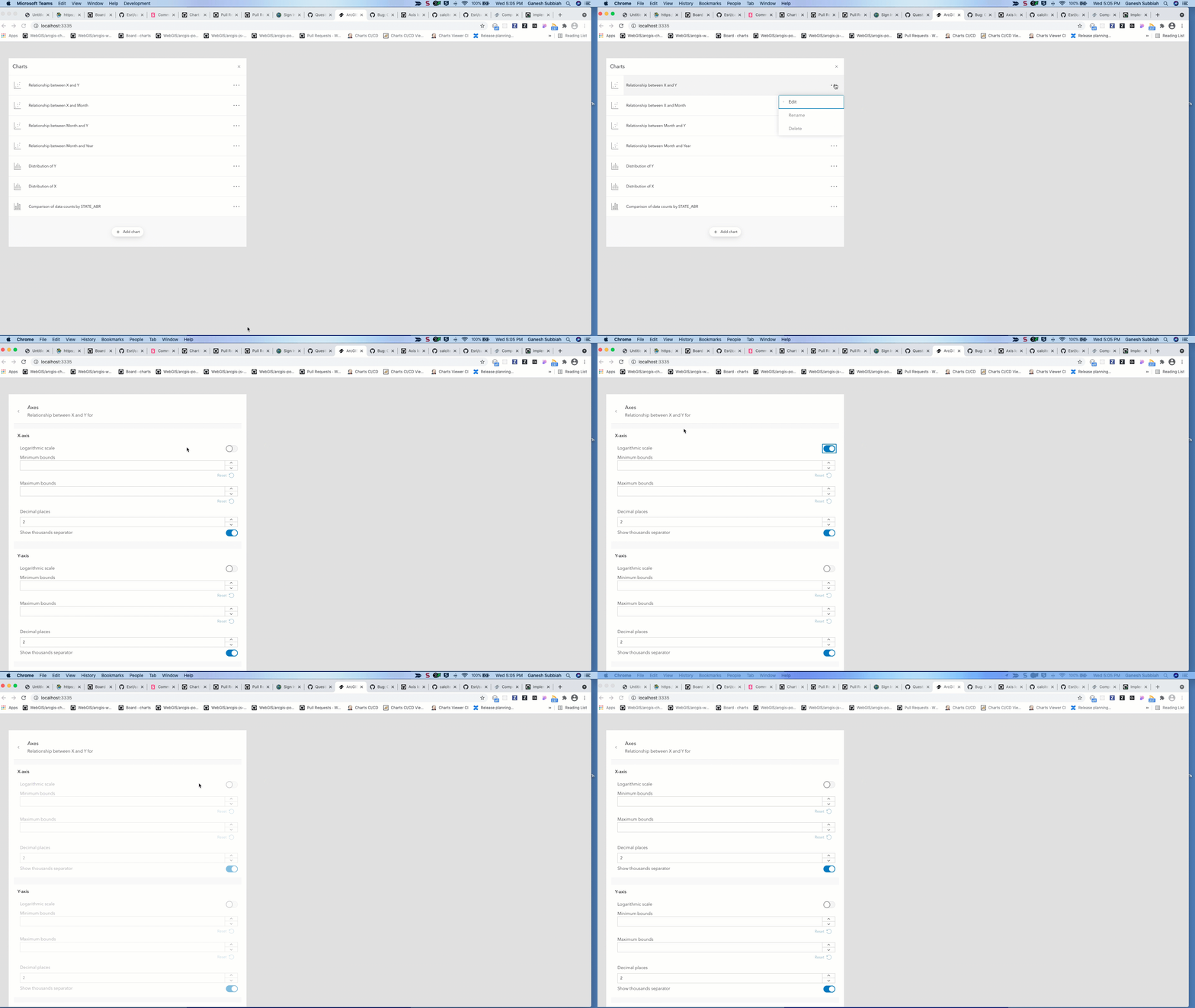
Using the proxy input has issues to keep the checked attribute in the sync. So with proxy input checked attribute should reflect the value of the switched attribute of the calcite-switch
This issue can be seen when calcite-switch with input Proxy is added to a panel in calcite flow, when the panel is removed from flow and added back as shown below.
 subgan82
on 24 Mar 2021
subgan82
on 24 Mar 2021
Related issues
 asangma
·
4Comments
asangma
·
4Comments
 nwhittaker
·
5Comments
nwhittaker
·
5Comments
 jcfranco
·
4Comments
jcfranco
·
4Comments
 capeoples
·
5Comments
capeoples
·
5Comments
 kevindoshier
·
4Comments
kevindoshier
·
4Comments