Calcite-components: Component: time picking
design for smartMapping Age renderer
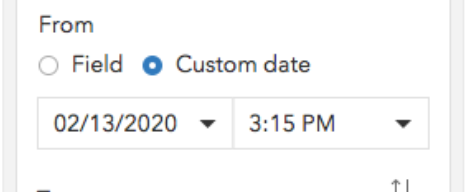
dojo component that we used in the past
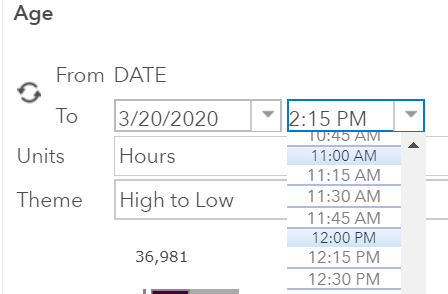
Note: This must also work for 24 hour time format (00:00–23:59) and different languages (e.g. 05:37 chiều)
Native component (no support in Safari and IE):
https://developer.mozilla.org/en-US/docs/Web/HTML/Element/input/time
 AdelheidF
All 22 comments
@Esri/calcite-components are there other use cases for this?
Curious if this would best be served as a dropdown, part of the date component, some combination of a time input and dropdown (I think input + dropdown has come up before in dicussions), want to get a discussion about best way to handle this.
 macandcheese
on 27 Mar 2020
macandcheese
on 27 Mar 2020
This is actually already designed by @julio8a https://github.com/Esri/calcite-components/issues/58#issuecomment-514809436 basically to the right of date optional time.
 paulcpederson
on 27 Mar 2020
paulcpederson
on 27 Mar 2020
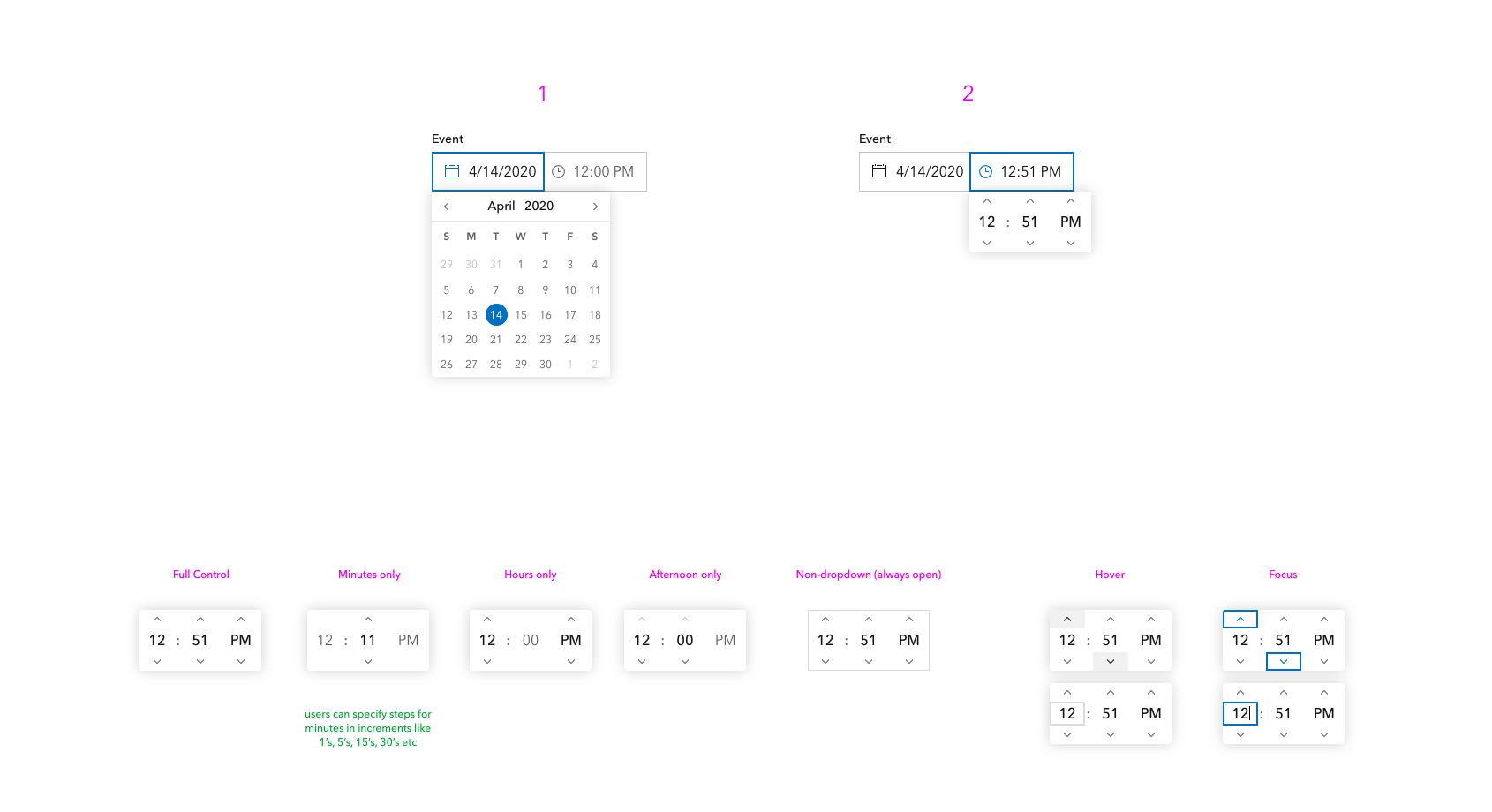
In my mind these are two separate inputs you can tab to independently. Possibly time picker has a dropdown as well, though not sure what that would look like.
paulcpederson
on 27 Mar 2020
design for time picker
 bstifle
on 30 Apr 2020
bstifle
on 30 Apr 2020
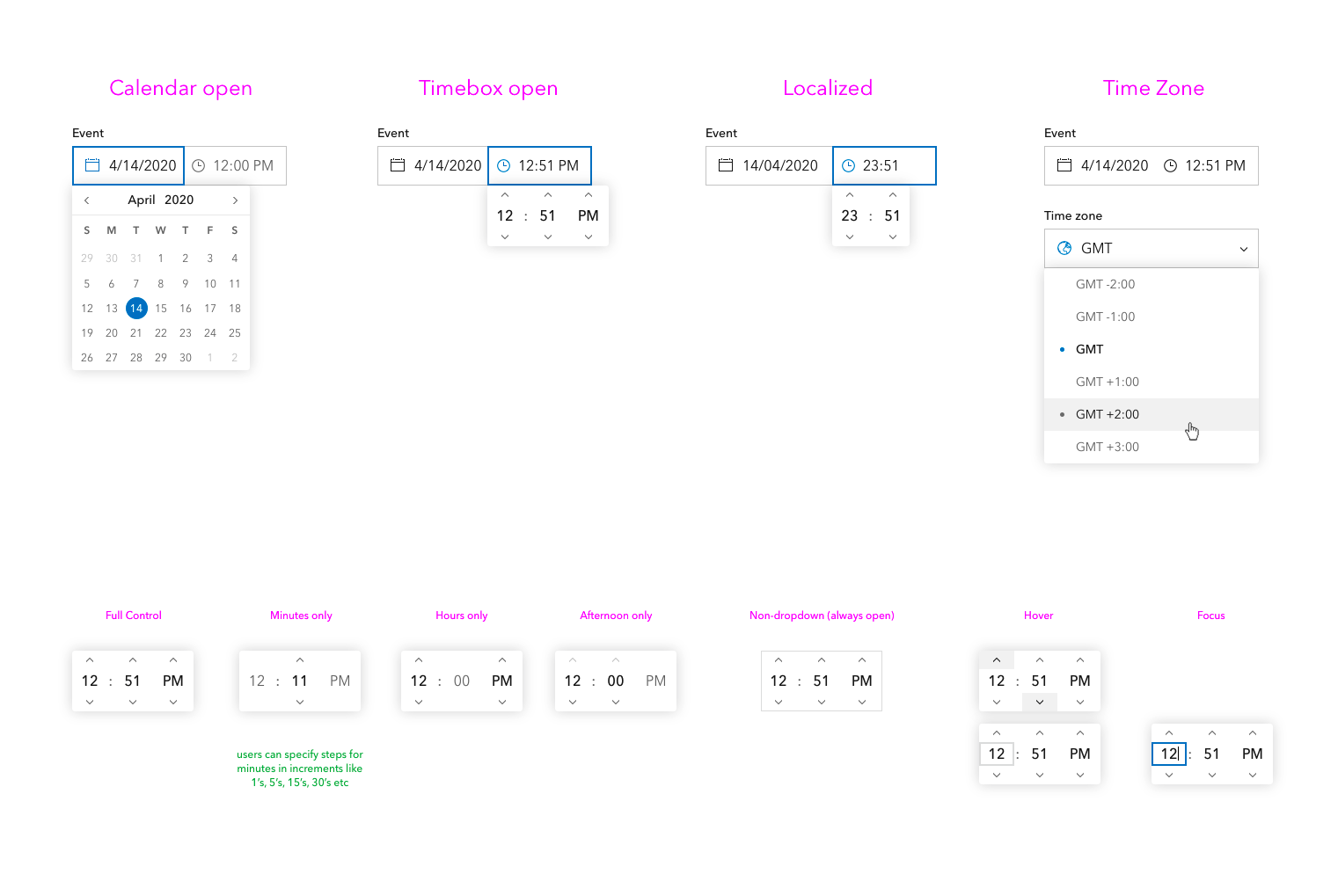
- Many countries don't use AM/PM but rather state everything in 24 hour time, assuming we would only show selector for locales that use it?
- When paired with calendar, if I'm on 12PM and hit up, we wrap to 1 and I go to the next day? Or does time picker only impact time, or do we not allow wrapping?
- Interested to see a range selection that needs to allow for time on both start and end (or maybe we don't allow that?
paulcpederson
on 30 Apr 2020
- yeah that makes sense
- i would vote yes on wrap, but no to affecting the date 3.

bstifle
on 30 Apr 2020
More updated ...
bstifle
on 30 Apr 2020
This issue has been automatically marked as stale because it has not had recent activity. It will be closed if no further activity occurs. Thank you for your contributions.
![github-actions[bot] picture](https://avatars.githubusercontent.com/in/15368?v=4&s=40) github-actions[bot]
on 26 Nov 2020
github-actions[bot]
on 26 Nov 2020
We still need this. Currently we use a plain text input box.
AdelheidF
on 26 Nov 2020
I think @eriklharper has this cooking in the oven !
macandcheese
on 26 Nov 2020
That is indeed correct! I've been working on this but haven't had time to get back on it in a while because of other high priority issues. Hope to resume this again very soon!
 eriklharper
on 30 Nov 2020
eriklharper
on 30 Nov 2020
We also have a need for this in Enterprise. Would this be built into the calcite-date component or would it be its own component?
 joshtaylor0404
on 11 Dec 2020
joshtaylor0404
on 11 Dec 2020
It's currently being developed as its own standalone component calcite-time.
eriklharper
on 14 Dec 2020
I'm wondering in light of #1404 if we want to have separate components for time as well. I'm thinking if we follow those conventions in #1404 then we would end up with these two components:
calcite-time-picker
This component shows just this time picking UI:
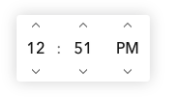
calcite-input-time-picker
This component shows the input and when clicked displays the calcite-time-picker which is used internally.
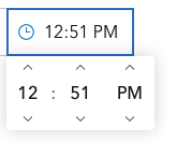
Thoughts? @bstifle @driskull
eriklharper
on 30 Dec 2020
I think thats a great idea
bstifle
on 30 Dec 2020
I agree. We should do that.
 driskull
on 30 Dec 2020
driskull
on 30 Dec 2020
Did some research on the step attribute on <input type="time"> and came to find out that it only supports 1-6, 10, 12, 15, 20, 30, 60 as well as these same numbers multiplied by 60: 60, 120, 180, 240, 300, 360, 600, 720, 900, 1200, 1800, 3600 which increment the minutes and disable the seconds, as well as 60 multiplied by the second set of numbers which increment just the hours and disable minutes and seconds, which makes sense.
Curious what people think of this behavior and should we replicate this for the Esri time picker? Also, I think it begs the question how we document this, since it could throw some for a loop when they find out they can't just put any arbitrary number in there and expect it to behave like <input type="number">.
I also noticed that when using a step value such as 20, and then typing in a value like 13, it won't add 20 to 13 to make 33, it simply increments up to 20, and decrements down to 0. Something else to keep in mind.
In light of this new insight into the complexity of the native time picker, I think I'd like to opt to make this a follow-up issue to add step support to the component after the initial version is out the door.
eriklharper
on 9 Feb 2021
thanks for researching this! are there any links to examples of these behaviors you have on hand?
bstifle
on 9 Feb 2021
thanks for researching this! are there any links to examples of these behaviors you have on hand?
Good question. I can whip up a codepen real quick and send you a link that will allow you to switch between these different step modes to see the result in the browser.
eriklharper
on 9 Feb 2021
@bstifle check this out: https://codepen.io/eriklharper/pen/abBmOGz?editors=1111 I made it so that you can pick the values that work from a dropdown, but there's also a text number input that you can edit freely to put in any number you want as well.
Only whole minutes or whole hours are supported, no fractions, so you can't do like 1.5 minutes or 2.5 hours. I also saw that for hours you can only do 1-6 and 12, but doing 10 hours (36,000 seconds) isn't supported even though 10 minutes (600 seconds) _is_ supported. Not sure how much this differs if we're talking about a 24-hour clock format. I've only been testing this on my current time setting of a 12-hour clock, but I can check that as well.
UPDATE: I tested on a 24-hour system setting, and it does appear to enable the 8 hour (28,800 seconds) to work in that case, but not for the 12-hour clock.
eriklharper
on 9 Feb 2021
this is awesome, thanks erik. would be awesome to use this as documentation for time
bstifle
on 9 Feb 2021
FYI: moved to the next milestone.
 jcfranco
on 10 May 2021
jcfranco
on 10 May 2021
Related issues
AdelheidF
·
4Comments
 ethanbdev
·
4Comments
ethanbdev
·
4Comments
driskull
·
4Comments
bstifle
·
3Comments
ethanbdev
·
4Comments
ethanbdev
·
4Comments
driskull
·
4Comments
bstifle
·
3Comments
Most helpful comment
I think thats a great idea