Cacti: Chrome sets graphs tree navigation view to width 0px
Describe the bug
The graphs tab graph view tree navigation is a width of 0px on Chrome (74.0.3729.108). On the actually screen it appears as a thing gray line but utilizing chrome dev tools inspector I was able to set the width of the navigation pane and it appeared as expected.
To Reproduce
Steps to reproduce the behavior:
- Go to 'Graphs'
- The navigation pane is a thin gray line.
Expected behavior
See the typical Graph Tab Tree View navigation.
Desktop (please complete the following information):
- OS: Linux, Windows
- Browser: Chrome
- Version: 74.0.3729.108
Additional context
Digging through the php-fpm, apache, cacti (cacti.log, cacti_stderr.log and the log utilized by the cacti service for the web interface), and mariadb logs did not show any errors.
I verified the Configuration>Users>[User]>User Settings>Minimum/Maximum Tree Width were set to non zero values (170 and 300 respectively).
This may be related but doesn't represent an issue that affects our use case, changing the theme setting did not have an affect on the appearance of the webpage. I'm curious if something is not applying correctly with the user settings and therefore it defaults to 0 width.
The issue appeared to happen on FireFox occasionally and Internet Explorer but we don't typically use those.
 xavloose
All 25 comments
If you enable the developer tools, then do a control-refresh does it work as expected? Do you see any errors in the browser console?
 netniV
on 11 Dec 2019
netniV
on 11 Dec 2019
It does not work as expected. There are no errors on the console. I checked the network tab to see if any requests failed and everything appeared to be working there.
xavloose
on 11 Dec 2019
I tested and this happen in all browsers (Firefox, Chrome, IE, Edge) so i dont think that is a browser dependant problem
I made a fresh install on centos8 and i have the roblem
I reverted snap to OS and made same steps using 1.2.7 and works normally
I think this is 1.2.8 related problem
 nicolapiazzi
on 12 Dec 2019
nicolapiazzi
on 12 Dec 2019
Our install is also on CentOS 8. I have SELinux set to permissive. All the versions met requirements but I can get a detailed list if that would be useful.
xavloose
on 12 Dec 2019
My Selinux is disabled at all !
I think that this is an html code problem only simply
nicolapiazzi
on 12 Dec 2019
I am not seeing the error on any of my installations, but that isn't to say there isn't something that might be triggering it that I haven't be able to replicate so far. If one of you can email me a dump of your database ([email protected]), noting which user it is that is experiencing this, I can take a look.
netniV
on 13 Dec 2019
Hi netniV, I can mail you a dump of the database, seems this may be the same problem I'm experiencing and my database is quite new and fresh.
 ghost
on 13 Dec 2019
ghost
on 13 Dec 2019
Well, this would suggest that maybe it's a cookie setting or javascript incompatibility in some way. Using your data and chrome, everything appeared fine to me.
netniV
on 13 Dec 2019
If you clear your cookies for the cacti site, does it start to work?
netniV
on 13 Dec 2019
Also, click the Graphs tab a second time, and see if the tree magically appears.
 cigamit
on 13 Dec 2019
cigamit
on 13 Dec 2019
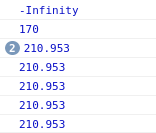
I did some more looking into the issue. The only place I see it set the cacti tree navigation to zero is lib/html_tree.php line 191. It set's it to zero if visWidth is < 0. I added a line above it to output visWidth and when the issue appears visWidth is -Infinity.
Potentially a bug with jstree?
I am not sure the width would ever need to be set to 0 as it looks like the css display property is utilized to hide and show the graph tree navigation. I reference it in the patch.
xavloose
on 13 Dec 2019
I tried removing my cookies and logging in again. This fixed the issue.
 fredleeflang
on 13 Dec 2019
fredleeflang
on 13 Dec 2019
Possibly related to https://github.com/Cacti/cacti/issues/3044 ? There's a lot in common here.
 reubenfarrelly
on 14 Dec 2019
reubenfarrelly
on 14 Dec 2019
Same here with Chrome 79.0.3945.79 and Firefox 72.0b6. Clearing cookies didn't help in my case.
 kaba1ah
on 14 Dec 2019
kaba1ah
on 14 Dec 2019
I have the problem with all browsers and not depending on cookies
It is related with MODERN scheme only
nicolapiazzi
on 16 Dec 2019
I am using the modern scheme without issue so that's strange. I even used a copy of the data someone had without issue. Are you able to share your DB dump with us @nicolapiazzi ? That way I can test if it's DB related, since cookie clearing doesn't seem to work for you?
netniV
on 16 Dec 2019
That fix seems to have resolved things for me. Chrome, Firefox and Edge all worked perfectly a moment ago in Tree View - so looking positive.
reubenfarrelly
on 17 Dec 2019
Hi Netniv
Today i changed my classic theme to modern theme and now seems to work
It seems that this theme switch worked well as a solution
I installed on modern with the problem and solved in chengind to classic and return to modern
nicolapiazzi
on 17 Dec 2019
I've confirmed that if you have the tree hidden, and then log off and back in again. that the tree will be hidden until you click the Graph tab a second time once the page has been rendered. I'm a bit surprised by this. I don't think that there is a reason to change anything though.
cigamit
on 24 Dec 2019
That is not the issue that is described. Issue #3044 (https://github.com/Cacti/cacti/issues/3044#issuecomment-559905552) has a screenshot that may aid in the understanding of this.
When the treegraph is hidden it's css display property is set to none. In this issue the display property is set to block or whatever but it has a width of zero and you will see that thin gray line. Toggling will only show whether or not that line is visible.
When I added some code I noticed on a particular line that it was getting a visible width property of -Infinity. This has my patch that makes it so it won't allow the width to be set to 0 with it was -Infinity but instead the user defined minimum.
As you can see by later logs -Infinity never happens again but without the patch it keeps reporting -Infinity and setting the width of the tree graph to 0.
xavloose
on 24 Dec 2019
3044 seems to be related to a content security policy of the server. If you are experiencing that error, please rectify that and then test for this issue again.
netniV
on 27 Dec 2019
I'm using Apache under Debian 10.2 and Content Security Policy is not configured.
$ apache2 -V
Server version: Apache/2.4.38 (Debian)
Server built: 2019-10-15T19:53:42
Server's Module Magic Number: 20120211:84
Server loaded: APR 1.6.5, APR-UTIL 1.6.1
Compiled using: APR 1.6.5, APR-UTIL 1.6.1
Architecture: 64-bit
Server MPM:
Server compiled with....
-D APR_HAS_SENDFILE
-D APR_HAS_MMAP
-D APR_HAVE_IPV6 (IPv4-mapped addresses enabled)
-D APR_USE_SYSVSEM_SERIALIZE
-D APR_USE_PTHREAD_SERIALIZE
-D SINGLE_LISTEN_UNSERIALIZED_ACCEPT
-D APR_HAS_OTHER_CHILD
-D AP_HAVE_RELIABLE_PIPED_LOGS
-D DYNAMIC_MODULE_LIMIT=256
-D HTTPD_ROOT="/etc/apache2"
-D SUEXEC_BIN="/usr/lib/apache2/suexec"
-D DEFAULT_PIDLOG="/var/run/apache2.pid"
-D DEFAULT_SCOREBOARD="logs/apache_runtime_status"
-D DEFAULT_ERRORLOG="logs/error_log"
-D AP_TYPES_CONFIG_FILE="mime.types"
-D SERVER_CONFIG_FILE="apache2.conf"
kaba1ah
on 27 Dec 2019
Finally had time to experience this. Resolved. Close if you confirm.
cigamit
on 18 Jan 2020
On Fedora 31, a default install had this one-pixel tree size issue that is resolved with the fix listed https://github.com/Cacti/cacti/commit/8efc3b783511dcc1dcc507d8d22f6b551b9fe0d6
 thekabal
on 8 Feb 2020
thekabal
on 8 Feb 2020
I am getting the same issue the cacti server is running on Debian 10.3 here
root@server1:/etc# cat /etc/debian_version
10.3
uname -a
Linux server1 4.19.0-6-amd64 #1 SMP Debian 4.19.67-2+deb10u2 (2019-11-11) x86_64 GNU/Linux
php -v
PHP 7.3.14-1~deb10u1 (cli) (built: Feb 16 2020 15:07:23) ( NTS )
Copyright (c) 1997-2018 The PHP Group
Zend Engine v3.3.14, Copyright (c) 1998-2018 Zend Technologies
with Zend OPcache v7.3.14-1~deb10u1, Copyright (c) 1999-2018, by Zend Technologies
apache2 -v
Server version: Apache/2.4.38 (Debian)
Server built: 2019-10-15T19:53:42

Now in this picture I am using Firefox 74.0.1 (64 bit) on Windows 10 (64 bit) to access the cacti
server.
Again the graphs are there if I go under console, management, graphs I can see the graphs there
with data on them but they just don't show up on the graph tab at the top when
I click on it.
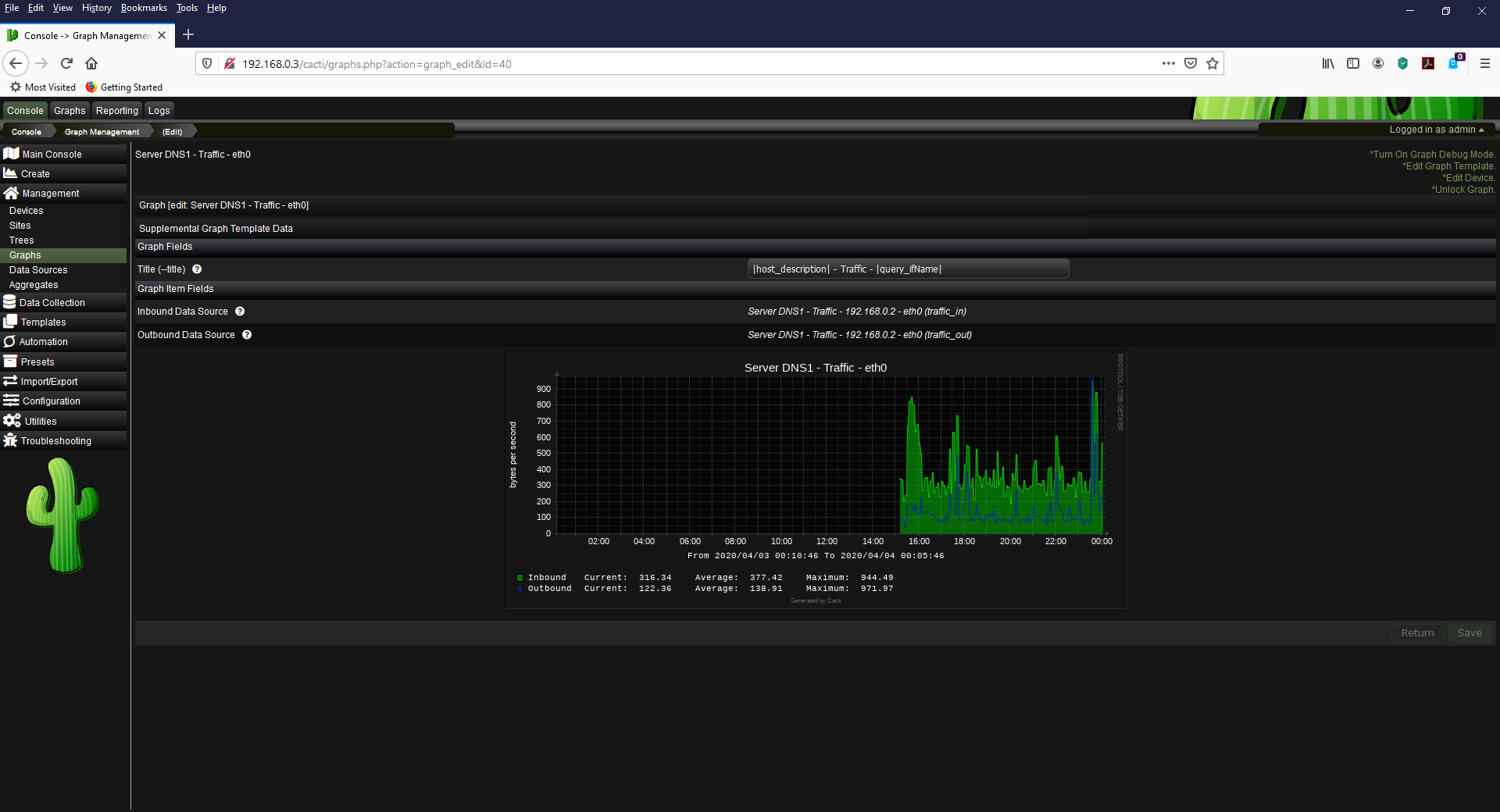
So why is the graph tab up at the top not working?
I believe this is the same error.
What is the fix for it? I am running Cacti 1.2.10 and I have tried
both the Modern Theme and the the Dark Theme it
doesn't matter I am getting the same result with no graphs
showing up on my graph tab.
So what is the fix for this?
 thereporter42
on 4 Apr 2020
thereporter42
on 4 Apr 2020
Related issues
 imax64
·
8Comments
imax64
·
8Comments
 barreljan
·
3Comments
barreljan
·
3Comments
 skyjou
·
6Comments
skyjou
·
6Comments
 riversdev0
·
3Comments
riversdev0
·
3Comments
 darius1706
·
5Comments
darius1706
·
5Comments