Cacti: When editing a user, graph options do not properly reflect previously saved settings
Describe the bug
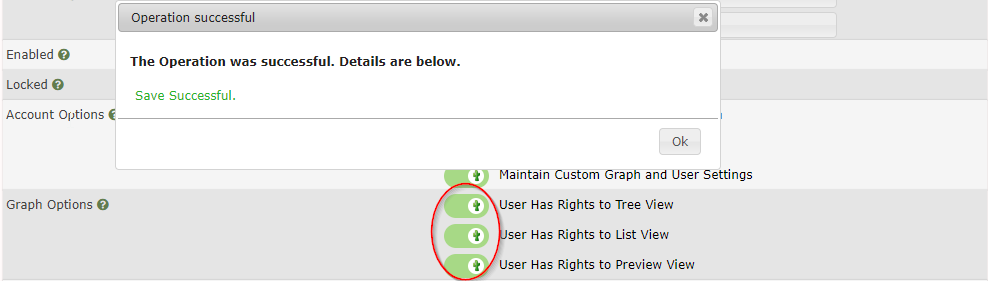
Disable the user rights to see the Tree/List/Preview View under the "graph options" with the slider and save the user. The user has the correct rights in the database but the slider still shows enabled but it should be shown as disabled. The slider show all the time enabled no matter to the stored database value.
To Reproduce
Steps to reproduce the behavior:
- Go to 'Console'
- Go to 'Configuration'
- Click on 'Users'
- Go to 'General Tab'
5 Disable under 'Graph Options' the setting 'User Has Rights to Tree View' with the Slider - Click on 'Save'
- Click on the Operation successful popup 'Ok'
- See error - The slider was enabled again
- When going back to 'user overview' and select the same user again the slider is shown as enabled but the right was correctly disabled
This issue belong to all sliders Tree/List/Preview View under the graph Options no matter which one is disabled.
Expected behavior
When the right was disabled the slider should be shown as disabled.
Screenshots
- Before save

- After save and open/edit the user again
Desktop (please complete the following information):
- OS: Windows 10 Version 1903 Build 18362.356
- Browser: chrome, Firefox, Edge
- Version: always latest
Server
- OS: Debian 9.9.0
- Version: Cacti version 1.2.7
- Database: mysql Ver 15.1 Distrib 10.1.41-MariaDB, for debian-linux-gnu (x86_64) using readline 5.2
- Webserver: Apache 2
 C00kiekiller
All 2 comments
Just confirming. That's pretty bad.
 cigamit
on 1 Oct 2019
cigamit
on 1 Oct 2019
👍2
Okay, update lib/html_utility.php and this will be resolved.
cigamit
on 2 Oct 2019
Was this page helpful?
0 / 5 - 0 ratings
Related issues
 skyjou
·
7Comments
skyjou
·
7Comments
 riversdev0
·
3Comments
skyjou
·
5Comments
riversdev0
·
3Comments
skyjou
·
5Comments
 interduo
·
6Comments
interduo
·
6Comments
 barreljan
·
3Comments
barreljan
·
3Comments
Most helpful comment
Just confirming. That's pretty bad.