Buttercup-desktop: Issue connecting to Google Drive from Buttercup desktop

As of this morning I have an issue connecting to Google Drive with the Desktop version of Buttercup? Not for an already existing archive, situated on Drive. That works okay. This happens when i want to add another archive. After clicking on 'Authenticate with Google' and going through the motions I get the error above. And of course the password etc. is correct. First I thought it was Manjaro related (since there is no official support for the AUR version), but it happens right now in Desktop on Mac also. Any ideas? thanks
 Peppeo
All 7 comments
Same problem for me. Fresh install (brew cask) yesterday, macOS 10.13.6 High Sierra, after successful authentication in Google, got the reported error. No previous archives, I'm a brand new user.
 PaoloneM
on 29 Oct 2019
PaoloneM
on 29 Oct 2019
Same here on macOs 10.14.6. Google authentication succeeded, but then the error showed up.
First installation.
 macno
on 29 Oct 2019
macno
on 29 Oct 2019
Same here on Windows 10 1903
 christianschneider89
on 30 Oct 2019
christianschneider89
on 30 Oct 2019
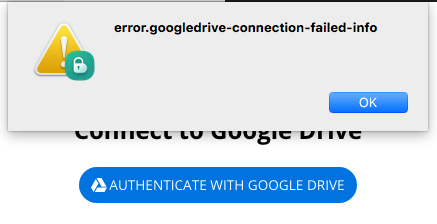
Can confirm.. Seems there's something up with the GDrive client.
 perry-mitchell
on 31 Oct 2019
perry-mitchell
on 31 Oct 2019
I opened a PR here. This should fix the problem with Google Drive.
 riyadhalnur
on 6 Nov 2019
riyadhalnur
on 6 Nov 2019
Great! Can confirm working with Brave 0.68.141 and Firefox 70.0.1 with Manjaro 18.1. Thanks!
Also: Buttercup 1.17.3 on MacOS Catalina 10.15.1 connecting fine now. #822 unfortunately still there, but i can live with that for now ;-)
Peppeo
on 8 Nov 2019
@perry-mitchell @sallar I think the windows builds didn't update properly. The version still shows 1.17.2 in the menus and drive errors while trying to connect. Linux builds are fine on my side.
riyadhalnur
on 9 Nov 2019
Related issues
perry-mitchell
·
6Comments
 zrzro
·
4Comments
zrzro
·
4Comments
 mannp
·
4Comments
mannp
·
4Comments
 kimus
·
5Comments
kimus
·
5Comments
 KneePham
·
3Comments
KneePham
·
3Comments