Buildinggadgets: Building Gadgets 3.3.4 configs are not being prepopulated correctly
This is a continuation of thread started at: https://www.curseforge.com/minecraft/mc-mods/building-gadgets?comment=222
- Forge version 31.1.35
- Building Gadgets version 3.3.4
- OS: Linux Mint 19.3
- Java: 1.8.0_212
I see I should have started this issue here, in your issue tracker, for which I apologize.
I just did a fresh install of Minecraft 1.15.2 with buildinggadgets-3.3.4 in MultiMC with no other mods installed.
Here is a screenshot of the first run /config/buildinggadgets-common.toml
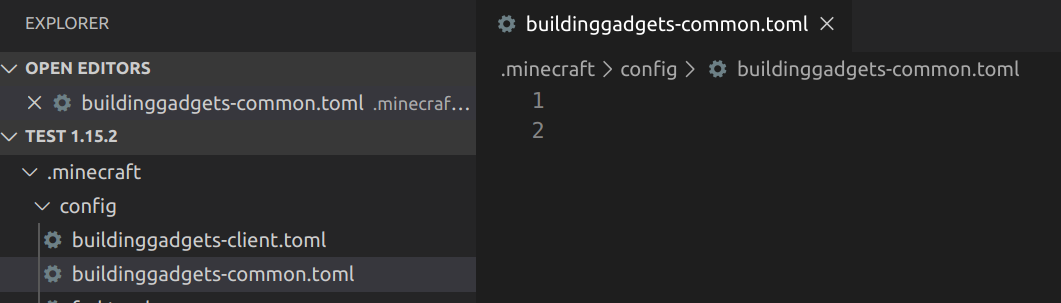
and /config/buildinggadgets-client.toml

As you can see the first screenshot is an empty file and the second one contains a total of 8 lines, which include several blank lines.
I exited Minecraft and then I then opened /saves/world/serverconfig/buildinggadgets-server.toml which was properly prepopulated and I copy/pasted the contents into /config/buildinggadgets-common.toml. I then relaunched Minecraft and during the launch process, the file /config/buildinggadgets-common.toml was overwritten and looks like the first run screenshot.
So the real issues are:
- The default configs are not being prepopulated correctly.
- Correctly formatted configs are being overwritten on startup.
- In order to make a change in the config I had to first create a world, then edit the /saves/world/serverconfig/buildinggadgets-server.toml, then reload the configs (or restart Minecraft).
As a closing remark, I am a retired software developer and have tried to detail this report in a way you can easily reproduce this issue.
Thank you,
CM
 ClaudiusMinimus
All 8 comments
This is intentional and how Forge has designed the new config file. We don't register anything to the common.toml and should likely stop generating one. We also apparently only register one thing to the client config. Most of our config settings are related to how the mod functions and thus need to be provided and set on the server. This is a little different for when you're playing in single player as technically there is no "server" but behind the sense there is and thus why you can find the buildinggadgets-server.toml in your world folder under serverconfigs. You should not be copying anything out of the file. Simply make your changes in buildinggadgets-server.toml and save them and run the game. This is an intentional design decision from forge. I don't have a say in where these config files are put. I simply tell them to build and what to put in them.
 MichaelHillcox
on 4 Apr 2020
MichaelHillcox
on 4 Apr 2020
As you can see here: 
 this is how it looks in our development environment too. On review of the code, we shouldn't be generating a common one, that's our issue but not a fatal flaw in the way our code runs. You can check out the config generator in the code if you'd like https://github.com/Direwolf20-MC/BuildingGadgets/blob/master/src/main/java/com/direwolf20/buildinggadgets/common/config/Config.java
I do understand that's it's weird as it caught me off guard when I first saw the new system but I can ensure you that this is correct. Edit the buildinggagdets-server.toml and save it and you'll have it updated when you next load your world :D
MichaelHillcox
on 4 Apr 2020
@MichaelHillcox you're not entirely correct. He also said, that the default configs aren't properly generated. Remember, that cpw created a fallback config, which can be edited independent of a world. However I believe this to be either a Forge bug or a user error (not knowing where this File should be located) [Notice the dedaultconfigs Folder. I'm not sure whether Forge is supposed to create config Files in there, or whether you're supposed to copy a created one over there. Whatever is the case is obviosuly a Forge Problem though...].
^ just wanted to make you aware that this exists...
 MajorTuvok
on 4 Apr 2020
MajorTuvok
on 4 Apr 2020
From what I'm aware that feature is intended for mod pack makers to define default config values which override the mods defaults so that mod pack makers don't have to ship full configs for a single line change.
MichaelHillcox
on 4 Apr 2020
Correct, which doesn't mean you can't use it, if you want some value to be used across all of your worlds.
MajorTuvok
on 4 Apr 2020
Thank you for your detailed explanations. My guess is for most players and modpack devs your mod works as-is. For what its worth, Building Gadgets is intended for a couple of packs I'm working on. One of the packs is purposely not using RF, and thus making configuring this mod confusing to those not understanding coding, directory structure, or file locations. However, I will look further into the use of /defaultconfigs as that may in fact be the answer I need.
One point you have not addressed where I stated:
"Correctly formatted configs are being overwritten on startup."
If the /config/buildinggadgets-common.toml is overwritten on launch of Minecraft, then what use is it?
Maybe a simple workaround might be to add a commented line in the /config/buildinggadgets-common.toml referencing the /saves/world/serverconfig/buildinggadgets-server.toml. However, again this can be confusing to those inexperienced with software development and is not an elegant solution. If this is indeed a forge issue as MajorTuvok suggests, then maybe the forge devs need to be made aware.
Thank you,
CM
ClaudiusMinimus
on 6 Apr 2020
The file is being cleared as it's invalid data in the config as we're not putting any settings in that file. If you add things into it then forge will see data that shouldn't exist and removes it. You'll likely see this in your log on start up. I you want to make changes to a world you run then it's in serverconfigs. If you want to change the settings for the mod pack you're working on then you can copy the buildinggadgets-server.toml to the /defaultconfig folder and remove any values you're not changing and leave what you are changing. This in turn will tell forge to use those settings in preference to ours.
MichaelHillcox
on 6 Apr 2020
Thank you
ClaudiusMinimus
on 6 Apr 2020
Related issues
 WenXin20
·
4Comments
WenXin20
·
4Comments
 Birgliss
·
4Comments
Birgliss
·
4Comments
 generrosity
·
5Comments
MajorTuvok
·
3Comments
MajorTuvok
·
6Comments
generrosity
·
5Comments
MajorTuvok
·
3Comments
MajorTuvok
·
6Comments